
6 ways to use AI in procurement

Rezvan Golestaneh
Published · 9 min read
In short
The quotes in your inbox, the contracts you sign and the invoices finance books are enough data to start using AI in procurement. Source-to-pay suites sell far more than that, built and priced for companies with a data team, while a team of two or three buyers covering software, services and goods can begin with what it already has.
What is AI in procurement?
AI in procurement is the use of machine learning, generative AI and AI agents for buying work: sorting spend, reading quotes and contracts, drafting requests and filling in systems. Buyers still make the decisions, and the AI does most of the reading and typing. Each kind of AI does a different job:
- Machine learning: sorts spend into categories, matches duplicate suppliers and spots unusual prices in large data sets.
- Generative AI: drafts requests for proposals, summarizes bids and explains contract wording in plain language.
- Agentic AI: carries out steps inside your tools, such as finding a supplier agreement and starting a draft. An MCP server is one way to give an assistant that access.
Large buyers are already past the pilot stage: 55% of multinationals in the EcoVadis and Accenture barometer use AI in procurement operationally. Across procurement organizations, 43% are now pursuing AI deployment, and 69% get it through AI built into platforms they already use, according to Hackett’s 2026 procurement research.
6 procurement tasks AI can take on
AI shows up in six parts of procurement work, and they need very different data before they help. The order below follows the purchase, from understanding spend to paying the invoice.
1. Spend analysis
AI classifies purchase and invoice lines into categories, merges duplicate supplier names and flags prices that don’t fit the pattern. It needs a few years of clean transaction data from your ERP or accounting tool, which is why it pays off most for companies with high volume and many suppliers.
2. Supplier discovery and risk monitoring
AI searches the web and data providers for new suppliers and watches existing ones for signals such as financial trouble, ownership changes or sanctions. The result depends on the data feeds behind it, and a confident risk score still needs someone who knows the supplier.
3. Sourcing, quotes and proposals
Generative AI drafts requests for quotes and proposals from a short brief, then summarizes and compares the answers. It saves hours on the writing, while the specification and the evaluation criteria still come from the buyer and the business owner.
4. Supplier contracts
AI reads supplier paper, pulls terms such as price, notice period and liability into fields, checks drafts against your rules and keeps renewal dates in view. Contract management is one of the areas where procurement teams already use AI most, together with market intelligence and spend analytics, according to Hackett’s 2026 research.
5. Purchase orders and invoices
AI extracts invoice data, matches it against purchase orders and receipts, and flags mismatches or duplicates before payment. It works best when orders and invoices already run through one system, so the matching has something reliable to compare. If that system is NetSuite, fynk connects through Zapier: new vendor records can start their contracts, and signed PDFs go to the File Cabinet, where finance already looks.
6. Intake and guided buying
AI turns a vague request (“we need a new packaging supplier next month”) into a structured one and points people to preferred suppliers or catalogs. The quality of the intake form decides most of the result; an assistant can’t invent the specification your production line needs.
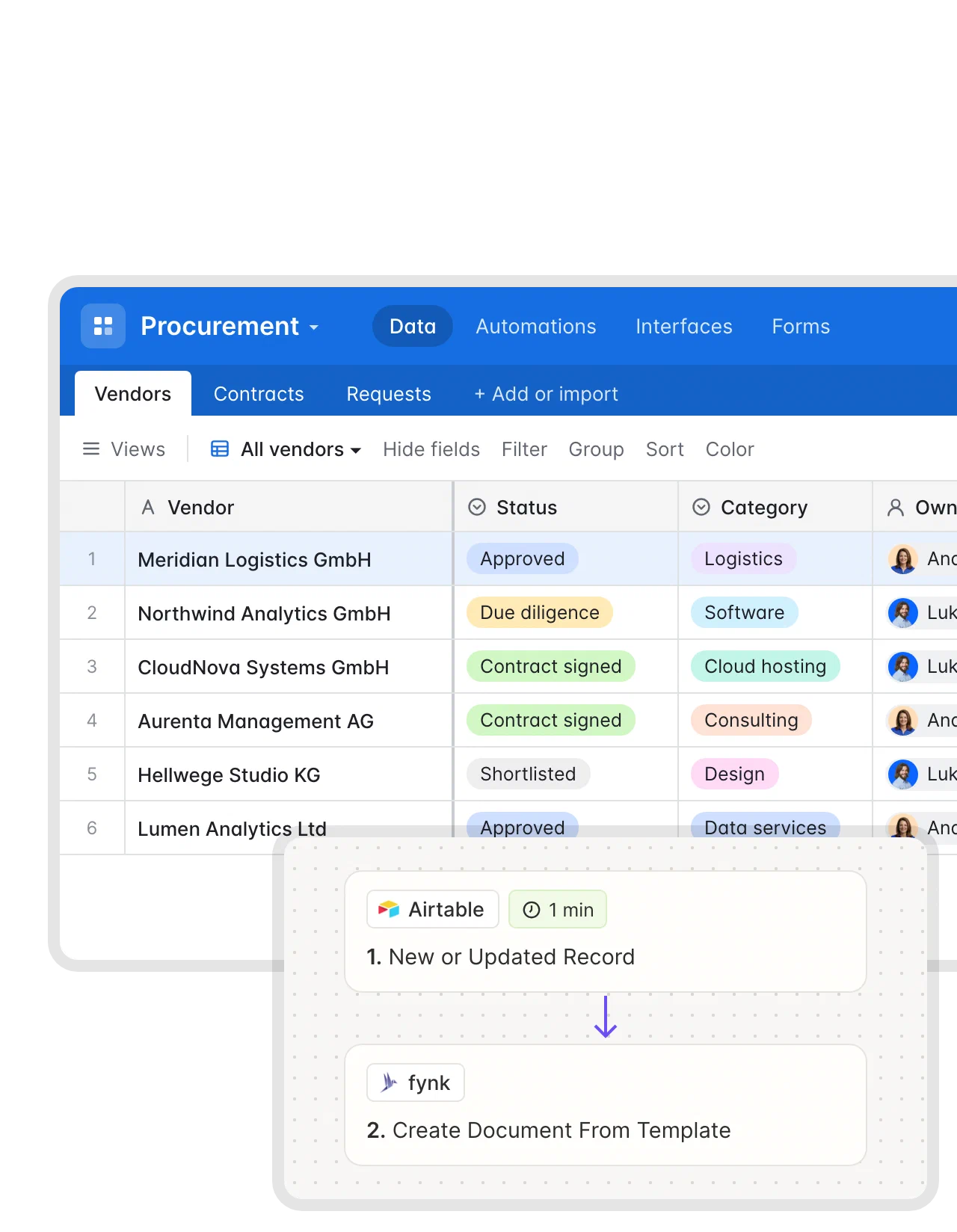
Once the request is complete, it can start the contract too. With fynk’s Jira integration, a finished request ticket starts a contract from your template through Zapier, and the Airtable integration drafts the supplier agreement when a vendor record reaches the status you pick:
Each of the six needs something different before it helps, and only some fit a small team today:
| Use case | What it needs first | Fits a team of 2 to 5 buyers? |
|---|---|---|
| Spend analysis | Years of clean transaction data | Later, once data is clean |
| Supplier risk monitoring | Paid data feeds, a supplier master | Partly, for critical suppliers |
| Sourcing, quotes and proposals | A clear specification | Yes, for drafting and comparing |
| Supplier contracts | The contracts you already sign | Yes, from day one |
| Purchase orders and invoices | One system for POs and invoices | When volume justifies it |
| Intake and guided buying | A request form people actually use | Yes, if intake is defined |
Where should a small procurement team start with AI?
A small procurement team usually sees results from AI soonest on its supplier contracts. The documents already exist, every purchase produces one, and the risks that hurt later (auto-renewals, price changes, missing liability caps) sit in their wording, not in a spend database nobody has built yet.
The rest of this guide follows one illustrative purchase, a new packaging supplier, from the request to next year’s renewal.
1. Get a complete request
The buyer needs the specification, expected quantities, budget, delivery location, required start date and an owner for the purchase. An assistant can tidy a vague request and list what’s missing, but it can’t know which packaging your line accepts, so ask before anything gets drafted.
2. Read the supplier’s own paper
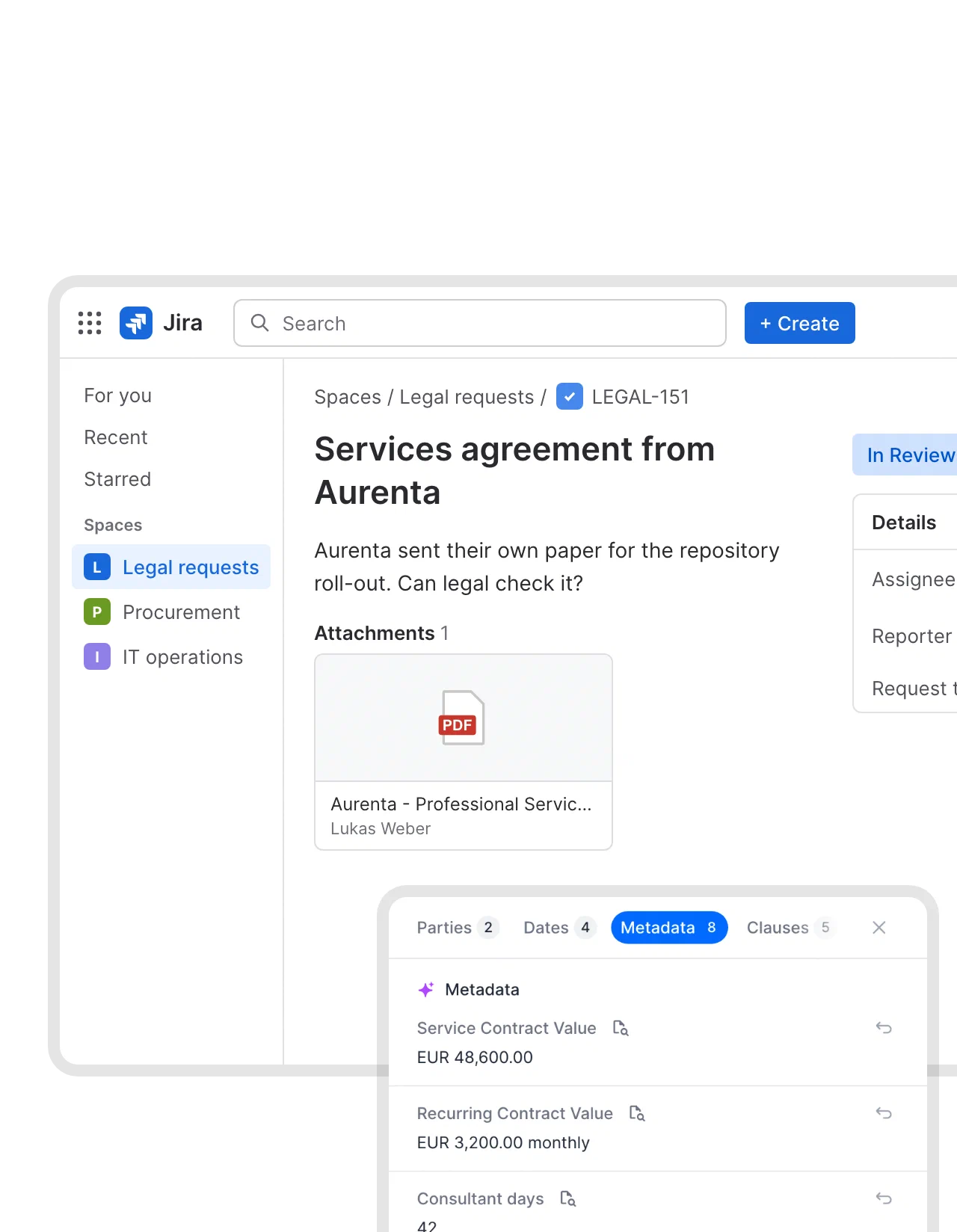
Suppliers often send their own agreement, and someone has to find the price, notice period and renewal terms in it. AI can pull those terms into fields you can search and track; check each extracted value against the document before you rely on it, because a correctly copied number can still answer the wrong question. Is that value a minimum commitment or an estimate? fynk’s AI import handles PDFs, Word documents and scanned paper and fills the contract’s metadata.
3. Compare the shortlist on the same questions
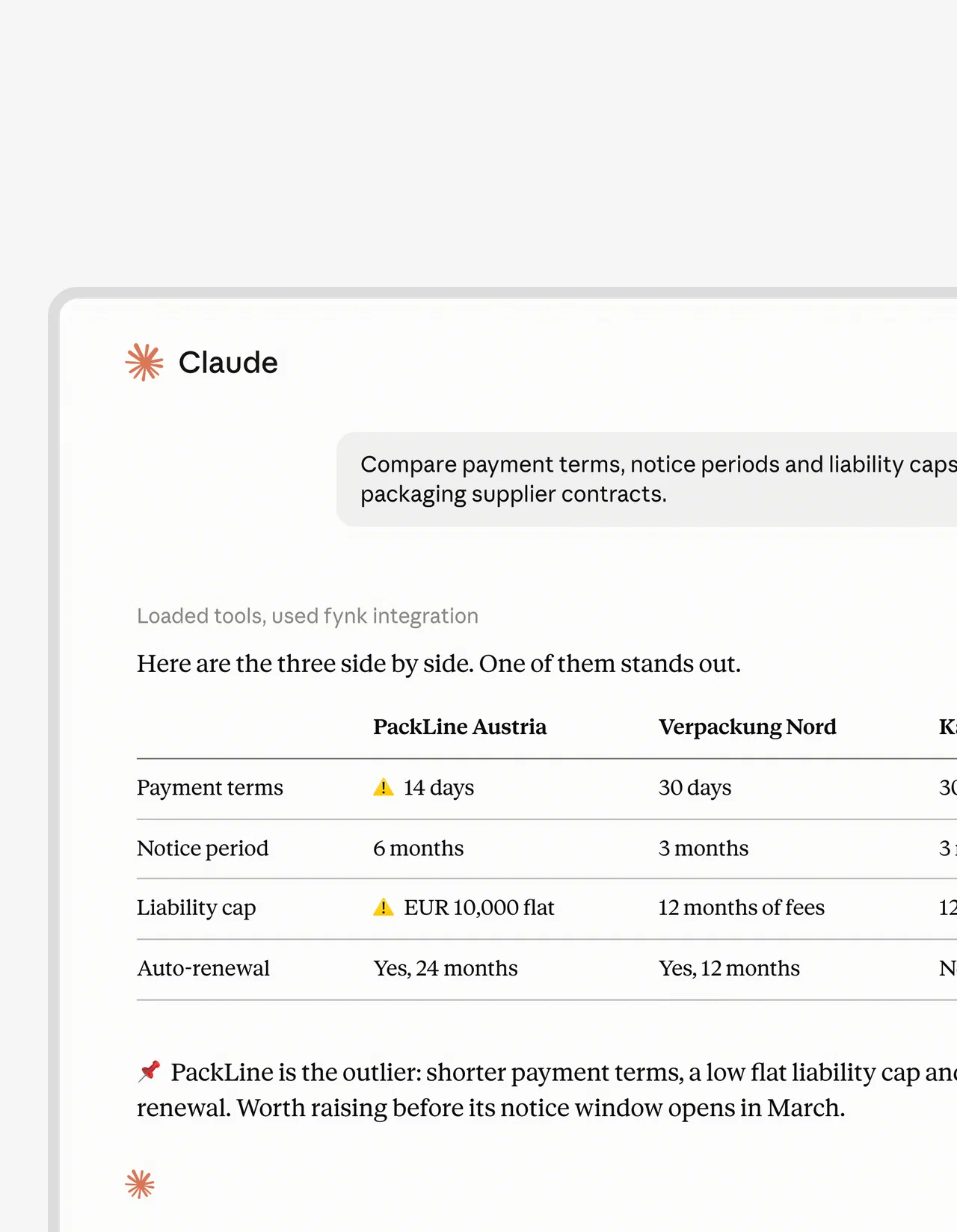
Reading three proposals one after another hides the differences. Put the same questions to every agreement and line the answers up side by side, keeping “not stated” visible instead of letting it look like a good answer:
| Supplier | Payment terms | Cancellation notice | Liability cap | Auto-renewal |
|---|---|---|---|---|
| Supplier A | Net 30 days | 60 days before term ends | Annual fees | Yes, annually |
| Supplier B | Net 45 days | 90 days before term ends | Total contract value | No |
| Supplier C | Payment before delivery | Not stated | Not stated | Yes, annually |
The suppliers and terms above are invented. A person still decides whether better payment terms justify a longer commitment, because the lowest price doesn’t settle that. With fynk’s MCP server connected, Claude can build this comparison across the contracts in your account.
4. Check the terms against your rules
Turn your purchasing policy into checks before the draft reaches legal: an explicit price-change mechanism, a clear notice period and an acceptable liability position, for example. fynk’s AI review checks the contract against those playbooks and shows the reason and the passage for every flag, so legal gets the issues with the draft.
Before fynk, compliance reviews were manual and time-consuming. Now our legal team can check against our playbook in seconds and flag issues before contracts are signed.
5. Sign, then keep the contract working
Route the final draft through the approval workflow before signature, and check it against the agreed deal, especially quantities, prices and delivery responsibilities. After signing, someone has to compare deliveries and invoices with the terms, which is what contract obligation management is about, and part of managing vendor contracts as a whole. The contract calendar shows notice dates early enough to review the supplier before the agreement renews itself.
For teams without their own starting documents, these templates fit common purchases; have the wording reviewed for your situation:
Free procurement templates to start from
The same five steps work for a software renewal as for a packaging order, which makes them a cheap test before buying anything bigger.
Check supplier contracts against your playbook.
Where AI in procurement still falls short
AI falls short where a purchase depends on relationships, on evidence outside the documents or on someone being accountable for the money.
- Negotiating power: AI can prepare talking points, but your alternatives, volume and supplier relationship decide what you get.
- Risk beyond the paperwork: a contract can promise capacity without proving it exists, and a confident summary doesn’t inspect a warehouse.
- Messy input: an outdated attachment or a missing amendment produces a neat comparison of the wrong terms.
- Accountability: an AI flag or a clean summary isn’t an approval, so name who reviews the evidence and who commits the company.
When you test AI procurement software, measure the work left after checking its output. If correcting it takes longer than doing the task, you’ve hired a colleague who needs supervision and never buys coffee.
How do you connect AI to procurement systems?
Connect AI where details currently get copied between windows: from the supplier record to the contract, and from the signed contract back to the ERP. With SAP, your IT team or an integration partner builds the connection on the fynk API and webhooks. NetSuite, Workday and Sage Intacct connect through Zapier, so a new supplier record there can start its agreement from your template.
Ready-made Zaps
- Create fynk supplier agreements for new Workday suppliers and send Slack channel messages Use this Zap
- Create fynk documents for new NetSuite records Use this Zap
- Save newly-signed fynk documents to the NetSuite File Cabinet Use this Zap
- Create fynk supplier agreements for new Sage Intacct vendors Use this Zap


Test one handoff with a real request and check that the signed document arrives where finance looks for it. fynk for procurement keeps drafting, approval, signing and tracking in one place for teams that buy from many suppliers.
Get a reminder before every supplier contract renews.
AI in procurement FAQ
There's no single best tool, because the use cases need different data. Writing assistants help with requests and bids, contract tools with supplier paper and renewals, and spend or sourcing platforms with large transaction volumes. A small team should favor tools that work with its existing records and show the source behind every answer.
Check the plan first. Business and enterprise plans of the big AI providers let you turn off training on your data, consumer plans may not. Supplier contracts often hold personal data such as contact names, so the provider's data processing terms have to cover that use before anyone uploads a contract.
Pick two or three numbers you already feel: days from request to signed contract, the share of renewals caught before the notice deadline, and how often an extracted value had to be corrected. Measure them for a month before and after, on the same kind of purchase.
Searching for a contract management solution?
Find out how fynk can help you close deals faster and simplify your eSigning process – request a demo to see it in action.
Please keep in mind that none of the content on our blog should be considered legal advice. We understand the complexities and nuances of legal matters, and as much as we strive to ensure our information is accurate and useful, it cannot replace the personalized advice of a qualified legal professional.


Get a regular dose of insightful contract management content

Take control of your agreements. Move your business forward.
Run agreements the way they should run: fast, clear, and on your terms.
No setup headaches
Go live in days, not quarters
No lock-in
Full export anytime
No hidden fees
Signatures included, no envelope fee