
What is an MCP server? Explained for business teams

Rezvan Golestaneh
Published · 9 min read
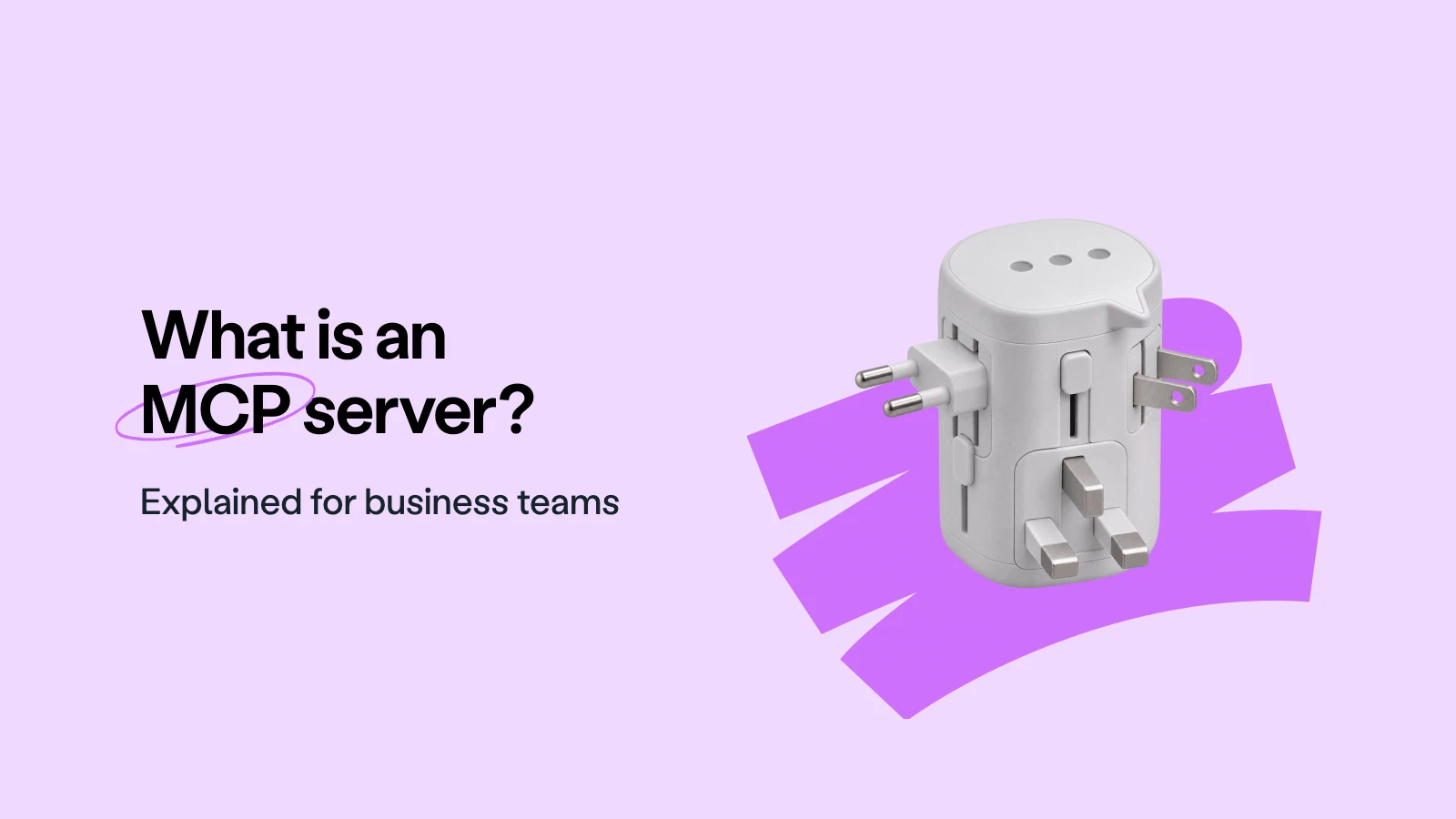
An MCP server lets an AI assistant read information and carry out permitted actions in another app through a shared standard.
- Sales, finance and legal teams use it to answer everyday questions in the apps they already use.
- For a vendor-hosted server, you connect your assistant rather than install software.
- Check who runs it, how you log in, read and write permissions, and whether an admin can switch it off and see a record.
- MCP connects assistants to apps; it doesn’t replace APIs or guarantee safety.
- With fynk, you can draft, find, analyze, update and sign contracts from your assistant.
What is an MCP server, and what happens when you connect one? Your AI assistant has offered to connect your apps, but the prompt says little about what it can read or change. Before you agree, you need to know where that access starts, where it stops and who can switch it off.
What is an MCP server?
An MCP server is a small piece of software on an app’s side that lets an AI assistant read information and carry out permitted actions through a shared standard. That’s the MCP server meaning in one line: it’s the part of an app that lets your assistant do things in that app for you.
The app might be your CRM, shared drive or contract system. MCP stands for Model Context Protocol. The official documentation compares it to USB-C: a common way to connect things that would otherwise need different connections.
The server is the app’s end of that connection. Your assistant supplies the conversation. The app supplies the records and available actions. You ask about an actual customer or document, without first copying everything into a chat.
What does an MCP server do?
An MCP server gives an assistant a set of available actions and returns the results when the assistant uses them.
Those actions are called tools in the MCP documentation. Think of them as things you could ask a colleague to do: search, read, create or update. The assistant picks an available action that fits your request, the app carries out the work, and the result comes back into the conversation.
Tools are the part most people mean, but the same documentation names two more things a server can offer. Resources are information the assistant may read for context, such as a policy document or a list of records. Prompts are ready-made tasks the app suggests, such as “summarize this account”. A server doesn’t have to offer all three.
Here are some everyday MCP server examples, assuming the connected app offers those actions:
- Calendar: Ask which afternoon is free for a supplier meeting. The assistant checks your calendar rather than suggesting Tuesday on principle.
- CRM: Ask for the latest note on a customer, then ask to add the outcome of today’s call.
- Contracts: Ask which agreements renew next quarter, instead of opening every PDF with “final” in its name.
Asking a chat “What should a customer handover include?” gets you advice. Asking a connected app “What did we promise this customer?” can retrieve its records. Asking it to update those records goes a step further. Reading and changing are different permissions, even when both start with a sentence.
How do business teams use MCP?
MCP for business lets teams ask everyday questions and carry out permitted tasks in the apps they already use.
- MCP for sales: Ask the CRM for deals closing this month and draft a follow-up for each.
- MCP for marketing: Pull last month’s campaign results from an analytics or email tool into a summary.
- MCP for finance: Check which invoices are overdue in the accounting tool before the weekly call.
- MCP for legal teams: Find every agreement with a given counterparty and its notice period.
- HR: Look up a new hire’s start date and prepare their onboarding checklist.
For central control, enterprise MCP setups let admins decide which servers and tools people may connect. Slack, Notion, HubSpot and Stripe are among the business apps with official MCP servers, so most teams can start without hosting anything themselves.
Which AI tools support MCP?
MCP is an open standard, run by the Agentic AI Foundation rather than one company, with more than 10,000 public MCP servers. It works in:
- ChatGPT, with read and write tools
- Claude
- Gemini
- Microsoft Copilot
- Cursor and Visual Studio Code
For business teams, the point is portability: the same server works across these assistants. You still connect and authorize each one separately.
MCP server vs API: what’s the difference?
An API is a door developers use to connect software; an MCP server is a door described so an AI assistant can choose which action to take.
With a traditional API integration, a developer usually decides in advance what happens: when a deal closes, create a contract. With MCP, the assistant chooses from the offered actions in response to your request: find the deal, check its details, then prepare the next step.
| Question | Traditional API integration | Vendor-hosted MCP connection |
|---|---|---|
| Who sets it up? | A developer or integration specialist | A user or admin, where the assistant permits it |
| Who uses it? | Software following a defined workflow | An AI assistant responding to your request |
| How do you connect? | Build or configure an integration and its access | Add the connection and authorize it, often through a browser login |
| What is it good for? | Predictable, repeated workflows | Questions and tasks phrased in everyday language |
If that sounds like an API with a new label, the skeptics on developer forums aren’t entirely wrong. MCP doesn’t replace APIs. MCP servers can sit in front of existing APIs, giving assistants a standard way to use them. A browser login is a common hosted setup, not a guarantee that every server is equally easy to connect.
Do you need an MCP server?
An MCP connection is worth considering when you repeatedly need an assistant to work with information or tasks inside another app.
For a vendor-hosted connection, you don’t install an MCP server yourself. The app vendor runs it; you connect your assistant to it. Local servers are a different setup, covered below.
Useful MCP server use cases include a weekly sales handover, regular renewal checks or preparing a meeting from records held across connected apps. Start with a job you already do, preferably one involving too much copying.
For an occasional question about a document, uploading the file may be enough. If you wouldn’t paste particular information into your assistant, don’t connect a server that will send it there. A connection changes how the information arrives, not whether you’ve approved sharing it.
Is an MCP server safe?
An MCP server’s safety depends on who runs it: the app vendor hosting it or someone providing a local server you download, as the official security guidance explains. Check whether you use the app’s normal login or have to paste an API key. Confirm it stays within your own permissions, whether it can read or write, and whether an admin can switch it off and see a record of its actions. Most MCP security risks come down to those four questions.
Once data reaches the assistant, the AI provider’s terms apply, so check those too.
MCP server examples for contracts
For contracts, an MCP server lets you ask about agreements and carry out permitted contract work from your assistant.
With the fynk MCP server, your assistant can draft, find, analyze, update and sign contracts, whether you work in Claude, ChatGPT, Cursor or Copilot Studio. fynk hosts the server, so you connect with a browser login instead of an API key, and the assistant gets the same fynk role as the person who connected it, nothing more. An admin can switch the server off for the whole account or remove a single connection, and every action the assistant takes shows up in the audit trail with that person’s name on it. It’s available on Trial, Essential, Business and Pro plans.
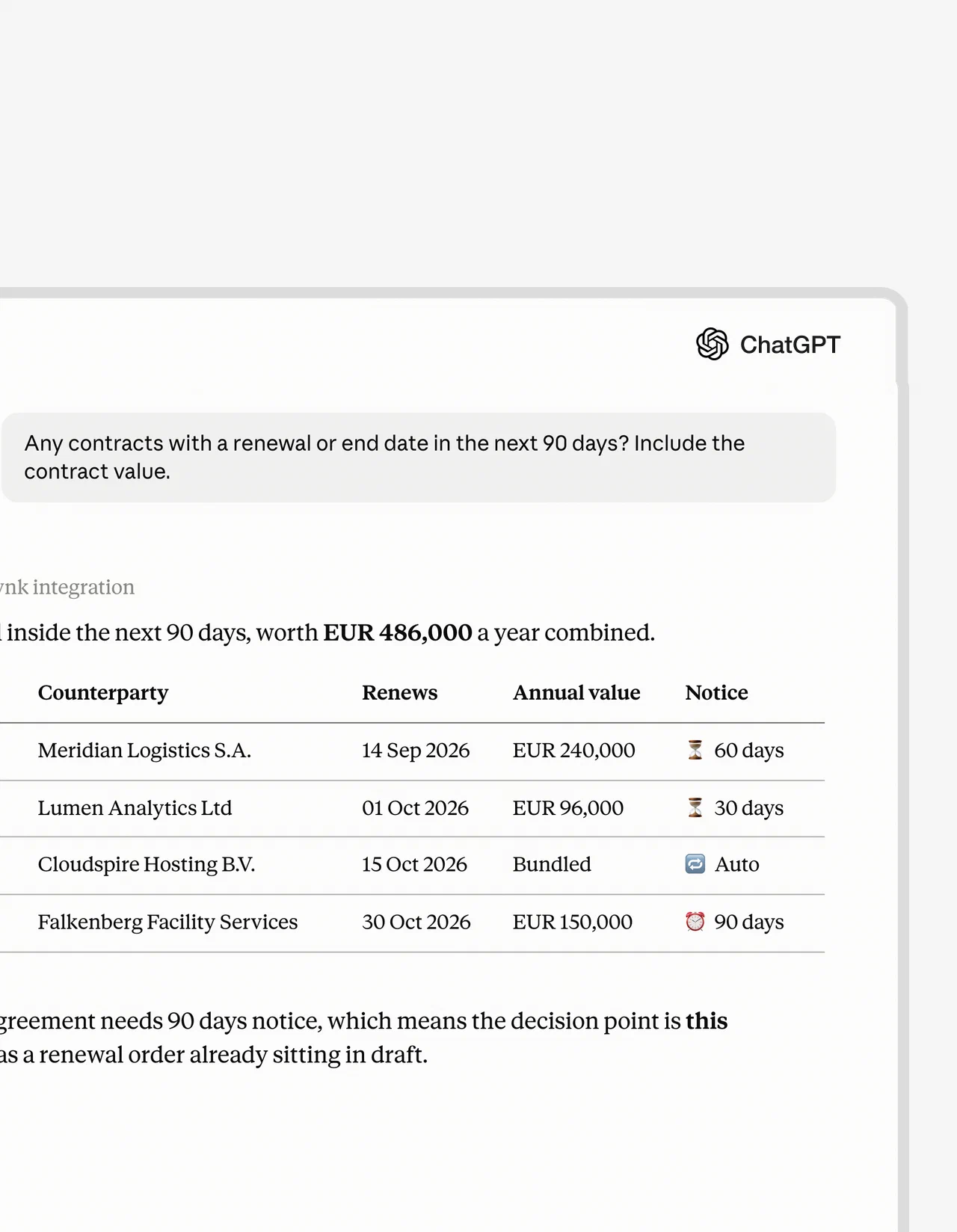
Ask what renews before the notice period runs out
Ask “Any contracts with a renewal or end date in the next 90 days?” in ChatGPT and get a table from fynk with the counterparty, renewal date, value and notice period.
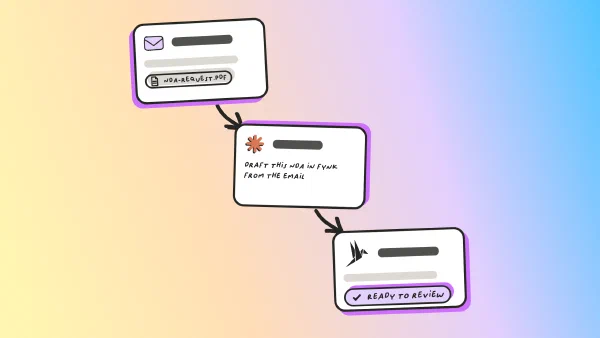
Turn an email into an NDA ready for signature
Ask Claude to draft an NDA from an incoming email. It reads the latest email about an NDA in Gmail, pulls out the counterparty and signer, and creates the document in fynk from the NDA template.

One prompt in Claude: read the email, pull out the details, create the NDA in fynk.
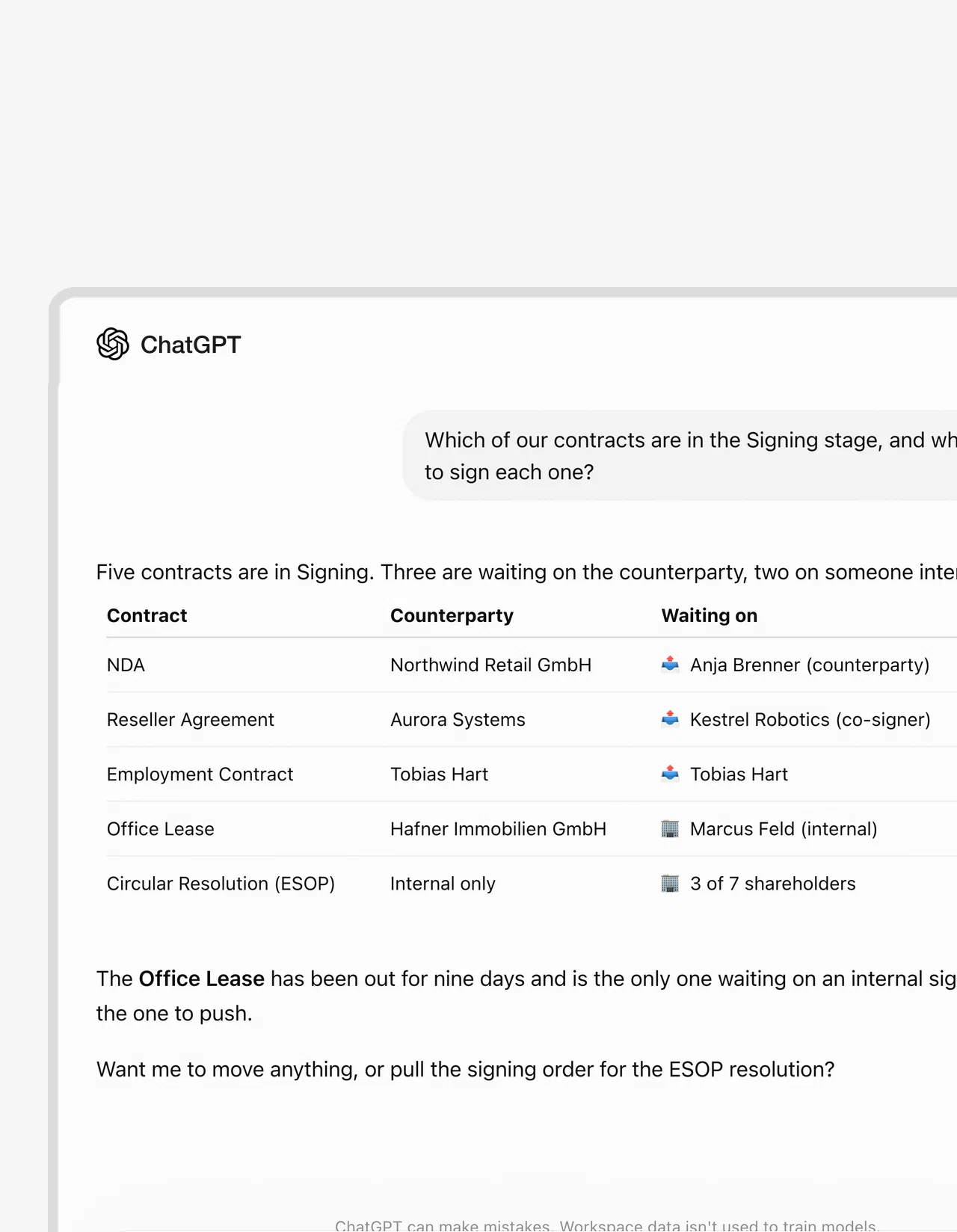
Find out who is holding up a signature
Ask which contracts are in signing and who still has to sign; the answer names each contract, the counterparty and the person it waits on.
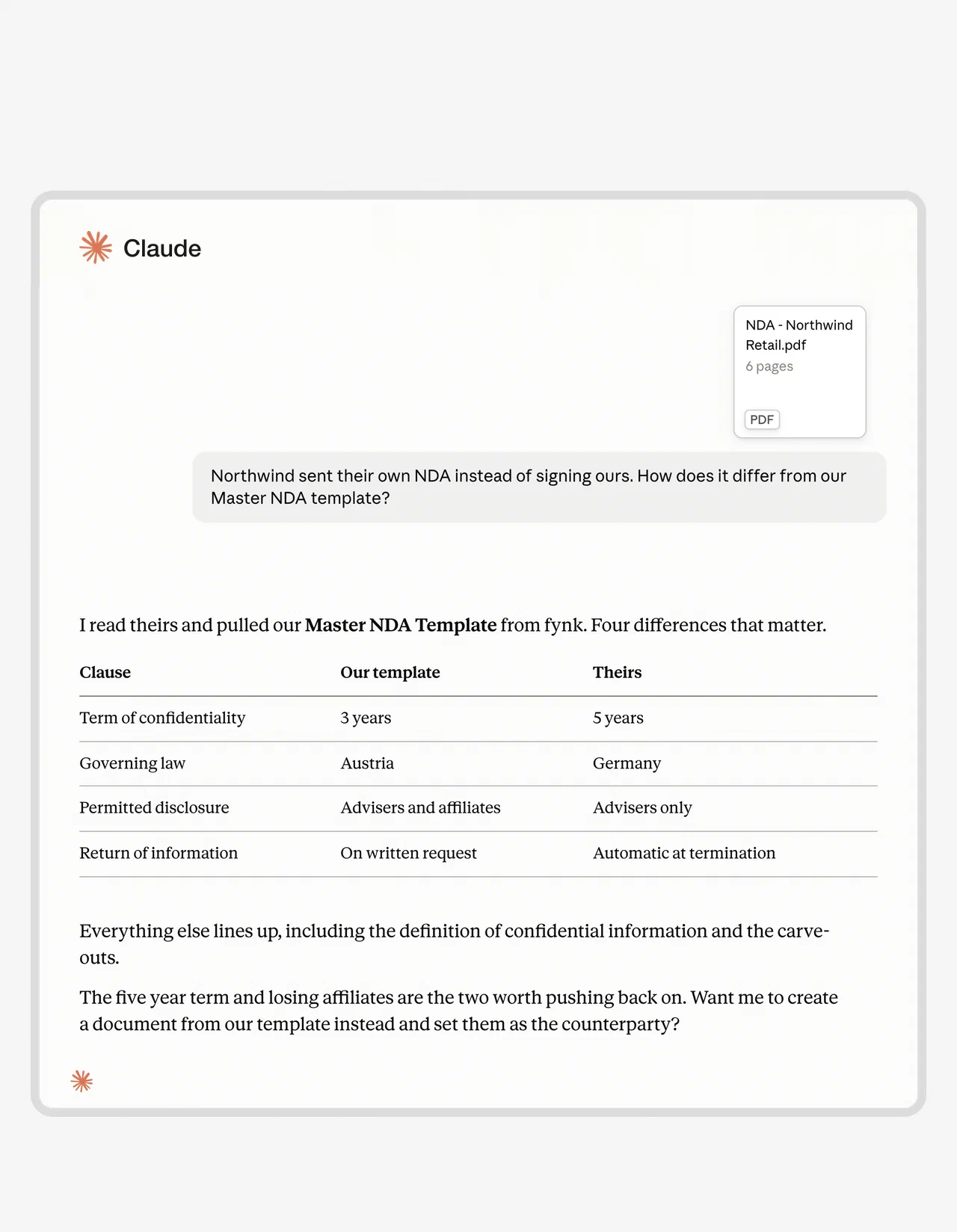
Check their NDA against your template
When the other side sends their own NDA, ask Claude to read it, pull your NDA template from fynk and list the clauses that differ, such as term, governing law and permitted disclosure.
Use cases
More MCP workflows, step by step
Walkthroughs that run contract work from Claude and ChatGPT.
What changes when your assistant is connected to fynk
| What changes? | AI chat on its own | AI chat connected to fynk through MCP |
|---|---|---|
| Where the contract comes from | You paste text or upload a file | The assistant accesses contracts in fynk within your permissions |
| What it can do | Discuss or produce text from what you provide | Work on the contracts themselves, from first draft to signature |
| Permissions | You choose what to share in the conversation | The connection inherits your fynk role |
| Record of actions | The conversation records the exchange | Agent actions also enter fynk’s audit trail under your name |
| After signing | Filing and tracking require work elsewhere | The contract remains in fynk, available for portfolio questions and archiving |
Some work stays inside fynk: its own AI review, AI draft and AI search, plus approvals. The assistant can identify the approver; a person still makes that decision. Which job to connect first is a separate question; AI agents for business pay off fastest on frequent work with a named reviewer.
Put your contracts in the conversation.
What else should you know about MCP servers?
You can use a vendor-hosted MCP server without coding, but your assistant’s access settings and the server’s location still matter.
Yes. ChatGPT supports MCP connections that let it use tools provided by an external app. What you can connect depends on your workspace permissions and security settings.
No. An API lets software interact with another system, while an MCP server presents information and actions in a standard form an AI assistant can use. Many MCP servers work through an app's existing API.
No, when the app vendor provides a hosted server and your assistant supports connecting to it. You authorize the connection and ask for work in ordinary language. Building a server or configuring a local one is a different job.
A local MCP server runs on your computer; a remote server runs elsewhere and your assistant connects over the internet. An app vendor can host a remote server for you. With a local server, you also need to consider what the downloaded software can access on your machine.
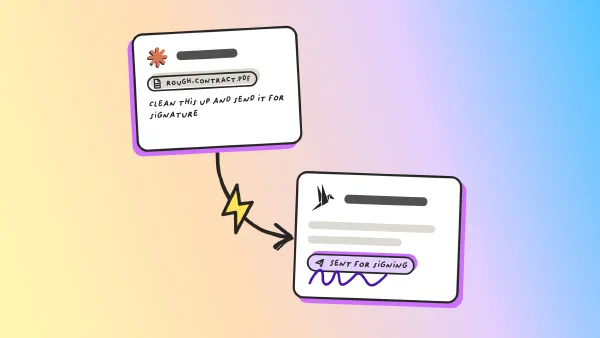
Only if the app behind it offers that action. The fynk MCP server can send a contract for signature from Claude or ChatGPT; the signing itself happens in fynk, at the electronic signature level you choose.
After checking its access, connect one app you already use and ask it one real question.
Searching for a contract management solution?
Find out how fynk can help you close deals faster and simplify your eSigning process – request a demo to see it in action.
Please keep in mind that none of the content on our blog should be considered legal advice. We understand the complexities and nuances of legal matters, and as much as we strive to ensure our information is accurate and useful, it cannot replace the personalized advice of a qualified legal professional.




Get a regular dose of insightful contract management content

Take control of your agreements. Move your business forward.
Run agreements the way they should run: fast, clear, and on your terms.
No setup headaches
Go live in days, not quarters
No lock-in
Full export anytime
No hidden fees
Signatures included, no envelope fee