
5 ways to compare contracts using fynk AI
Ask a question instead of opening seven PDFs. fynk AI reads the contracts in your account, puts the terms side by side, and shows you where they differ.
Video transcript
Click any line to jump thereThe fynk AI Assistant turns contract work into a conversation. It can create a contract from a template, fill in the values, and move it to signing. In this example, I'm going to show you five different ways to compare documents using AI Assistant in fynk. So the first way to compare documents together is compare terms and values side by side. I just start by asking something simple from AI Assistant, like comparing the values of all of my MSAs that exist in my document list. None of these documents are identical, so they are created using different templates and they have different structures. So it would be very time consuming to compare it manually since they don't share any common structure, but luckily using AI Assistant, it's no problem anymore. So I've asked for the annual value, and here you can see a table of my four MSAs side by side with their annual values mentioned in this. And as you can see, there's a little square next to each of these values. If I click on these references, it will take me to the original document where these values are coming from. fynk Assistant knowledge is only limited to your documents, so it cannot add any values or any fictional fact to your documents.
Now I want to ask for a little bit more advanced comparison. So I want to compare their annual value, notice period, payment terms, and liability cap.
It now gives me a bigger comparison table, including all the values that I wanted, and I can easily see where the terms differ and which liability cap stands out.
The second way to use AI Assistant is to compare the renewal dates of a set of contracts. So in the same chat, I just keep chatting and ask which of these renews first and what is the last day we can give notice on it.
So normally if you set up the metadata in your account in fynk, you don't need to actually set the renewals by hand. It'll be done all automatically. But just for the sake of comparison, I'm going to ask this question.
Here's the result. We can see that the Nordwerk Elektronik is the one that renews first.
And the assistant also tells me what is the last day for non-renewal notice and why. So the third way to compare multiple documents together is not just by comparing the values side by side, but you can actually ask for a ranking.
So rankings might need a little bit more judgement and I want to rank these four contracts by risk and I want to know why.
So Assistant tells me that Helios is the most risky one because it both has the highest annual fee and the highest liability cap. That's good to know. And I can see exactly how it reached that conclusion, so I can decide whether I agree with it or not. This is very useful when your time is limited and you want to know which contract to start dealing with.
Let's move on to the next case.
So since AI Assistant is aware of all of the documents that you have in your document hub, you can also add other documents to this comparison.
So you can mention order form, a statement of work, or addendum, or any other document that is related to these main documents. So for this example, I'm going to mention the order form and I'm gonna ask what order forms do we have under the Sonneck Master Services Agreement, and what they do add to the main document that I have here.
Assistant starts fetching the matching document that I have and then it finds it. And then it gives me the answer. So I can see that the document that I ask for adds an Analytics module for 40 named users and also adds about 24,000 euros per year on top of the MSA subscription fee that I have here. So that's useful information for sure.
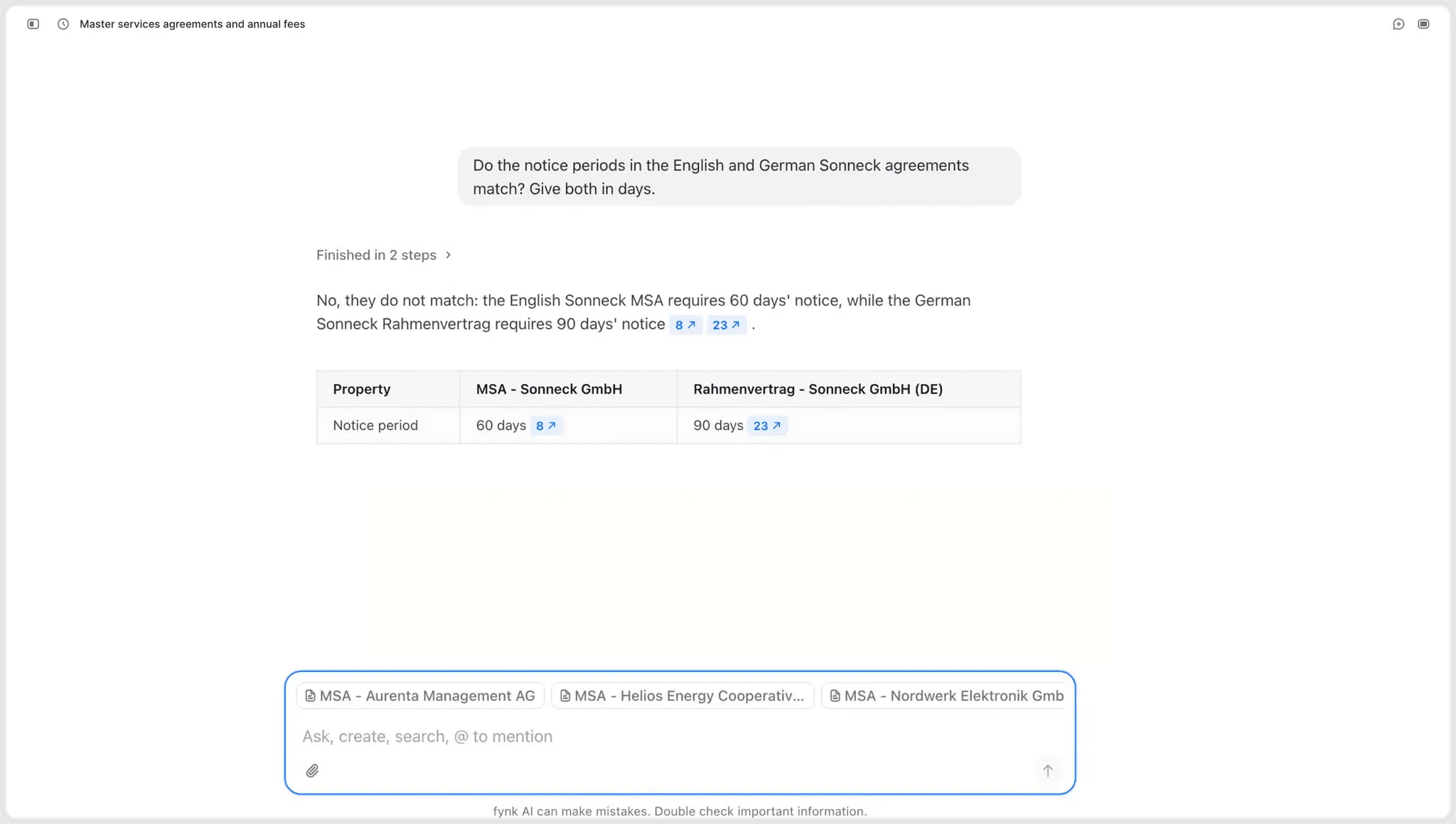
Last but not least, the fifth way that you can compare two documents together, it's to compare two versions of the same document, but in different languages. So to show you that, I'm gonna ask, do the notice period in the English and German version of the Sonneck agreements match?
And it searched for them and I can see that for my English version it's actually 60 days whereas in my German version it's 90 days. It's just a really quick way to find out any inconsistencies between your different versions of the same documents if you have any. And this is how you can easily compare two or multiple documents together using AI Assistant.
The goal
Compare two or more contracts in a chat, without reading any of them end to end.
- Put the same terms side by side across every contract
- See which deadline lands first
- Rank the set so you know where to start
Every number in the answer links back to the clause it came from.

Compare terms and values side by side
Start simple. Ask the AI Assistant to compare the annual value of every MSA in your account and you get one table, one row per contract. Use @ to pick specific documents, or name a group instead: all vendor agreements, or everything with Acme.
Your contracts don’t have to match for this to work. They can come from different templates and have nothing in common structurally, which is exactly what makes comparing them by hand so slow. Add more terms to the question and the table grows with it, until the outlier is impossible to miss.
Sample prompts:
- Compare the annual value of all my MSAs.
- Compare the annual value, notice period, payment terms and liability cap.
- What changed between these five MSAs?
- Which obligations differ between the vendor agreement and the supplier agreement?

Find the deadline that lands first
A notice period means nothing on its own. Ninety days sounds generous until you notice the contract renews in five weeks. Ask for both in one question and fynk AI works out each notice deadline from the dates and durations in the documents, then tells you which contract runs out first and why.
Most of the time you won’t need to ask at all. Once the dates sit in your account, fynk tracks the renewals and reminds you before a notice window closes.
Which of these renews first, and what is the last day we can give notice on it?

Ask for a ranking, not just a table
Sometimes the differences aren’t what you’re after. You want a verdict. Ask the Assistant to rank the set by risk and it returns them in order with the reasoning attached, for example the highest annual fee sitting next to the highest liability cap. Because you can see how it got there, you can also disagree with it.
Risk is one angle of many. Rank by how favorable the liability terms are, how much negotiation each contract is likely to need, or how far each one drifts from your standard terms. Several criteria at once works too.

Compare related documents
Order forms, statements of work and addenda change a deal without replacing it, so the terms that actually apply end up spread across several documents. The Assistant reads everything in your document hub, so it finds the related documents itself. Ask what sits under a given agreement and what it adds, and the answer comes back with the numbers: an extra module for 40 named users, say, and 24,000 euros a year on top of the subscription fee.
The same question works down a chain of addenda, where each one quietly rewrites the one before it.
Compare [main agreement] with [addendum 1] and [addendum 2]. Tell me which terms were added, changed or overridden, flag any conflicts, and summarize what applies today.

Check two language versions against each other
Signing the same agreement in two languages doubles the chance the two drift apart. Ask whether the notice periods in the English and the German version match and you get a straight answer: 60 days in one, 90 in the other, each linked to its clause.
Ask the follow-up as well: which version governs if they conflict. That sits in the prevailing language clause, and the Assistant reads it straight out of the contract.
Do the notice periods in the English and German version of this agreement match? Give both in days.
What makes it fast?
Compare multiple docs with one question
See differences without a spreadsheet
Ranked answers, not just tables
Every value links to its clause
"The AI Assistant genuinely lowers the barrier for colleagues outside Legal. Instead of learning filters or search logic, you just ask in plain language, and even vague questions lead to useful results."

Frequently asked questions.
Keep it to a focused set, one contract type or one counterparty rather than your whole account. The narrower the question, the more reliable the answer.
The Assistant can only compare what the document says. If a field is empty, it will tell you so rather than guess. AI analysis fills those fields when a document is imported, and older documents can be analyzed again.
Yes. Two versions, one set of terms, asked as a question. That is the same thing the language comparison does, and it works just as well on a draft against the signed original.
No. Reading and comparing happen freely, but anything that changes a document is shown to you first and applied only once you approve it. It also stays inside the permissions you already have.
Yes. Nothing here is specific to vendors. The same questions work on customer agreements, employment contracts, or anything else in your account.
Still have questions?


Take control of your agreements. Move your business forward.
Run agreements the way they should run: fast, clear, and on your terms.
No setup headaches
Go live in days, not quarters
No lock-in
Full export anytime
No hidden fees
Signatures included, no envelope fee