


MCP - combine fynk with your AI agent
Bring fynk into Claude, ChatGPT, Cursor or your favorite AI agent. Send drafts, start signing, import bulk, or ask about the whole portfolio. All done by chat, via your assistant.











Contracting, reduced to a conversation.
Everybody on the team gets the same shortcut: ask in plain language, get it done by fynk on the background. No click, no jumping tabs.
"The advantage of the MCP is that we have different systems all connected to Claude. That means I can use Claude as my single point of contact, and from there access my project management system, my CRM, my contract management system. I only use Claude, and I don't even have to go into fynk, Asana, or Pipedrive."

Draft and send
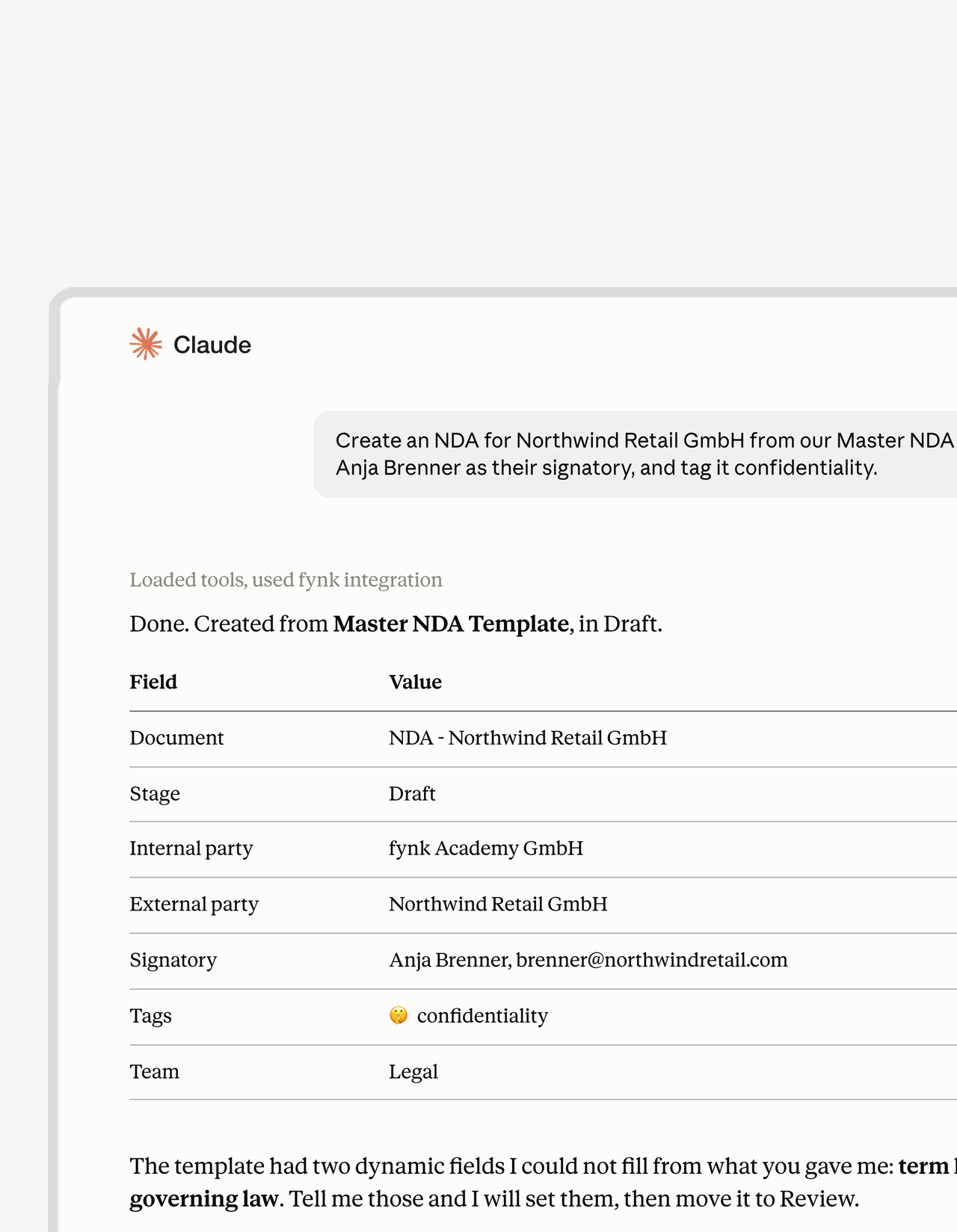
Start free trialOne message in. Contract out for signature.
Open the template. Fill the fields. Add the parties. Go find the signatory. Four steps, gone. Name the company, the signatory and the dates, and your agent builds the rest from your own template. Sent before you switch tabs.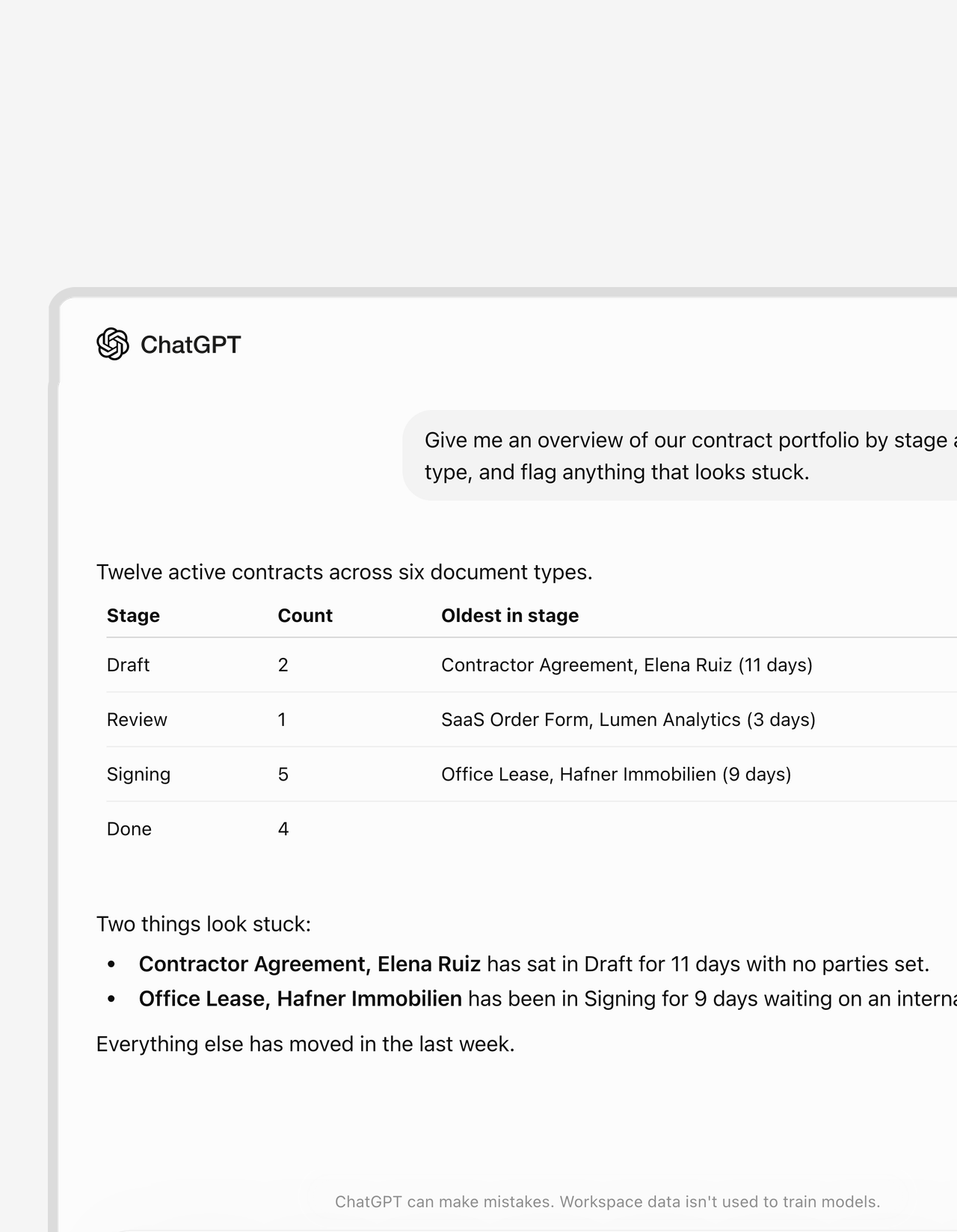
Where things stand
Get a demoAsk where a contract stands. Skip the hunt.
Which stage? Whose desk? How long has it been sitting there? Stop opening tabs to find out. Ask in plain words and the whole portfolio answers at once: waiting on a signature, sitting in Review, stuck in Draft for eleven days. Your dashboard, minus the dashboard."The central visibility of all contracts is what I would miss the most if fynk disappeared tomorrow."
 Dr. Jörg Burkhardt Head of Sales & New Partnerships, 1. FC Nürnberg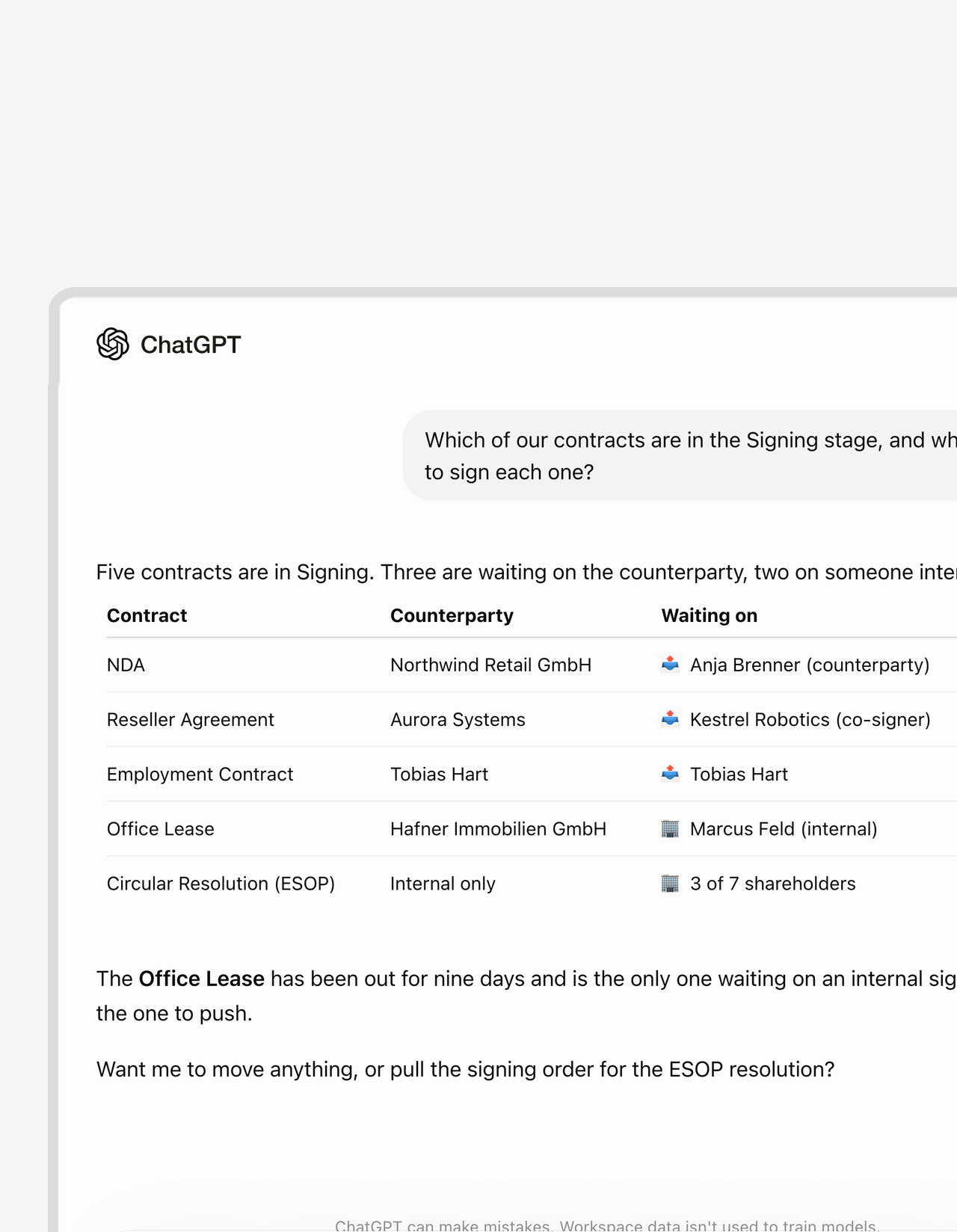
Unblock it
Start free trialFind out who's sitting on the signature.
Contracts never announce why they’re stuck. Yours will now. Every blocker arrives at once with a name attached: the empty field, the missing signature block, the approver who never opened it. One message, and you know exactly who to chase.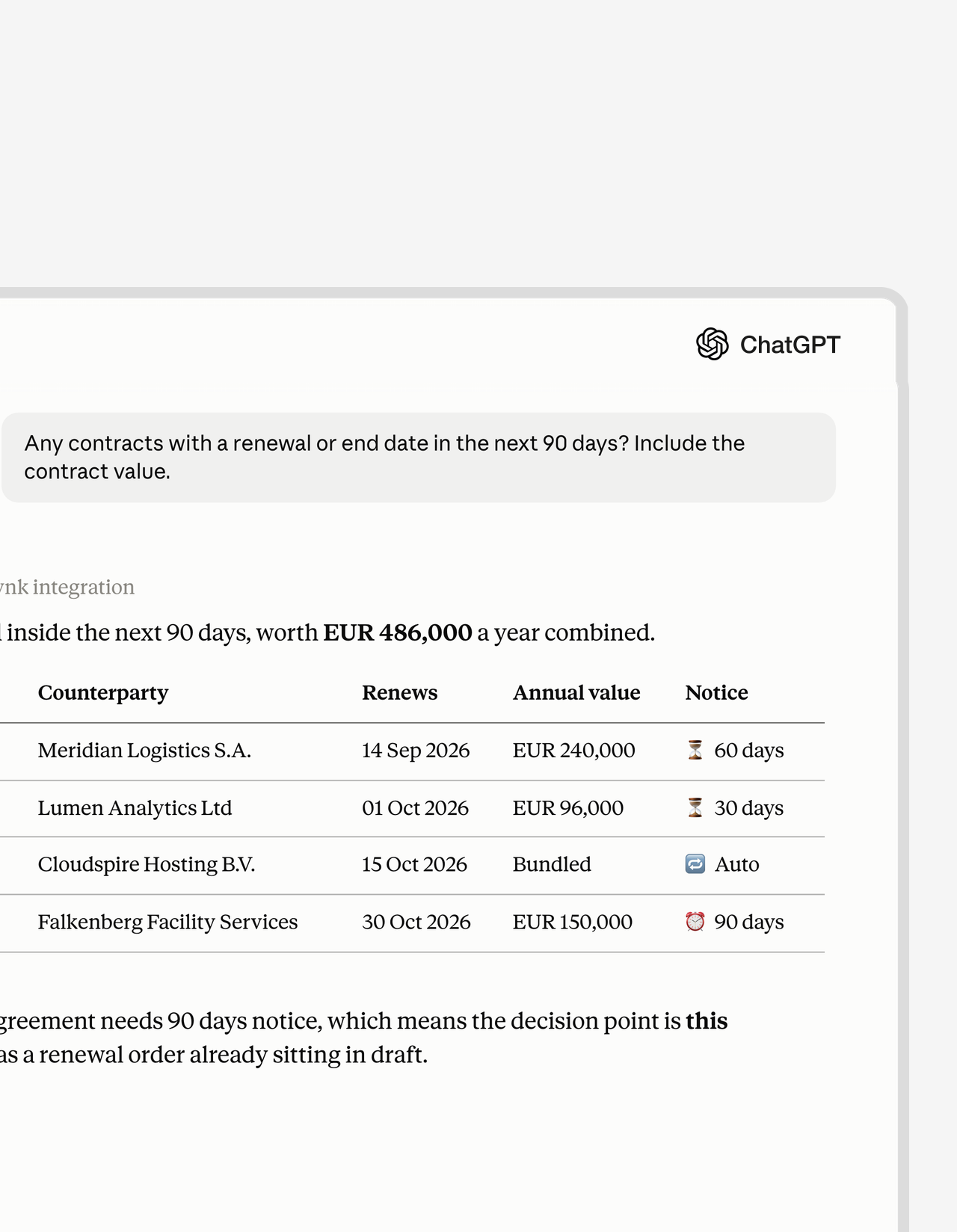
Deadlines
Get a demoNothing renews behind your back.
Most auto-renewals get spotted on the invoice, months too late. Ask what expires this quarter and the list arrives with notice periods and contract values attached. Renew it or kill it, while that’s still your call."We lost money because we missed termination deadlines. That was the moment we knew our old approach had to change."
 Elisa Prößdorf Legal Solutions Manager at Unite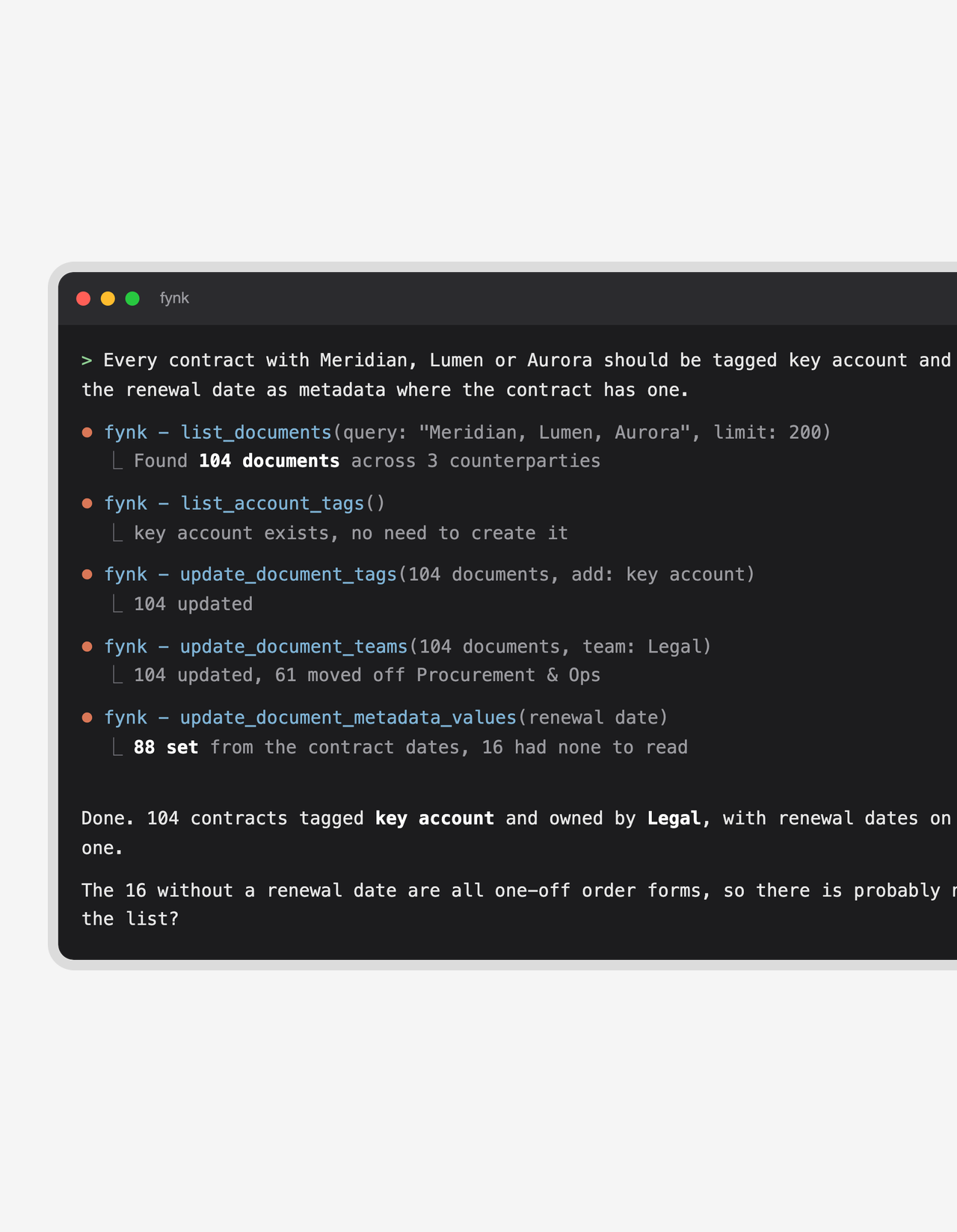
Reorganize at scale
Start free trialReorganize a hundred contracts in one instruction.
Say goodbye to the cleanup nobody volunteers for. Describe the set once, from a chat window or straight from your terminal, and a hundred contracts come back re-tagged, re-teamed and dated. Your agent works the whole list and reports what it couldn’t move.


Pick the tool. The contracts follow.
Anything that speaks MCP can reach your contracts, and the tool set is identical everywhere. Setup is documented per tool, so there is nothing to reverse-engineer.

Claude
The one most teams reach for first. Ask what renews next quarter, draft the NDA that answer just made necessary, and put it in front of a signatory. All in the same conversation.

Claude Code
For the people who would rather script it than click it. Run a portfolio cleanup or a bulk import straight from the terminal, right where the rest of your automation lives.

ChatGPT
Already installed almost everywhere, so it's the shortest path to getting a whole department off email threads. Setup runs through a custom app rather than a one-click connector, so budget an extra minute for it.

Cursor
Contract work that doesn't cost you the editor. Pull up the vendor agreement behind the integration you're building, or get a DPA out to a new subprocessor between commits.

VS Code
Everything Cursor gets, in the editor most engineering teams standardize on anyway. Contract actions sit beside your other extensions instead of in a browser tab you keep losing.

Codex
Hand off the part nobody wants. Describe a batch of documents to file, classify or move along, then go do something else while it works through the list.

Microsoft Copilot Studio
Build an internal agent on the Microsoft stack and expose only the contract actions your teams should have. Everyone stays inside the software IT already approved.
Anything else
The protocol is open, so a tool nobody has heard of yet gets exactly what the seven above get. Point it at the server URL and log in.


Zero-touch filing
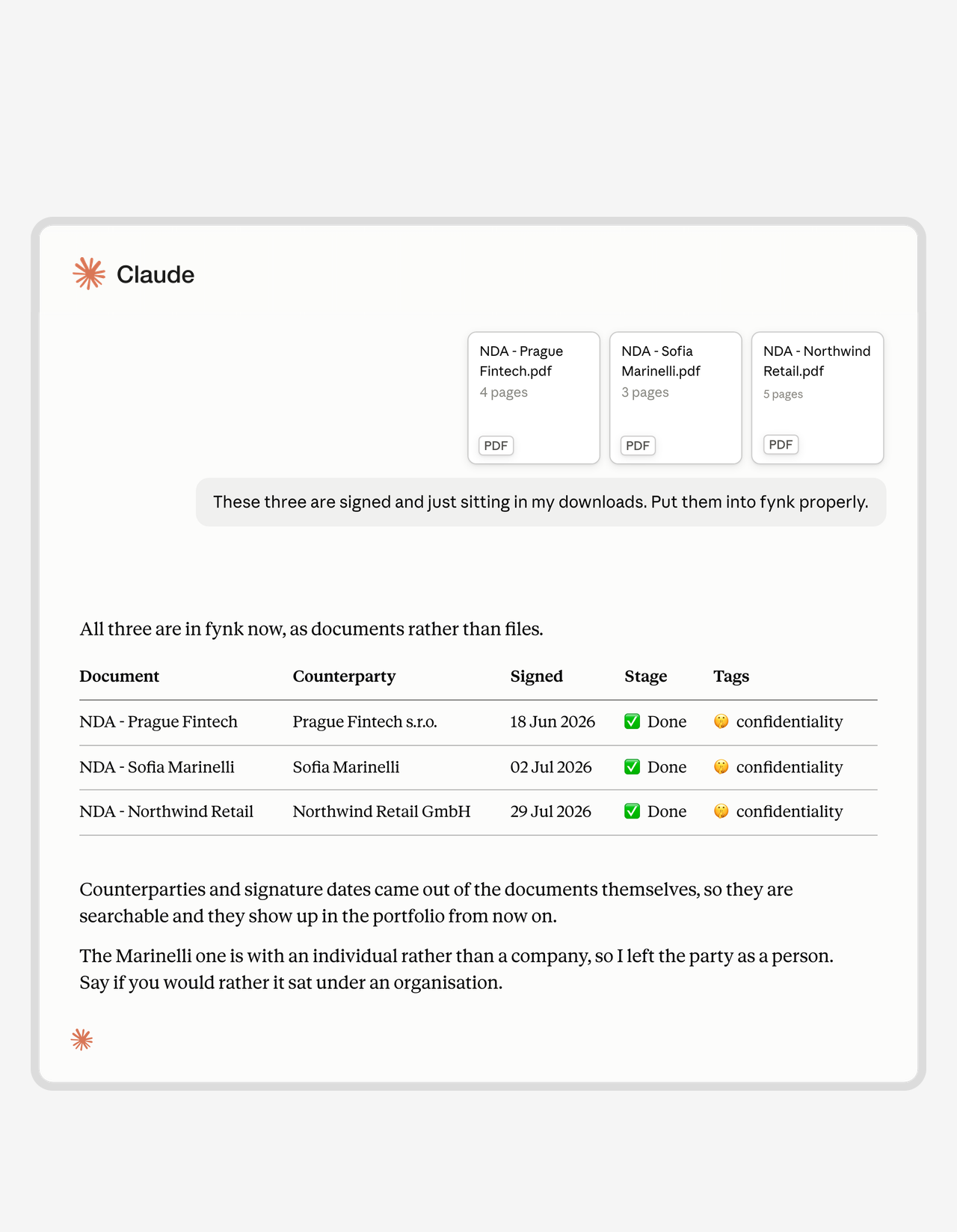
Get a demoHand over the folder of signed PDFs. Get an archive that answers back.
Signed contracts rot in your downloads until somebody finds an afternoon. That afternoon never comes, which is exactly why your contract data is out of date. Drop the pile in. Every file lands as a real document, counterparty and dates extracted, tagged and searchable."I don't have to open every contract and search through pages anymore. I can find what I need with just a few clicks."
 Alina Heiner Founder and Director at maven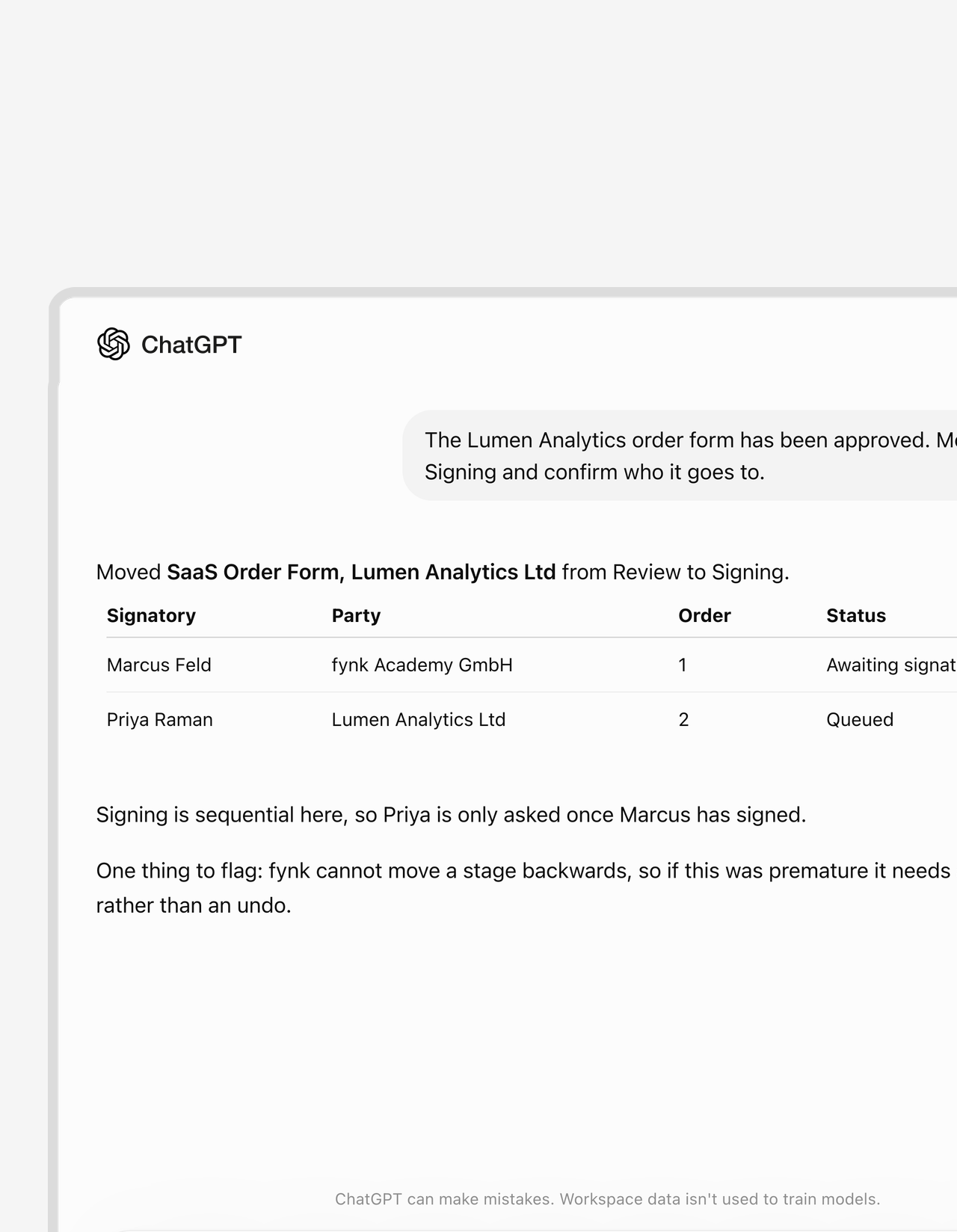
Green light
Start free trialApproved in the meeting. Signing starts before it ends.
Approval and signature are usually separated by somebody remembering to press a button. Close that gap. Say the word and it moves to Signing, the right people asked in the right order, and fynk never walks a contract backwards.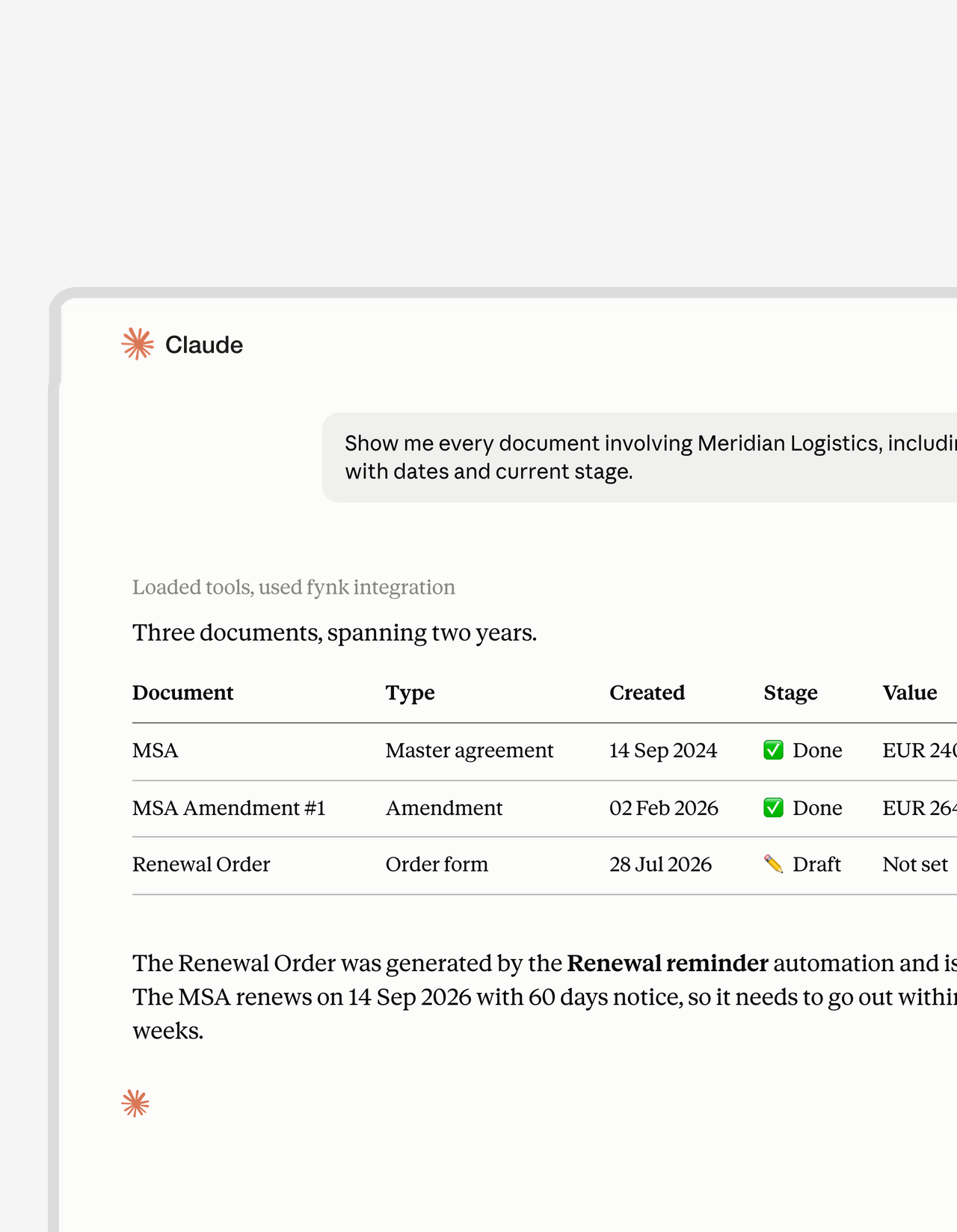
One counterparty
Get a demoAsk about a supplier. Get the whole paper trail.
One supplier is never one contract. It’s an MSA, two amendments and a renewal order nobody remembers signing. Name them once and all of it lines up, oldest to newest, showing notice periods, values and what quietly lapsed. Walk into the renewal call already knowing."Searching across multiple contracts for the same topic or clause used to mean a lot of manual digging. Now it just works, and it's a genuine improvement in how quickly we can get answers."
Viola Dittmann Teamlead Legal at Advancis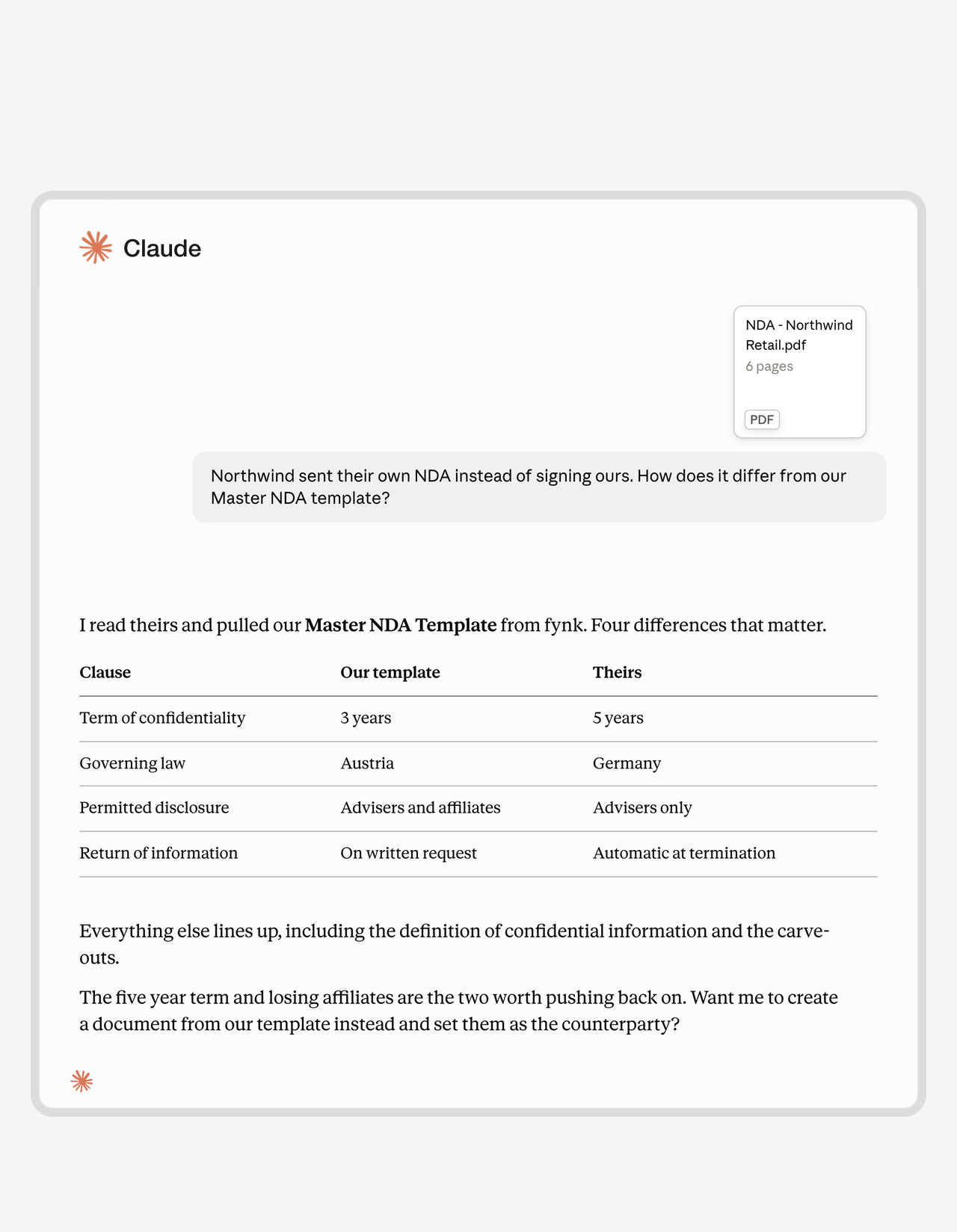
Their paper
Start free trialThey sent their own contract. See what they changed.
Counterparty paper is where bad terms hide. Six pages that look like yours, with a five-year term buried in clause four. Your agent reads theirs against your template and hands back only what changed. You catch it before you sign, not at renewal.FEATURES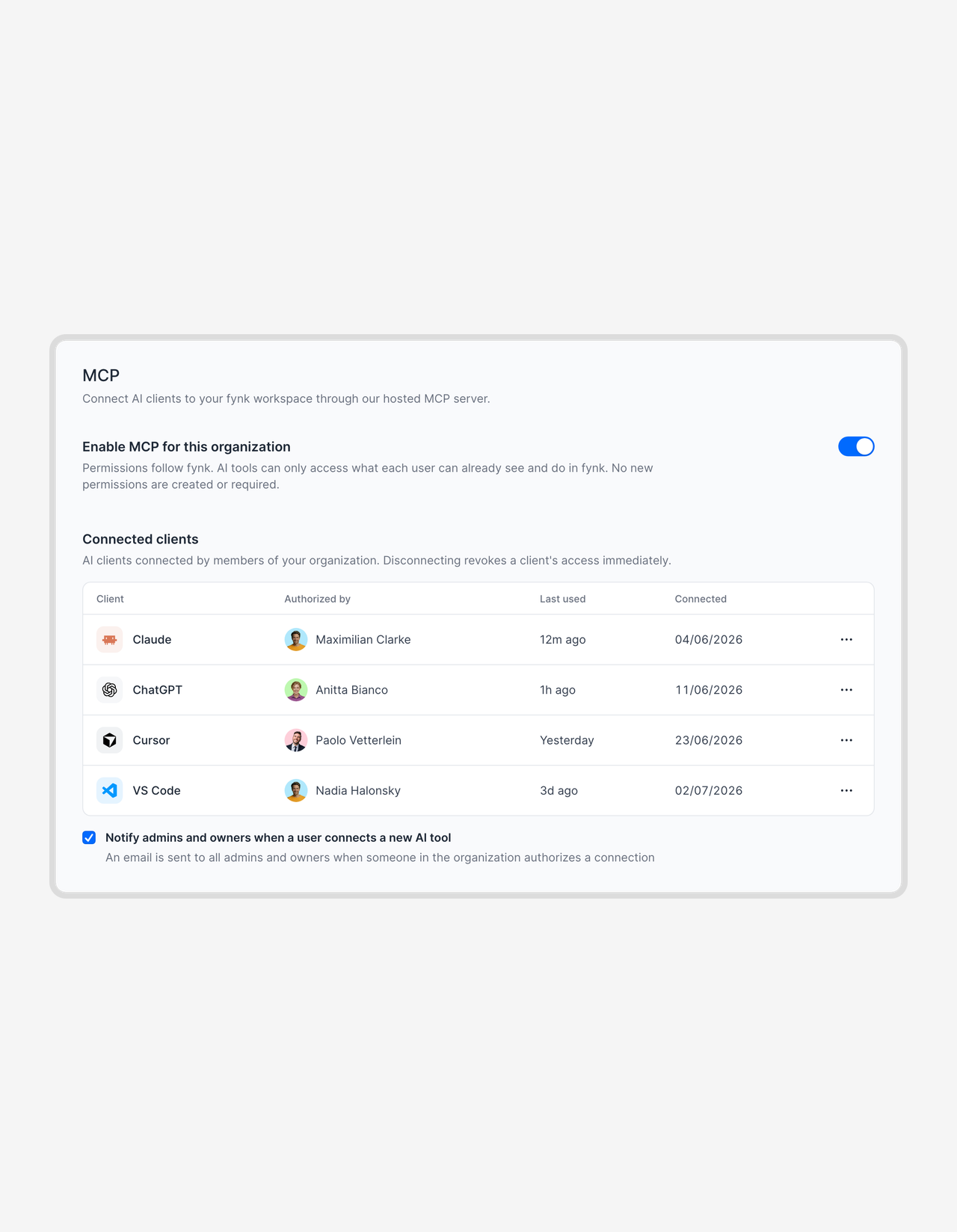
Your own agent
Get a demoHand contract actions to your team. Keep the guardrails.
Put contract actions inside an agent your team already uses, and each person reaches exactly as far as their fynk role permits. No new access to police.


Connecting fynk to your AI tool takes about a minute
The connection always starts from the AI tool, never from fynk
- Step 1
Open the connector settings in Claude, ChatGPT, Cursor or whichever tool you use, and paste in the fynk MCP server address.
- Step 2
Approve the request with your normal fynk login. Check the address you are shown first, and decline it if it isn’t the tool you were setting up.
- Step 3
Start working. The connection carries your own role and document permissions, and every action it takes lands in the audit trail under your name.
What can your agent actually do in fynk?
The fynk MCP server exposes 56 tools. Most contract platforms stop at reading. This one runs the whole lifecycle, from creating a document out of a template to moving it through Signing and archiving it afterwards. Your assistant never reaches further than your own role already allows.
Working with documents
| What your assistant can do | |
|---|---|
| Find and read | Search and filter the whole portfolio, open any contract in detail, pull down the latest signed PDF. |
| Create | Start from one of your templates, from a blank document, or from a PDF you hand over. |
| Fill in | Set dynamic fields, metadata values, and the document’s own details. |
| Parties and signatories | Add, change or remove either side, and reuse counterparties you have worked with before. |
| Move it along | Push a contract into Review, into Signing, or mark it Done. |
| Organize | Change tags and owning teams, join a document, see who else has access. |
| Retire | Archive what is finished, restore what should not have been. |
Example: create an NDA from your Master NDA template, set the counterparty and signatory, then send it to Signing. One instruction, four tools.
Working with templates
| What your assistant can do | |
|---|---|
| Inspect | List every template, see which are published, and see which fields each one expects. |
| Dynamic fields | Add, change or remove the variables a template asks for. |
| Parties | Set up who the template is between. |
| Signature blocks | Add, change or remove where the signatures land. |
Example: add a dynamic field to your MSA template, and every document created from it asks for the value.
Reading your account
| What your assistant can read | |
|---|---|
| Structure | Teams, users, tags and document types. |
| Data model | Metadata fields, saved parties and playbooks. |
| Context | Account and user details, running automations, import status. |
This is what makes the answers exact. Your assistant queries your real stages, tags and metadata fields rather than keyword-searching a pile of PDFs.
What it deliberately cannot do
AI review, AI draft and AI search stay inside fynk. Playbooks can be listed but not run, and checkpoints can be read but not approved: your assistant names the approver, and a person still makes the call. The server also works from the PDF and a structured summary rather than raw clause text, so broad portfolio questions land well and forensic single-clause questions do not.
Wide open to your tools. Locked down everywhere else.
It carries your permissions, it can be switched off in one place, and nothing it does happens quietly.
It acts as you.
No new permissions, ever. The connection inherits the role of whoever set it up. Demote them to viewer and their agent is a viewer that same second.
Nothing to rotate.
No client ID, no secret, no API key changing hands. OAuth handles all of it. Tokens die after an hour, connections after three months of silence.
Admins hold the switch.
One toggle kills the server org-wide. Pull any single connection on the spot. Every new tool someone connects lands in an admin's inbox.
fynk hosts the server.
Log in through fynk in your browser and you're connected. No plugin to deploy, no infrastructure to run, no ticket for IT.
EU-grade security.
European infrastructure, German data centers, ISO 27001, GDPR, published subprocessors. The same terms as the rest of fynk. Past your AI tool, their terms apply.
Every action, on record.
Agent activity lands in the same audit trail as work done by hand, under the name of whoever connected it. No separate log to chase.






More product features to explore.
Draft.
Create contracts from proven templates. Fast, consistent, and ready to send.
Boost.
AI reviews, summarizes, and explains your contracts so you never miss what matters.
Sign.
Send contracts for legally binding e-signatures, tracked from sent to signed.
Insights.
See the full picture of your contracts with dashboards, search, and smart alerts.

Your contracts leave fynk on your terms.

European by design.
Designed and developed in Austria. Hosted exclusively in ISO 27001-certified German data centers, under European law.

Security at the core
End-to-end encryption and secure engineering standards across a continuously monitored infrastructure.

Access on your terms
The connection carries the role and document permissions of whoever authorized it, and one setting turns it off account-wide.

GDPR, fully embedded
Fully compliant with European data protection regulations, supported by regular audits and external penetration testing.
Widely trusted by companies worldwide


Frequently asked questions.
MCP is an open standard for connecting AI tools to the systems they need to work in. fynk's MCP server is the fynk end of that connection. Once your assistant is connected, it reads and acts on your contracts directly instead of you copying things back and forth.
There are 56 tools: 19 that only read, and 37 that make changes. Most contract platforms with an MCP server stop at reading. This one runs the whole lifecycle: create from a template, fill fields, add parties and signatories, set metadata, move stages, tag, reassign teams and start signing. Archiving, restoring and deleting a tag or team are in there too, so an assistant working for someone with those permissions can do the same. It never reaches further than that person already could.
Claude, Claude Code, ChatGPT, Cursor, VS Code, Codex and Microsoft Copilot Studio all have documented setup, and anything else that accepts a server URL connects on the same terms. You always start on the AI tool's side, never in fynk: paste the fynk server address into it and approve the login.
Trial, Essential, Business and Pro. It's on by default rather than something you request, and there is no cap on how much you use it. The fynk API reaches fewer plans than that, so this is the wider of the two.
No, and you do not need one to run the other. They are independent, and either can be enabled on its own. The API suits setups where IT builds an integration and then maintains it. This is the version for everyone else, where the work happens in software you already had open.
fynk puts no restriction on who connects, so any user can do it and the connection reaches only what their role already allows. Your AI tool may be stricter: adding a custom connector in Claude, ChatGPT or Cursor usually requires admin rights there. On the fynk side, one setting disables the server account-wide, and any single connection can be pulled at any time.
A one-click login link is exactly the kind of thing an attacker would send you, so fynk shows a warning when the tool asking for access is one it does not recognize, and puts the requesting address in front of you before you approve anything. Read it, and decline if it isn't the tool you were setting up.
Your contracts sit on the same German infrastructure fynk uses everywhere else, covered by the same ISO 27001 certification and DPA. Whatever your assistant pulls out then travels to the AI tool you connected, and from that point their terms govern it. If you need guaranteed EU residency all the way through, use the fynk assistant instead.
fynk's own AI review, AI draft and AI search stay inside the app. Playbooks can be listed but not run, and checkpoints can be read but not approved. The approver gets named for you, and a person still makes the call. The server also works from the PDF and a structured summary rather than raw clause text. Broad portfolio questions land well. Forensic single-clause questions do not.
Still have questions?
Take control of your agreements. Move your business forward.
Run agreements the way they should run: fast, clear, and on your terms.
No setup headaches
Go live in days, not quarters
No lock-in
Full export anytime
No hidden fees
Unlimited signatures included