
What is quote to cash? Process, steps and the billing handoff

Rezvan Golestaneh
Published · 11 min read
In short
Most quote-to-cash trouble starts after the deal is already won. The quote, the CRM deal and the signed contract each show a slightly different price, the discount approval sits in a chat, and finance has to pick one figure for the first invoice, often without the signed contract open.
What is quote to cash?
Quote to cash is the sales and finance process that starts when a customer asks for a price and ends when the money is collected and the contract renewed. In a software deal, a rep quotes 40 seats at a 10% discount, a manager approves the discount, the customer signs an annual contract, finance invoices the first year, the customer pays on day 30, and eleven months later someone prepares the renewal.
You’ll also see it written as Q2C or QTC. Teams at companies of 50 to 500 people rarely have one owner for the whole thing. Sales runs the front half and finance the back half. The contract sits in the middle, so it has to carry everything billing needs from sales.
Quote to cash gets mixed up with three related terms:
| Term | Where it starts | Where it ends | What it covers |
|---|---|---|---|
| CPQ (configure, price, quote) | Picking products | Quote accepted | Building correct quotes and enforcing pricing rules. A part of quote to cash, often a software category |
| Quote to cash | Quote | Cash collected, contract renewed | Pricing, approvals, contract, signature, invoicing, collection and renewal |
| Order to cash | Order received | Cash collected | Fulfillment, invoicing, credit and receivables. Mostly a finance process |
| Lead to cash | First lead | Cash collected | Quote to cash plus marketing and pipeline before the quote |
CPQ is one part of quote to cash. It handles the first steps well and stops at the quote, before the contract and the invoice, where the costly mistakes tend to happen.
What are the steps of the quote-to-cash process?
The quote-to-cash process has seven steps, and each one hands something to the next. The handoff is the part worth watching, because each step usually works fine on its own.
- Price the deal: the rep picks products and quantities from a price list. Hands on: a quote with line items.
- Approve exceptions: discounts, longer payment terms or unusual clauses go to whoever may approve them. Hands on: a decision with its conditions, ideally run by a deal desk.
- Draft the contract: sales or legal turns the quote into a contract or order form. Hands on: a draft with the approved price and terms.
- Negotiate and sign: the customer redlines, both sides agree, both sign. Hands on: the signed contract.
- Set up billing: finance creates the customer, the subscription or the invoice schedule in the accounting tool. Hands on: the first invoice.
- Collect: the customer pays, or finance follows up. Hands on: a paid invoice, matched to the customer.
- Change and renew: upsells, amendments and renewals start the loop again from step 1 or 3.
If you write proposals before the formal quote, the contract proposal is where step 1 really begins.
Where does quote to cash break?
Quote to cash breaks between steps 4 and 5, when the signed contract says something that billing never hears about. Sales celebrates in a channel, someone forwards a PDF, and finance builds the invoice from the CRM deal, which still shows the price from before the negotiation.
The terms that get lost are almost always the same few:
- A discount with an end date: “15% off for the first year” turns into “15% off” in billing, forever.
- The start date: the contract starts on the 1st of next month, the invoice is dated the day of signature.
- A PO number: the customer’s accounts payable team only pays invoices that quote one, and nobody asked for it.
- A price increase rule: the contract allows a yearly CPI adjustment, billing never applies it.
- Payment terms changed in negotiation: the template said Net 30, the customer got Net 45, the reminder goes out on day 31.
- The billing contact: the invoice lands with the person who signed, who forwards it to someone who left in March.
Most quote-to-cash problems show up as late or disputed invoices, and the cause is usually a fact that got lost in the handoff. Late payment in general works the same way: 61% of European companies say that when customers pay them late, it’s normally down to poor management practices rather than cash flow. A wrong invoice gives the customer’s accounts payable team a perfectly good reason to wait.
Write the contract so billing can invoice from it
The contract is the only document both sides signed, so billing should be able to invoice from it without asking sales what was meant. That takes a few clauses written so the person who sends the invoice can use them:
- Billing and payment terms that name the invoicing schedule, the due date and how the customer pays.
- A start date that says what triggers billing: signature, go-live or a fixed date.
- A price escalation rule with the index, the date it applies and any cap.
- A rule for disputed invoices, so one wrong line doesn’t hold up the whole payment.
- The billing contact and any PO requirement, in the order form rather than in an email thread.
Standard wording does most of this work. The risk sits in the deals where someone changed it under pressure, which is why approved exceptions should be checked again before signature, against the same rules finance will bill by.
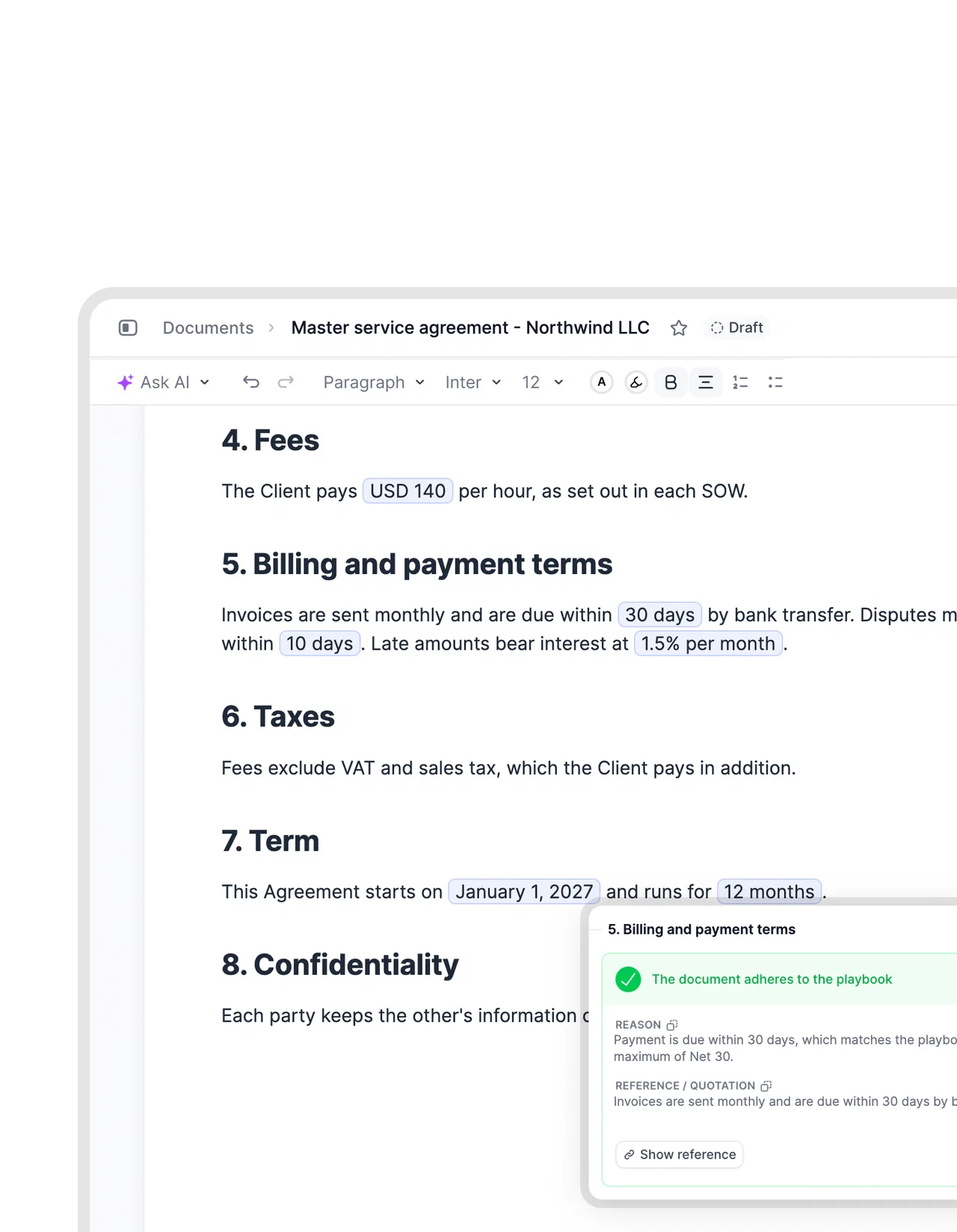
In fynk, the AI review checks a draft against your playbook before it goes out for signature. If your playbook says payment terms may not go past Net 30, a contract that slipped to Net 60 during negotiation gets flagged before signature, while it can still be fixed.
After one wrongly agreed guarantee clause cost his previous executive search firm €50,000 to €70,000, Harald R. Fortmann, now founder of Five 14, used fynk templates to lock the clauses consultants weren’t allowed to change.
fynk helped us lock down contract terms so deals could no longer be signed without proper control. This protects the company when consultants are under pressure from clients to make exceptions.

If you’re starting from scratch, these templates already carry payment and billing terms you can adjust:
Free templates for quote to cash
- Sales quote template A quote with line items, validity and payment terms. Use template
- SaaS agreement template Subscription terms, fees and renewal for software. Use template
- Master service agreement (MSA) template One framework for repeat work, billed per order. Use template
- Purchase order (PO) template for products The customer's side, with the PO details billing needs. Use template
What does billing need from a signed contract?
Billing needs a short, fixed set of facts from every signed contract, handed over when the contract is signed so nobody has to dig them out of the PDF later. Copy this list into your CRM deal stage, your contract template’s cover page or the form sales fills in at close:
- Legal name and address of the customer entity that gets invoiced
- Billing contact (name and email) and, if required, the PO number
- Contract start date and what triggers the first invoice
- Billing frequency (monthly, quarterly, annual, upfront, by milestone)
- Payment terms (for example Net 30) and payment method
- Agreed prices per line item, including discounts and when each discount ends
- Price increase rule: index or percentage, date and cap
- Minimum commitment or usage limits, if any
- Term end, renewal type (automatic or not) and the notice date
- A link to the signed contract itself
Ten items sounds like a lot until you count how many emails it takes to find them one by one. Kept on the contract itself, the facts and the signed document can’t drift apart.
Track price, start date and payment terms on every signed contract.
How to connect the contract to billing
The cleanest way to connect contract and billing is to let the signature trigger the handoff, so nobody has to remember to send it. The signature event tells the tool finance already uses that a contract is final, that tool pulls the contract data, and the signed PDF lands on the customer record next to the invoices.
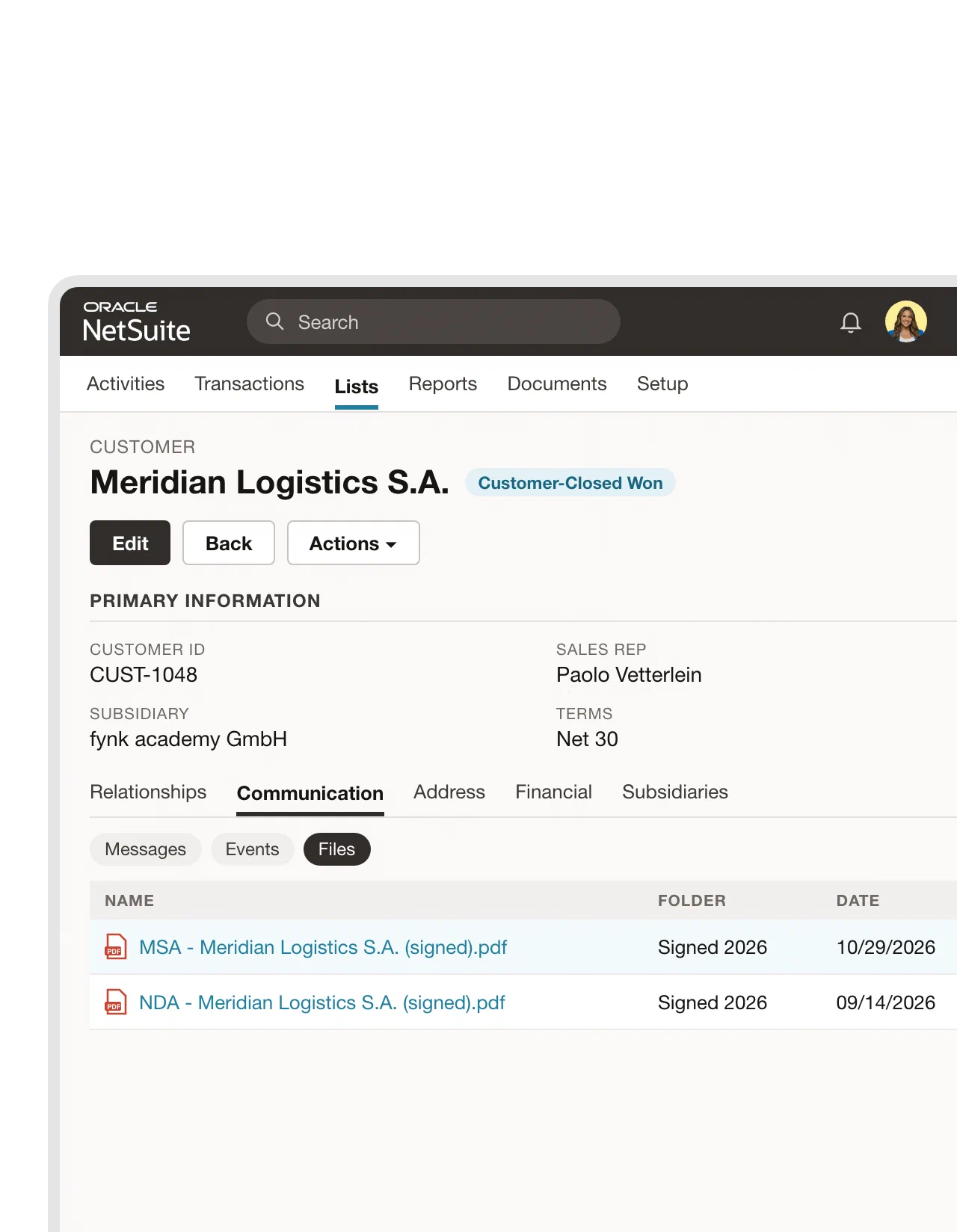
In fynk, a contract holds those billing facts as metadata: value, start date, notice period and any custom field you add. When the last party signs, a webhook on “Document is signed by all parties” tells your billing system, which then fetches the PDF and the values through the fynk API. Without your own integration, a Zap does the same job for common accounting tools. With the NetSuite integration, the signed PDF lands in the File Cabinet on the customer record, so finance opens the contract from the place it bills from.
For smaller accounting tools, these Zaps create the customer and the invoice in QuickBooks, Xero or Stripe as soon as a contract is signed, or upload it to Lexware Office for bookkeeping:
Ready-made Zaps
- Create QuickBooks customers and invoices for newly-signed fynk contracts Use this Zap
- Create and send Xero invoices when new fynk contracts are signed Use this Zap
- Create Stripe customers and invoices for newly-signed fynk contracts Use this Zap
- Upload newly signed fynk contracts to Lexware Office (lexoffice) for bookkeeping Use this Zap


Webhooks and API access come with the Business and Pro plans; the pricing page shows what each plan includes.
How do changes and renewals fit into quote to cash?
Changes and renewals are quote to cash again, just shorter. An upsell, a price change or an extra service needs its own approval, its own signed document and its own billing handoff, or billing keeps invoicing the original contract.
The pattern that causes trouble is the change agreed by email. The customer adds ten seats in a reply, the rep says “sure”, and the extra seats show up in usage but not on any invoice. A short change order or amendment, signed by both sides, fixes that and gives finance something to bill.
Renewals follow the same rule. The notice date has to be on someone’s calendar months before the term ends, the renewal price comes from the current contract (including any increase rule), and billing switches to the new price on the renewal date, not the day someone notices. If you work from HubSpot, fynk can create the renewal contract from the renewal deal with the prior term, old and new annual value already filled in.
Do you need quote-to-cash software?
Most companies with 50 to 500 employees can run quote to cash with the tools they already have, as long as those tools pass the right data to each other. A full CPQ and billing platform pays off when pricing gets complex, for example usage-based billing or hundreds of product combinations.
| Setup | Best for | Where it falls short |
|---|---|---|
| Spreadsheet price list, Word contracts, accounting tool | Fewer than a handful of new contracts a month, one person doing sales and billing | Everything is retyped; changes and renewals depend on memory |
| CRM quotes, a contract tool, accounting tool, connected by webhooks or Zapier | Most B2B companies with 50 to 500 people, subscription or service contracts, standard pricing with some exceptions | Complex usage-based pricing still needs a billing system that can rate usage |
| CPQ suite plus subscription billing platform | Large product catalogs, usage-based or hybrid pricing, high contract volume | Months of setup, a dedicated admin, and a price tag to match |
The middle row is where fynk fits. Quotes come from the CRM: in HubSpot, the deal’s line items become the quote table row for row, and the Salesforce integration does the same with opportunity products. The contract is drafted, reviewed, approved and signed in fynk, and the signed terms go on to billing.
Create the quote and contract from your HubSpot deal.
Which quote-to-cash metrics should you track?
Track four quote-to-cash metrics, and count them by hand for a month before you build a dashboard:
- Days from quote to signature: shows where deals wait for approvals or legal.
- Days from signature to first invoice: the clearest sign of a slow or manual billing handoff.
- Invoices corrected or disputed because of contract terms: price, discount, start date or PO number. Note the reason for each one.
- Renewals invoiced on the old price: checks whether increase rules and renewal changes reach billing.
There’s no good universal benchmark for these, because a 12-page enterprise MSA and a one-page order form move at different speeds. Compare each month with the last. A simple check works too: take ten contracts signed last quarter and compare each one, line by line, with its latest invoice.
Quote to cash FAQ
In a mid-sized company, usually nobody owns all of it. Sales or RevOps owns pricing and quotes, legal owns the contract, finance owns invoicing and collection. Name one person, often in RevOps or finance, who owns the handoff list and the metrics, even if the steps stay with their teams.
They're two sides of the same deal. Quote to cash is the seller's process, from quote to collected payment. Procure to pay is the buyer's process, from purchase request to paid invoice. The PO number on your invoice is where the two meet.
Some definitions end there, especially in enterprise software. In practice, revenue recognition is an accounting step that runs on the invoices and contract terms, so it depends on the same clean handoff from the signed contract.
No. RevOps is a team or function that runs the revenue systems and data across marketing, sales and customer success. Quote to cash is one of the processes it often owns, together with finance. A company without a RevOps team still has a quote-to-cash process, just with the steps spread across sales and finance.
Searching for a contract management solution?
Find out how fynk can help you close deals faster and simplify your eSigning process – request a demo to see it in action.
Please keep in mind that none of the content on our blog should be considered legal advice. We understand the complexities and nuances of legal matters, and as much as we strive to ensure our information is accurate and useful, it cannot replace the personalized advice of a qualified legal professional.


Get a regular dose of insightful contract management content



Take control of your agreements. Move your business forward.
Run agreements the way they should run: fast, clear, and on your terms.
No setup headaches
Go live in days, not quarters
No lock-in
Full export anytime
No hidden fees
Signatures included, no envelope fee