
AI for finance teams: 5 questions your contracts can answer

Rezvan Golestaneh
Published · 11 min read
In short
It’s budget week, and the CFO asks what you’re already committed to next year. The answer is spread over signed PDFs, including a lease in a former colleague’s inbox. AI for finance teams can read those PDFs for you, though only the ones you hand it, and someone still has to decide which amounts count as a commitment.
How finance teams use AI
Most of the work AI takes off your plate sits in four places:
- Accounts payable: match each invoice to its purchase order and check the price against the contract.
- Month-end close: spot unusual transactions and reconciliation gaps before you sign off.
- FP&A: draft forecasts and variance notes from your numbers, with price increases and payment dates pulled from the contracts.
- Spend and commitments: read your contracts for values, end dates, notice periods, and payment terms.
Three in four finance teams at large companies already use AI, up from under a third two years ago. On a smaller team, start with the last one. Your price checks, forecasts, and accruals all depend on it, and AI can only read the contracts you’ve actually uploaded.
5 questions AI can help finance answer
Each of these questions comes back every budget cycle, and each one depends on having the right records and knowing where a person has to decide.
1. What are we already committed to?
A commitment is money you’ll owe under contracts you’ve already signed, whether or not the invoice has arrived. AI can read each contract and pull out the value, the start and end date, and the notice period, so you start from the signed terms rather than a spreadsheet someone last updated before vacation.
Before you add anything up, sort each amount into one of three kinds:
- Fixed total: a one-off price or a total for the whole term.
- Recurring fee: a monthly or yearly amount until the contract ends or is canceled.
- Usage-based: an amount that depends on how much you use, which you have to estimate.
For example, a software subscription at $3,000 a month that runs until the end of June adds $18,000 to next year’s commitments. A cloud bill that depends on usage doesn’t have a number in the contract at all, so you plan it from past invoices. Include signed amendments too, because they often change the price or the term.
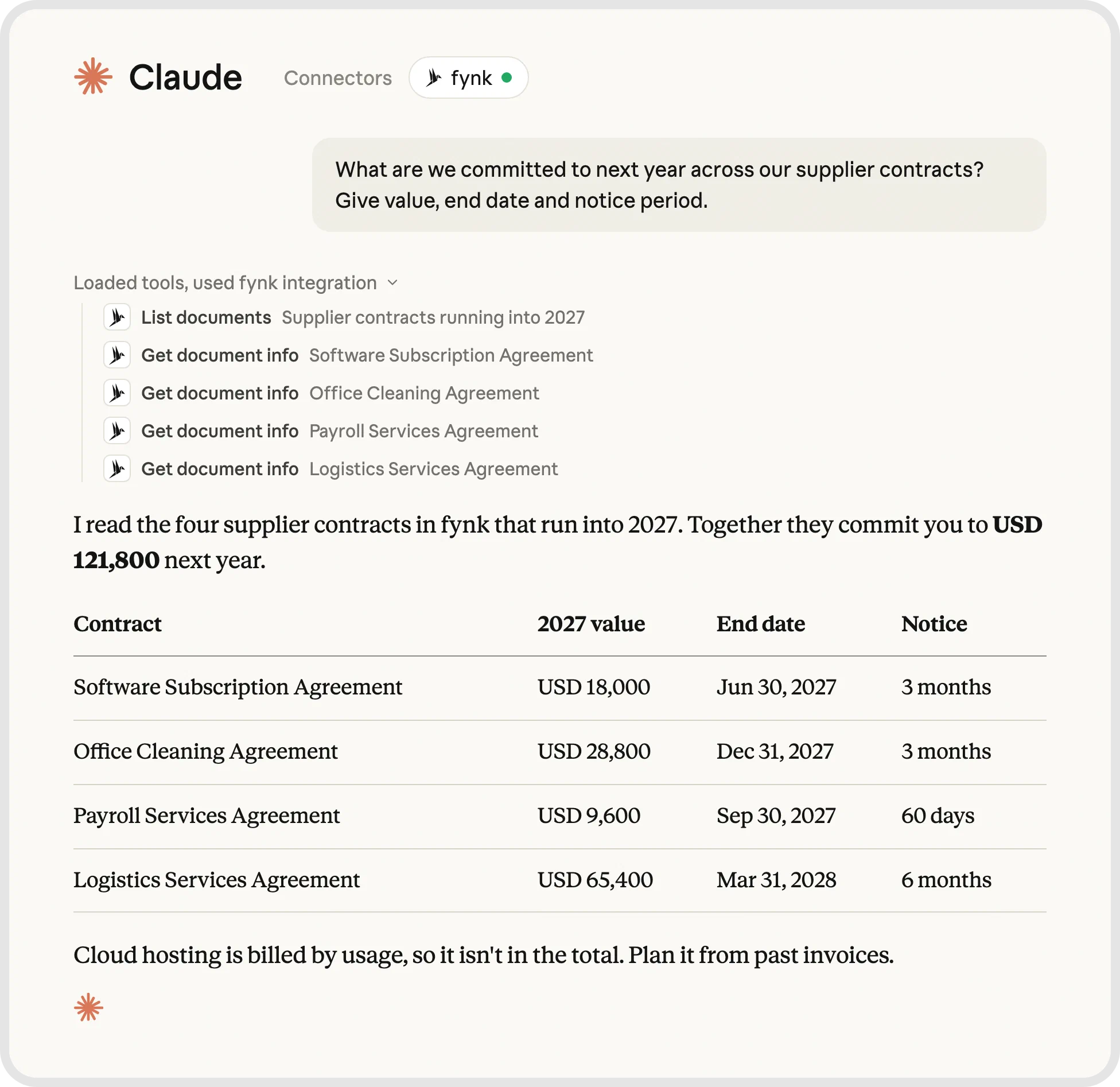
Connect Claude to fynk and ask it what you’re committed to next year. It reads the value, end date, and notice period of each supplier contract and adds them up for you.
2. What can we still cancel before budget lock?
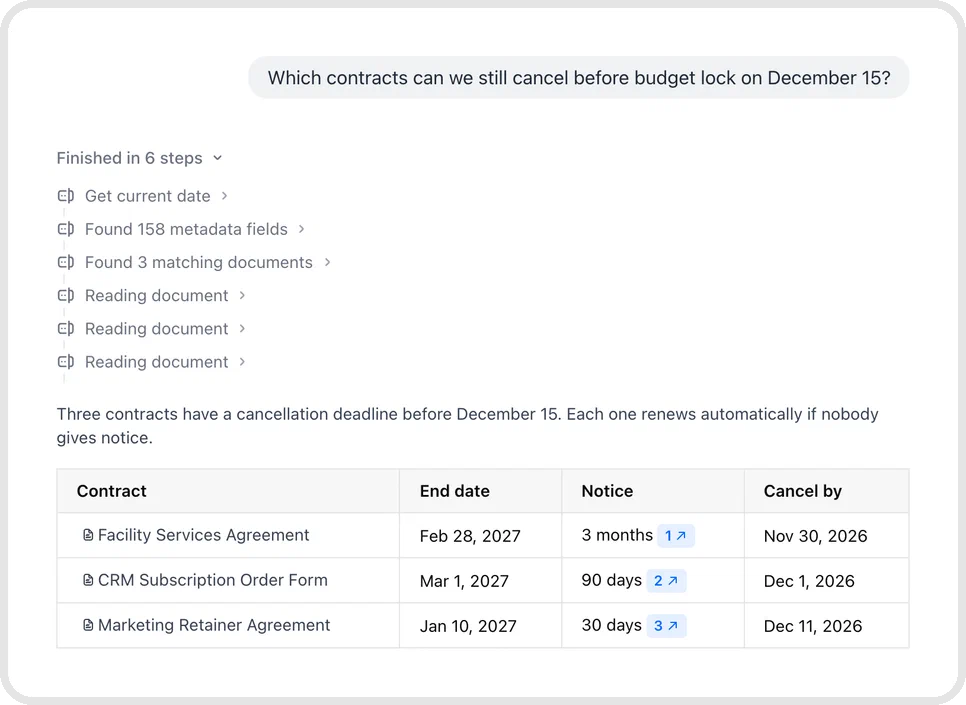
The last day to cancel is the end date minus the notice period, and it usually comes months before the end date. For example, a contract that ends on March 31 with three months’ notice has to be canceled by December 31. If your budget locks in mid-December, that decision belongs in this budget round, even though the contract still has three months to run.
AI can read the notice periods and renewal terms and give you a list of contracts whose cancellation deadline falls before or soon after budget lock. For each one, check:
- Whether the notice period and renewal terms match the signed wording.
- Who owns the decision and needs time to review the service.
- How the cancellation has to be delivered and documented.
In fynk, you can ask the AI assistant which contracts you have to cancel before budget lock, and it works out the last day for each one. Reminders then reach the contract owner before every deadline. The owner still decides whether to cancel, renegotiate, or keep the service.
3. What will change the forecast?
Some clauses change how much you pay, or when. These are the ones to find:
- A CPI escalation clause ties price increases to inflation.
- Billing and payment terms set when money is due.
- A milestone payment may depend on acceptance of the work.
- A price ramp changes the fee at an agreed point.
AI can find these clauses across many contracts at once. Ask in plain words, for example “Which supplier contracts include an escalation clause?”, and read the clause behind each answer before you use it.
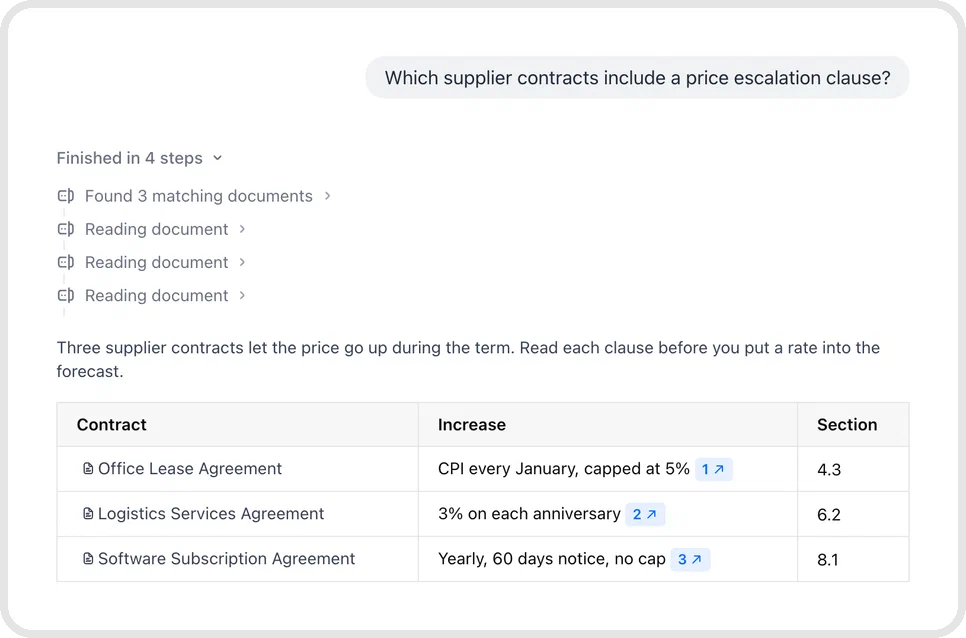
What the clauses mean for the plan is a separate step. Take a lease whose rent follows inflation every January: the clause gives you the date and the index, but you choose the inflation rate to plan with. The same goes for the expected milestone date and for payments that may not happen at all. For AI in FP&A, the clauses are inputs, and the assumptions stay with you.
Ask your contracts what moves the forecast.
4. Which spend has no contract behind it?
Compare who you pay with who you have a contract with. Export the vendor payments of the last 12 months from your accounting system, match each vendor to a signed agreement, and look at what’s left over. A monthly payment to an agency with no agreement on file is the kind of gap you’re looking for.
In fynk, ask the AI assistant whether you have a signed contract with a vendor, and it reads every document with that name before it answers.
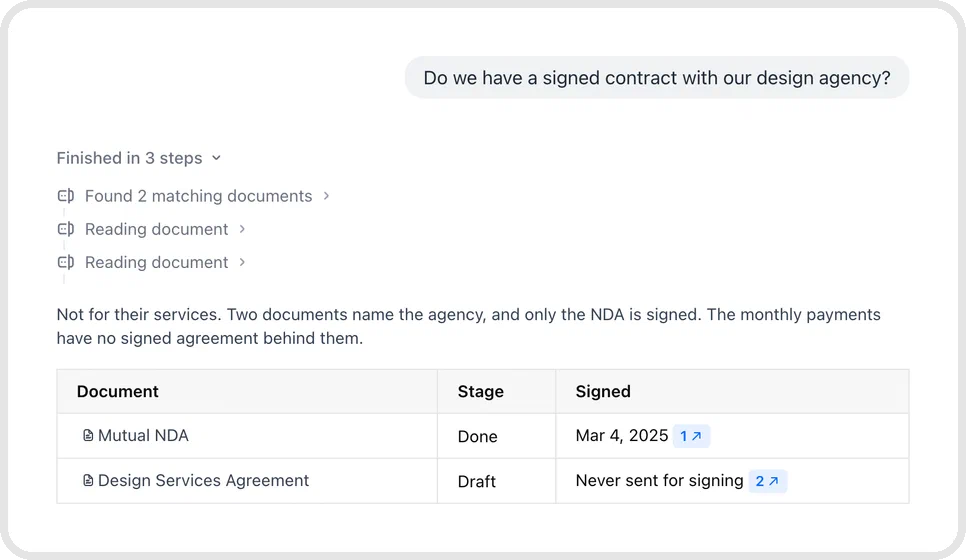
AI helps most with the matching, because names rarely line up: the invoice says one thing, the contract another. Matching spend against contracts is a typical job for AI agents: an assistant connected to your accounting system and your contracts does the comparison and flags the gaps. Finance or procurement then decides which gaps need action.
5. What can we show the auditor?
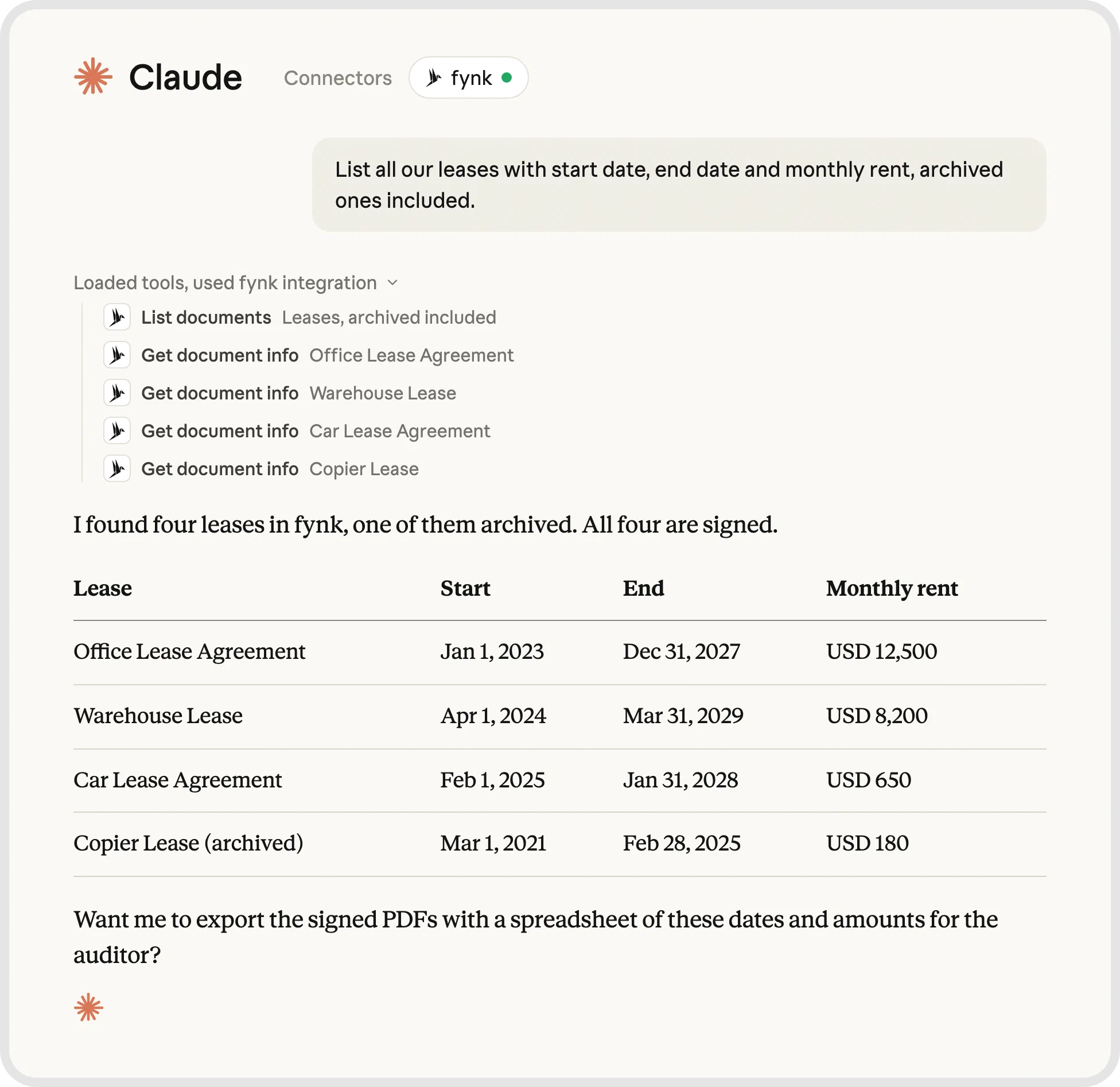
The evidence is the signed documents, the data taken from them, and the record of who did what. AI can help you find the agreements behind a request, for example every lease or every contract with one supplier, but a person checks that the selection covers the request and reconciles it to the figures in the books.
Keep that evidence in order all year to avoid the usual mistakes in finance audits, so nobody has to rebuild the file in the week the auditor arrives.
When the auditor asks for all leases, ask Claude through the fynk connector for the list, or filter the document list in fynk, and export the signed PDFs with a metadata spreadsheet of their dates and values, while the audit trail shows who viewed, changed, or signed each one.
Investors ask for the same evidence. fiskaly, a provider of digital fiscalization for retailers across Europe, keeps every agreement in fynk in one structure, with the five to ten figures that matter shown at the top of each contract. When someone asks for them, they’re already there.
Which finance tasks to give AI, and which to keep
Give AI the reading and preparation work a person can check afterward. Keep assumptions, approvals, and commitments with people. AI for CFOs should help with the decision, and the person who made it should stay easy to see.
| Task | AI fit | Why |
|---|---|---|
| Pulling dates and values from contracts | Good fit | The signed text is there to check the extraction against. |
| Drafting variance commentary from your numbers | Good fit, check | AI can prepare the wording, but you verify the calculations and explanations. |
| Answering “Do we have a contract with X?” | Good fit | Search finds matching agreements; check names and repository coverage. |
| Preparing a contract from an approved template | Good fit | The wording stays fixed and only the values change, so a person checks the values. |
| Forecasting from contract terms | Careful | Terms supply inputs. Assumptions and uncertain timing remain yours. |
| Booking journal entries | Careful | Check accounts, amounts, periods, and supporting evidence before posting. |
| Approving payments or signing | Keep human | These actions commit money or bind the company. |
| Deciding to renew or cancel | Keep human | Usage, service quality, alternatives, and business needs take judgment. |
CoastCap, a family office with seven companies and an investor in fynk, has Claude fill in the values of its intragroup loan notices from approved templates and saves 20 to 30 minutes per drawdown.
By having predefined templates for contracts and only changing dynamic fields … we can be sure that those contracts comply with our own standards.

If you prepare loan or financing paperwork yourself, start from a template like these:
Finance templates to start from
- Secured business loan agreement template Set out a secured term loan with repayment and collateral. Use template
- Unsecured loan agreement template Document a loan without collateral, with interest and repayment. Use template
- Circular resolution for loan agreements - template Record a written shareholder decision to approve a loan. Use template
- Factoring agreement template (sale and purchase of receivables) Agree the sale of receivables to a factoring company. Use template
Make it show its work
Every AI-assisted figure needs a source and a reviewer before it enters reporting.
Teams that can show how their AI reached a number also see fewer errors: 33% of companies that can produce AI audit evidence report a significant drop in errors, against 6% of those that can’t. That’s an association, and adding an audit log won’t produce the same result by itself.
An answer that sounds sure of itself still has to be checked. Open the source and look at the amount, currency, period, and any conditions attached to it.
In fynk, AI analysis shows the sentence behind every value it reads, so you check it before it’s saved.
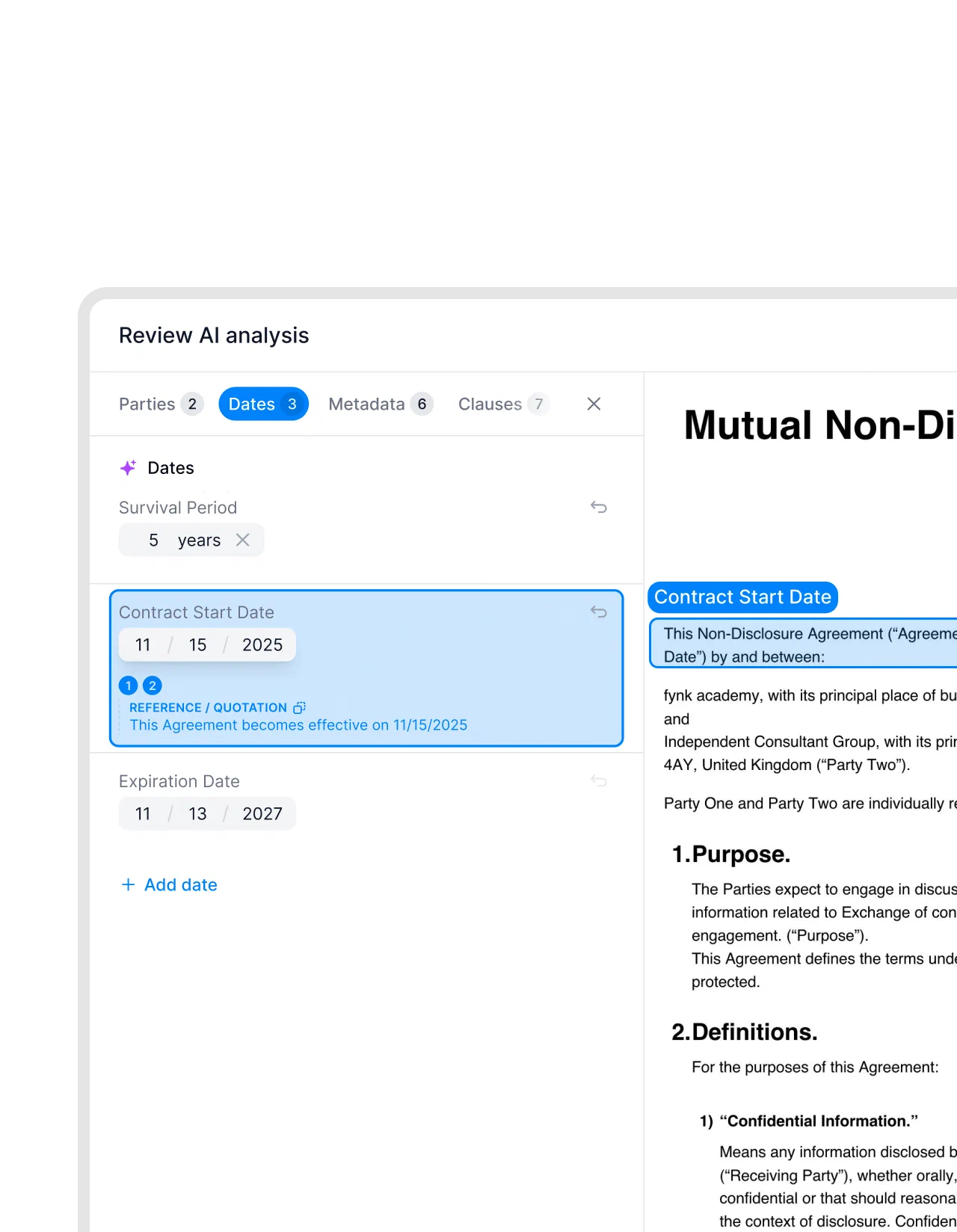
Where the data is processed matters too. Before you connect any AI tool to financial records, check where it processes and stores the data and whether its provider trains models on it.
Trace every figure back to a signed contract.
How to start with AI in your finance team
Start with one recurring question, checked contract data, and a comparison against your current process. A three-person team can use this four-week plan to split collection, review, and connection work without making AI everyone’s second job.
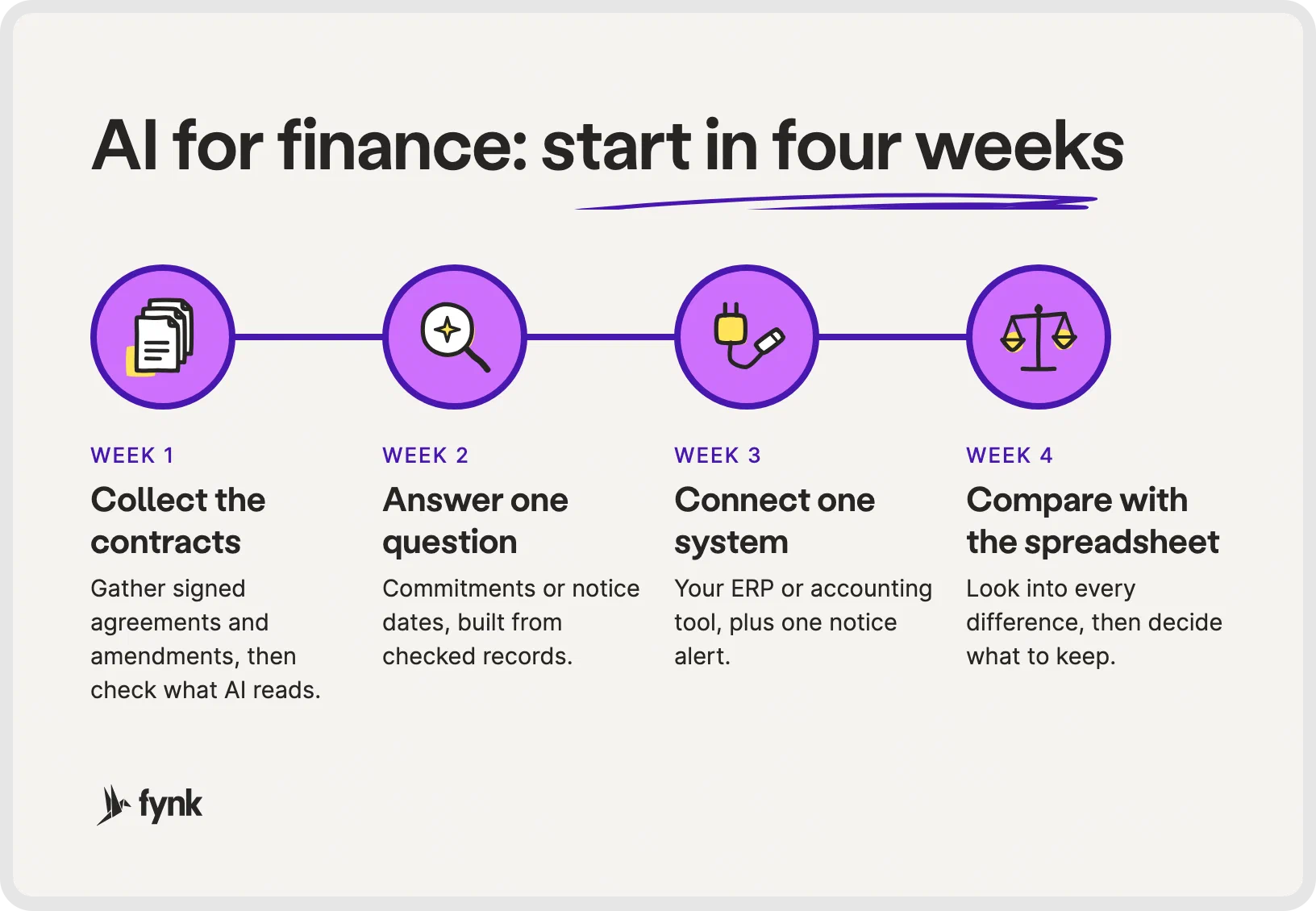


The plan at a glance: one question first, then one connection, then a check against the old way.
Week 1: collect and check the signed contracts
Gather signed agreements and amendments in one place, and ask department owners for anything still sitting in their inboxes.
Import them into the tool that will read them. AI reads parties, dates, durations, and renewal terms, and a person checks each value against the document. Write down missing agreements and unclear values instead of filling the gaps with guesses.
Week 2: answer one question from the data
Choose commitments or notice dates. Define the period and the entities the answer must cover, then build the list from checked records.
Ask each contract owner to review their entries, and resolve discrepancies before the result goes into the budget discussion.
Week 3: connect one system and one alert
Connect your ERP or accounting system to the contract data it needs, and add one notice-period alert with a named recipient. Test both against the signed agreement, including which company and which record receive the information.
Ready-made Zaps cover the usual pairs: NetSuite, QuickBooks Online, or Xero for the books, and Slack for the alert.
Ready-made Zaps
- Save newly signed fynk documents to NetSuite and notify a Slack channel Use this Zap
- Send Slack DMs before notice periods for newly signed fynk contracts Use this Zap
- Create QuickBooks Online purchase orders from newly signed fynk supplier contracts Use this Zap
- Create Xero repeating invoices for newly signed fynk retainer contracts Use this Zap


Week 4: compare with the old spreadsheet
Run the same question through the old spreadsheet and the checked contract data, and look into every difference in totals, missing agreements, and conflicting dates.
Compare the effort too, including review and corrections. Then decide what to keep, what needs fixing, and whether another question is ready to add.
AI for finance teams FAQ
Finance teams can use AI to extract contract data, find obligations, identify cancellation windows, and prepare analysis from checked records. With the right connections, an assistant can also compare vendor spend with signed agreements. People still review the findings and make financial decisions.
AI can take over parts of reading, searching, and preparing work. That doesn't remove the need to choose assumptions, investigate discrepancies, and authorize commitments. Judge it by the work it can reliably handle and the review it still requires.
Safety depends on the tool's access controls, processing location, data retention, and training terms. Use approved tools, give access according to roles, and retain a record of changes. Check each connected provider separately and review outputs before using them in reporting or financial actions.
General assistants such as ChatGPT or Claude can help with finance work, and there are tools built for single finance jobs, such as invoice capture, forecasting, or contract data. For an in-house team, the useful choice is the tool that can reach the records behind your question and lets a person check every answer against its source.
Start with a recurring task whose answer you can verify against a signed document, such as extracting notice periods or contract values. Gather the source records and assign a reviewer first. Compare the result with your existing process before connecting it to further actions.
Searching for a contract management solution?
Find out how fynk can help you close deals faster and simplify your eSigning process – request a demo to see it in action.
Please keep in mind that none of the content on our blog should be considered legal advice. We understand the complexities and nuances of legal matters, and as much as we strive to ensure our information is accurate and useful, it cannot replace the personalized advice of a qualified legal professional.




Get a regular dose of insightful contract management content



Take control of your agreements. Move your business forward.
Run agreements the way they should run: fast, clear, and on your terms.
No setup headaches
Go live in days, not quarters
No lock-in
Full export anytime
No hidden fees
Signatures included, no envelope fee