
Delegation of authority matrix for contracts and spend

Rezvan Golestaneh
Published · 11 min read

In short
Someone replies “OK from me” to an email about a new supplier, and a week later that reply is treated as approval for a two-year deal. Finance thought it was about the budget estimate. Legal never saw the changed terms, and now the CEO is asked to sort out the paperwork after the fact.
Once a company is too big for “just ask the CEO,” it needs a delegation of authority. It tells people which decisions they can make alone and whose yes they need for the rest, and it leaves a record of who agreed.
What is a delegation of authority?
A delegation of authority is the company rulebook for who can commit the company to what, and up to which amount. It says, for example, that a budget owner can approve a €20,000 supplier contract, while a €150,000 one needs the CFO and the managing director. Three terms get mixed up around it. The delegation of authority policy is the rule set itself: limits, deputies, exceptions, and who keeps it up to date. The DoA matrix, sometimes called an authority matrix, is the table inside it that lists decision rights by area and amount, and an approval matrix is a narrower version that only shows who has to approve.
The policy also explains how to read the table, for example whether a limit applies per invoice or to the whole contract, and what happens when two rows apply. It should say which purchases a budget owner can make alone, too, since an approved budget doesn’t automatically approve every purchase in it.
Management books use the term more loosely. There, a manager hands someone a task along with the authority to finish it and stays accountable for the result. A company DoA writes that down for decisions that spend money or commit the company to terms.
One contract, four roles
A simple delegation of authority example is a €60,000 supplier agreement over two years with a changed liability clause. Four roles are involved:
- Recommends: the Head of Ops proposes the supplier and explains why the business needs it.
- Approves: the CFO approves the spend, and legal separately approves the changed liability clause.
- Signs: the Head of Ops or the managing director, depending on who is authorized to sign.
- Informed: procurement gets the signed agreement and the purchasing details.
These four roles are the letters R, A, S, and I in the matrix below. Whether the Head of Ops may sign at all is a question of signing authority, which also covers whether the person signing for the supplier can bind the supplier.
A delegation of authority matrix you can copy
This delegation of authority matrix covers six areas:
- Customer contracts
- Supplier contracts and spend
- Discounts
- Non-standard legal terms
- Offers above the salary band
- Company-level commitments, such as loans, leases, real estate, and acquisitions
The amounts and roles are placeholders, so change them to fit your company’s size, budget, and appetite for risk. You can also use it as an approval matrix template.
- RRecommends
- AApproves
- SSigns
- IInformed
| Decision | Limit (total value) | Owner | Manager | Dept. head | Legal | CFO | MD | Board | Finance |
|---|---|---|---|---|---|---|---|---|---|
| Customer contract | Up to €50,000 | R | A | S | I | ||||
| €50,000 to €250,000 | R | AS | A | I | |||||
| Above €250,000 | R | A | AS | I | |||||
| Supplier contract or spend | Up to €25,000 | R | A | S | I | ||||
| €25,000 to €100,000 | RS | A | I | ||||||
| Above €100,000 | R | A | AS | I | |||||
| Discount | Up to 10% | R | A | I | |||||
| More than 10% | R | A | A | I | |||||
| Non-standard legal terms | Any change to approved wording | R | A | I | |||||
| Offer above the salary band | Any amount | R | AS | A | I | ||||
| Loan, guarantee, or lease | Any amount | I | RA | AS | A | I | |||
| Real estate or acquisition | Any amount | I | A | RAS | A | I |
Owner means whoever brings the decision: the account owner, the requesting team lead, the deal owner, or the hiring manager. Manager is the sales manager or budget owner, Dept. head is the head of that area (Sales, Ops, or HR), MD is the managing director, and Finance includes procurement. Contract rows assume standard terms, and non-standard terms cover liability, indemnity, governing law, and IP.
A deal that hits several rows needs every approval they list. An S assumes the person already has authority to sign, and anything that goes to the board follows the board’s own process. Your accounts payable approval matrix should use the same spend tiers, so that an invoice matching an approved contract or purchase order only needs a payment check.
Back to the example from above: the €60,000 supplier agreement lands in the middle spend tier and in the legal-terms row, so the CFO and legal both approve it. In sales, a deal desk checks each non-standard deal against the discount and legal-terms rows before the quote goes out. If an offer says “subject to board approval,” get the board decision on record before anyone treats that condition as met.
Put your matrix to work.
6 rules to add to the matrix
Most arguments come from what the table leaves open, like how to count the value or who decides while the CFO is on vacation.
1. Count the full commitment
Use the total value over the full term. A €2,000 monthly contract for 36 months is a €72,000 decision, plus any setup fees and committed minimum purchases. Renewals, variable usage, taxes, and currency conversion are where people’s numbers drift apart, so the policy should say how each of them counts.
2. Prohibit purchase splitting
Related purchases that make up one commitment are counted together. Three €20,000 orders for the same planned rollout are a €60,000 decision, even if they carry three purchase order numbers.
3. Require dual control at the top tier
The largest commitments need two approvers. In the example matrix, a €120,000 supplier agreement goes to both the CFO and the managing director, and whoever recommended the deal can’t be one of the two. Both decisions are recorded before anyone signs.
4. Name a deputy for every approver
Write down who covers for each approver and which limits they have while doing it. When the CFO is away, the request then goes to the named deputy, who decides within the cover arrangement, instead of to whoever happens to reply first.
5. Put sub-delegation in writing
Authority is passed on only in writing, with the person, scope, limit, and duration. A manager with a €25,000 limit can’t delegate €40,000, and a temporary €10,000 purchasing delegation should state when it ends.
6. Give exceptions one route
Exceptions go through one process with named decision makers. An urgent €30,000 repair outside the budget might go to the CFO and the managing director, for example, with the reason and both approvals on record, even when the supplier is pressing for an answer.
From matrix to workflow
Most DoAs sit in a PDF on the intranet and work only as long as people remember them. To enforce one, each rule has to become a required approval step, a routing choice, or a record that exists before anyone commits the company.
Start at intake. Before any approval begins, the requester states the entity, the full-term value, the proposed terms, and the business owner, and your document approval workflow carries the request from there.
| Matrix rule | In the workflow |
|---|---|
| Count total contract value | Calculate the full commitment and pick the template for that tier |
| Prevent splitting | The requester lists related purchases before picking a tier |
| Two people approve top-tier decisions | The checkpoint step needs two approvals |
| Cover an absent approver | A team with the role holder and the deputy, where one approval is enough |
| Review non-standard terms | A playbook flags deviations, and a legal approval step is required |
| Keep evidence | Each approval is recorded with the approver and a timestamp |
Let the template carry the rules
In fynk, approval workflows are checkpoints set on a template, before a document reaches Review or Signing, and every document created from that template gets them.
The value tiers therefore become separate templates. You might keep “Supplier agreement up to €25,000” and “Supplier agreement above €25,000,” with an extra Finance step on the second. The amount in the contract doesn’t change the route by itself, so the requester works out the total value and picks the matching variant.
A checkpoint can have several steps, each starting once the one before it is approved. For every step you set whether one, two, or all approvers have to approve, and whether those are individual users or a whole team.
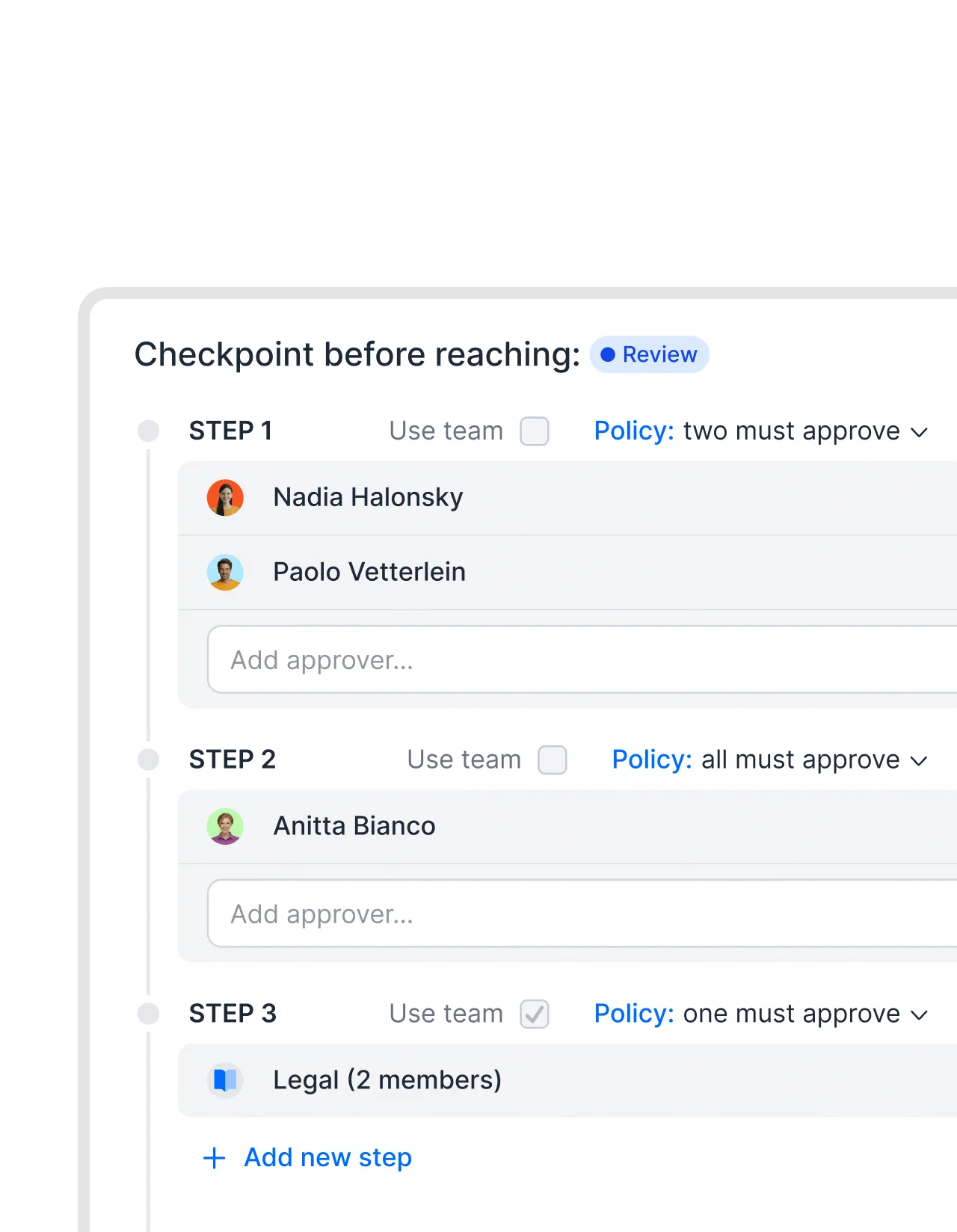
Top-tier dual control is then a step set to “two must approve.” Absence cover works with a team that holds the approver and the deputy, set to “one must approve,” as long as someone updates its members when the register changes.
Apply the hiring and legal rows
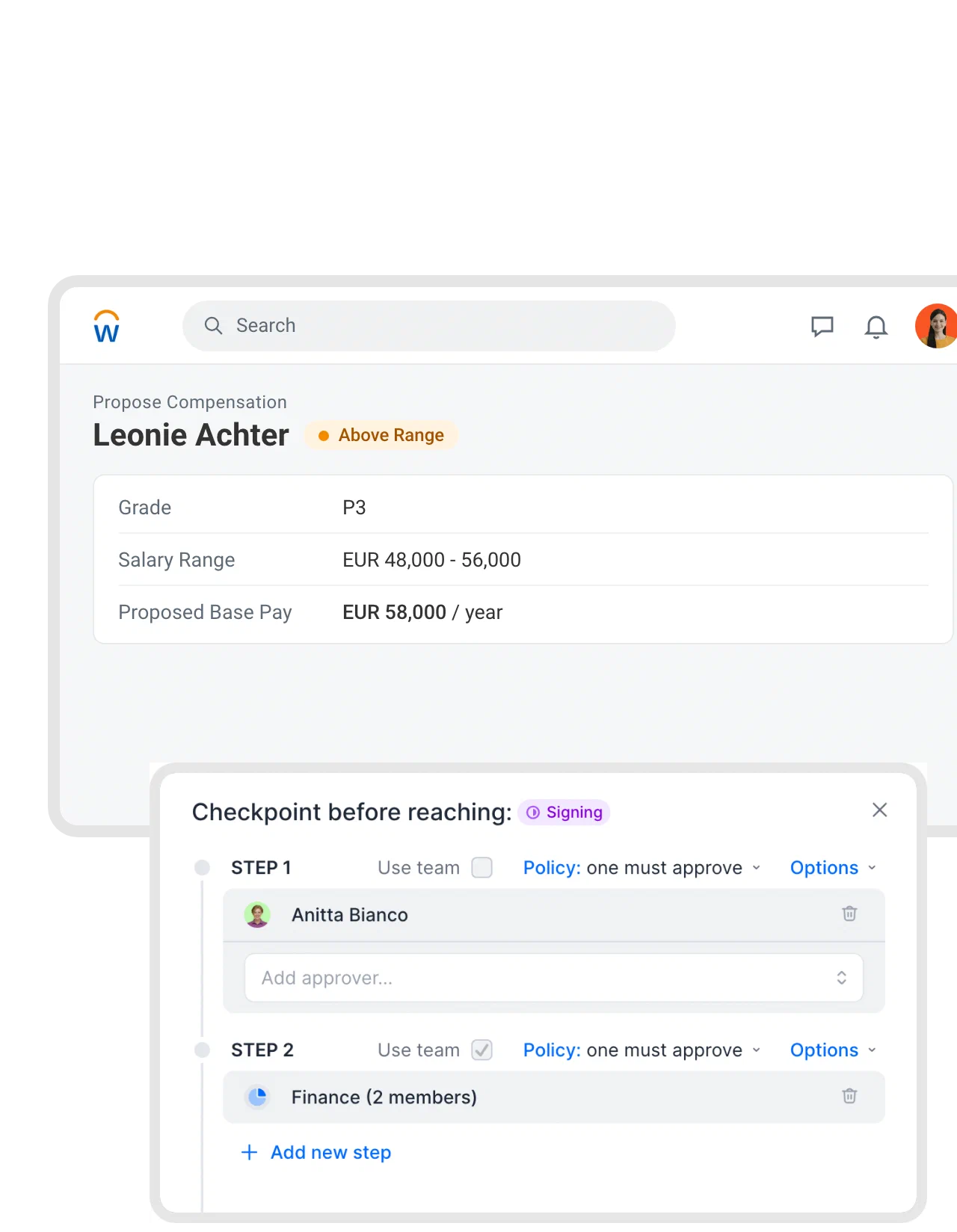
Offers above the approved salary band get their own template variant, with HR and Finance approving before anyone signs. Below, an above-range pay proposal from Workday sits next to a checkpoint with a reviewer and then the Finance team.
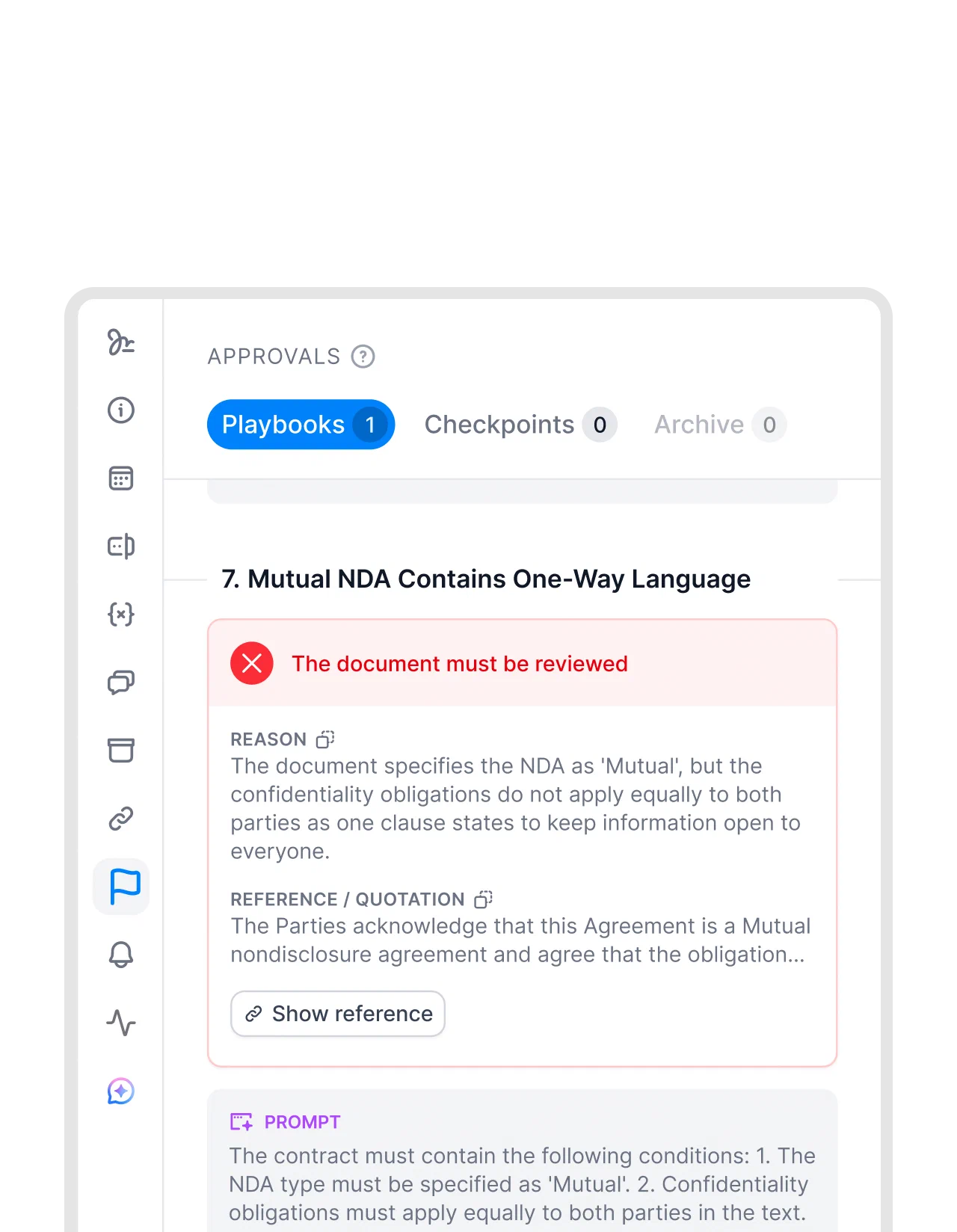
For non-standard terms, AI review playbooks check the contract against your rules and flag each point red, orange, or green with a reason. Legal still makes the call; the flags show where to look. A playbook can also carry its own checkpoint, so every document it runs on needs that approval in addition to the commercial ones.
Reminders and the audit trail
Until every approval is in, the contract can’t go to signing, and anyone who hasn’t decided yet gets a reminder every two days. Each decision is saved in the audit trail with the approver and a timestamp.
User roles decide who can edit, approve, or sign. If two people have to sign together, signature order sends the contract to one after the other.
Approvers can also decide in Microsoft Teams. With a Zap, the request shows up there as a card, and the approver selects Approve or Reject.
Ready-made Zaps


Previously we had to manage contract reviews and approvals via endless email back-and-forth and improvised approval forms, followed by a signing process. If everything needed to be documented, it required a lot of manual filing. Now we have everything in one place.
Turn your DoA matrix into approval rules.
How to adopt and keep the DoA current
A delegation of authority template only helps if everyone works from the same version and knows where exceptions go.
- Have the board or the managing directors approve the policy, often in a written resolution. Where that process is available, a circular resolution records the decision without a meeting. Note the scope, the entities covered, and the date the policy takes effect.
- Give it one owner in Finance, Legal Ops, or Operations. That person maintains the matrix, the role register, the deputies, and the exception log, and keeps the current version in one place employees know.
- Roll it out on one page: the matrix plus the calculation and escalation rules. A short training with three cases (a purchase, a discount, an offer above the band) works well if people have to find the route themselves.
- Review it when someone changes role or leaves, after a reorganization, and when an entity is added, and at least once a year if nothing happened. Update the approval routes at the same time.
- Log every exception with the request, the rule it departed from, the reason, who decided, the outcome, and any expiry. If one rule keeps collecting exceptions, the rule is probably wrong.
Free templates for adopting and using your DoA
- Circular resolution for conclusion of a contract - template Shareholders approve a contract in writing, without a meeting. Use template
- Board meeting minutes template Record the meeting where the DoA was adopted. Use template
- Contract amendment template Change approved terms without reopening the whole contract. Use template
- Framework agreement template Fix terms once, so call-offs stay inside the approved limits. Use template
Delegation of authority FAQ
DoA, also written DOA, stands for delegation of authority. In finance and legal teams it usually means the company's rules for spending and contract decisions, and the DoA matrix is the table that lists each decision, its limit, and the roles involved.
For a €60,000 supplier agreement, the Head of Ops recommends the purchase, the CFO approves the spend, and Legal approves a changed liability clause. The Head of Ops or managing director signs under existing authorization, and procurement is informed.
A delegation of authority sets who may make decisions or commit the company, and within which limits. An approval matrix only shows who has to approve particular decisions. The delegation policy also covers signing, deputies, sub-delegation, exceptions, and upkeep.
The board or the managing directors, depending on the company's governance, often in a written resolution. Finance, Legal Ops, or Operations can prepare and maintain it, with one named owner.
At least once a year, and whenever someone changes role or leaves, the company reorganizes, or a new entity is added. Check limits, deputies, role holders, and approval routes together, and look at the exception log to see which rules keep failing.
Management texts sort delegation by scope and duration: general or specific, permanent or temporary, written or informal. Anything that spends money or commits the company should be specific and written, and cover for an absence is a temporary delegation with an end date.
A RACI matrix says who does a piece of work, who owns it, who is consulted, and who is told. A DoA matrix grants authority: who may approve or commit the company, and up to which limit. Many companies use both, and the DoA matrix decides who can say yes.
Searching for a contract management solution?
Find out how fynk can help you close deals faster and simplify your eSigning process – request a demo to see it in action.
Please keep in mind that none of the content on our blog should be considered legal advice. We understand the complexities and nuances of legal matters, and as much as we strive to ensure our information is accurate and useful, it cannot replace the personalized advice of a qualified legal professional.




Get a regular dose of insightful contract management content





Take control of your agreements. Move your business forward.
Run agreements the way they should run: fast, clear, and on your terms.
No setup headaches
Go live in days, not quarters
No lock-in
Full export anytime
No hidden fees
Signatures included, no envelope fee