
AI agents for business that pay off + examples

Rezvan Golestaneh
Published · 12 min read
An AI agent doesn’t just answer your questions. It takes the next steps itself, inside the tools where your business data lives.
You probably get useful answers from AI already. The slow part is what comes after the answer, when you still have to open the right tool and do the work by hand. An agent does those steps for you, within the permissions you give it. So you stay the brain, and the AI becomes the muscle.
That holds whether you’re the founder of a 5-person company or a team lead at a 500-person one, and the first question is the same for both of you: which job do we repeat every week that an agent could do?
What’s an AI agent?
A business AI agent has 3 parts: a model, connections to the tools where the work lives, and permission to act within a defined job.
The model understands your request and picks the steps. The connections let it read records or change them. And the job sets what it’s allowed to change, and when a person takes over.
So how is that different from a chatbot? A chatbot tells you how to write the contract. An agent opens your contract tool and writes the draft. The piece that connects the assistant to your business tools is an MCP server.
What can an AI agent do for your business?
It can take over the jobs you repeat every week. The inputs need to be there and the result needs to be clear, with someone to check it.
The table maps one handoff per team, so you can spot the one your company repeats.
| Team | A recurring job to hand over | Tools it touches | Where a person signs off |
|---|---|---|---|
| Sales | Prepare an agreement from a won deal | CRM and contract system | Check terms and signer before sending |
| Finance | List paid vendors without a signed agreement | ERP or accounting and contract system | Verify matches and review any draft |
| HR | Prepare an offer from approved hiring details | HR system and contract system | Check terms and recipient before sending |
| Procurement | Gather supplier agreements for an upcoming review | Purchasing records and contract system | Decide what to renew or negotiate |
| Delivery and operations | Prepare a briefing after signature | Contract system, automation tool and team channel | Check the briefing before planning delivery |
| Legal | Collect incomplete contract records for correction | Request source and contract system | Resolve uncertain details and approve changes |
| Management | Summarize contract stages and possible delays | Contract system and assistant | Decide which delays need attention |
Procurement can go further than a review: AI in procurement can carry a supplier contract from the first request to renewal. Legal has its own list of legal AI agents for in-house teams.
AI agent examples by team
Four of those handoffs, up close.
Sales: a won deal becomes a draft
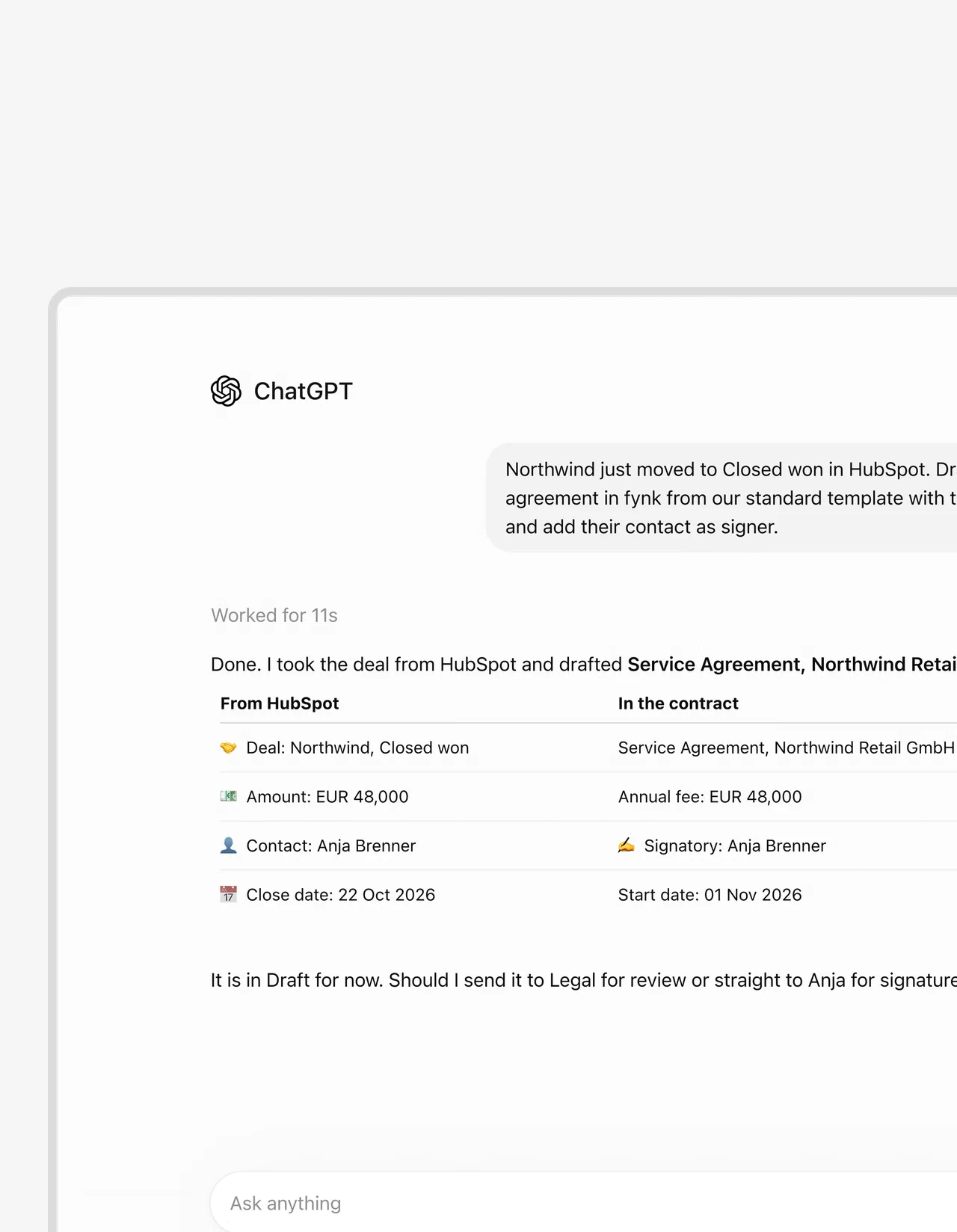
Before. You open the closed-won HubSpot deal and find the approved service agreement. Then you copy the amount, the start date and the customer details over by hand. Again.
After. With the right connections on, ChatGPT drafts the agreement in fynk from your approved template and adds the signer. Tell it to leave the document as a draft and ask you whether it should go to Legal or the signer.
The CRM supplies the deal details, and fynk holds the agreement for review and signing. If you’d rather skip the chat, you can create contracts from HubSpot deals automatically.
Finance: which vendors were paid without a contract?
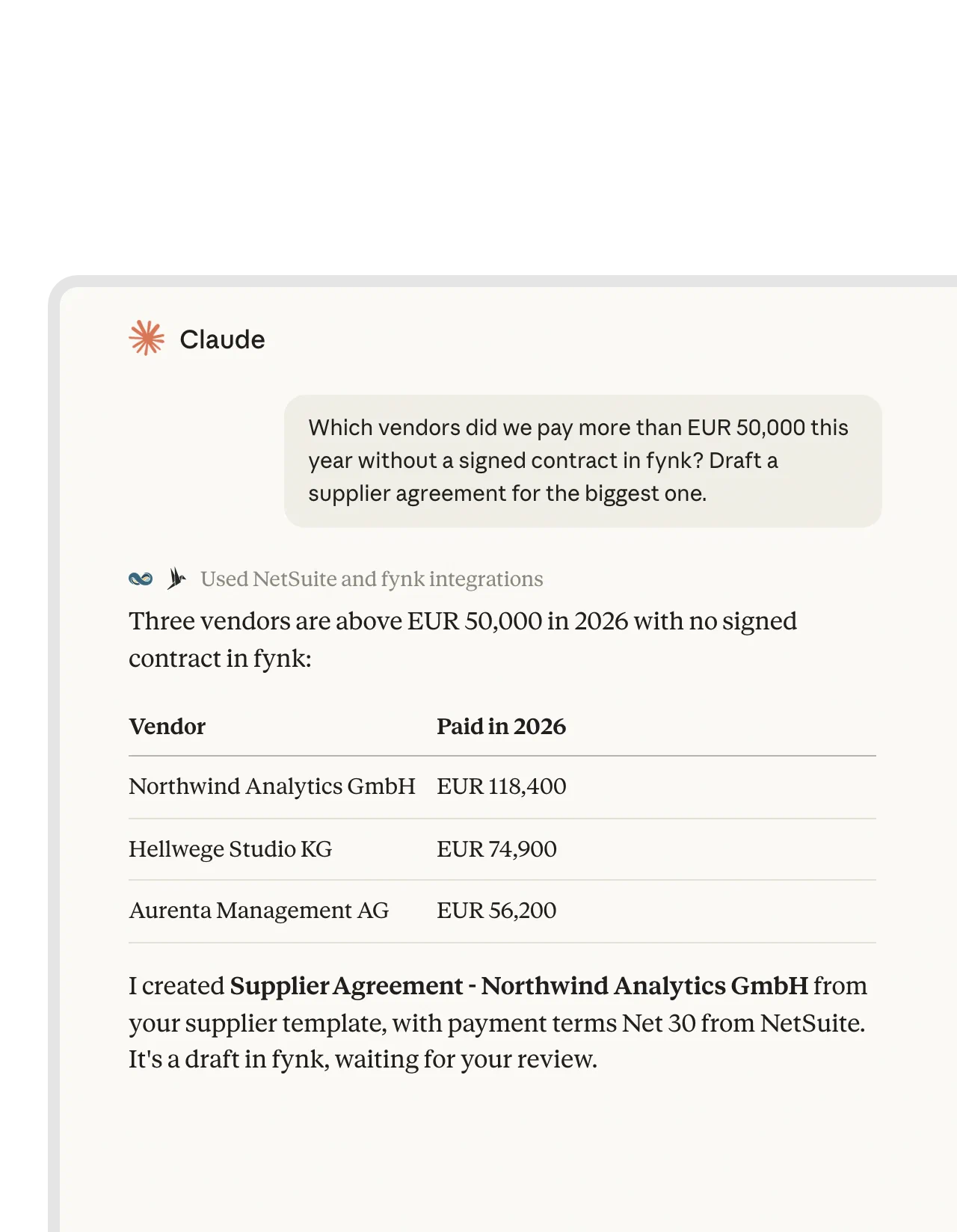
Ask Claude: “Which vendors were paid more than EUR 50,000 without a signed contract in fynk? Draft a supplier agreement for the biggest one.”
Claude reads spend from NetSuite and contracts from fynk in the same chat. The two tools aren’t linked to each other. Claude just uses both connectors at once.
You get the list and a draft supplier agreement to review. But check the matches before you act on them, because a vendor with a slightly different legal name in each system can look like a gap when it isn’t one. It’s one of the contract questions AI for finance can answer.
Delivery: signature triggers a briefing
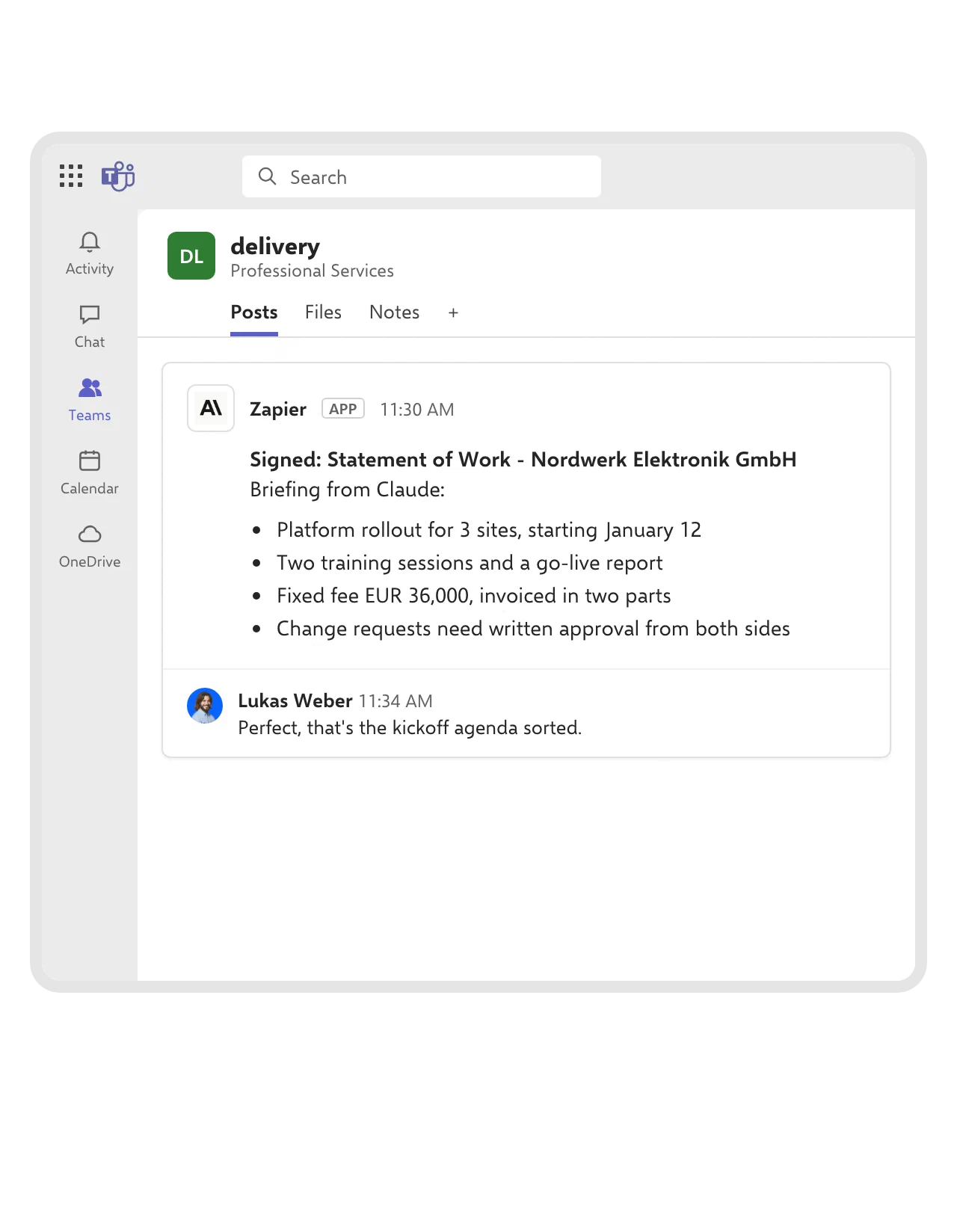
Contract signed → fields read → Claude writes a briefing → it lands in Microsoft Teams.
A Zap in Zapier runs that chain through the Microsoft Teams briefing workflow, with Claude summarizing what was agreed and what the team has to deliver.
To be fair, this one is a fixed automation with an AI step. Nobody here is deciding what to do next, least of all the software. And that’s fine. The delivery lead still checks the briefing against the agreement before handing out work.
Leadership: Monday’s meeting starts with the queue
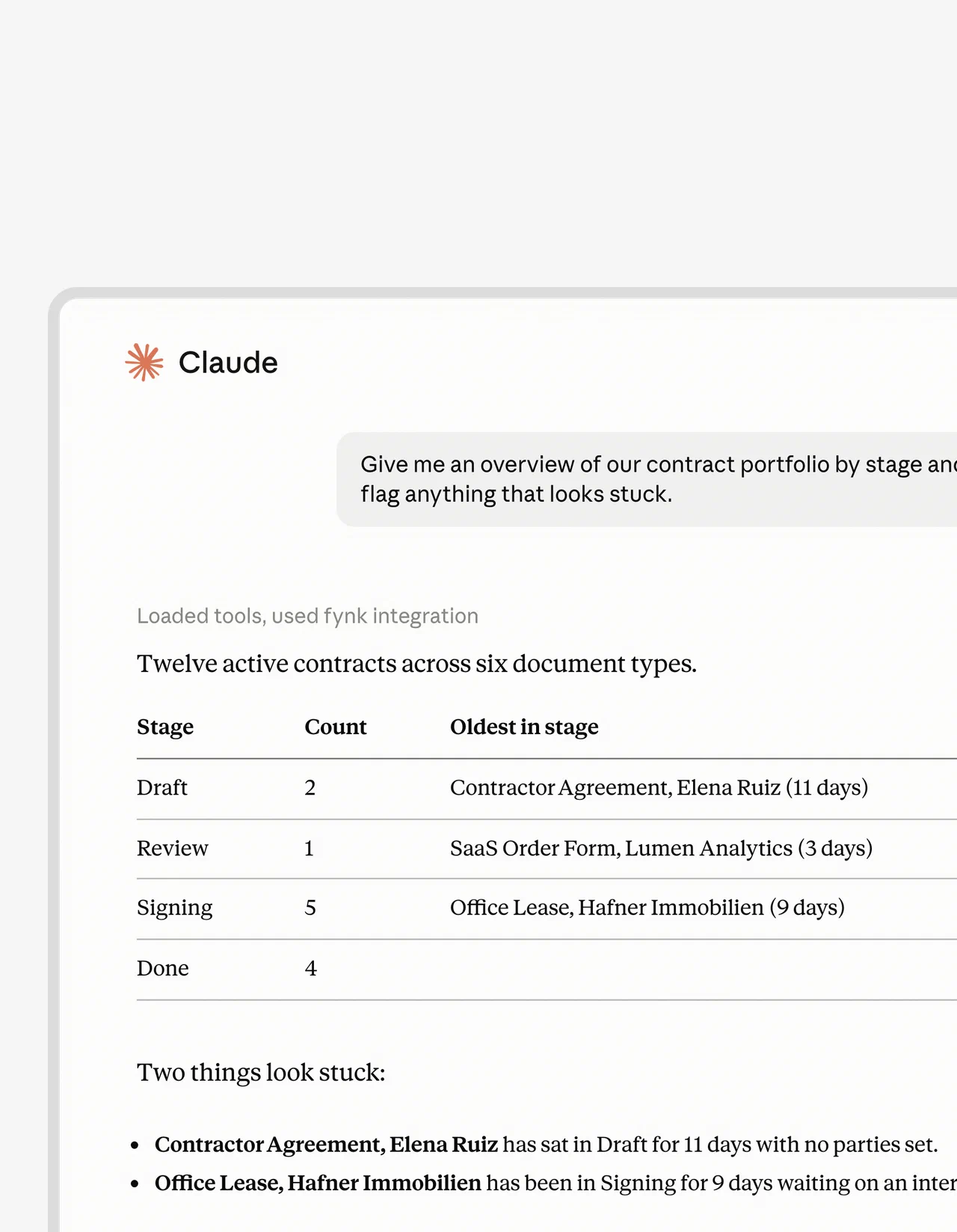
Your meeting starts in ten minutes. Skip the round of “any update on this?” messages and ask Claude for an overview of your contracts by stage and what looks stuck.
Ask for the oldest contract in each stage too, then check with the people responsible whether those delays need attention before anyone brings them up in the meeting. Time in a stage tells you where to look. It doesn’t tell you the whole story.
What can go wrong, and how to limit it
Anything that can act can also act wrong. Keep an eye on three things.
- Too much access. Whatever its connection allows, the agent can do. Give it only the tools and rights the job needs.
- Instructions hidden in content. A document or email can contain text that tries to steer the agent. This is called prompt injection, and it’s the main reason to check every new connection for MCP security.
- Nobody checking. Right most of the time still means wrong some of the time, and someone has to catch the rest. Keep a person on every result that leaves the company.
So start with jobs where a mistake is easy to spot and easy to undo. A draft you can fix. An email already sent to a customer, not so much.
How many companies use AI agents today?
Fewer than the hype suggests, so you’re not late.
Scaled use of AI agents is below 10% in nearly every business function, and 62% name security and risk as the main obstacle to scaling them (Stanford AI Index). In Germany, 11% of companies that use or are exploring AI already use agents and 29% plan to (Bitkom).
So you don’t need a company-wide rollout. Testing one useful job is a normal place to start.
How to pick your first AI agent
Pick a boring one. A good first job happens often and follows written rules, on data the agent can reach. Its mistakes are easy to undo, and someone checks the result.
Step 1: Name two candidate jobs
Write each one as an action with a clear result. “Draft the contract when a deal closes” is something you can test. “Handle customer communication” isn’t, yet.
Step 2: Score both jobs honestly
Give each question 0 points for no, 1 for partly and 2 for yes.
In this example, the contract job has approved templates and connected records, plus a named reviewer. The email job has only partial rules, and nobody’s assigned to check it.
| Question | Draft the contract when a deal closes | Answer every customer email |
|---|---|---|
| Does the job happen at least weekly? | 2 | 2 |
| Are the rules written down? | 2 | 1 |
| Does the data live in tools the agent can connect to? | 2 | 2 |
| Is a mistake easy to spot and undo? | 2 | 0 |
| Is there one person who checks the result? | 2 | 0 |
| Total | 10 | 5 |
Verdict: Pilot the contract draft. Narrow the email job before you test it.
Step 3: Check what the score hides
Eight points or more makes a good first job. Below eight, fix what’s missing or make the job smaller.
But a total can lie. A 9 with no reviewer, or with a mistake you can’t take back, isn’t ready.
What does an AI agent need connected?
Each system that holds the real records for its job. Deals live in the CRM and spend in ERP or accounting. People sit in the HR system, and agreements in the contract system.
Records don’t always agree, and the agent will copy the wrong one with total confidence. Decide which system wins for each value before it starts.
Sooner or later, most jobs that cross teams end in a contract. A won deal becomes an agreement. A new supplier needs one too, and a new hire gets an offer. That’s where we come in: fynk is the contract system the agent works in at that point.
The fynk MCP server lets Claude, ChatGPT, Copilot Studio and other MCP tools draft, find, analyze, update and sign contracts in fynk. “Sign” means starting the signature process, because people still sign for themselves. The server is on by default on Trial, Essential, Business and Pro.
If your team works directly in fynk, the fynk AI assistant creates contracts, fills in values and adds signatories. It also moves documents toward signing, searches your repository and organizes contracts in bulk. Nothing goes out until you approve it.
We keep approvals with people. Approval workflows keep the required sign-offs on the agreement, and MCP can’t approve a checkpoint.
The connection uses the connected person’s role, and every action shows up under their name in the audit trail. Admins can cut a single connection or turn off MCP for everyone.
Controls matter most when someone feels pressure to make an exception. Harald R. Fortmann puts it this way:
fynk helped us lock down contract terms so deals could no longer be signed without proper control. This protects the company when consultants are under pressure from clients to make exceptions.

What do AI agents cost?
It depends on four things: assistant licenses, the tools you connect, setup, and the time people spend checking and fixing results.
Fill in this worksheet with your own numbers.
- Hours today. Minutes per task × tasks per month ÷ 60.
- Hours with the agent. Review minutes per task × tasks per month ÷ 60, plus corrections and any manual steps left.
- Time freed. Hours today minus hours with the agent.
- Costs to compare. Licenses for the assistant and connected tools, usage charges if any, setup time, and ongoing checking and maintenance.
Say a job takes 15 minutes and happens 40 times a month. That’s 10 hours today. If each result needs three minutes of review, that’s two hours. You’re left with eight hours, and that’s before the corrections and leftover steps, let alone setup and maintenance.
Put your own hourly cost on the hours freed and compare it with what you add. And be honest about one thing: saved time only counts if someone uses it.
Build or buy? We sell contract software, so weigh this with that in mind: for a first job, use what you already pay for. Most teams already have an assistant like ChatGPT, Claude or Copilot, and connecting it to your tools is cheaper than building your own agent. Building only makes sense once you know the job well enough to write down its volume and rules, and you’ve found that nothing on the market fits.
How do you run a 30-day AI agent pilot?
Measure one job first. Then run the agent next to the manual way for a week, check every live result in the week after, and make the call in week 4.
Step 1: Pick the job and measure today in week 1
Score the job and name the reviewer. Then time the current process. Write down what a good result looks like and what counts as a miss, and agree on it before you see the agent’s output. Once people have seen it, the bar tends to move.
Step 2: Connect and compare in week 2
Have IT check the connections and access first. Then run the agent next to the manual way on the same cases, with its output kept well away from anything live, so a bad draft can’t reach a customer.
Compare both. When the agent misses something, find out why. Usually it’s missing data or missing access, or the instructions weren’t clear.
Step 3: Check every live result in week 3
Now the job runs for real, within the agreed scope, and the reviewer checks every result and notes each correction the agent’s output needed. Keep the manual way open for anything the agent can’t finish.
Step 4: Keep, adjust or stop in week 4
Compare three numbers with the manual baseline.
- Time per task. Count the prompting and checking, plus any fixing.
- Correction rate. How often a person changes the result.
- Items missed. Tasks or records the agent should have handled but didn’t.
Keep it if the results are worth the effort. Fix a narrow weakness and test again. Stop if checking eats the time you hoped to save.
Who owns it? The team that owns the job owns the result. IT owns connections and access. One named reviewer checks results and flags problems. If your operations team runs the pilot, agree on these roles before live work starts.
Sandro describes the value of automation and AI in contract work:
We quickly realized that fynk takes a fresh approach to contract management, putting automated processes and AI at the forefront. This has saved us a great deal of time in contract creation, negotiation, analysis, and review. We are completely satisfied.
Let your agents finish the job in fynk.
AI agents for business FAQ
It reads records and carries out the steps you allow in your connected tools. That can mean preparing a contract draft, comparing spend with signed agreements or gathering a status overview. Give it one clear job and have a person check the result.
There's no single best one. The best agent for you works in the tools you already use and does one job well. Pick the job first, with the scorecard above, then choose the assistant that can reach the records that job needs.
For your first job, buy: connect the assistant you already pay for to your tools. Build only when you know the job, the volume and the rules well, and no existing tool fits.
It depends on licenses, connected tools, setup and review time. Use the worksheet above to compare your current task time with the agent's, corrections included. Then weigh the time freed against the extra software and maintenance costs.
Enterprise AI agents run under central control: IT sets up the connections, roles decide what each agent may read and change, and every action is logged. Picking the first job works the same at any company size. Larger companies mainly add a security and data protection sign-off before the pilot starts.
That depends on permissions, the providers you connect and human review. In fynk, the connection uses the person's role, every action lands in the audit trail and admins can switch it off. Check results and confirm how each connected provider handles your data.
Start with one handoff you repeat every week and measure it. You stay the brain. The numbers will tell you how much muscle to add.
Searching for a contract management solution?
Find out how fynk can help you close deals faster and simplify your eSigning process – request a demo to see it in action.
Please keep in mind that none of the content on our blog should be considered legal advice. We understand the complexities and nuances of legal matters, and as much as we strive to ensure our information is accurate and useful, it cannot replace the personalized advice of a qualified legal professional.




Get a regular dose of insightful contract management content




Take control of your agreements. Move your business forward.
Run agreements the way they should run: fast, clear, and on your terms.
No setup headaches
Go live in days, not quarters
No lock-in
Full export anytime
No hidden fees
Signatures included, no envelope fee