
How to use AI in sales after the buyer says yes

Rezvan Golestaneh
Published · 12 min read
In short
AI for sales means using AI tools to do parts of a salesperson’s work, from researching accounts to drafting the contract. Most of the attention goes to the first half. An AI sales assistant can have your follow-up email ready before you’ve hung up. But the deal isn’t done until someone signs an agreement.
That’s where deals stall. Someone writes the contract from memory. The customer’s redline sits in an inbox. A discount waits for approval.
To use AI in sales well, give each job the right tool and feed it your real data and templates instead of its memory. Keep pricing and legal calls with people, and test it on one deal type before the whole team gets it. Below is how that works in practice for sales leaders and account executives at B2B companies with 50 to 500 employees, and for the sales ops people who run the process behind them.
AI in sales examples across a sales week
AI sales tools can help at almost every step of the week. Each job needs its own tool, though, and a person who checks the result.
| Job | What AI does | Where fynk fits |
|---|---|---|
| Account research | Summarizes account information and suggests talking points | Not fynk: your CRM or a research tool |
| Call notes and follow-up emails | Extracts discussion points, next steps and a draft email | Not fynk: a call recorder or meeting notes tool |
| CRM updates | Suggests field updates from notes and conversations | Not fynk: your CRM |
| Forecasting | Uses sales data to estimate outcomes and flag patterns | Not fynk: your CRM’s forecasting |
| Proposals and quotes | Prepares a document from the deal’s products and prices | Document templates, CRM integrations and pricing tables |
| Contract draft | Fills a named template with agreed commercial terms | MCP server, document templates and dynamic fields |
| Customer redlines | Summarizes proposed changes for a person to inspect | Redlining in one shared document; connected assistant for summaries |
| Approvals | Identifies pending decisions and who owns them | Approval workflows; MCP reads checkpoints, people approve |
| Signature | Adds signatories and starts the signing process when instructed | MCP server, signatures and signing order |
| Renewals | Lists upcoming dates, notice periods and contract values | Contract calendar, reminders and portfolio questions through MCP |
Four rows of that table say “Not fynk”, and that’s fine. fynk for sales teams covers the contract rows: getting the agreement drafted, reviewed and signed, then remembering what happens next. It’s also the part most advice about AI in B2B sales skips.
Why the late stage is where small teams lose time
Small teams lose time after the yes because contract work mixes repetitive admin with decisions that need a clear owner.
Salesforce’s State of Sales, seventh edition, reports that reps spend 60% of their week not selling. Creating quotes takes about 17% of a rep’s week, and manual data entry takes about 13%.
Those figures cover the whole sales week, so they don’t measure contract delays. They do explain why a rep typing the agreed price into yet another document should bother you.
Contract admin carries risk, too. A draft might have the wrong price or miss the agreed term. Or it leaves out the service commitment someone made on the call. The customer remembers that promise. Your delivery team only sees what’s signed.
Generative AI in sales can help prepare that paperwork, as long as it gets two things: a reliable source for the commercial facts and a template for the legal wording.
A prompt playbook for the deal after the yes
Use these prompts with an assistant such as Claude or ChatGPT connected to fynk through the MCP server, which lets it draft, find, analyze, update and sign contracts. Swap the brackets for your own details.
From call transcript to draft
Read [TRANSCRIPT FILE] from my call with [CUSTOMER]. First show the agreed scope, price and currency, contract term, start date and signatory. Separate confirmed terms from ideas we only discussed. Then draft a contract in fynk from [TEMPLATE NAME], fill its dynamic fields, add [CUSTOMER LEGAL ENTITY] and [SIGNATORY NAME AND EMAIL], and leave it in draft. List missing information without guessing. Keep the template’s legal wording.
That’s how you draft a contract from a sales call transcript. The assistant shows you the terms it pulled out, then creates the draft with the dynamic fields, customer and signatory filled in. The document stays in draft, and anything missing gets flagged instead of guessed.
fynk doesn’t record or transcribe calls. The commercial terms come from the transcript, the legal terms from the template.
Check: Compare the extracted terms with what was actually said. Watch for the offer the customer discussed but never accepted (it’s in the transcript, and it shouldn’t be in the contract).

The extracted terms appear before the contract is drafted.
From the CRM deal to a contract
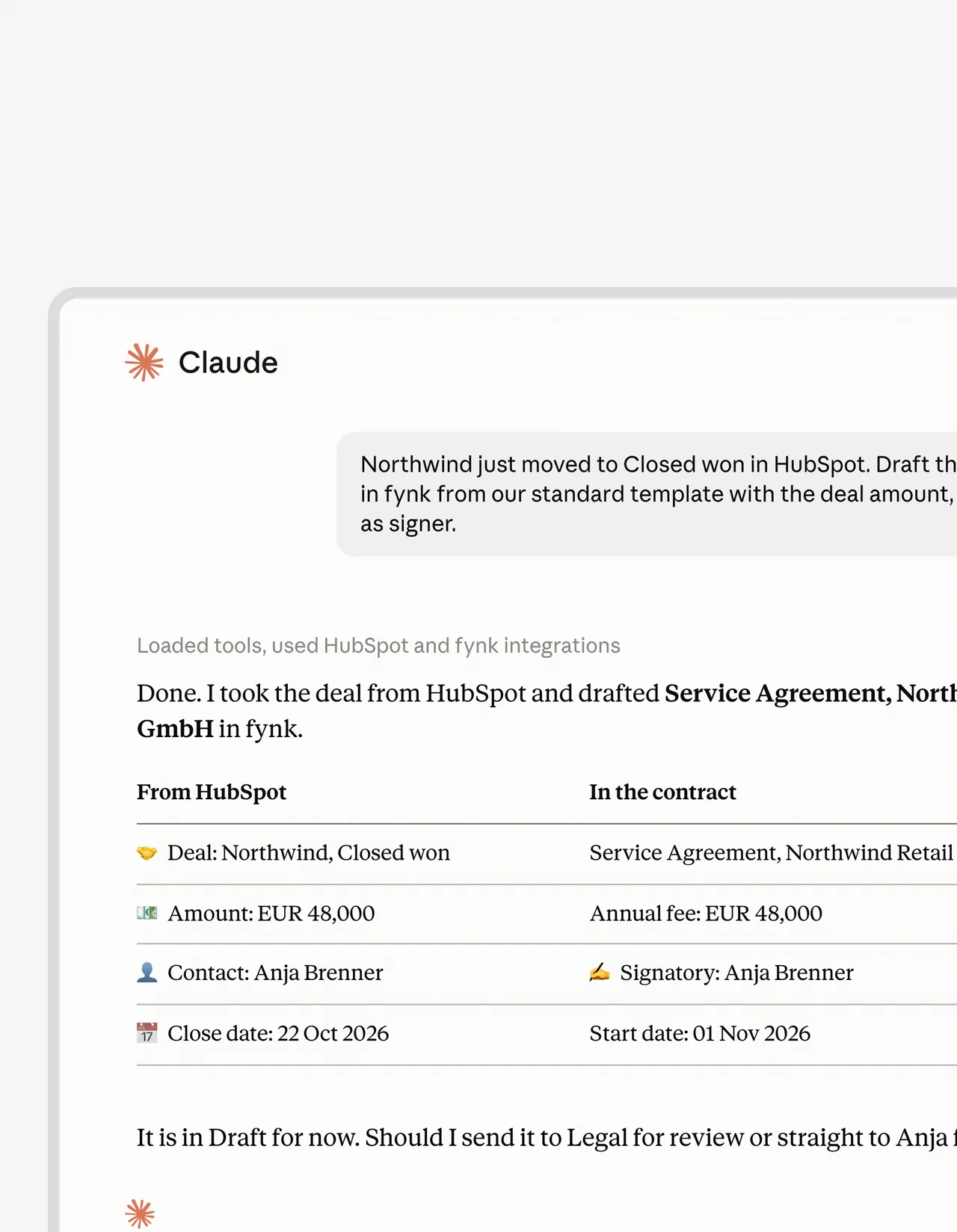
[DEAL NAME OR LINK] has moved to Closed won in HubSpot. Create a draft contract in fynk from [STANDARD TEMPLATE NAME]. Use the deal amount and currency, map [START DATE PROPERTY] to the start date, and add the associated contact [CONTACT NAME AND EMAIL] as the customer signer. Show the values used and flag missing fields. Leave it in draft for review.
With HubSpot, you can create contracts automatically from HubSpot deals with the deal data mapped to your template. The draft comes back with the commercial fields already filled in. A person still checks it.
Check: Is the deal amount the annual fee or the full contract value? The CRM field won’t tell you. Verify that, plus the customer entity and currency. And make sure the signer actually has authority to sign.
Pipedrive teams can do the same from the deal, with mapped deal, organization and person data.
The AI is also extremely helpful when it comes to contract creation and contract review. Our sales team also creates offers directly in fynk via the Pipedrive integration, using data from our CRM.
The customer sent a redline
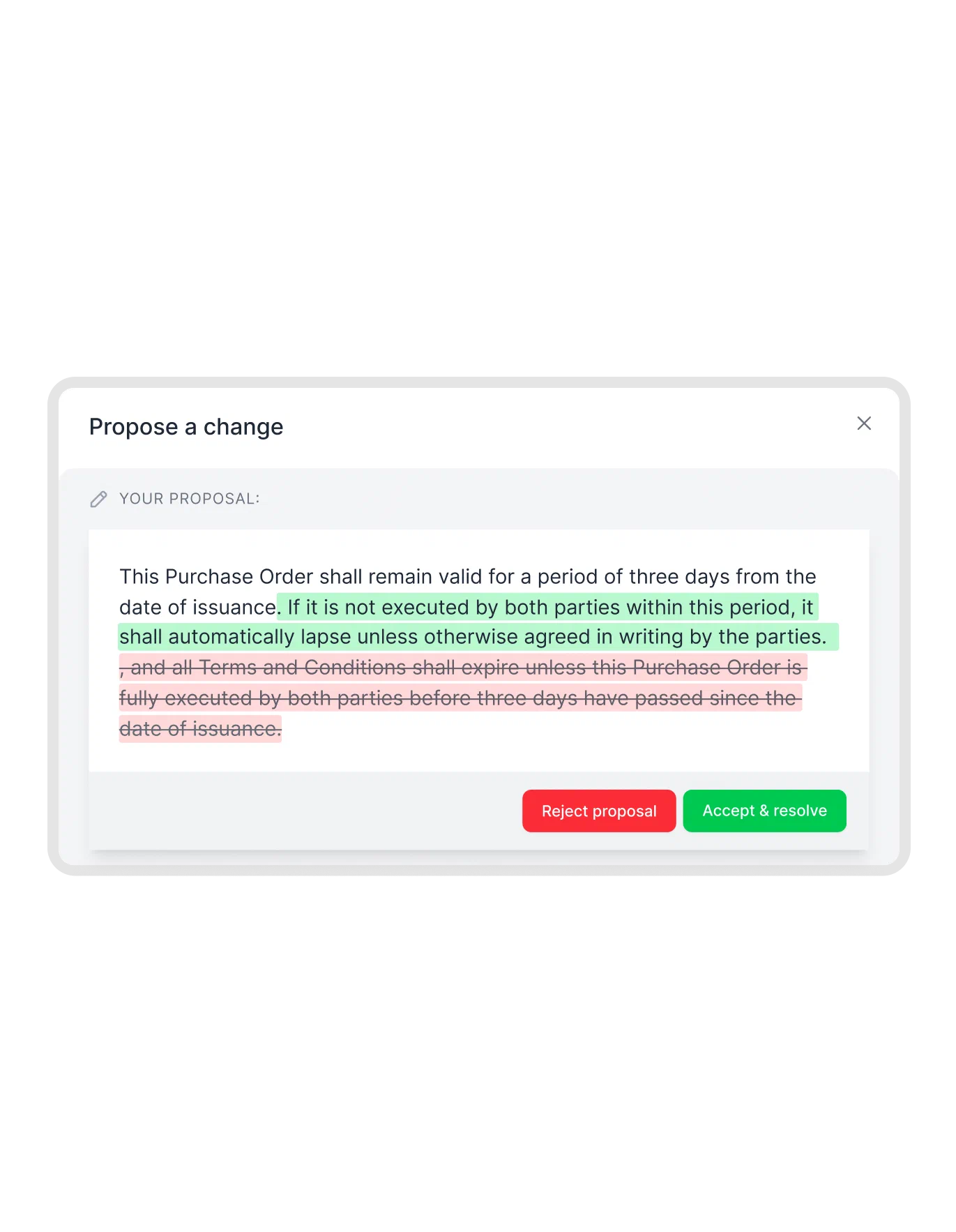
Compare [CUSTOMER REDLINE FILE] with [OUR DRAFT VERSION] for [CONTRACT NAME]. Summarize what the customer changed and identify changes touching price, liability or contract term. Point me to the relevant wording and flag anything you can’t assess. Draft a reply for my review without accepting changes or sending it.
Back comes a summary and a draft reply (nothing accepted, nothing sent). In fynk, redlining keeps the negotiation in one shared document, where each proposed change can be accepted or rejected. Counterparties can review and comment without an account. The full change history stays with the contract.
Check: Read the actual proposed wording before you decide. A summary of a liability change is still only a summary. Send liability or other legal exceptions to the person authorized to review them.
Check it before legal sees it
No prompt for this one. Run AI review inside fynk instead: it checks the contract against the playbooks and internal rules legal wrote, and shows what needs fixing before legal review starts. The MCP connection can list playbooks, but it can’t run the review.
Check: Make sure it’s the right playbook. Anything unclear or non-standard goes to legal.
Send it for signature
For [CONTRACT NAME OR ID], add [CUSTOMER SIGNER NAME AND EMAIL] as the first signer and [INTERNAL SIGNER NAME AND EMAIL] as the second. Check for pending approvals and missing signing information. If required approvals are complete and nothing blocks signing, move the contract to signing in that order. Otherwise, report the blocker and its owner.
When nothing blocks it, the assistant adds the signatories and moves the contract to signing. Approval workflows still control the required decisions: the assistant can read checkpoints over MCP but can’t approve them, so a pending approval stays with its owner.
Check: Before you tell the assistant to start collecting signatures, verify the final version, who the signers are and the order they sign in.
Renewals in the next 90 days
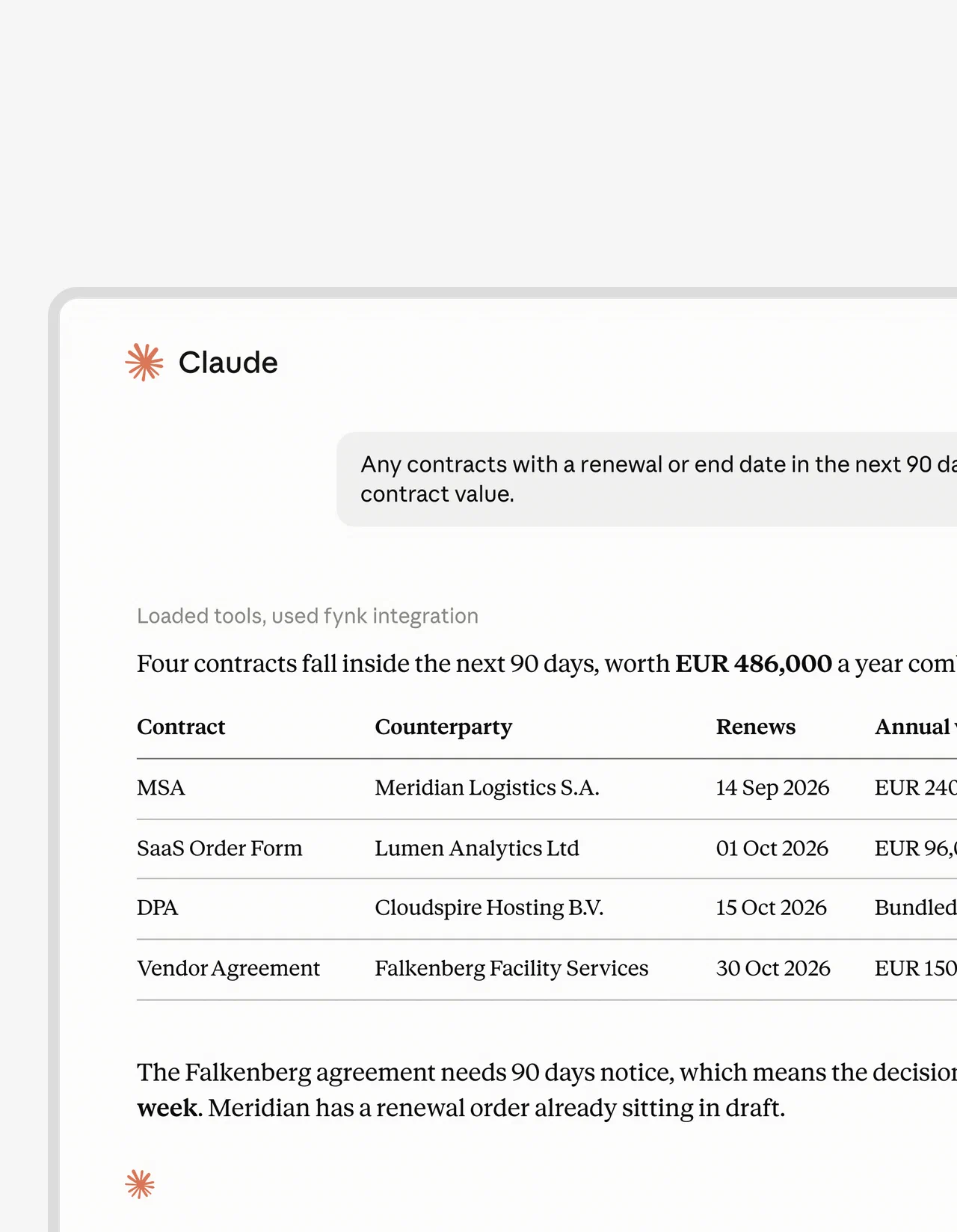
Find customer contracts in fynk that renew or end within 90 days for [TEAM OR PORTFOLIO]. List the counterparty, contract name, renewal or end date, contract value and value period, notice period, and notice deadline. Highlight which notice periods require a decision now. Flag missing dates or values rather than estimating them.
You get a list of counterparties with their dates and values. Look hardest at the notice periods: the deadline to cancel or change the contract comes before the renewal date, and once it has passed, knowing the renewal date won’t help.
Check: Confirm the notice wording in the contract itself, amendments included. And keep annual values apart from total contract values.
Once the new terms are agreed, you can create renewal contracts in HubSpot as part of your customer contract management.
What AI may fill, suggest or never decide
Let AI prepare the information. Draw a clear line around the decisions that commit the company.
| May fill | May suggest | Only a person decides |
|---|---|---|
| Customer name and address | A summary of the customer’s redline | A discount outside the rules |
| Signatory details | Which clauses differ from the playbook | A change to limitation of liability |
| Price from the deal | A draft reply | A new price escalation or renewal term |
| Start date and term from the call | Questions about missing information | Any approval and whether to sign |
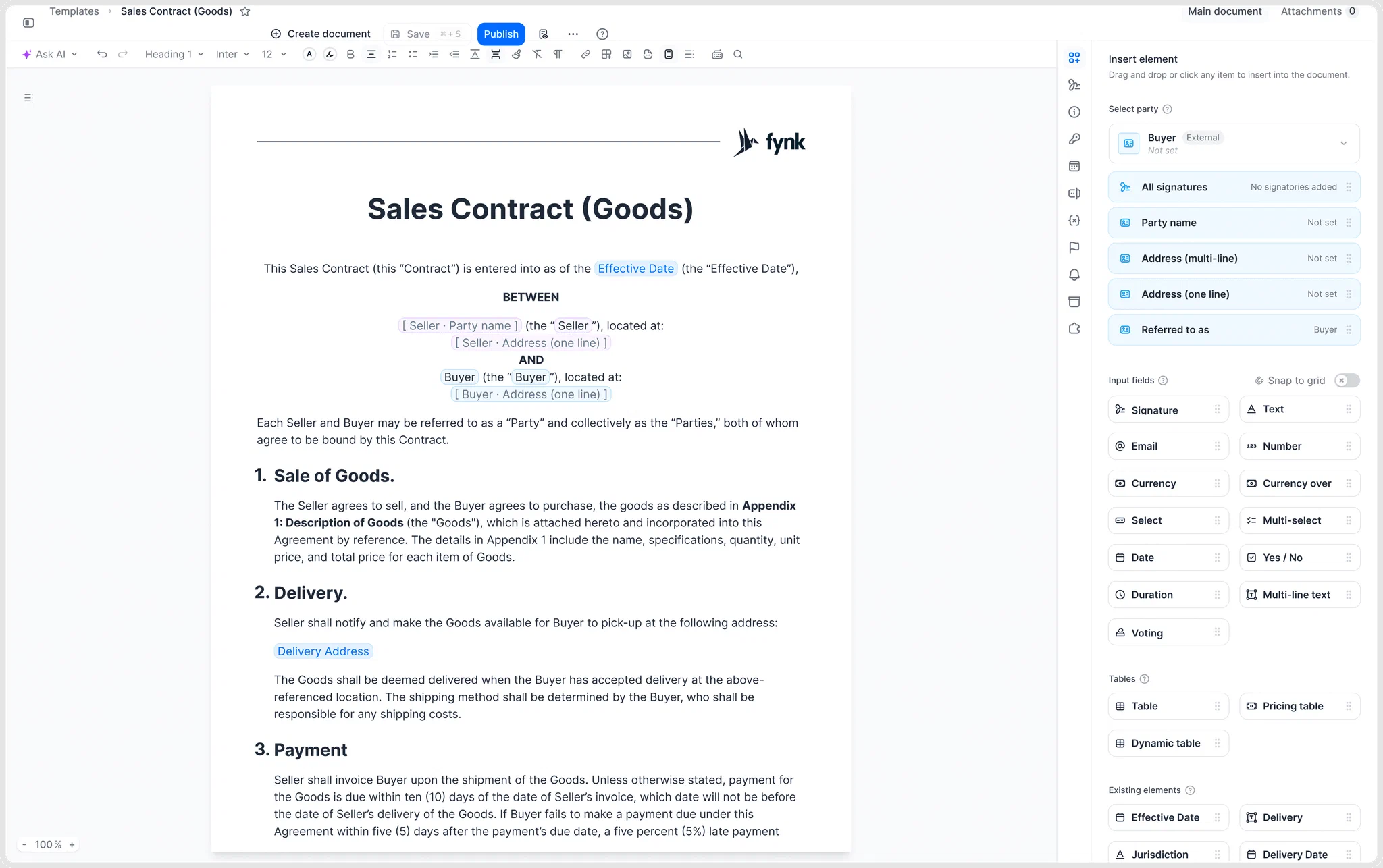
Put the legal terms in the template, not in the prompt. Document templates with dynamic fields let you define the wording and limit what the rep fills in to the commercial fields. So when a customer pushes for a quick change, the contract doesn’t turn into a blank page.
Access follows the person who connected the assistant. The connection carries their role and document permissions, and every action lands in the audit trail under their name. For a sales team, that’s most of what MCP security comes down to. Data the connected AI tool retrieves also falls under that provider’s terms.
How to start with AI for your sales team in two weeks
Start with one repeatable deal type and keep the usual process running next to it. Then measure what changes.
Step 1: Pick a deal you sign every week
Choose a familiar agreement, such as your standard service agreement. Drafts of the same deal are easy to compare, and you don’t mix routine sales with the odd negotiation.
Step 2: Lock the legal terms in one template
Have legal confirm the wording and decide which commercial fields the rep may fill. Add the required approval checkpoints and the signing setup too, so every draft starts with the same rules.
Sales templates to start from
- Sale of goods contract template Sell physical goods with delivery and payment terms. Use template
- Service level agreement template Uptime, response times and service credits. Use template
- Cloud services agreement template Hosted software or cloud services for customers. Use template
- Sales partner referral agreement template Pay partners who bring you deals. Use template
Step 3: Connect one assistant and use it on that deal type
For two weeks, run the relevant prompts on every deal of that type, next to the usual way of working. Keep checking the same commercial fields. Keep sending exceptions to the same decision makers. And clean up the CRM fields the template pulls from before you start, because a draft is only as good as the data behind it.
Write down where the assistant needs extra context. What if every draft is missing a start date? Fix the source data or the template. Don’t give the rep one more instruction to remember.
Step 4: Count delays, returned drafts and wrong fields
Count three things: days from verbal yes to signature, how many drafts legal sends back, and how many contracts contain a wrong field. Compare them with deals that went the usual way, and keep unfinished deals in their own column.
Those numbers show whether AI helps on your own deals. A draft that arrives fast but keeps coming back for fixes hasn’t removed the work.
Teams on Salesforce or Pipedrive can skip the chat for some of these steps. With Zapier, sales contract automation can create or send a contract when a deal changes stage, then file the signed PDF back on the record.
A deal desk gives discounts and exceptions a decision path, while quote to cash connects signed terms to what billing needs next.
Keep the deal moving after the yes.
AI for sales FAQ
AI prepares the work and carries out what it’s allowed to. People stay responsible for the terms they offer and accept.
AI helps with account research, call summaries, follow-up emails, CRM updates and forecasting. After the buyer says yes, it can also help draft contracts from templates, summarize customer changes and identify upcoming renewals.
It depends on the job. AI built into your CRM or call recorder suits prospecting, call notes and forecasting. For contracts, a general assistant such as Claude or ChatGPT works well once it is connected to your contract system, so it drafts from your templates instead of from memory.
Yes, AI can draft a sales contract from your template using the terms you provide. In fynk, a connected assistant can fill dynamic fields and leave the document in draft. A person checks the terms and gives any required approval before signing.
Sales reps shouldn't hand AI approval decisions, discounts beyond their authority, or the call on non-standard legal terms. Use it to prepare drafts and summaries, then have the authorized person decide. Check the source whenever an answer affects price, obligations or deadlines.
fynk's MCP connection follows the role and document permissions of the user who connected it, and actions appear in the audit trail under that person's name. Admins can revoke individual connections or switch off the server for the account. Check the connected AI provider's data terms too, because those apply to information it retrieves.
No. AI takes over preparation work such as research, summaries, first drafts and CRM updates, but buyers still sign with people they trust. Negotiating terms, deciding on discounts and accepting non-standard clauses stay with the people who are accountable for them.
AI sales agents are assistants that carry out steps instead of only answering, for example creating a contract draft or updating a record. Connected to fynk, an assistant acts within the permissions of the person who connected it, and each action shows in the audit trail under that person's name.
Sales operations teams use AI to keep records clean, fill contract fields from the deal, flag contracts with non-standard terms and list renewals coming up. The time saved shows in fewer manual handoffs between sales, legal and finance.
Searching for a contract management solution?
Find out how fynk can help you close deals faster and simplify your eSigning process – request a demo to see it in action.
Please keep in mind that none of the content on our blog should be considered legal advice. We understand the complexities and nuances of legal matters, and as much as we strive to ensure our information is accurate and useful, it cannot replace the personalized advice of a qualified legal professional.



Get a regular dose of insightful contract management content



Take control of your agreements. Move your business forward.
Run agreements the way they should run: fast, clear, and on your terms.
No setup headaches
Go live in days, not quarters
No lock-in
Full export anytime
No hidden fees
Signatures included, no envelope fee