
We missed the date, and it cost us

Theresa Quitt
Published · 9 min read
In short
You just closed your funding round, a grant came through, and your first big customers are signing. Providers are handing you startup deals. Everything moves fast, and every signature feels like a win.
A year later, three things happen. Your cloud provider’s startup discount ends and the bill doubles. Your biggest customer renewed on the old terms because nobody started the renegotiation in time. And while doing the cash flow plan, you realize part of that grant was a loan, and repayments start next year.
Different problems, one cause: every contract you signed came with deadlines, and nobody was watching them.
I’m by no means a techie, but you pick up quite a few things working in a SaaS. Im challenging the need of a dedicated contract management tool for high growth startups and am testing different approaches to solve the pain points we and our peers encounter.
📖 Read the series overview: DIY contract management: five workflows worth building yourself
What you need to know
For every contract, it comes down to five pieces of information:
- The last day to cancel or renegotiate, not just the end date.
- When special terms end, like a startup discount.
- The next deadline, once a contract has renewed itself.
- Enough lead time to actually decide: weeks for small contracts, months for big ones.
- What’s due when, including repayments and contracts you can’t leave before a fixed date.
The good news: you don’t have to dig these out yourself. AI is genuinely good at reading a contract and finding the notice period, the end date and the price clauses. The difference with fynk’s AI is what happens next: Claude gives you an answer in a chat, while fynk saves the dates into the contract itself, where you can check them, correct them and get reminded.
A tool just for yourself is easy to build. It gets tricky the moment a team relies on it: several people adding contracts, owning renewals, seeing only what they should, and trusting the same dates.
To test both routes fairly, I used the same made-up startup: five contracts and three financing agreements.
Route 1: Excel and Outlook
For my old-school friends who still worship Excel.
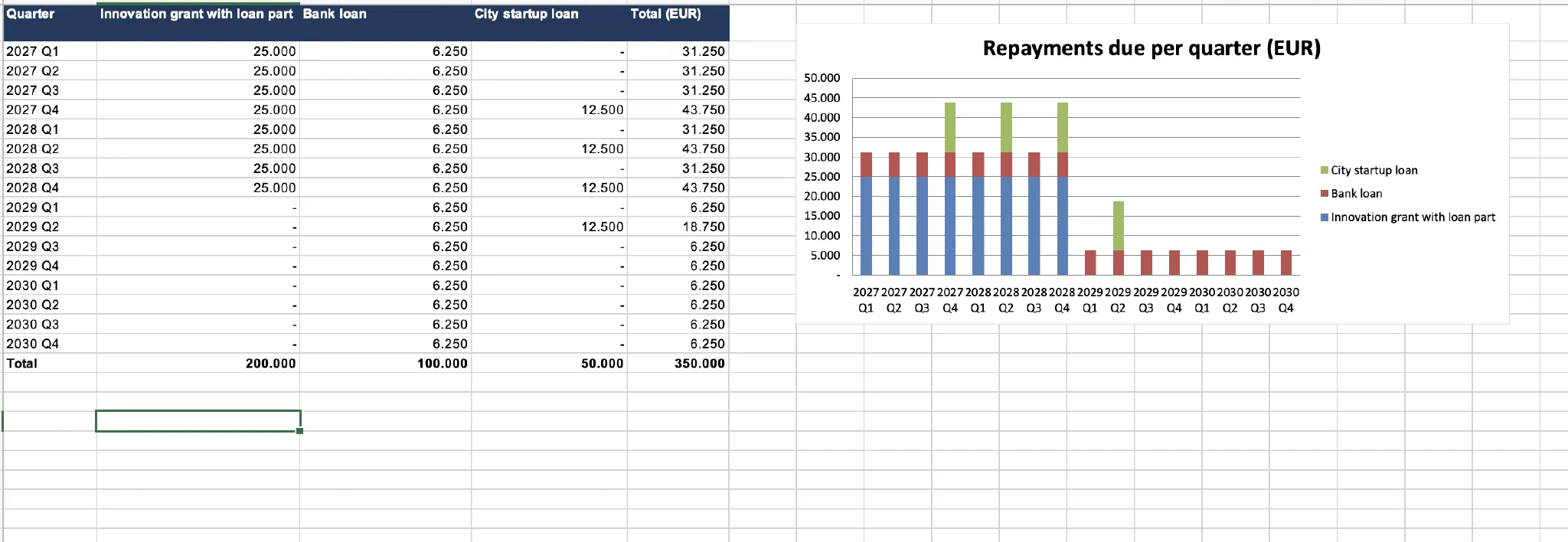
🛠️ What I built. One workbook with two tabs. The contracts tab holds the key terms of each contract, plus formulas for when the current term ends (jumping ahead if the contract already renewed), the last day to cancel, and the days left. Each contract has an owner, a status, and a “send reminder today” column that switches to “yes” when a deadline gets close. The financing tab lists every loan installment and totals them per quarter. I also exported the deadlines into Outlook, but that’s a snapshot: every new contract or changed date means exporting again.
⏱️ How long it took. Building the workbook is quick, especially with AI built into Excel. What takes time is getting the contracts in: reading each one (or uploading it to an AI) and typing in the terms. Around five minutes per document.
To be fair, any tool needs your contracts first, fynk included. The difference is the effort: connect Claude to your storage (SharePoint, OneDrive or Google Drive) and to fynk through fynk’s MCP server, and Claude moves the contracts over in one go. fynk’s AI then reads every one, pulls out the terms and sets up the reminders. No typing, no copy and paste.
💶 What it costs. Nothing extra if you already pay for Microsoft 365 or Google Workspace.


🚧 Where it gets hard. Getting contracts in. Excel can’t read a PDF, so every new contract and every amendment means someone finds the dates and types them in. Renewals are the one thing that runs on its own: as long as the terms stay the same, the formula jumps to the next deadline. Where it trips: notice periods tied to the end of a quarter instead of a date.
🤖 Claude as data-entry helper. I saved a short Claude skill: “Read this contract and give me one row with these columns.” Upload a contract, get the row, paste it into Excel. About two minutes per contract, and you see what it found before it goes in. New contracts went in cleanly. Amendments were trickier: Claude recognized that the document changed an existing contract instead of adding a duplicate, but someone still had to update the row by hand.
🚀 Level up: let Claude handle the routine. Two things can run without you. Contracts in: drop a PDF into a OneDrive or SharePoint folder, and a Zapier flow has Claude read it and add the row. Reminders out: a Claude skill on a schedule reads the workbook every morning and sends each owner a Slack message about anything due soon. Scheduled tasks come with every paid Claude plan, and Claude’s Microsoft 365 connector can read Excel files in OneDrive and SharePoint (Team and Enterprise plans). The catch: everything runs under one person’s account and connections. If that person leaves or a connection expires, it stops, and nobody notices until a date is missed. And automated rows appear without anyone checking them.
Prefer to stay inside Microsoft? Power Automate can do both, but it’s tricky: Claude only plugs in through a premium connector with its own API key, and flows tend to break quietly when a column gets renamed or a file moves.
💡 How fynk handles this: reminders run in fynk itself, not on someone’s account, and go to whoever owns the contract.
Then there’s access. A spreadsheet is shared as a whole: either everyone sees every contract, or each department keeps its own file and nobody has the full picture.
💬 My take: good enough for one person with a handful of contracts or very simple and standardized contracts. It’s only as reliable as the last contract someone remembered to enter.
Don’t let contract deadlines
surprise you!
Route 2: an app built with AI
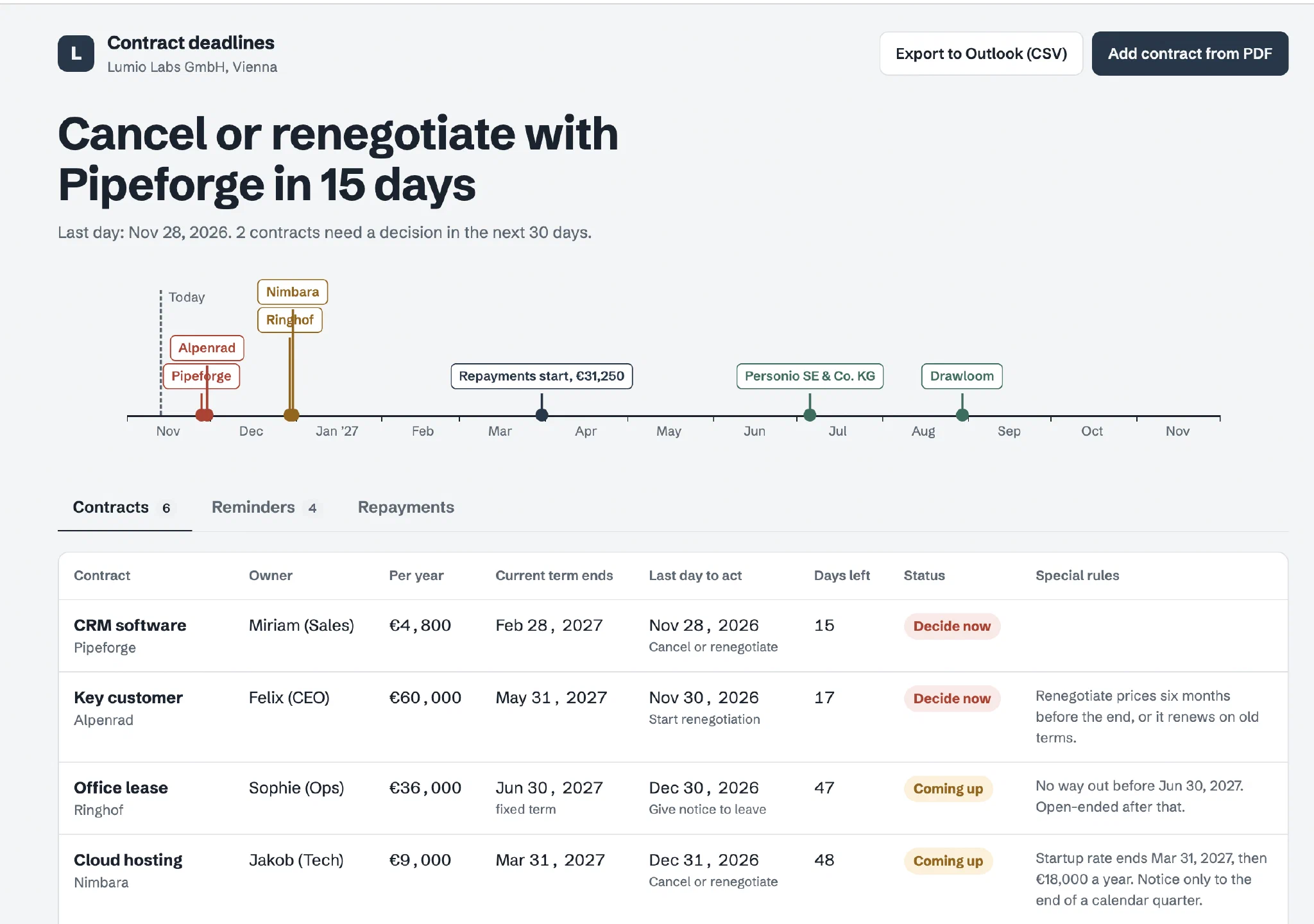
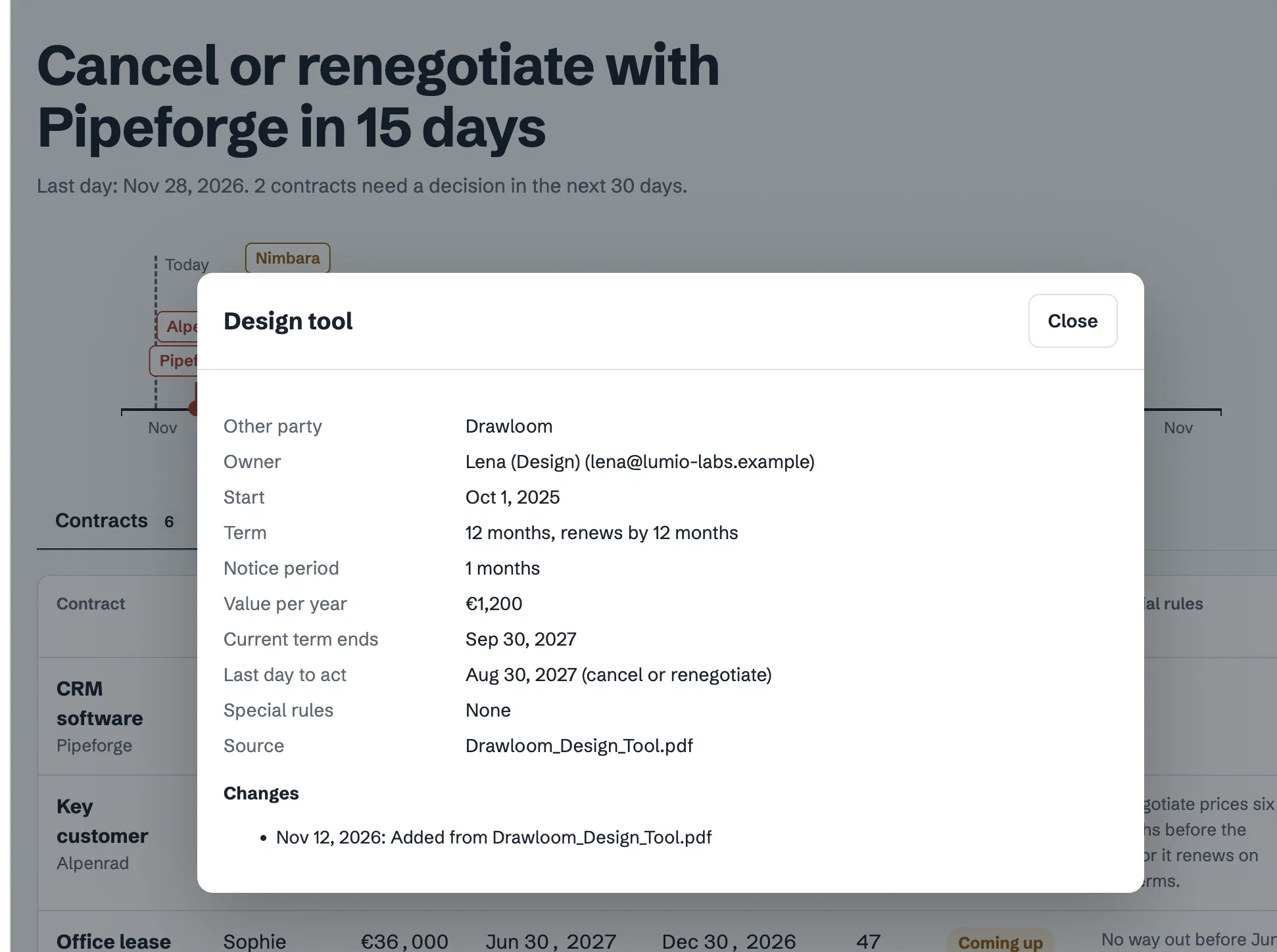
🛠️ What I built. I described what I needed and let Claude build it. Literally one prompt: no code, no back and forth (tools like Lovable work similarly). The result: a timeline of every deadline in the next twelve months, a contracts table with the last day to act, repayments per quarter, and an “Add contract from PDF” button. Claude reads the PDF, fills in each date with a short quote from the contract next to it, and you check before saving. If the PDF is an amendment, it says which contract it changes and what exactly changes.
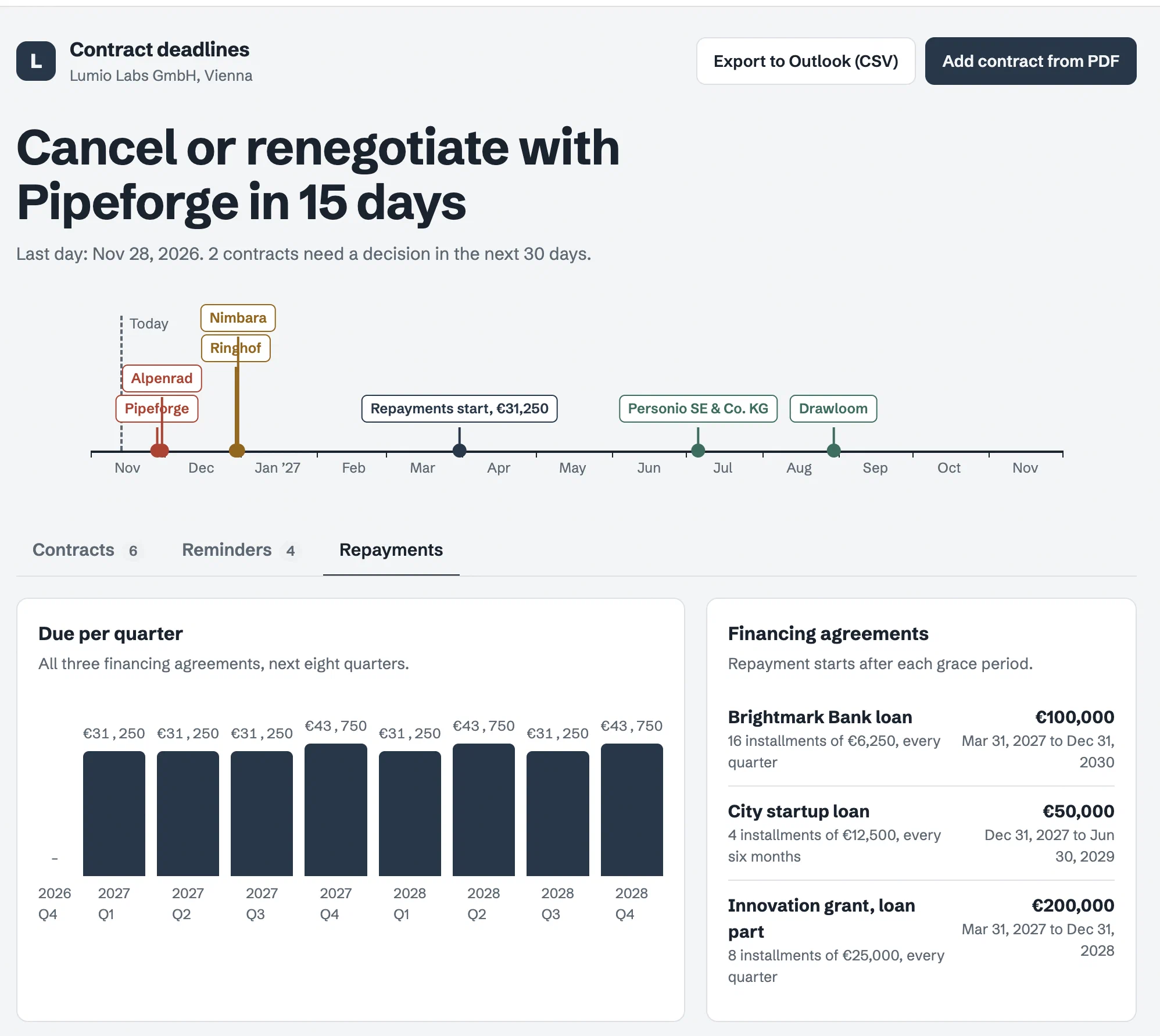
🔔 Reminders, built in. On its own, the app only shows reminders when someone opens it. So I added the same scheduled skill as in Route 1: every morning, Claude checks the deadlines and sends each owner a Slack message. Same catch: it runs under one person’s account.
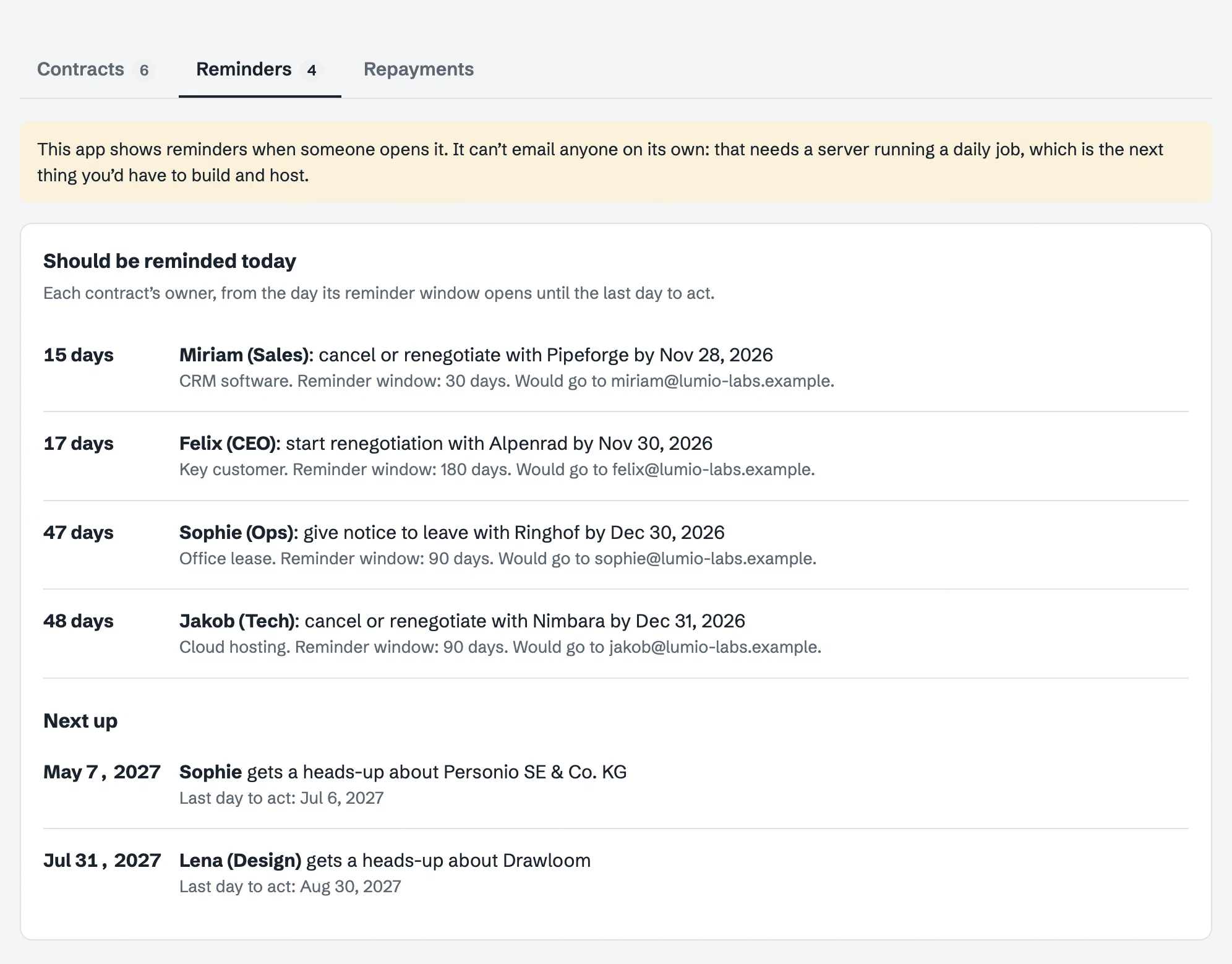
⏱️ How long it took. With the contracts at hand and a clear idea of what I needed, the app was running with all entries in under 25 minutes.
💶 What it costs. Nothing extra on top of a Claude subscription, as long as it lives inside Claude.
🚧 Where it gets hard. Reading dates out of PDFs is where this route shines. The question is whether you trust what it read, and who checks. Sharing is easy, assuming all of your colleagues use claude: colleagues open it with a click, and you decide who can only look and who can add contracts. But like with the spreadsheet everyone who can open it sees every contract, including confidential information. It also only stores the dates, not the PDFs, so you still need a folder for the documents.
💡 How fynk handles this: the dates live in the contract itself, next to the document, and teams decide who sees what, so sales sees customer deals and ops sees vendors.
🧑💻 For the tech bros and gals who want to perfect it. Host it directly, which runs the app and the database for you, or export the code and host it yourself. Either way, you can add logins, roles that decide who sees which contract, storage for the PDFs and proper email reminders. Roughly $25 to $50 a month for Lovable plus a free email service at this volume, and, in my estimate, a day or two of work if you’re not a developer. You can keep perfecting it right up until maintenance kicks in: every fix, update and security question is now yours, for a website that holds every contract you have.
💬 My take: impressive for one person, and the closest DIY gets to “it reads the contract for me.” But once a team uses it, you own the security, the access rules and every bug fix. That’s a product, not a side project.
A few months in
Any tracker works on day one. The real test comes later. Depending on how fast your business scales, you’re soon flooded with new contracts and amendments, and keeping the tracker current becomes a job of its own. And be honest about adoption: how many people actually worked it into their routine, rather than opening it when they happened to remember?
| Excel route | AI app | |
|---|---|---|
| Cost | Included in Microsoft 365 or Google Workspace | Included in Claude; about $25 to $50 a month once hosted |
| Getting contracts in | Typed in, or pasted from Claude | Read from the PDF, checked by you |
| Reminders | Only with a scheduled skill or Power Automate | Only with a scheduled skill |
| Who sees what | Everyone sees everything | Everyone sees everything |
Stop tracking deadlines by hand.
My honest take
Both routes work for one person with a handful of contracts. If that’s you, build it.
Both get shaky when a team or more relies on them: amendments change dates without anyone updating the tracker, people should only see their own contracts, and reminders have to run all year without anyone checking that they still do. None of this breaks on day one. It breaks quietly, months later, exactly when a missed date costs money.
A spreadsheet holds up for a few dozen contracts, maybe a few hundred with real discipline. Beyond that, the same problems show up everywhere: several copies and nobody sure which is current, no record of who changed a date, and dates that no longer match the contract.
💰 Financing agreements: just build it. For repayment schedules across several loans and grants, a good spreadsheet wins. List every installment, total them per quarter, and put the first due dates in your calendar. You don’t need a contract tool for this, including ours.
Where fynk fits
Every build I tried fails at the same spot: getting every contract in, and keeping it right once more than one person is involved. That’s the part fynk takes off your plate.
- Nothing to type in. Every contract lands in one place, signed in fynk or uploaded, and the AI pulls out the dates for you to confirm.
- Nothing to remember. Deadlines and reminders are set up for you and roll forward when a contract renews.
- Everyone sees what they should. Sales sees customer deals, ops sees vendors, HR sees employment contracts without splitting your records into separate files. Founders see it all.
- Nothing depends on one person. Reminders go to whoever owns the contract, vacation or not.
- Make it yours. Connect fynk to Claude through fynk’s MCP server and build your own skills on top, for example to get renewal reminders in Slack instead of by email.
Searching for a contract management solution?
Find out how fynk can help you close deals faster and simplify your eSigning process – request a demo to see it in action.
Please keep in mind that none of the content on our blog should be considered legal advice. We understand the complexities and nuances of legal matters, and as much as we strive to ensure our information is accurate and useful, it cannot replace the personalized advice of a qualified legal professional.



Get a regular dose of insightful contract management content

Take control of your agreements. Move your business forward.
Run agreements the way they should run: fast, clear, and on your terms.
No setup headaches
Go live in days, not quarters
No lock-in
Full export anytime
No hidden fees
Signatures included, no envelope fee