
DIY contract management: five workflows worth building yourself

Theresa Quitt
Published · 8 min read
You can build more of your contract stack than software companies admit, and for a while you should. Here is where it holds and where it cracks.
- Five contract workflows a founder or ops lead can build this week
- The exact point where each one breaks
- Why the seams between tools hurt more than any single tool
- A side-by-side table, including what the afternoon costs you
Depending on your profile, you can either build more than you think, or you think you can build more than you actually can. Either way, here’s where you can vibe code your way out of buying a tool, where it cracks, and the one thing no amount of building gets you.
In this post
- Five things a founder or ops lead can genuinely build this week
- Where each one cracks
- Why the seams between them are the part that actually hurts
- A side-by-side, including what the afternoon costs you
Let’s skip the part where software companies pretend you can’t build anything yourself. You can, and for a while you should.
1. The proposal and contract tracker
👷🏼♀️ Build it. A Notion database, a few CRM properties, or an Excel sheet if you appreciate the old-school chic. Deal, stage, value, who’s waiting on whom. Half an hour, and your Monday standup improves immediately.
⛓️💥 Where it cracks. Your CRM knows the deal stage. It doesn’t know the document’s state. It says “sent” because an email went out, not because it noticed their legal team rewriting your liability cap. No amount of clever automation closes that gap, because they’re two different things.
In fynk, the stage reflects the document’s state. It moves from draft to review to signing to done because the document actually did, not because someone updated a row. That’s how 1. FC Nürnberg got out of email approvals and Excel tracking.
2. Templates that fill themselves
👷🏼♀️ Build it. Zapier and a doc with merge fields. Deal closes, out comes a PDF with the name and the price in it. A few hours if you’re slow. Or skip the template and let Claude draft the terms from your call notes.
⛓️💥 Where it cracks. The first conditional. “DPA annex only if they handle personal data.” Merge fields don’t do if-statements, and the workarounds get ugly fast. Then you change a clause and need to know which forty documents came from the old version. A Drive folder can’t tell you. The Claude route has the opposite problem: every contract is a fresh draft, and nobody checked this one.
In fynk, conditions live in the template, and every document remembers which template it came from, so finding the forty is a filter. If you like the call-notes route, keep it: your AI assistant can draft from the transcript into a fynk template and leave it in draft, so a person checks the numbers before the counterparty does.
3. Finding a term, and keeping what you found
👷🏼♀️ Build it. Full-text search across a Drive folder handles “that Acme thing from March.” For harder questions, point Claude at the folder and ask. You’ll get a good answer in seconds.
⛓️💥 Where it cracks. “Which contracts let the customer audit us?” isn’t a keyword problem. “Audit” shows up in plenty of contracts with no audit right. Claude does better, but its answer lives in the chat, not on the document. Nobody checked it, and if you ask again tomorrow, a field may come back different.
You need the clause as a field, saved to the document once someone has confirmed it. fynk ships around a hundred predefined clause and metadata fields, plus your own, so “every service agreement with no liability cap” becomes a filter instead of an afternoon of reading.
4. Comparing two versions
👷🏼♀️ Build it. Drop both PDFs into Claude and ask what changed, or run a word diff. For a one-off, that’s genuinely fine.
⛓️💥 Where it cracks. “What’s different between these two files” is rarely the real question.
The clean copy that isn’t clean. The counterparty’s clean version contains an edit nobody marked. You can’t tell from Claude’s answer whether it caught it, because a summary that missed something looks exactly like a complete one.
The signed copy that comes back as a scan. Nobody rereads 30 pages to check that the liability cap on page 14 still says what it said on Tuesday.
Round six of nine. You don’t want what’s different between two files. You want what changed since you last looked. That’s a history problem, and two PDFs in a chat window have no history, only whatever someone named v7_final_FINAL.pdf.
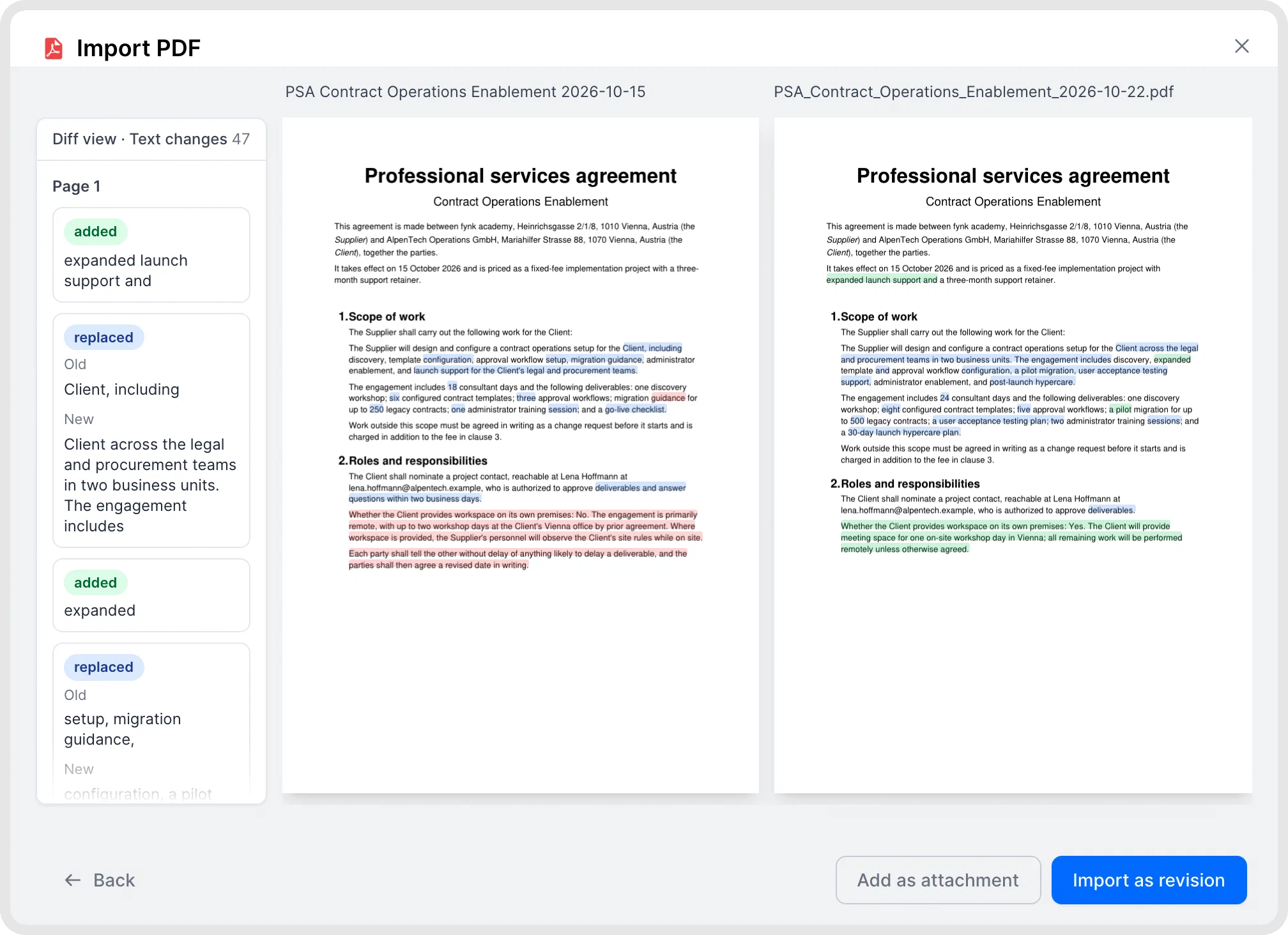
In fynk, every version stays on the document, so you compare any two of them word by word, scans included.

5. Checking a document against your rules
👷🏼♀️ Build it. A skill or a prompt with your checklist. Flag anything over 12 months, any auto-renewal, any uncapped liability, any exclusivity. Eighty percent of the value in an afternoon.
⛓️💥 Where it cracks. It gives you an opinion in a chat window. Nobody is stopped. The deal that skipped the check still got signed, and you find out in the quarterly review.
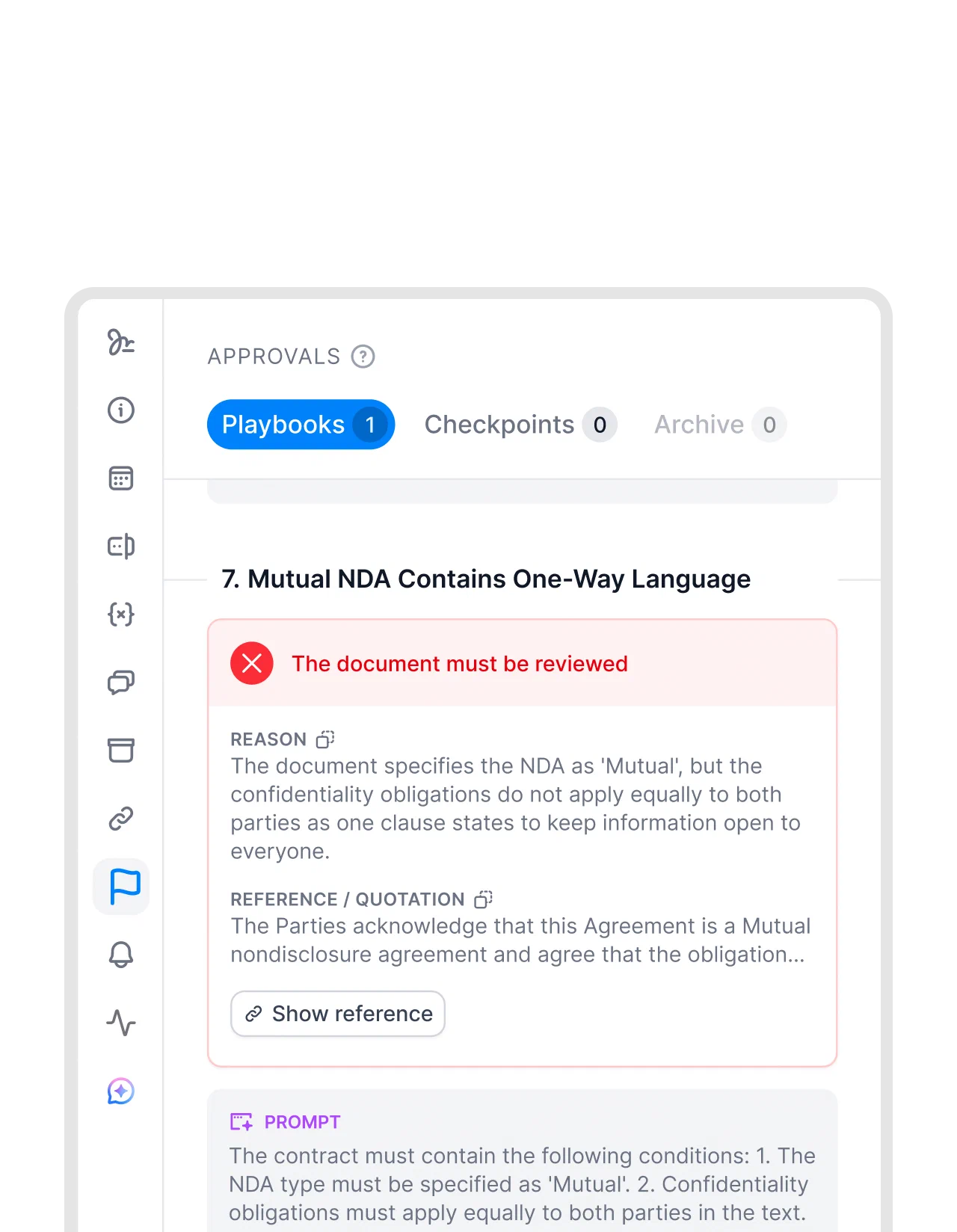
A fynk playbook is the same idea with teeth: AI-checked conditions, flags that link to the exact passage, and approval checkpoints that block signing until someone deals with them. Same check, but it’s a gate rather than a suggestion, and it runs for everyone rather than for whoever remembered to ask.
Ask your contract anything.
Two you can’t treat as side quests
Reminders
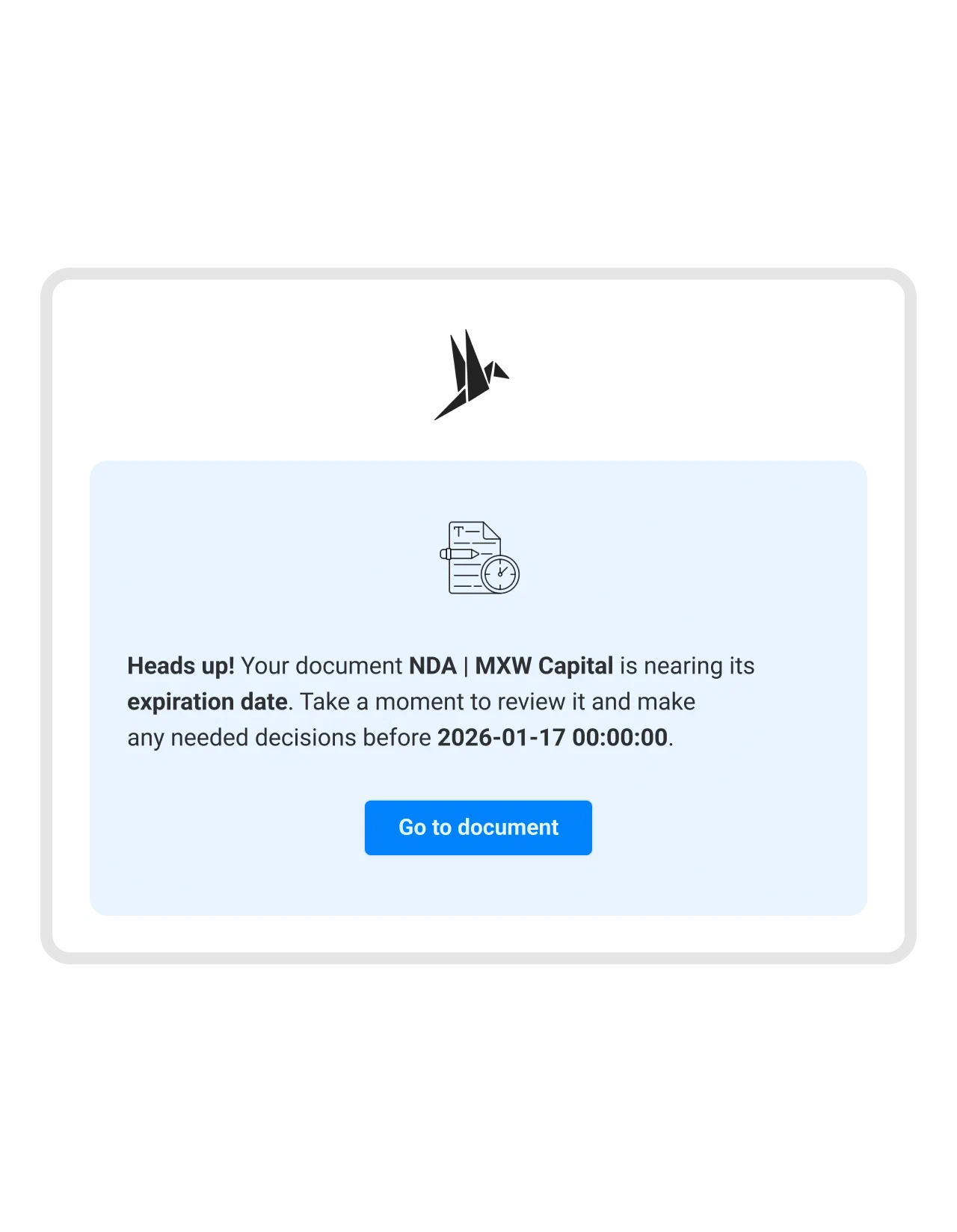
Scheduling an email is easy. The date isn’t. Your last possible termination date isn’t written in the contract. It’s effective date plus term plus elapsed renewals, minus the notice period, and one amendment shifts all of it. Then the chain has to survive a year: the Zap, the token, the sheet, and the person who built it. When a link breaks, nothing tells you. Nothing happening looks exactly like nothing being due.
In fynk, notice and expiry dates are computed on the document, and reminders go out from there.
Signing
You can build the five jobs above. Don’t build this one. Valid electronic signatures mean identity verification, certified trust providers, and an evidence package that still holds up when someone disputes it three years later. Under eIDAS, QES is a regulated service, not a feature. Plenty of vendors do it well. Buying it separately just adds one more tool to the chain. fynk includes SES, AES and QES, with no per-envelope fee.
The part nobody budgets for
Each job above is one station in a flow: draft, review, negotiate, approve, sign, store, track, renew. Building a station takes an afternoon. Keeping the stations connected is the project nobody signs up for.
Every handoff between tools is an export, a rename and a human remembering. A setup built around one person’s memory breaks when the second person needs it. And things break on their own: the model changes, a token expires, and a workflow that stopped firing three weeks ago looks exactly like a quiet month.
One document, one version history and one audit trail is the thing you can’t assemble out of five good tools. Not because any of them is bad, but because the seams are where the work falls through.
Side by side
| The job | Build it with | Where it cracks | In fynk |
|---|---|---|---|
| Proposal and contract tracker | Notion, CRM or Excel, half an hour | Knows the deal stage, not the document | Stage is the document’s real state |
| Template autofill | Zapier plus merge fields, or Claude | No conditionals without pain, no idea which documents used the old clause | Dynamic fields and conditions, and you can find every document from a template |
| Find a term | Search, or a skill | Keywords aren’t clauses | Around 100 predefined clause and metadata fields, plus your own |
| AI analysis and reruns | Claude, a script and a database | Lives in a chat, unchecked, and reruns overwrite | Fields saved to the document after review, bulk rerun on selected fields |
| Compare versions | Claude or a word diff, minutes | Can’t prove it caught everything, no record of what you reviewed | Any two versions from history, word by word, scans included |
| Checking against your rules | A skill with a checklist | An opinion, not a gate | Playbook conditions plus approval checkpoints that block signing |
| Renewal reminders | Spreadsheet plus a schedule | Date goes stale, chain has to survive 1+ year | Computed notice and expiry dates |
| All documents in one view | One query per document type | Nothing lines up across proposals, NDAs, employment and funding | Personalized dashboards: to-dos, reminders, renewals, types, values, payment dates |
| Current version | Folder naming discipline | v7_final_FINAL.pdf | One document, full version history |
| Signing | Don’t | eIDAS, identity, evidence packages | SES, AES and QES, no envelope fees |
| The whole flow | Glue between five tools | Every handoff is an export and a rename | One document from draft to renewal |
| Keeping the CRM in sync | Zapier glue | Two copies that drift apart | Native HubSpot app, plus API and MCP |
| Maintenance | You, forever | Silent failure | Someone else’s job, and they’re damn good at it |
Now the awkward part
We’ve spent this whole post telling you to build things, so here’s what the afternoon costs. An afternoon of a founder’s time is the most expensive hour in the company, and it recurs every time something breaks.
fynk’s free plan is one user, unlimited documents, templates, and signatures including QES. Essential is €19 per user per month, billed yearly. So if it’s just you and a handful of documents, the thing you were about to build is sitting behind a signup form for free. Save the afternoon and build something fun.
Where that stops being true: €19 per user adds up across a team, so put in your own numbers to see what it saves in hours and euros. Moving an existing process into any new system takes real time. If what you have works and nobody else needs it, sticking with it is a legitimate answer. We’d just rather you chose it on purpose than drifted into it.
You don’t have to pick
fynk’s MCP server connects to Claude, ChatGPT, or whatever you already have open. It runs with your permissions, and what it does lands in the audit trail.
So keep building. A Monday digest of everything stuck in review for five days. A script that re-tags two hundred legacy contracts. The pipeline report your CFO invented last Thursday. A rough contract PDF you polish in Claude and send straight into fynk. That’s a prompt, and it’s still the fun part. You’re just building on one flow instead of on five folders and the glue between them.
Now over to you
Pick one row from that table and check it against reality this week. Work out the true last possible termination date on your last three contracts, by hand. See whether your tracker and your Drive folder agree on what’s current. Ask what happens to the reminder when the person who built it leaves in March.
Then decide what’s worth your afternoon.
Searching for a contract management solution?
Find out how fynk can help you close deals faster and simplify your eSigning process – request a demo to see it in action.
Please keep in mind that none of the content on our blog should be considered legal advice. We understand the complexities and nuances of legal matters, and as much as we strive to ensure our information is accurate and useful, it cannot replace the personalized advice of a qualified legal professional.


Get a regular dose of insightful contract management content



Take control of your agreements. Move your business forward.
Run agreements the way they should run: fast, clear, and on your terms.
No setup headaches
Go live in days, not quarters
No lock-in
Full export anytime
No hidden fees
Signatures included, no envelope fee