
What is a deal desk, and how does a sales team run one?

Rezvan Golestaneh
Published · 9 min read
In short
Most sales teams already have a deal desk, spread across DMs, the CFO’s inbox and whoever answers first at quarter end. A request for 20% off and 75-day payment terms gets a yes, and nobody knows what the company got in return.
A company of a few hundred people can replace that with a shared way to decide exceptions, run by people it already has.
What is a deal desk?
In practice, a deal desk is a queue with owners. Sales sends in every deal that breaks standard pricing, payment terms or contract wording, and the desk checks the request, brings in the people who can decide, and records an answer before the company commits. That answer might be yes, no, or yes with different terms, such as a smaller discount for upfront payment.
Deal desk vs CPQ: CPQ (configure, price, quote) software builds quotes under rules you set. The desk decides the exceptions to those rules.
Deal desk vs RevOps: RevOps manages the broader revenue process and often owns the deal desk at this company size.
Deals desk vs deal desk: Both names mean the same thing.
What are the signs you need a deal desk?
You need a deal desk when the answer to an exception depends on who the rep knows and how hard they push.
The clues are usually familiar:
- The discount depends on whoever answers first.
- Approvals disappear into DMs, leaving the next person to ask again.
- Legal sees the redlines after the customer has already received them.
- Finance learns about unusual payment terms from the invoice.
- Quarter-end requests pile up with nobody deciding what goes first.
If reps keep asking “Who can say yes to this?”, nobody owns the decision yet, and another chat channel won’t change that.
Deal desk roles and responsibilities, without a new team
A part-time deal desk splits the work across a sales ops or RevOps owner, a finance decision maker, and a legal decision maker in their existing jobs.
The RevOps owner runs the queue and checks that requests contain enough information to decide. Finance handles the commercial exposure. Legal handles departures from approved contract terms. They don’t all need to attend every request.
| Owner | Decides | Doesn’t decide |
|---|---|---|
| Sales ops / RevOps owner | Whether the request is complete, who needs to review it, and standard pricing questions within existing authority | Discounts beyond delegated authority or acceptance of non-standard legal terms |
| Finance | Discounts past the agreed line, payment terms, billing arrangements, and pricing ramps | Whether a liability or termination change is legally acceptable |
| Legal | Liability, termination, service-level agreement (SLA) wording, and other non-standard contract terms | Whether the business should accept a lower price or delayed cash collection |
Who approves which amount belongs in the company’s delegation of authority. The desk uses those limits.
For a request involving both a discount and changed liability, the owner gets both decisions. A finance yes doesn’t stand in for legal approval.
What goes to the deal desk, and what never should?
The deal desk should review departures from your approved commercial and legal terms, while routine deals stay with sales.
Publish the trigger list where reps prepare their deals. Start with these exceptions and adapt them to your actual policies.
Send to the desk:
- Discounts past the rep’s authorized line.
- Payment terms beyond your standard net 30.
- Multi-year price locks.
- Free months or pricing ramps.
- Custom uptime commitments or service credits.
- Changes to the liability cap.
- Termination for convenience.
- Volume rebates.
- Reseller margins outside approved partner terms.
Keep out of the desk, provided no other trigger applies:
- Standard price list deals on approved terms.
- Deals within the rep’s authorized discount.
- Renewals on unchanged terms.
A desk that sees every deal becomes the bottleneck. Reps should be able to tell that their deal qualifies for the standard route without asking permission to use it.
Most exceptions first show up in the contract proposal a rep sends, so start from templates that already carry your standard terms:
Free templates for sales deals
How do you collect one request, filled in once?
Use a short deal desk request form that captures the exception, its business case, and the customer’s deadline together.
Copy these fields into the CRM deal or the contract:
- Customer and deal link: The customer name and a link to the deal in your CRM.
- Deal value over the full term: Include currency, committed fees, and the contract length.
- What’s non-standard and why: State the requested departure from your normal price or terms.
- The customer’s give: Record the agreed exchange, or say that none has been offered.
- Deadline the customer set: Include the time zone and what happens if the deadline is missed.
- Who already said yes: Name each person and the specific exception they approved, or write “none.”
The owner checks the request before sending it to an approver. “Customer needs a better deal” isn’t enough context to decide between a discount, a longer payment period, and a smaller initial purchase.
Keep the request on the deal record or the contract, and put the decision and its conditions next to it. The rep shouldn’t need to reconstruct an approval from a screenshot of someone’s phone.
What turnaround should a deal desk promise?
A deal desk should promise response times by request type and explain how quarter-end requests enter the queue.
These are examples to adapt, not benchmarks:
- Pricing question: A decision within the same business day once the request is complete.
- Non-standard terms: A decision within one business day, or a named owner and a specific next response time if further review is needed.
- Quarter end: A daily review slot with a published cutoff. Requests arriving after the cutoff move to the next business day.
Set the clock from a complete request, and tell the rep promptly if something is missing. If the customer needs an answer sooner, the desk owner confirms whether the approver can meet that deadline before sales promises it.
Give every exception a recorded yes.
Carry the decision into the contract
An approval only counts once it reaches the document the customer signs. Three habits keep it there:
- Put the approved exception and its reason into the contract itself, as a proposed change with a comment.
- Make the required approvals a stop before signing, so a contract with a non-standard term can’t go out without them.
- Let the rep see where the contract stands without asking the desk owner.
After signature, the approved exceptions carry into billing through quote to cash, delivery, and ongoing customer contract management, so keep them on the signed contract where finance and account managers can find them.
In fynk, this runs from the CRM. The quote is built from the HubSpot deal’s line items, the customer’s requested change sits in the document as a redline with its reason, and an approval checkpoint blocks signing until the desk has approved. The rep sees the status on the deal, and the customer signs in the browser without an account.
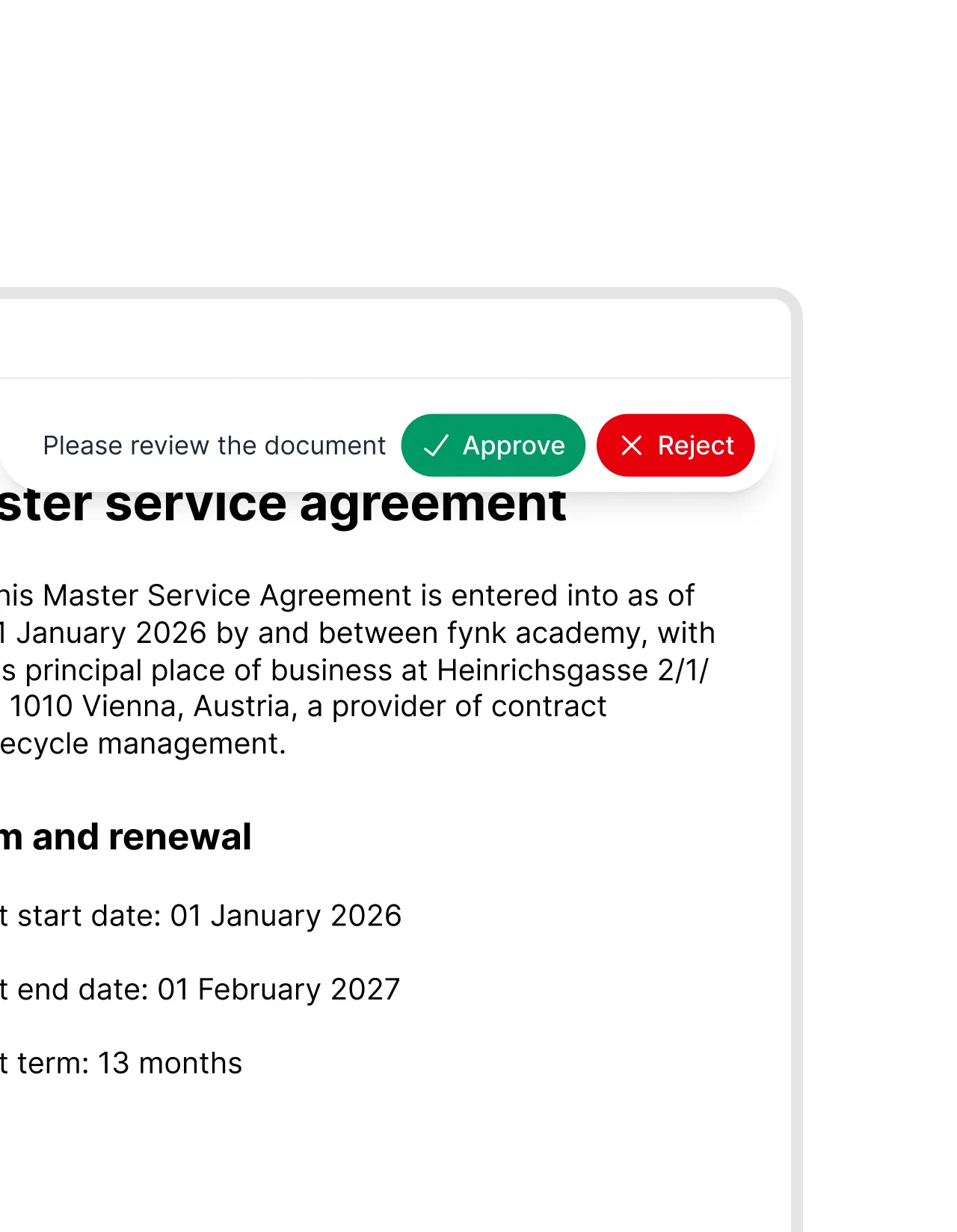
1. FC Nürnberg moved its contract approvals into fynk.
What used to take at least one week or longer now can be done in the best case in half an hour.

Deal desk KPIs
Useful deal desk KPIs show how long decisions take, how much work reaches the desk, and where approved deals get stuck.
Track these measures:
- Time from request to decision: Measure from the complete request to a recorded answer. Separate pricing questions from legal exceptions so you can see which queue needs attention.
- Share of deals that go to the desk: Compare deals needing desk review with all deals in the same period. A rising share may point to outdated standard terms or triggers that catch routine work.
- Time from approval to signature: Check what happens after the desk says yes. A long gap may sit in revised paperwork or customer review rather than the approval queue.
- How often approved exceptions get reopened: Record whether a new customer request changed the decision or the original approval was unclear.
Top contracting performers have contract cycle times almost 4 times faster than the worst, according to World Commerce & Contracting. Use it to look for delays across your whole contracting process. It isn’t a turnaround target for the desk.
If decisions are quick but signatures still stall, making the desk answer faster won’t address the delay.
Why do sales teams hate deal desks, and what fixes it?
Sales teams hate deal desks when the process adds uncertainty, repeats settled decisions, or leaves them without an answer they can use.
| What frustrates sales | What to change |
|---|---|
| Approvals happen in DMs with no usable record | Record the decision, conditions, and approver on the deal or contract so nobody has to ask again |
| Every small redline sends the whole deal back for approval | Approve the exception and its boundaries, rather than reopening the business decision for each version; reassess when wording changes those boundaries |
| The desk only says no | Always answer with an option sales can offer, such as a smaller discount tied to upfront payment |
| Nobody owns the queue at quarter end | Name the queue owner, available approvers, and absence cover before the rush |
For example, a correction to the customer’s address shouldn’t reopen an approved payment exception. A new right to delay payment should. Write that distinction into the decision so the rep and reviewer can apply it consistently.
Negotiate the exception in one document.
Deal desk FAQ
A deal desk works by giving exceptions a clear owner, enough context to decide, and a recorded answer.
Usually to whoever owns the queue. In a growing company that is often RevOps or sales ops, reporting to the sales leader or COO. Some companies place it under finance to keep pricing discipline. Either works if the approval limits come from the company's delegation of authority, not from the desk itself.
In companies with a dedicated team, a deal desk analyst checks incoming requests, models the price and payment impact, and prepares the decision for the approvers. In a smaller company, the RevOps or sales ops owner does that part next to their other work.
Not to start. A request form, a field on the CRM deal and a shared place for decisions are enough. Software helps once volume grows: when quotes come from the CRM, exceptions are proposed in the contract and approvals block signing, nobody has to chase the status by message.
It works when it decides exceptions only and answers on a promised schedule. It fails when every deal needs its approval or when approvals stay in chat with no record. Track time from request to decision and the share of deals that reach the desk to see which one you have.
Give the next exception an owner and a recorded decision before it becomes a late-night favor.
Searching for a contract management solution?
Find out how fynk can help you close deals faster and simplify your eSigning process – request a demo to see it in action.
Please keep in mind that none of the content on our blog should be considered legal advice. We understand the complexities and nuances of legal matters, and as much as we strive to ensure our information is accurate and useful, it cannot replace the personalized advice of a qualified legal professional.




Get a regular dose of insightful contract management content



Take control of your agreements. Move your business forward.
Run agreements the way they should run: fast, clear, and on your terms.
No setup headaches
Go live in days, not quarters
No lock-in
Full export anytime
No hidden fees
Signatures included, no envelope fee