
Best MCP servers for business teams in 2027: 12 picks by job

Rezvan Golestaneh
Published · 9 min read
In short
Most lists of the best MCP servers are written for developers, so they lead with Context7, GitHub and Playwright. Those are good picks if you write code all day. If your work runs through Slack threads, a CRM, project boards and contracts, the shortlist looks different, and it’s shorter than the directories with thousands of entries suggest.
How these 12 were picked
Every server on this list is official, hosted by the app’s own vendor, and connected by logging in to your account, so nobody has to run a server or pass API keys around. Each one also does useful work outside engineering. The facts below come from each vendor’s own documentation.
fynk is our product. It’s number 11, in the files and documents group, and shows up in a few examples where a request ends in a contract.
| Job | Server | Best for | Worth knowing |
|---|---|---|---|
| Conversations and notes | Slack | Team conversations | Workspace admins approve clients |
| Conversations and notes | Notion | Notes and internal knowledge | Admins control which clients connect |
| Projects and requests | Atlassian | Jira and Confluence | Some calls use Rovo credits |
| Projects and requests | Asana | Project handoffs | Connects through your Asana login |
| Projects and requests | Linear | Issues and projects | Has a read-only option |
| Customers and money | HubSpot | Sales and CRM records | Reads and writes CRM data |
| Customers and money | Intercom | Support conversations | US- and EU-hosted workspaces only |
| Customers and money | Stripe | Billing and payments | Refunds need confirmation in the Dashboard |
| Files and documents | Box | Business files | An admin enables it first |
| Files and documents | Canva | Designs and decks | Admins on team plans can switch it off |
| Files and documents | fynk | Contract work | Acts with the connecting user’s permissions |
| Everything else | Zapier | Apps without their own server | 2 tasks per call after January 5, 2027 |
The 12 best MCP servers for business teams
The 12 servers below follow the job column in the table: conversations and notes (1 and 2), projects and requests (3 to 5), customers and money (6 to 8), files and documents (9 to 11), and Zapier for everything else. Start in the group where your recurring task begins.
1. Slack
Slack’s official MCP server searches messages, files, users and channels. It can read and send messages, including scheduled ones, and work with threads, reactions, canvases and lists.
Slack is the right first server when the answer belongs where someone asked the question. Only apps published in the Slack Marketplace and internal apps can use it, and workspace admins approve and manage the MCP clients, so plan for that conversation before the rollout.
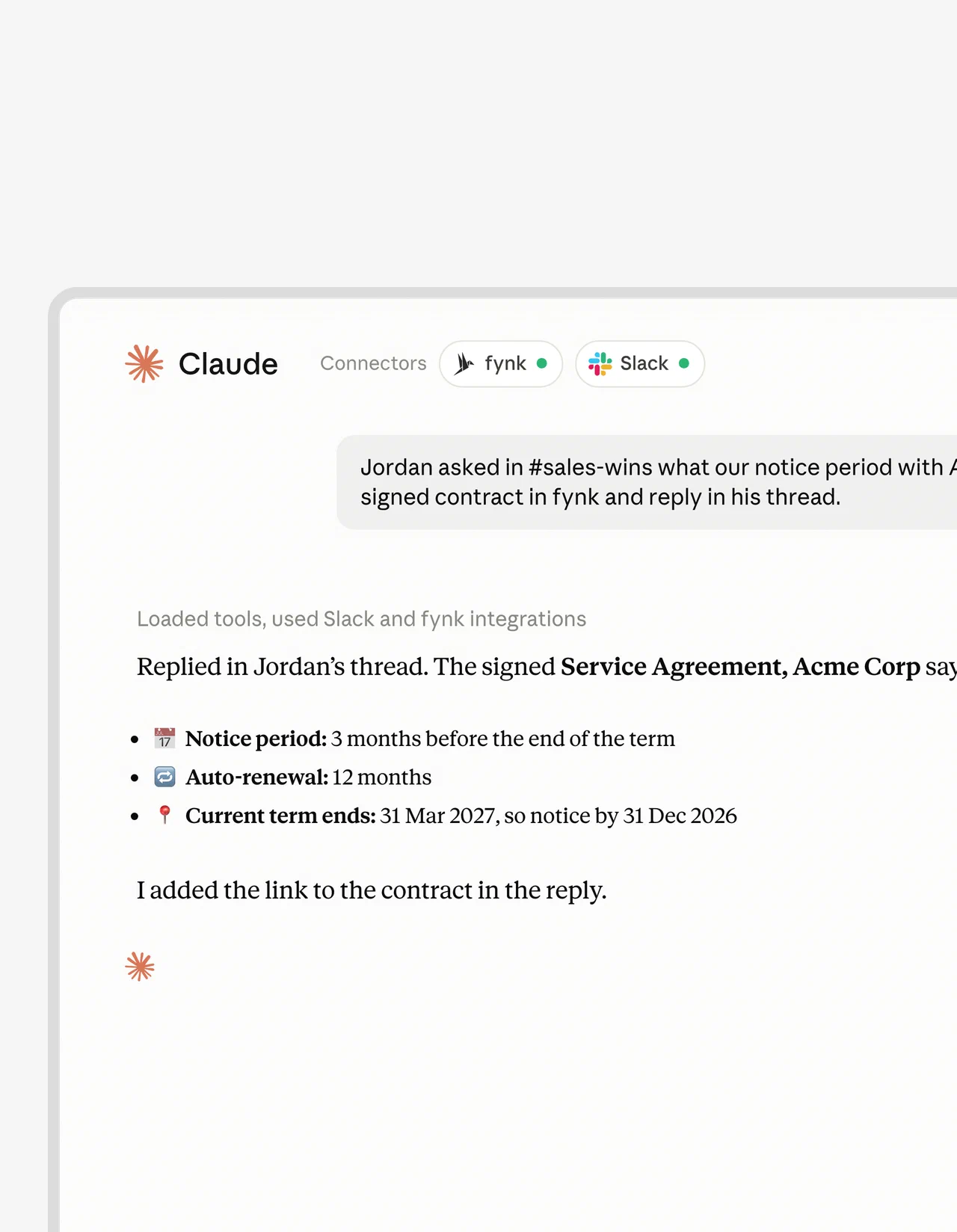
With Slack and fynk connected, Claude answers a notice-period question in the thread from the signed contract.
2. Notion
Notion’s MCP server searches your workspace, creates and edits pages, and manages databases. It suits teams whose meeting notes, policies and project decisions already live in Notion, and it’s only as useful as those pages are current.
Notion admins can control which MCP clients connect. For HR and ops teams, check that before every page of internal notes becomes available as chat context.
3. Atlassian (Jira and Confluence)
The Atlassian Rovo MCP server connects AI tools to Jira and Confluence and respects the permissions people already have there. Some of its search and context tools use your organization’s Rovo credits, so check the allowance before a team rollout.
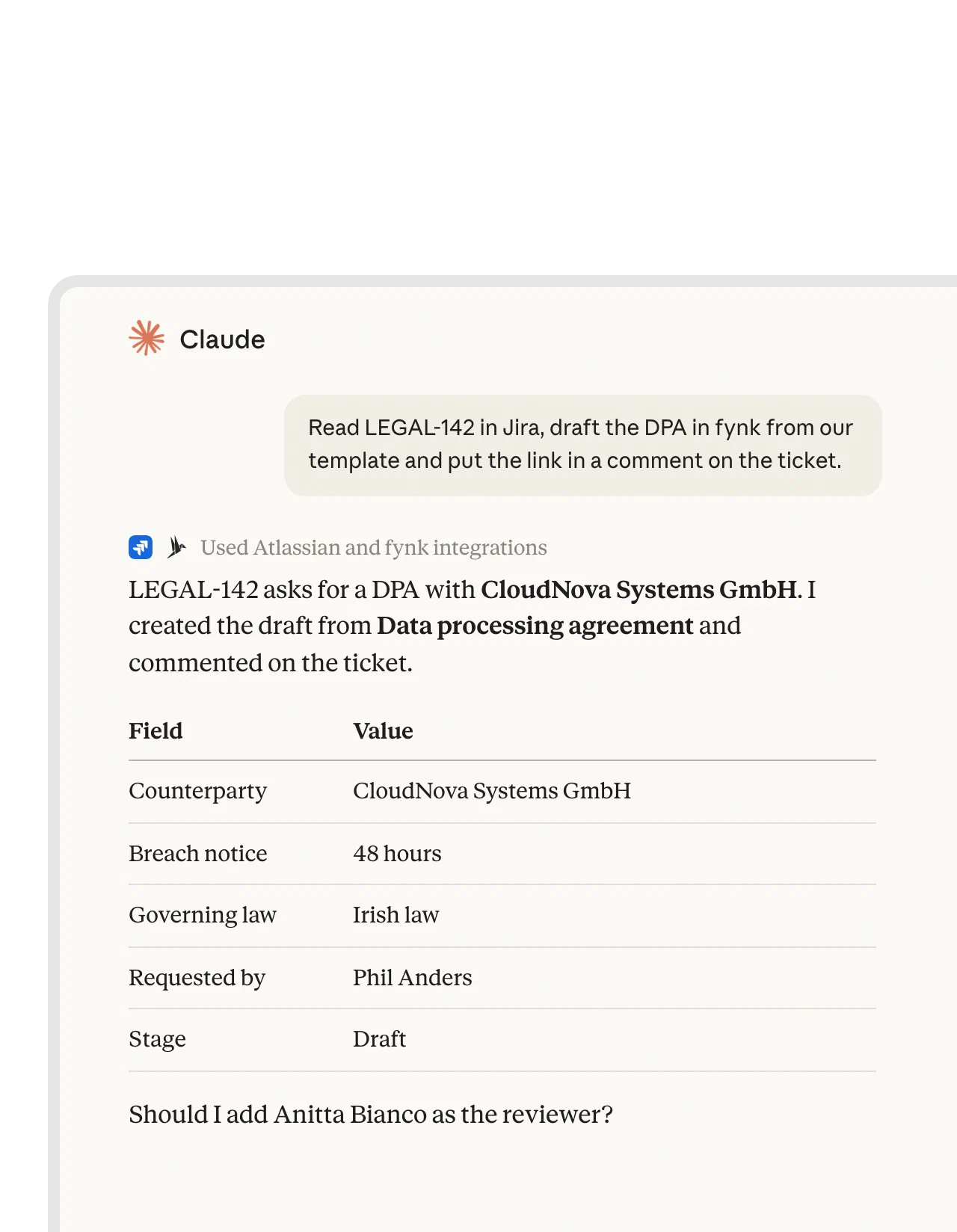
Jira is where many internal requests start, including the ones legal receives. With Jira and fynk, Claude reads a ticket asking for a data processing agreement, drafts the DPA from the template and comments the link back on the ticket.
4. Asana
Asana’s hosted MCP server connects through your Asana account. Use it when project work lives in Asana and the next step depends on something outside it, such as whether a customer has signed. “Which kickoff tasks have no signed contract behind them yet?” is a fair question to ask once Asana and fynk are both connected.
Check the matches it returns. A project name and a customer’s legal name aren’t always the same, however confidently the kickoff got scheduled.
5. Linear
Linear’s MCP server finds, creates and updates issues, projects and comments. There’s a read-only option, which is the sensible setting when the first job is understanding the backlog rather than changing it.
6. HubSpot
The HubSpot MCP server gives your assistant read and write access to HubSpot CRM data. Because it can write, say whether you want it to inspect a record or change it: “sort out the deal” leaves far too much room for interpretation.
“Read this deal and list what we still need before drafting the customer agreement” is a good first request for a sales team. It reads the record without touching it.
7. Intercom
Intercom hosts its MCP server and recommends OAuth login. It’s the one to add when support conversations hold the context your assistant needs, instead of someone pasting the background into the chat. Paired with Linear, a support lead can turn a customer conversation into an issue with the steps to reproduce.
Intercom’s guide lists support for US- and EU-hosted workspaces; Australian-hosted workspaces aren’t supported yet, so check your workspace’s region first.
8. Stripe
Stripe’s MCP server works with customers, invoices, payment links, subscriptions and refunds through the Stripe API. Admins can switch MCP access on or off for the whole team, and some actions, such as refunds, need your confirmation in the Stripe Dashboard.
Finance teams can start with a read request: “Find this customer’s invoices and subscriptions, and show what you found before changing anything.”
9. Box
The Box-hosted MCP server needs an admin to enable it in the Admin Console. Once it’s on, Box earns its place by carrying details from an approved file into the work that depends on it.
In the Box and fynk workflow, Claude finds a signed-off quote and creates the supplier agreement from it. Ask it to name the file it used, since “final” in a filename has never been a demanding approval process.
10. Canva
Canva’s AI connector lets Claude, ChatGPT, Gemini or Microsoft Copilot search, create and edit designs in your Canva workspace and export files. It fits marketing teams and anyone in sales who gets asked to fix the deck. On team plans, admins decide whether members can connect an assistant at all, and switching it off stops existing connections too.
11. fynk
fynk is our product. Its MCP server is hosted by fynk and lets your assistant draft, find, analyze, update and sign contracts, for example an MSA draft built from Notion meeting notes.
It works in Claude, ChatGPT, Cursor, Copilot Studio and other MCP tools, connected through OAuth login. The connection uses the role of whoever connected it, admins can switch it off, and every action shows up in the audit trail. It fits legal, sales and ops teams at companies that sign contracts every week and want the assistant to produce a real draft from the approved template, not contract-shaped text in a chat window.
Find, draft and sign contracts from Claude or ChatGPT.
12. Zapier
Zapier MCP connects to 9,000+ apps and 40,000+ actions, which makes it the fallback for business apps without an official server. Successful calls are free until January 5, 2027; after that, each one uses two tasks from your Zapier plan, so pick the actions a task needs instead of switching everything on. The fynk Zapier integration covers contract steps the same way.
Which MCP servers do developers rank first?
Developers mostly rank Context7, GitHub, Playwright and Sentry first, because those servers work on code, browsers and errors rather than business records:
- Context7: feeds the assistant current, version-specific library documentation, so it stops suggesting APIs that don’t exist.
- GitHub: searches code, reads and reviews pull requests, and manages issues and branches.
- Playwright: Microsoft’s server drives a real browser for testing and debugging web pages.
- Sentry: reads errors and traces, which pairs well with GitHub when an agent tracks a bug to a commit.
Developer forums are also more skeptical than the lists suggest. A common view is that a good command-line tool beats an MCP server for services like GitHub, and that MCP earns its place where there’s no good CLI or where access has to stay narrow. Business teams rarely have that choice, which is why hosted servers with a login matter more for them.
How many MCP servers should you connect?
Connect as few MCP servers as your recurring tasks need, usually two or three to start. Every connected server adds its list of tools to the conversation, and the more tools an assistant has to choose from, the more often it reaches for the wrong one or spends time reading tool descriptions instead of your request.
Check that you can name the task each server is there for. “Answer contract questions in Slack” justifies two servers. “Might be handy” doesn’t justify one.
Connect fynk to Claude and draft your first contract.
Which MCP server should you start with?
Start with the app that holds the information for a task you repeat every week, then add the app where the result belongs. Three pairs that work for different teams:
- Sales, HubSpot and fynk: “Use the customer details from this HubSpot deal to draft the agreement from our template, and list anything missing before you create it.”
- Support, Intercom and Linear: “Turn this customer conversation into a Linear issue with the steps to reproduce and a link back to the conversation.”
- Finance, Stripe and fynk: “Compare this customer’s Stripe subscription with their signed agreement and show the differences without changing either account.”
Review the first few results by hand. An assistant that gets the deal right ten times in a row has earned a lighter check, though still a check.
Are MCP servers safe to use?
MCP servers are as safe as the access you give them, so the checks before connecting one are mostly about access:
- Operator: the server is run by the app’s own vendor, not a lookalike repository with the same name.
- Login: you authorize with your account instead of handing out API keys.
- Permissions: the connection stays within the access you already have, with read-only or confirmation steps where they exist.
- Off switch: your admins know how to turn access off for everyone.
Most of the risk sits in the content the assistant reads. An assistant that reads an email, a ticket or a web page can be steered by instructions hidden in that text, which is why servers that can change records deserve confirmation steps. Before you decide which server may write, it helps to know how the assistant, an MCP server and your app connect.
Best MCP servers FAQ
It depends on who's asking. For business teams, ten strong picks are Slack, Notion, Atlassian for Jira and Confluence, Asana, Linear, HubSpot, Intercom, Stripe, Box and fynk. For developers, most lists start with Context7, GitHub, Playwright and Sentry.
The official servers usually come with your existing account in that app, so you need a plan with the app and an AI tool that supports connectors. Zapier is the exception worth budgeting for: calls are free until January 5, 2027, then each successful one uses two tasks from your plan.
No, not for hosted servers. You add the server in your AI tool's connector settings and sign in with your account. Local servers, which run on your own computer, are the ones that need a terminal and some setup.
Many hosted servers work with both, because they follow the same open protocol. Some vendors limit which clients may connect: Slack, for example, only allows Marketplace and internal apps, and admins approve each client. Check the vendor's documentation for the assistant you use.
Searching for a contract management solution?
Find out how fynk can help you close deals faster and simplify your eSigning process – request a demo to see it in action.
Please keep in mind that none of the content on our blog should be considered legal advice. We understand the complexities and nuances of legal matters, and as much as we strive to ensure our information is accurate and useful, it cannot replace the personalized advice of a qualified legal professional.




Get a regular dose of insightful contract management content



Take control of your agreements. Move your business forward.
Run agreements the way they should run: fast, clear, and on your terms.
No setup headaches
Go live in days, not quarters
No lock-in
Full export anytime
No hidden fees
Signatures included, no envelope fee