Sales: +44 204 577 2699
English Deutsch
Log in
fynk fynk Logo
Why fynk?
Features

Sign

E-signatures and tracking

Organize

Contract management

Boost

AI assistant and AI analysis

Scale

Approvals and automations

Insights

Contract data and dashboards

See all features

→
Additional benefits

AI assistant

AI analysis

AI review

MCP server

Integrations

API

Security & GDPR

By team

Legal

Finance

Operations

Sales

IT

Procurement

HR

Founders & Owners

See all teams

→
By industry

Finance & Banking

SaaS & IT

Manufacturing

Retail

Energy

Media & Creative

Sports

Construction

e-Commerce

See all industries

→
Customers Pricing
Company

Why fynk

About us

Careers

Partnerships

Contact

Know how

Case studies

Templates

Blog

Webinars

Use cases

Clause library

Glossary

Business tools

PDF tools

From the blog
Blog post cover
                        image: How to sign as power of attorney: formats, samples and rules

How to sign as power of attorney: formats, samples and rules

Signing under a power of attorney has a format of its own, and banks in …

Explore all posts
Free trial Get a demo
Free trial
fynk PDF tools
    • Merge PDFs Combine PDFs into one file
    • Split PDF Cut a PDF into parts
    • Organize PDF Reorder, rotate, delete pages
    • Rotate PDF Turn pages left or right
    • Compress PDF Shrink a PDF for email
    • PDF to JPG Turn pages into images
    • JPG to PDF Turn photos into one PDF
    • Watermark PDF Stamp DRAFT or CONFIDENTIAL
    • Add page numbers Number an exhibit pack
    • Compare PDFs (Current tool) See what changed between two versions
    • Redact PDF Black out names and numbers
    • Remove PDF metadata Strip author names and dates
    • Flatten PDF Lock form fields and comments
    • Protect PDF Lock a PDF with a password
    • Unlock PDF Remove a password or restrictions
  • Share by email
  • Share on LinkedIn
  • Share on X
  • Share on WhatsApp
Features

Sign

E-signatures and tracking

Organize

Contract management

Boost

AI assistant and AI analysis

Scale

Approvals and automations

Insights

Contract data and dashboards

See all features

→
Additional benefits

AI assistant

AI analysis

AI review

MCP server

Integrations

API

Security & GDPR

By team

Legal

Finance

Operations

Sales

IT

Procurement

HR

Founders & Owners

See all teams

→
By industry

Finance & Banking

SaaS & IT

Manufacturing

Retail

Energy

Media & Creative

Sports

Construction

e-Commerce

See all industries

→
Customers
Pricing
Company

Why fynk

About us

Careers

Partnerships

Contact

Know how

Case studies

Templates

Blog

Webinars

Use cases

Clause library

Glossary

Business tools

PDF tools

From the blog
Blog post cover image: How to sign as power of attorney: formats, samples and rules

How to sign as power of attorney: formats, samples and rules

Signing under a power of attorney has a format of its own, and banks in particular are strict about it. This guide …

Explore all posts

fynk PDF tools

Organize

  • Merge PDFs
  • Split PDF
  • Organize PDF
  • Rotate PDF

Optimize & convert

  • Compress PDF
  • PDF to JPG
  • JPG to PDF

Edit

  • Watermark PDF
  • Add page numbers

Review & protect

  • Compare PDFs (Current tool)
  • Redact PDF
  • Remove PDF metadata
  • Flatten PDF
  • Protect PDF
  • Unlock PDF
  • Share by email
  • Share on LinkedIn
  • Share on X
  • Share on WhatsApp
Business tools →
  1. PDF tools
  2. Compare PDFs

Compare PDFs

See every difference. Instantly.

Drop the original and the revised version. Every addition, deletion and edit is highlighted in your browser. No account, and the files never leave this tab.

Older version Drop the original PDF PDF only, up to 25 MB. Nothing is uploaded.
Newer version Drop the revised PDF PDF only, up to 25 MB. Nothing is uploaded.

Open Unlock PDF →

Removed Added Changed

Stays on this device. The files never leave your browser. No account, nothing stored.

PDF comparison in fynk In fynk you can compare stored PDFs, a one-off upload, or a file from the assistant. fynk can also read scans.

Next for this file

  • Redact PDF
  • Protect PDF
  • Merge PDFs

In fynk, AI review checks the new version against your playbook and flags the risky changes. Find out about AI review in fynk →

Start free trial Book a free demo

Know what changed before you sign

Drop both versions and every changed word is marked, so you check the edits instead of rereading the whole contract. A changed number shows up; a new font or logo does not.

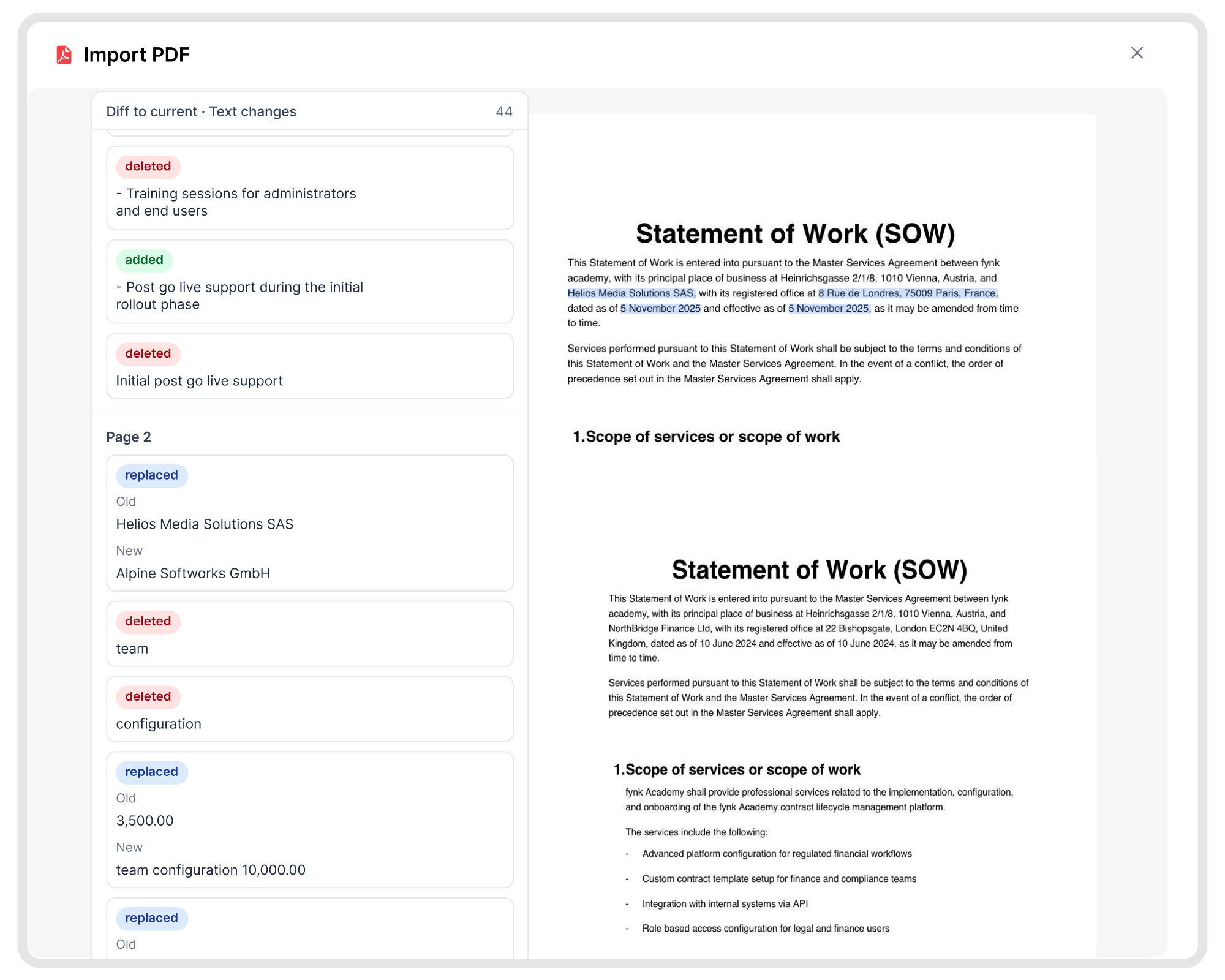
  • Two versions, side by side.

    Left is the older file, right is the newer one. Swap them if you dropped them the wrong way round.

  • Adds, deletes, edits.

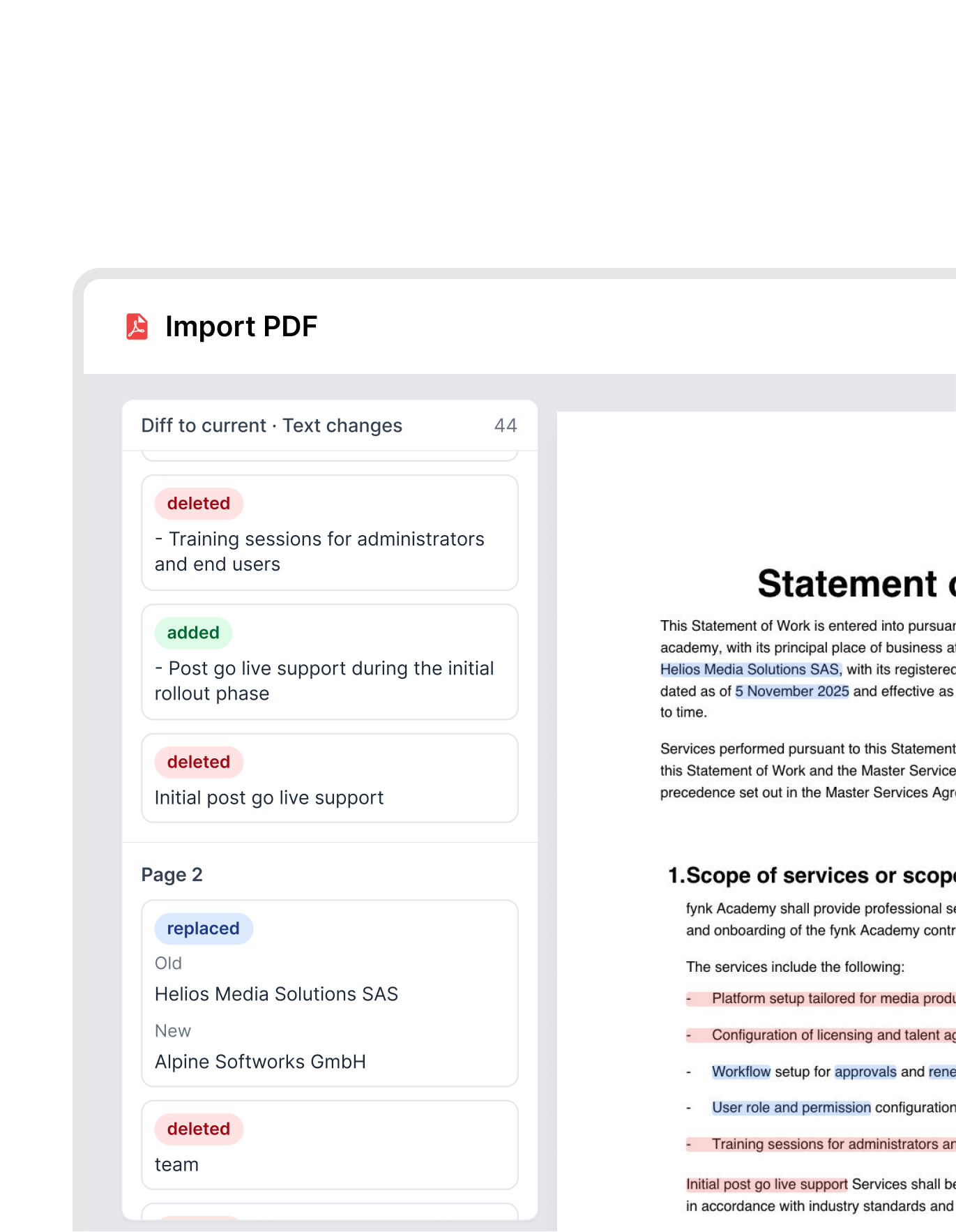
    Removed text in red, new text in green, replacements in blue. One box per change, so nothing hides inside a long paragraph.

  • Every change in one list.

    Each change gets its own line. Click one and the page jumps to it, with the box flashing so you spot it straight away.

  • Download the marked-up copy.

    Save the result with the highlights on it and forward it to whoever has to sign off on the new version.

  • The same comparison fynk uses.

    Drop two files here. In fynk you can also compare stored files, a one-off upload, a PDF from the AI assistant, and scans.

  • Nothing is uploaded.

    The comparison runs on your device. We never see the contract. There is no account and nothing to store.

When a two-file compare is enough

Use this when someone sent you a PDF and you need to know what they actually changed before you sign.
  • What they said they changed, and what they actually changed
    Counterparty redlines

    What they said they changed, and what they actually changed

    Upload the draft you sent and the file that came back. Highlights mark every wording difference, so you are not relying on their covering email.
    IN FYNK
    • PDF comparison

  • A last pass on the final PDF
    Before you sign

    A last pass on the final PDF

    The last PDF in the thread is the one that gets signed. Compare it to the version you last approved. If a clause moved or a number changed, you will see it here.
    IN FYNK
    • AI review

Know which changes matter

This tool shows what changed. In fynk, AI review also tells you whether a change breaks your playbook, and both sides negotiate in one live document instead of trading versions.
Find out about AI review in fynk →
Start free trial Book a free demo

"Sending contracts by email and waiting for signatures sometimes used to take a week or more. Now, contracts are signed within half an hour in many cases, sometimes even faster."
Dr. Joerg Burkhardt
Dr. Joerg Burkhardt Head of Sales & New Partnerships, 1. FC Nürnberg

Trusted and loved by our users

  • OMR rating

    4.8/5

    100+ reviews

  • G2 rating

    4.9/5

    50+ reviews

  • Trusted

    Trusted rating

    4.7/5

    1,0 Sehr gut

The next-generation CLM

Only fynk offers a flexible, integrated and truly end-to-end contract platform for all teams to use - not just legal.

  • Sign

    Every signature type, covered.

  • Organize

    One place for all your contracts.

  • Boost

    AI that works inside your contracts.

  • Scale

    Automate, connect, and grow.

  • Insights

    Full visibility, zero blind spots.

Organize

Organize your agreements using AI

Work smarter and faster with fynk’s built-in AI. Centralize agreements, extract data, automate tasks, and offer secure access for your entire team.

Get a demo
FEATURES
  • Signatures (SES, AES, AES eID, QES)

  • Signature order

  • Signature style

  • Voting

  • Signature tracking

  • eIDAS Compliance

  • Document hub

  • Bulk import

  • Document calendar

  • Tasks & Reminders

  • Configurable notifications

  • Kanban dashboard

  • Multi-entity management

  • AI assistant

  • AI analysis

  • AI summary

  • AI draft

  • AI review

  • AI search

  • Approval workflows

  • Dates & durations

  • PDF comparison

  • Integrations

  • API

  • Branding

  • Teams

  • Dashboards

  • Metadata

  • Analytics

  • Audit trail

  • History

More free PDF tools

Merge, split, rotate, compress, convert, protect, unlock or redact a PDF in this browser. No account, and the file stays on your device.

All PDF tools →
  • Redact PDF

    Select text or draw a box, then download a copy where those areas are gone.

  • Protect PDF

    Lock a PDF with a password and AES-256 encryption, with optional print and copy limits.

  • Merge PDFs

    Arrange the pages, drop the ones you do not need, download one file.

  • Remove PDF metadata

    See the author, software, and dates the file reveals, then download a clean copy.

  • Flatten PDF

    Lock filled-in form fields, comments and stamps into the page so nobody can change them.

  • Unlock PDF

    Remove a password you know, or lift print and copy restrictions.

Frequently asked questions.

  • No. Both files stay in this browser tab as local data. The comparison runs on your device. We do not receive the documents, so there is nothing for us to store or delete.

  • No. It compares the words. A different font or logo will not show up. A changed number or a deleted clause will.

  • A scan is a picture of a page, so there are no words to compare. Save it again from Word (File, Save as PDF) and try again. fynk can read scans. This page cannot.

  • Yes. Each file must be a PDF under 25 MB, and this tool handles up to 50 pages. For larger documents, compare them in fynk.

  • Yes. After the highlights appear, use Download comparison. The file is built in this tab from the pages you already see, and still never leaves your device.

  • This page compares two PDFs you drop in the tab. In fynk you can compare any two PDFs you already stored, any file you upload on the spot, or a PDF from the AI assistant. fynk can also read scans. This page cannot.

  • Not for this tool. A fynk account is for stored files, scans, the assistant, comments, and signing.

Still have questions?

Contact us
Markus
Brendan
Simon

More product features to explore.

  • Draft.

    Create contracts from proven templates. Fast, consistent, and ready to send.

  • Boost.

    AI reviews, summarizes, and explains your contracts so you never miss what matters.

  • Sign.

    Send contracts for legally binding e-signatures, tracked from sent to signed.

  • Insights.

    See the full picture of your contracts with dashboards, search, and smart alerts.

Take control of your agreements. Move your business forward.

Run agreements the way they should run: fast, clear, and on your terms.

Start free trial Start free trial
Get a demo Get a demo
4.9 on G2.com
4.8 on OMR

No setup headaches

Go live in days, not quarters

No lock-in

Full export anytime

No hidden fees

Signatures included, no envelope fee

Take control of your agreements. Move your business forward.
Get a demo
fynk fynk Logo

PRODUCT

  • Sign
  • Organize
  • Boost
  • Scale
  • Insights

ADDITIONAL BENEFITS

  • Contract management software
  • AI assistant
  • AI contract analysis
  • AI review
  • MCP server
  • Integrations
  • API
  • Security & GDPR

SOLUTIONS

  • Legal
  • Finance
  • Operations
  • Sales
  • IT
  • Procurement
  • HR
  • Founders / Owners

BY INDUSTRY

  • Finance & Banking
  • SaaS & IT
  • Manufacturing
  • Retail
  • Energy
  • Media & Creative
  • Sports
  • Construction
  • e-Commerce

SUCCESS STORIES

  • Unite SE
  • 1. FC Nürnberg
  • fiskaly
  • Five 14
  • Maven

RESOURCES

  • Pricing
  • Case studies
  • Templates
  • Webinars
  • Clause library
  • Glossary
  • Blog
  • Electronic signatures
  • Signature methods
  • Business tools
  • PDF tools
  • Trust Center

COMPANY

  • About us
  • Contact
  • Careers
  • Partnerships

COMPARE

  • Alternatives
  • Compare
  • Best of

LEGAL

  • Legal notice
  • Terms & conditions
  • Privacy policy

© 2026 fynk GmbH