
Advanced Electronic Signature (AES)

Rezvan Golestaneh
Updated · Published · 13 min read
What is an advanced electronic signature (AES)?
An advanced electronic signature (AES, sometimes AdES) is an electronic signature that meets four extra requirements set out in Article 26 of the eIDAS Regulation: it is uniquely linked to the signer, it can identify the signer, it is created with means the signer controls, and it is bound to the document so that any later change is detectable.
In practice, this means an AES proves two things a simple electronic signature (SES) cannot prove on its own: who signed and that the document has not changed since.
You have probably used one already. A typical example: you receive an NDA by email, sign it in an eSignature tool and confirm the signature with a one-time code sent to your phone by SMS. Signing with a national digital ID such as Swedish BankID or Danish MitID is another common example.
eIDAS defines three levels of electronic signature:
- Simple electronic signature (SES): any data in electronic form that a person uses to sign, such as a typed name or a drawn signature.
- Advanced electronic signature (AES): an SES that also meets the four requirements of Article 26.
- Qualified electronic signature (QES): an AES created with a qualified signature creation device and based on a qualified certificate. Only the QES has the same legal effect as a handwritten signature (Article 25(2) eIDAS).
💡 Good to know: The concept of an “advanced electronic signature” is older than eIDAS. It was introduced by the EU eSignature Directive 1999/93/EC, which eIDAS (Regulation (EU) No 910/2014) replaced. eIDAS was amended by Regulation (EU) 2024/1183 (“eIDAS 2.0”, in force since 20 May 2024), which left the AES requirements unchanged. The term is not EU-only either: the UK kept it in UK eIDAS, and Switzerland defines a “fortgeschrittene elektronische Signatur” in Article 2 of its ZertES. US law (ESIGN Act and UETA) does not define signature levels at all. Read more in our guide to the legality of electronic signatures.
The four requirements of an AES (Article 26 eIDAS)
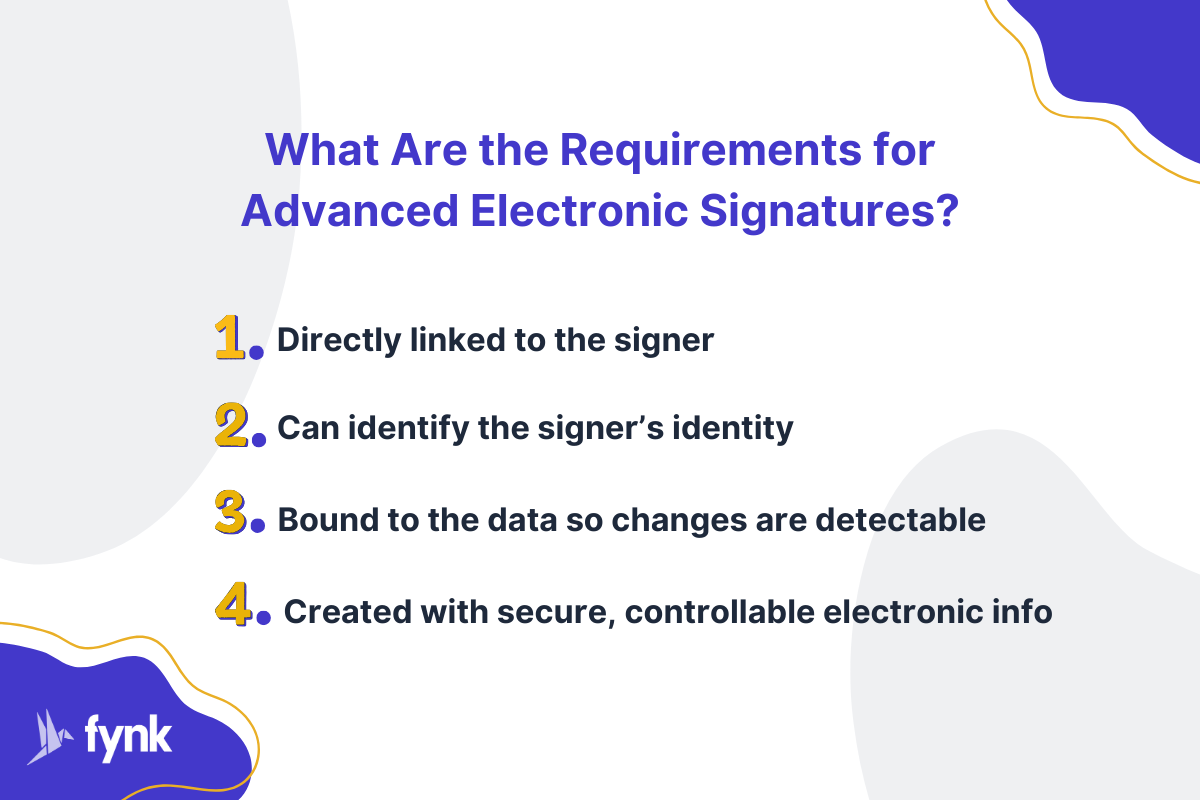
For an electronic signature to count as advanced, it has to meet all four of the following requirements.

| Requirement (Art. 26 eIDAS) | What it means in plain language | Example |
|---|---|---|
| (a) Uniquely linked to the signatory | The signature belongs to exactly one person and cannot be attributed to anyone else. | The confirmation code goes to the signer’s own mobile number, or the signature uses a key in a certificate issued to that one person. |
| (b) Capable of identifying the signatory | The signature carries or points to evidence of who signed. | The verified phone number, an eID login such as BankID, or the name in the signer’s certificate is recorded with the signature. |
| (c) Created using signature creation data the signatory can, with a high level of confidence, use under their sole control | Only the signer can trigger the signature. | A one-time code on the signer’s phone, an eID app protected by a PIN or biometrics, or a private key on a smart card. |
| (d) Linked to the signed data so that any subsequent change is detectable | The signature is bound to this exact version of the document. | If a single word is changed after signing, validation shows that the document was modified. |
A drawn or typed signature alone meets none of these requirements, which is why it stays an SES. The identity check and the technical binding to the document are what make a signature advanced.
How an AES works technically
eIDAS is technology-neutral: Article 26 does not require a certificate or a specific technology. In practice, most AES are built on public key infrastructure (PKI), the same technique that QES uses. Here is what happens when a document is signed:
- The document is hashed. Software calculates a hash, a short fixed-length value that works like a fingerprint of the document. Change one character and the hash changes completely.
- The hash is signed with the private key. The signer’s private key encrypts the hash. The result is the cryptographic signature, which is embedded in the document (for PDFs, typically in the PAdES format).
- A certificate links the key to a person. A digital certificate contains the matching public key and the identity of its holder.
- A timestamp records when it was signed. A trusted timestamp proves the signature existed at a given time, which also keeps it verifiable after the certificate has expired.
- Anyone can verify it. The verifying software recalculates the document’s hash and checks it against the signature using the public key. If they don’t match, the document was changed after signing.
Cryptographic keys
- Private key: a secret value only the signer (or a secure device or service acting on the signer’s behalf) can use. It creates the signature. If it leaks, anyone could sign in the signer’s name, which is why requirement (c) asks for sole control.
- Public key: the matching value that anyone can use to check a signature. It cannot be used to create one.
Digital certificate
A certificate binds a public key to an identity and is issued by a certification authority (CA), also called a trust service provider. It contains:
- Holder: the name of the person (or organisation) the key belongs to.
- Issuer: the CA that checked the holder’s identity and issued the certificate.
- Serial number: identifies the certificate, so it can be checked against the CA’s revocation list.
- Validity period: the time during which the certificate (not the signed document) is valid. A signature made while the certificate was valid stays valid after it expires, provided it was timestamped.
Not every AES gives each signer a personal certificate. Many eSignature platforms instead verify the signer (for example, by SMS code or eID), record that evidence in an audit trail and seal the finished document so changes become detectable.
The visible signature on the page, such as a typed name, a drawing or a scanned wet signature, is only the graphic representation. The security comes from the identity evidence and the cryptographic binding behind it.
How to get an advanced electronic signature
You don’t need special hardware for an AES. There are three common ways to create one:
- Through an eSignature platform with phone verification. The signer opens the document from an email link, signs and confirms with a one-time code sent to their phone. This is the most common route for business contracts.
- With a national eID. In several countries, people already have a verified digital ID, for example BankID in Sweden and Norway, MitID in Denmark or SPID in Italy. Signing with it links the signature to a strongly verified identity.
- With a certificate-based digital ID. In Adobe Acrobat you can sign a PDF with “Use a certificate” and a digital ID. Whether the result counts as an AES depends on the digital ID: a self-created one protects the document against changes but says little about who you are. A digital ID issued by a trust service provider after an identity check also meets the identification requirement.
How to sign a document with an AES in fynk
In fynk, the sender chooses the signature type for each document. With AES, the signer confirms the signature with a code sent to their phone. Here’s how it works:
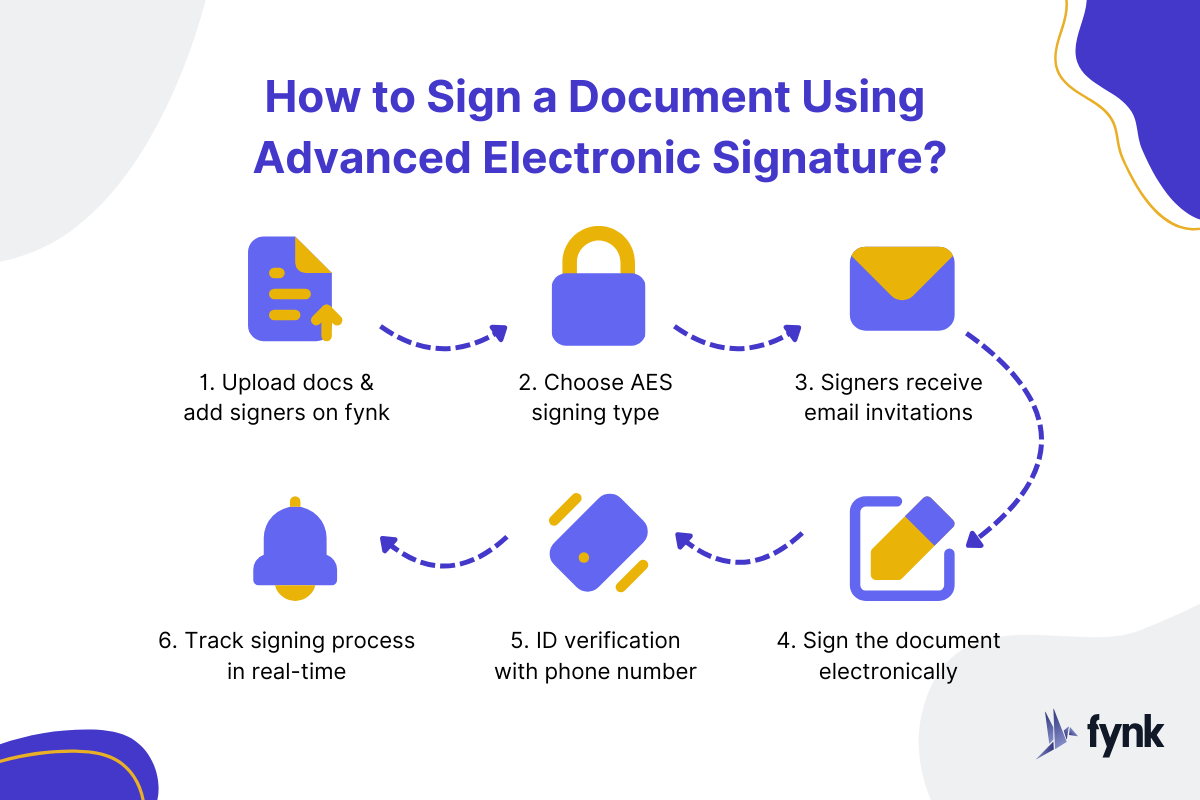
- Upload the document (Word, PDF and other formats work directly, no conversion needed) and add the signatories.
- Choose AES as the signature type.
- Signers receive an email with a link to sign. They don’t need a fynk account.
- Each signer adds their signature.
- Each signer confirms their identity with a code sent to their phone.
- You get notified about every signature, and every step is recorded in the audit trail.
AES with a national eID in fynk
With the AES (eID) signature type, signers confirm with a verified digital ID instead of a phone code. This type is switched off by default and has to be enabled once in the account settings. The sender only sets the signature type; the signer picks their method from the list while signing. These are the AES (eID) methods currently available in fynk. Each one links to its page in the signature method directory:
| Method | Available in |
|---|---|
| Danish MitID (Intesi) | Denmark, Greenland |
| Finnish Trust Network (Intesi) | Åland, Finland |
| Italian SPID (Intesi) | Italy |
| Norwegian BankID (Intesi) | Norway |
| Swedish BankID (Intesi) | Sweden |
If a signer picks a qualified method in this phase, the signed document is marked as QES.
Why use fynk for advanced electronic signatures?
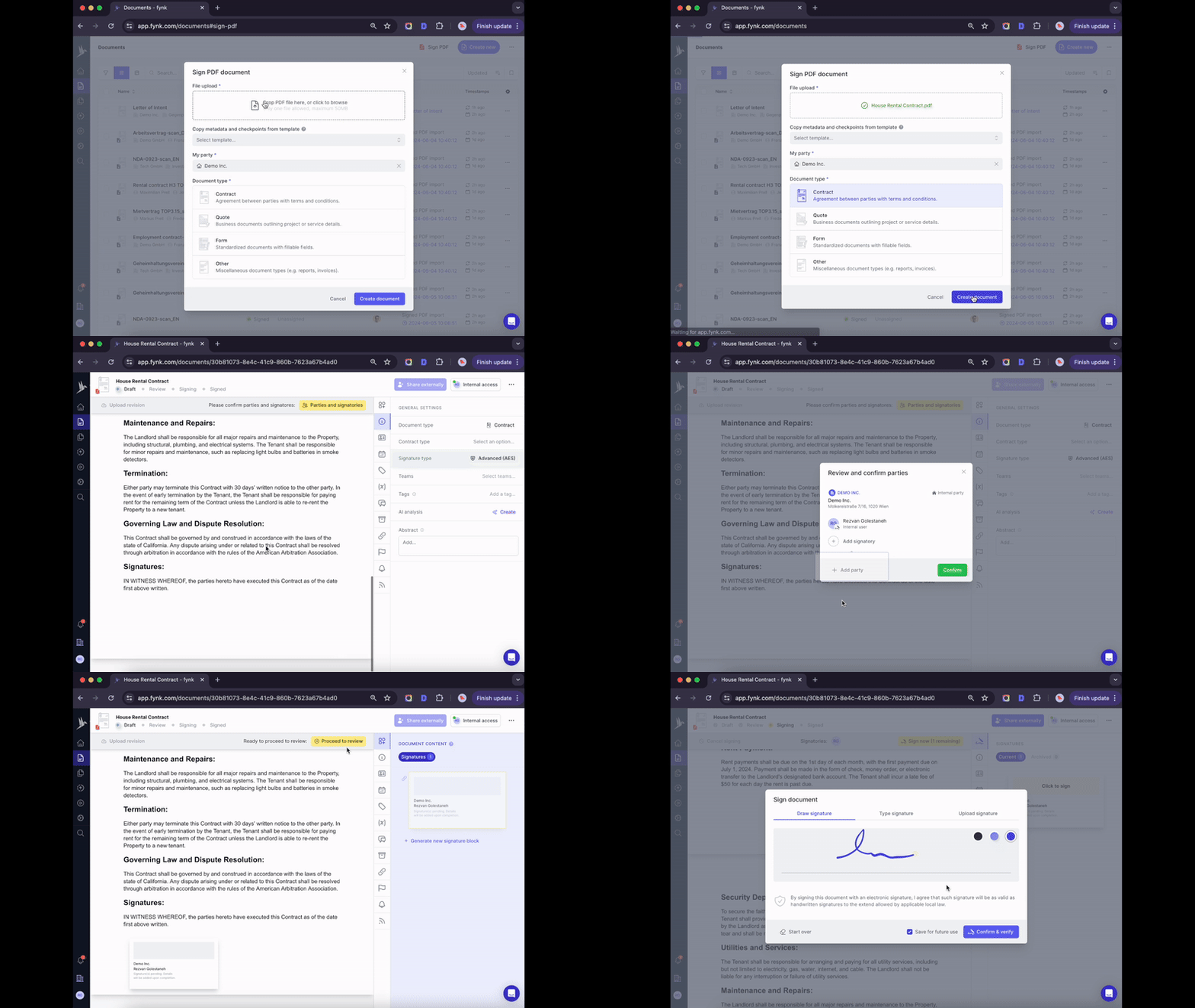
- All three levels in one tool: choose SES, AES or QES per document, depending on what the contract needs.
- Signing built into contract management: create, sign and manage contracts in one place, with templates and legal document automation.
- Evidence included: the audit trail records who did what and when.
- European hosting: data is hosted in ISO 27001-certified data centres in Germany, in line with GDPR.
How to verify an advanced electronic signature
How you check an AES depends on how it was created:
- Certificate-based signatures in a PDF: open the file in Adobe Acrobat or Acrobat Reader. It shows whether the signature is valid, who the certificate was issued to and by whom, when the document was signed, and whether it was changed after signing.
- Any PAdES, XAdES or CAdES signature: upload the file to the European Commission’s free DSS validation tool. It reports whether the signature is intact and which level (AdES or QES) it reaches.
- Platform-based signatures: check the audit trail or signing certificate the platform attaches to the completed document. It lists the signers, how each one was verified, and timestamps for every step.
A valid result means the document is exactly what was signed. A warning such as “document has been modified” means the content changed after signing and the signature no longer covers it.
AES vs QES: which one do you need?
Both are cryptographically secure, so the difference is mainly legal. A QES requires a qualified certificate from a qualified trust service provider and a qualified signature creation device, and in return it has the legal effect of a handwritten signature in every EU member state. An AES does not.
| Advanced electronic signature (AES) | Qualified electronic signature (QES) | |
|---|---|---|
| Legal basis | Art. 3(11) and Art. 26 eIDAS | Art. 3(12) and Art. 25(2) eIDAS |
| Identity check | Varies: phone code, eID, certificate | Mandatory, by a qualified trust service provider (video ident, eID, in person) |
| Certificate | Not required (common in practice) | Qualified certificate required |
| Signature device | Any device | Qualified signature creation device (today mostly a remote service run by the provider) |
| Legal effect | Admissible as evidence, cannot be rejected for being electronic (Art. 25(1)) | Equivalent to a handwritten signature (Art. 25(2)), recognised in all EU member states (Art. 25(3)) |
| Meets a statutory written-form requirement | No | Yes, unless national law excludes the electronic form |
| Typical use | Most B2B contracts, NDAs, HR documents without form requirements | Contracts that require written form by law |
Which signature for which document?
Most contracts have no form requirement, so an SES or AES is legally sufficient. You need a QES only where national law prescribes written form, and some documents can’t be signed electronically at all. The examples below use German law (as of October 2026). Other countries have their own rules, so check the law that governs your contract.
| Document | Form requirement (Germany) | Signature to use |
|---|---|---|
| NDA | None | SES or AES |
| B2B sales or purchase contract | None | AES (SES is valid too) |
| B2B service or SaaS agreement | None | AES |
| Open-ended employment contract | None for the contract; the statement of essential terms (Nachweisgesetz) may be given in text form since 1 January 2025, except in sectors listed in § 2a SchwarzArbG such as construction and hospitality | SES or AES |
| Fixed-term employment contract | Written form for the fixed term (§ 14(4) TzBfG) | QES or wet ink |
| Commercial lease for more than one year | Text form since 2025 (§ 578 BGB) | AES |
| Consumer credit agreement | Written form (§ 492 BGB) | QES or wet ink |
| Termination of employment or termination agreement | Written form, electronic form excluded (§ 623 BGB) | Wet ink only, no eSignature |
| Guarantee (Bürgschaft) by a private individual | Written form, electronic form excluded (§ 766 BGB) | Wet ink only |
| Will | Handwritten or notarised (§ 2247 BGB) | No eSignature |
| Property purchase | Notarial deed (§ 311b BGB) | Notary |
A fixed-term employment contract signed with a scanned signature does not meet the written form: the LAG Berlin-Brandenburg held the fixed term invalid in such a case (judgment of 16 March 2022, 23 Sa 1133/21). Planned German reforms may drop the written-form requirement for fixed terms from 2027, but as of October 2026 this is not law.
Where the law sets no form, an AES is often the better choice than an SES because it gives you identity evidence and tamper detection if the contract is ever disputed.
Is an advanced electronic signature legally binding?
Yes. Under Article 25(1) of eIDAS, no electronic signature, including an AES, may be denied legal effect or rejected as evidence just because it is electronic or not qualified:
An electronic signature shall not be denied legal effect and admissibility as evidence in legal proceedings solely on the grounds that it is in an electronic form or that it does not meet the requirements for qualified electronic signatures.
That makes an AES binding for every contract that has no form requirement. It is not, however, equivalent to a handwritten signature: that status is reserved for the QES (Article 25(2)). In a dispute, a court weighs the AES evidence freely. In Germany, for example, the presumption of authenticity for electronic documents in § 371a ZPO applies only to qualified signatures. This is why the identity evidence and audit trail behind an AES matter.
If a trust service provider causes damage, Article 13 of eIDAS makes it liable for intent or negligence. For a qualified provider, fault is presumed unless it proves otherwise; for a non-qualified provider, the person claiming damages has to prove it. National liability rules apply on top.
Benefits and limits of advanced electronic signatures
Benefits:
- Fast: signing takes minutes, with no printing, scanning or posting.
- Identity evidence: you can show who signed and how they were verified.
- Tamper detection: any change after signing is visible on verification.
- No extra hardware: a phone or an existing eID is enough.
Limits:
- An AES does not satisfy a statutory written-form requirement. For those documents you need a QES or wet ink.
- Outside the EU, how much weight an AES carries depends on local law. In the US and UK, the general rules on electronic signatures apply rather than eIDAS levels.
Which signature should you use?
Use an AES for most business contracts where you want proof of who signed: NDAs, sales and service agreements, many HR documents. Use a QES when the law requires written form, such as fixed-term employment contracts or consumer credit agreements in Germany. Use an SES for low-risk, everyday agreements. A few documents, such as wills and employment terminations in Germany, still need pen and paper.
Want to send your next contract for an advanced electronic signature? Try fynk and choose the signature level per document.
Sign
any
Document in Less than
a Minute.
Frequently Asked Questions
You do not need to buy anything special. You can sign with an eSignature platform that verifies you with a one-time code sent to your phone, sign with a national eID such as BankID or MitID, or sign a PDF with a digital ID issued by a trust service provider.
Under the EU eIDAS Regulation there are three levels: the simple electronic signature (SES), the advanced electronic signature (AES) and the qualified electronic signature (QES). Each level adds requirements on identifying the signer and protecting the document, and only the QES is equivalent to a handwritten signature.
Yes. Under Article 25(1) eIDAS an AES cannot be denied legal effect or rejected as evidence because it is electronic. It is binding for all contracts without a form requirement, but it does not replace a handwritten signature where the law requires written form.
A QES is an AES with two extras: a qualified certificate issued by a qualified trust service provider after an identity check, and a qualified signature creation device. Because of this, only the QES has the legal effect of a handwritten signature in all EU member states.
No. Article 26 eIDAS is technology neutral and does not require a certificate. Most AES still use certificates and public key cryptography, while some platforms verify signers by phone code or eID and seal the document instead.
The signature is calculated from a hash of the exact document. If anything in the document changes after signing, the hash no longer matches and the verification tool shows that the document was modified.
The AES level is defined by eIDAS, UK eIDAS and the Swiss ZertES. Other countries, such as the US, do not use signature levels, but generally accept electronic signatures as evidence. Whether a specific document can be signed electronically always depends on the law that governs it.
Please keep in mind that none of the content on our blog should be considered legal advice. We understand the complexities and nuances of legal matters, and as much as we strive to ensure our information is accurate and useful, it cannot replace the personalized advice of a qualified legal professional.



Get a regular dose of insightful contract management content
WHAT'S NEXT
Read all
Take control of your agreements. Move your business forward.
Run agreements the way they should run: fast, clear, and on your terms.
No setup headaches
Go live in days, not quarters
No lock-in
Full export anytime
No hidden fees
Signatures included, no envelope fee