
Build, adopt, give back:
how we rebuilt fynk's AI assistant with open-source CopilotKit

Constantin Wintoniak
Published · 12 min read
We replaced our hand-built AI chat with open source, and wrote the Vue version of the framework ourselves.
- Adopt the standard: AG-UI and CopilotKit took 11,000 lines out of fynk
- Contribute instead of forking: our Vue port is now part of CopilotKit
- Build only what’s yours: contract tools, permissions and citations
Our in-app assistant runs on about 11,000 fewer lines of our own code than the chat it replaced. It also runs on a framework that, until May 2026, didn’t exist for the stack we use. One of our engineers, Abel Enekes, wrote that part and contributed it to the project. This is why, and what we’d tell any founder or operator putting an AI agent into their own product.

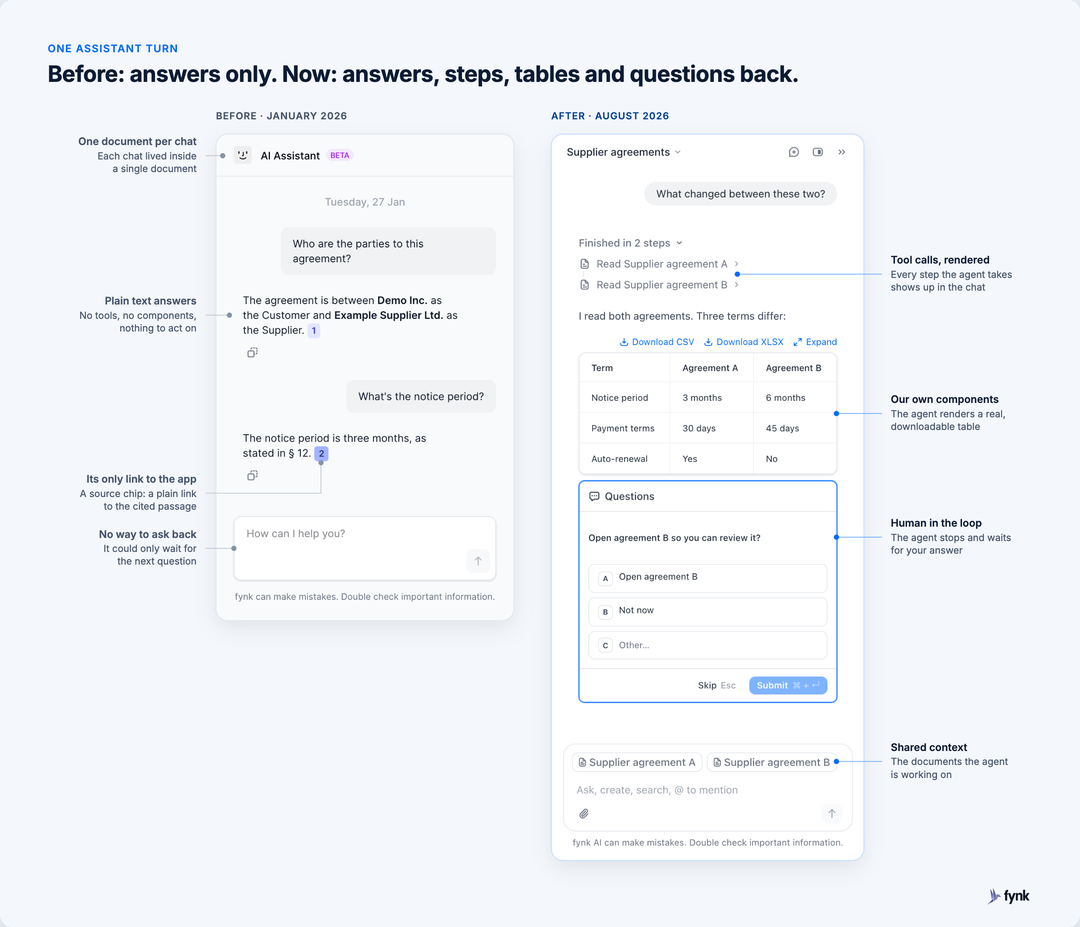
In August 2026 we shipped the fynk assistant: one agent that answers questions about your contracts, compares them, and creates, tags and moves documents for you. The launch post shows what it can do. This one is about how it’s built, and about the parts we decided not to build ourselves.
What was wrong with our first AI chat?
It could only answer questions about one document at a time, and every new feature needed changes in the app and in the AI service first. At the start of 2026, fynk had a document chat we had built ourselves: open a contract, ask a question, get an answer with a link to the clause. It worked, and customers used it.
Every piece of an answer came in a message format we had defined ourselves. Here’s the first word of “The notice period is three months”, as our server sent it in January 2026:
{
  "status": "ok",
  "message": {
    "type": "AIMessageChunk",
    "id": "…",
    "content": "The notice period",
    "additional_kwargs": {},
    "response_metadata": {}
  },
  "bounding_boxes": null
}
In plain words: one piece of text, wrapped in fields we made up, with a slot for PDF coordinates.
That format knew two things: a piece of text, and where in the PDF it came from. Everything else needed a new field, which we had to add to the frontend and the AI service before a feature could ship. Comparing two contracts meant changing the format. Showing a table meant a new message type in the frontend. Letting the agent ask “should I open this for you?” meant another state in a state machine we maintained by hand, next to an unreliable WebSocket connection.
If you don’t write code, here’s the short version: customers never see this work, but every new feature depended on it. We were building the same basics that every company with an AI agent needs. When that happens, you should stop building them yourself.
Why did we switch to an open protocol?
Because the hard parts of an in-app agent are the same in every product, and someone had already standardized them.
- What is AG-UI?
- AG-UI, the Agent-User Interaction Protocol, is an open protocol for how an AI agent talks to a user interface. The agent streams typed events for text, tool calls, state updates and pauses for user input. Any AG-UI interface can render them, whichever agent framework produced them. CopilotKit is the frontend framework from the team behind AG-UI.
Early in 2026 I wrote to Abel that we should move “most of how AI interaction is structured” to a standard like AG-UI. He had been reading about it since autumn 2025. Here’s the same sentence from today’s assistant:
{ "type": "RUN_STARTED",          "threadId": "…", "runId": "…" }
{ "type": "TEXT_MESSAGE_START",   "messageId": "m1", "role": "assistant" }
{ "type": "TEXT_MESSAGE_CONTENT", "messageId": "m1", "delta": "The notice period" }
{ "type": "TEXT_MESSAGE_END",     "messageId": "m1" }
{ "type": "RUN_FINISHED",         "threadId": "…", "runId": "…" }
In plain words: five standard events that any AG-UI interface can read.
More lines for the same sentence, so why is this better? Because the next question doesn’t need a new format. Ask the assistant to compare two agreements, and the same stream simply carries more kinds of events (simplified):
RUN_STARTED
TOOL_CALL_START        Read Supplier agreement A
TOOL_CALL_END
TOOL_CALL_START        Read Supplier agreement B
TOOL_CALL_END
TEXT_MESSAGE_CONTENT   "I read both agreements. Three terms differ:"
STATE_SNAPSHOT         { documents in context: 2 }
RUN_FINISHED
In plain words: the assistant reports every step it takes, so the interface can show you each one.
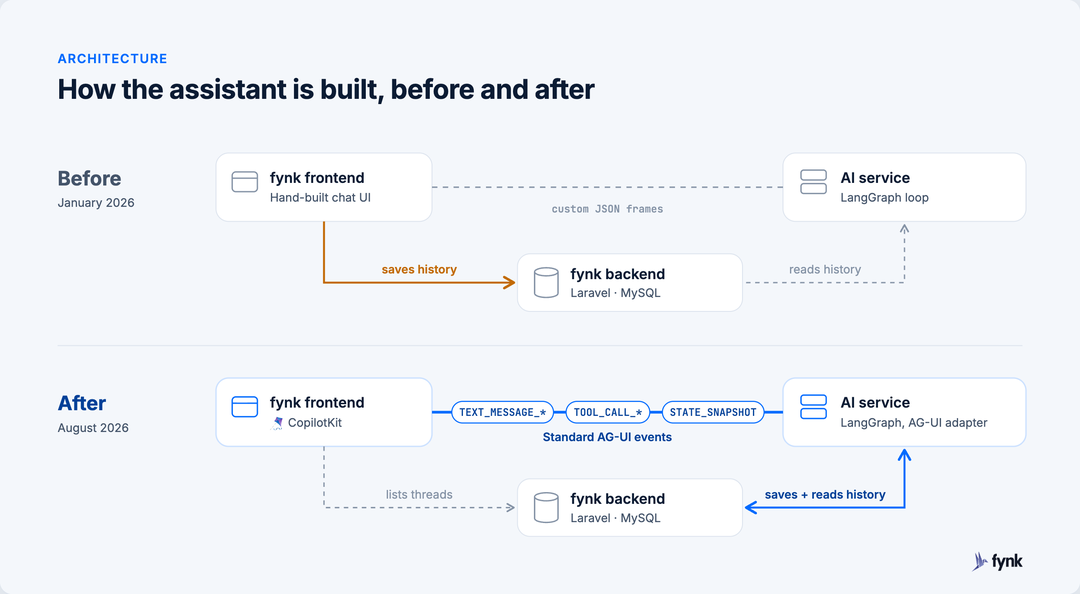
Nothing in there is fynk-specific, and that’s the point. Our AI service runs the agent, built with the open-source framework LangGraph, and an AG-UI adapter turns its output into AG-UI events. Our backend keeps the threads and history. The frontend renders the events with CopilotKit. The events between agent and interface follow the standard, and the conversation history stays in fynk’s own backend.
What do you do when the framework doesn’t support your stack?
You fork it, you wait, or you contribute. CopilotKit was React-only, and fynk is a Vue app. Each option has a cost, and it’s worth being honest about them.
Forking is the fast option for about a month. After that you maintain someone else’s codebase alone, and every upstream fix is a merge you have to do by hand.
Waiting is free, unless the feature you need is the thing your customers are waiting for.
Contributing is the expensive option up front. You have to meet the maintainers’ standards, match their tests and keep up with their pace. In exchange, you stop being the only people who care about your code.
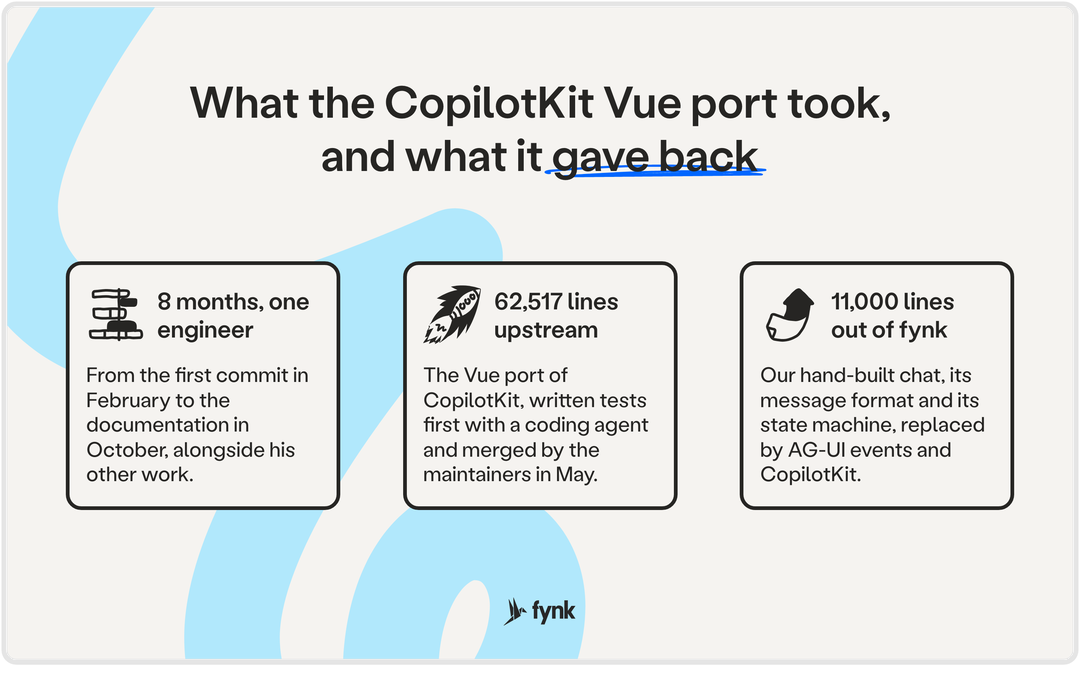
We contributed. Abel started in February, expecting to write “a couple of lines” with a coding agent. His pull request came in at 62,517 lines across 244 files, built tests first against CopilotKit’s own React test suite. The maintainers reviewed it, fixed the architecture where it needed fixing, and merged it on 13 May 2026. @copilotkit/vue was on npm the same evening.
I just wanted to save a couple of lines. Getting from 'it works' to 'it works like CopilotKit' was the real journey.
Most of the benefit came after the merge. Since May, the CopilotKit team and other contributors have shipped more than twenty Vue fixes and features we didn’t have to write: a threads drawer, documentation, human-in-the-loop fixes, accessibility. Abel kept contributing too, five merged pull requests so far. A fork would have given us none of that.
What can a small team with coding agents take on now?
More than we would have planned a year ago. Back then, porting a framework well enough for its maintainers to accept it would have needed a team of developers. We did it with one engineer and a coding agent, alongside his other work: about three months from the first commit in February to the merge, eight months until the documentation was done in October.
Those eight months took about 11,000 lines out of our codebase and brought more than twenty Vue changes we didn’t have to write. As a company of 25 to 30 people, we would make the same call again.
The hours weren’t the only cost. Contributing means working on two fronts, on your own product and in the project’s review. For us that stayed manageable: the maintainers reviewed Abel’s pull request the day he opened it, made the architecture fixes themselves and merged it about two weeks later. And the chats customers already had needed to move to the new setup, history included, which was real work of its own.
What surprised us as a team is where the effort went. Most of it went into telling the agent what to do and checking the result: porting the tests before the code, writing decisions into an AGENTS.md and a parity document instead of repeating them in every prompt, and checking that each test did what its name said.
I asked for 1:1 tests, I got 1:1 test names.
What makes an in-app agent something people trust with contracts?
Mostly, that you can see what it does and stop it before it changes anything.
1. Shared state: it knows which contract you’re looking at
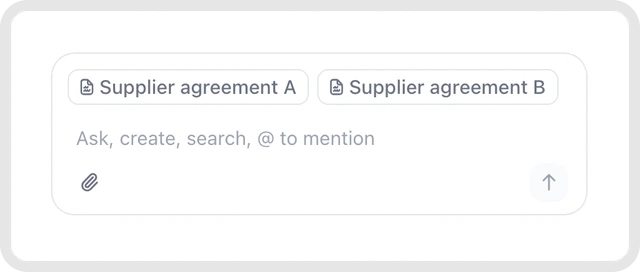
AG-UI keeps a piece of state in sync between the agent and the interface. In fynk, that state holds the documents in context. Open a contract and the assistant already has it attached, so “what’s the notice period here?” just works. In the full-page chat you type @ to add documents, and they stay attached for the follow-up question. The conversation stays open when you move to another page, so you can start with a broad question, open a contract and keep going. For the person asking, that means no copying and pasting, and no explaining which contract they mean.
2. Tool calls in the chat: you see every step it takes
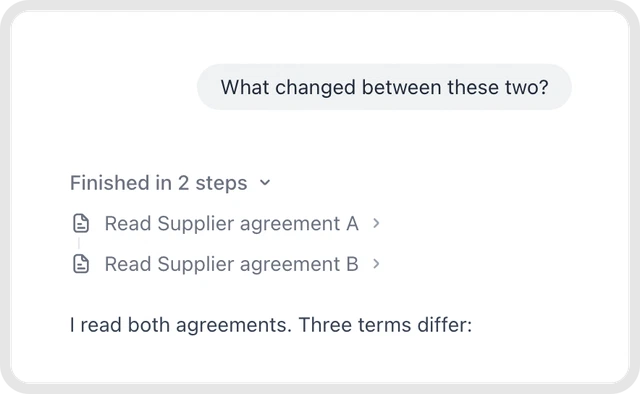
Every tool the agent calls arrives as its own event, and CopilotKit renders it in the thread. Each answer carries a collapsible “Finished in N steps” trace: which documents it read, what it searched, what it changed. Failed steps show up too. With contracts, people need to check what the agent did. The trace shows them.
3. Human in the loop: it asks before it acts
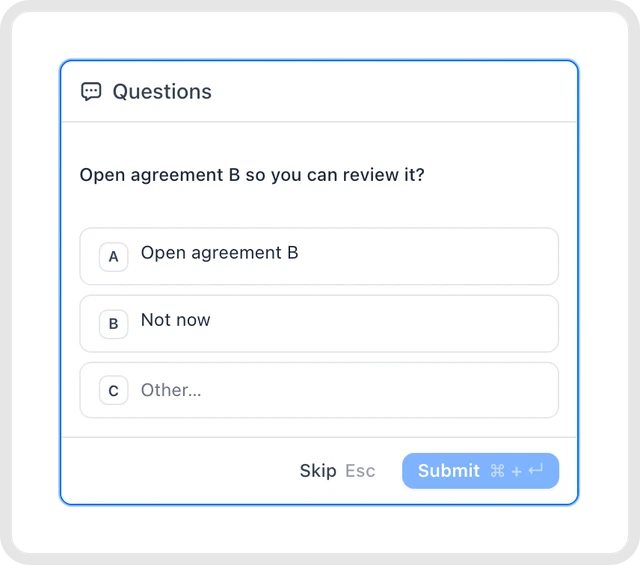
The agent can pause a run and wait for the user. We use that everywhere something changes. Before it opens a document, it asks. Before it moves a contract back from signing, it shows a confirmation that says what will happen (“This cancels the current signing process and invalidates any existing signatures”) and waits for a click. We decided this on the product side first: the assistant asks every time, and users can decide later to give it more room.
In our old chat, this card would have needed changes in five places:
- a new message type in our own format
- the AI service, to send it and wait for the reply
- the frontend, to read it
- the state machine, for a new waiting state
- the WebSocket, to carry the answer back and resume the run
We’d have planned about two weeks for that. Now it’s two places and about two days: the agent pauses the run, and a Vue component shows the card and sends the answer back.
4. Generative UI: tables and lists in our own components
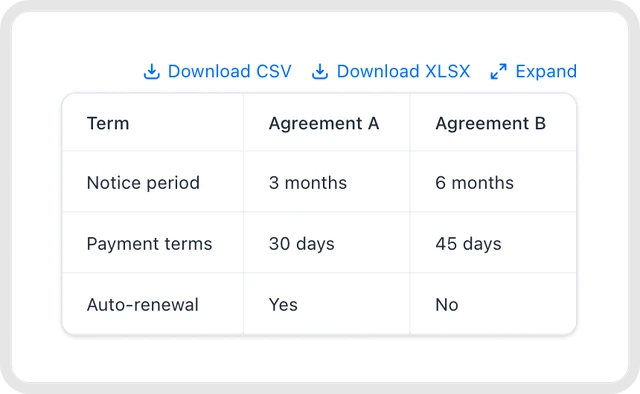
Plain text is a poor format for “compare these two supplier agreements”. The agent can render our own components inside the chat, so the comparison comes back as a real table with every term side by side, and you can download it as CSV or Excel. Lists of documents render the same way, straight from the tool result, instead of being retyped by the model. You can forward the table to your CFO as it is.
5. Citations and permissions: it can do what you can do, nothing more
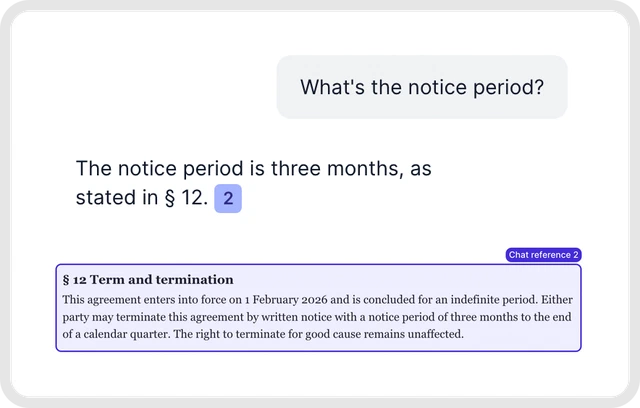
We built this part ourselves. Click a numbered citation and fynk scrolls the contract to the clause and highlights it, so checking an answer takes a second. The assistant has exactly the access rights you have: it only sees the contracts you can see, and only changes what you’re allowed to change. And if a template needs an approval, the assistant waits for that approval too. Ask it to send such a contract for signature and it tells you which checkpoint is still open. All AI processing stays in the EU, and your data is never used to train AI models.
What's stood out most for us is how natural it feels to use. Ask a question the way you'd ask a colleague, get a professional, reliable answer back. We wouldn't want to be without it now.
See the five building blocks on your own contracts.
What should you build yourself, and what should you adopt?
Build what makes your product different, and adopt everything every agent needs. If you’re putting an agent into your own product, here’s how we decided:
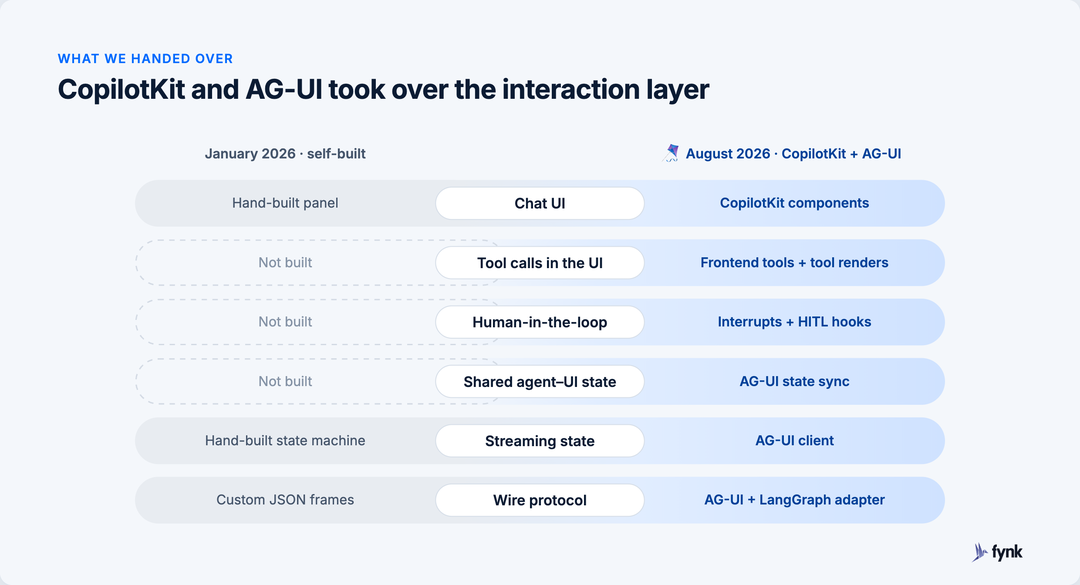
| Layer | Build or adopt | What decided it |
|---|---|---|
| Chat UI, streaming, message list | Adopt (CopilotKit) | Most of our pre-CopilotKit chat code lived here. Replacing it took about 11,000 lines out of fynk. |
| Agent-to-UI wire format | Adopt (AG-UI) | In our own message format, every new feature needed a new field that the frontend and the AI service both had to learn. AG-UI already had events for text, tool calls, state and pausing for the user. |
| Shared state, tool rendering, human in the loop | Adopt (AG-UI, CopilotKit) | We had a hand-written state machine for one document at a time. CopilotKit already handled several documents, tool calls and pauses for the user. |
| The tools themselves | Build | Creating from a template, moving a stage, building a dashboard. The assistant uses the same tools as our API and MCP server, so we write each one once. |
| Permissions and approval checkpoints | Build | That logic already lived in fynk. The assistant calls into it with the user’s rights, so a checkpoint stops it exactly where it stops a person. |
| Citations into the source | Build | Jumping to § 12 and highlighting it needs our own document viewer. We kept this in-house, building on the clause links our first chat already had. |
| Where the data and the AI run | Decide early | Customers ask where their contracts are processed before they ask what the assistant can do. fynk is hosted in the EU, in ISO 27001-certified data centers. All AI processing stays in the EU, and your data is never used to train AI models. Our security page lists every provider. |
If you’re a founder weighing whether to build more of your own stack, we wrote down which contract workflows are worth building yourself and where they stop working.
Frequently asked questions
Yes. The @copilotkit/vue package has been part of CopilotKit since 13 May 2026, when the maintainers merged the Vue port that fynk contributed. It covers the chat components, shared state, tool rendering, generative UI and human in the loop.
AG-UI is the protocol: a standard set of events an AI agent streams to a user interface. CopilotKit is a frontend framework that renders those events, with components for chat, tool calls, shared state and human in the loop. CopilotKit is built on AG-UI, and both come from the same team.
Adopt the parts every agent needs: the chat interface, streaming, the protocol between agent and interface, and the handling of pauses for the user. Build the parts that belong to your product: the tools the agent calls, permissions, approval rules and citations into your own data.
No. All AI processing stays in the EU, and your data is never used to train AI models. The assistant also only sees and does what your own user account can. Our security page lists every provider.
All of them. The assistant is part of every fynk plan, without a separate AI add-on. The pricing page lists the plans.
Try it, read the code, or both
The assistant is in every fynk account: in the sidebar under “fynk AI”, and through the assistant badge on every page. If you’d rather use your own AI tools, the fynk MCP server gives them the same tools. And if you build in Vue, CopilotKit for Vue is ready for your next agent. Some of it is ours, and we’d love to see what you do with it.
CopilotKit announced Vue support on their blog.
Thanks to the CopilotKit and AG-UI teams for the reviews, the fixes and the patience. And to Abel, who planned to write a couple of lines and wrote a framework port.
Please keep in mind that none of the content on our blog should be considered legal advice. We understand the complexities and nuances of legal matters, and as much as we strive to ensure our information is accurate and useful, it cannot replace the personalized advice of a qualified legal professional.



Get a regular dose of insightful contract management content

Take control of your agreements. Move your business forward.
Run agreements the way they should run: fast, clear, and on your terms.
No setup headaches
Go live in days, not quarters
No lock-in
Full export anytime
No hidden fees
Signatures included, no envelope fee