
Claude legal artifacts: what's in the gallery and what contract teams can use

Rezvan Golestaneh
Published · 7 min read
Claude legal artifacts turn legal documents into working boards, tables and checkers you can share in Claude.
- Anthropic announced the legal gallery on October 28, 2026.
- Start with an example, add your documents and connectors, then tailor the artifact.
- For contract teams, the deviation board, tabular review, matter board and Obligations Checker are the ones to try.
- Claude does the first pass; a lawyer applies judgment.
- Approvals, signatures, deadlines and the audit trail still happen outside the artifact.
Claude legal artifacts are adaptable boards, tables, and checkers for legal work. Anthropic announced the legal gallery on October 28, 2026, with examples that teams can fill with their own documents and connected sources.
For contract teams, the appeal is practical: turn agreements into a view of exceptions, obligations, or upcoming work. This post covers what’s in the gallery, which artifacts are worth a contract team’s time, and what still has to happen after the board is built.
What are Claude legal artifacts?
Claude legal artifacts are interactive tools for specific legal tasks that teams can adapt and share in Claude, such as trackers, dashboards and review tables. Each one opens with a worked example, so you see the workflow before adding your own material.
Using one takes four steps. Open an example in the legal gallery, bring your documents and sources, and ask Claude to tailor it to your team. Connectors can pull in playbooks or research sources, so you don’t have to upload everything by hand. Claude completes a first pass, a lawyer applies judgment, and the finished artifact can be shared with colleagues, clients or partners. Every output links back to its source.
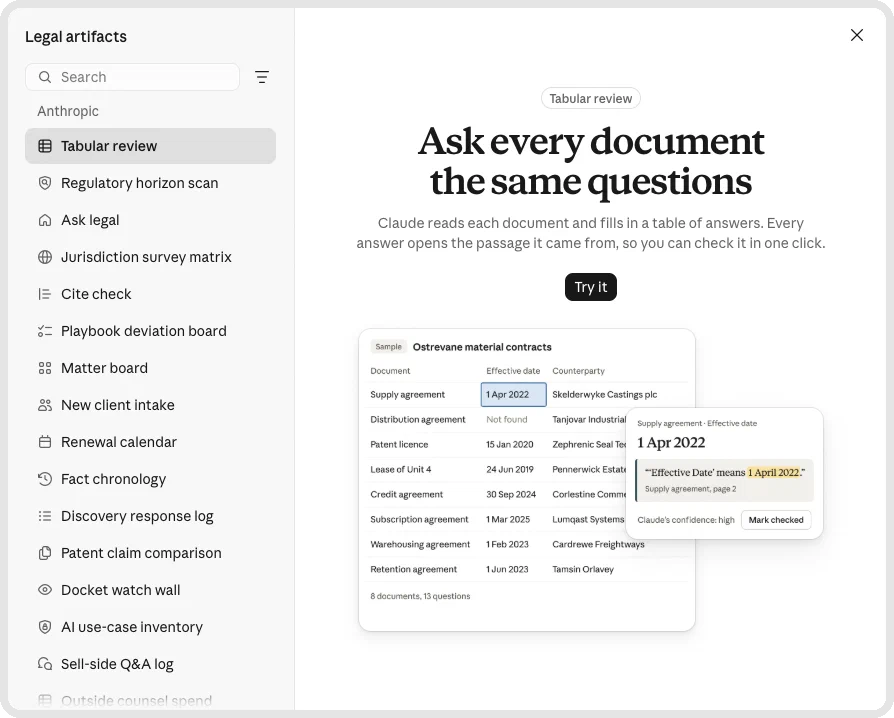


Legal artifacts are not the same as the Claude legal plugin. The plugin gives Claude a set of legal commands; an artifact is the working board or table your team opens, fills and shares.
Which legal artifacts are in the gallery?
When we opened the gallery on October 30, 2026, it listed 22 artifacts from Anthropic, from Ask legal and New client intake to a Renewal calendar, plus artifacts from partners such as Foley & Lardner, Goodwin, Harvey, PwC and Wilson Sonsini. The table covers the ten named in Anthropic’s announcement. The last column is our assessment for contract teams.
| Artifact | Built by | What it does | Useful for contract teams? |
|---|---|---|---|
| Cite check | Anthropic | Compares a legal document with sources; flags mismatched quotes, wrong page numbers, and unsupported claims. | For checking supporting legal analysis. |
| Jurisdiction survey matrix | Anthropic | Compares a legal topic across states or countries, with links to the law. | For researching requirements across markets. |
| Matter board | Anthropic | Turns engagement letters, emails, or spreadsheets into open matters with owners, next steps, and deadlines. | Yes, for organizing incoming work. |
| Playbook deviation board | Anthropic | Compares contracts with standard terms, flags differences, and routes exceptions to their approver. | Yes, for reviewing departures from policy. |
| Regulatory horizon scan | Anthropic | Maps upcoming regulations by business and location, ranked by impact, with sources. | For planning reviews prompted by regulatory changes. |
| Tabular review | Anthropic | Shows requested terms across contracts, linked to the exact language. | Yes, for comparing a group of agreements. |
| AI Governance Benchmark | Goodwin | AI governance benchmarking. | Relevant to governance work rather than routine contract tracking. |
| Harvey Intake | Harvey | Collects legal requests, answers routine ones from Legal’s guidance, and routes the rest to a lawyer. | For handling incoming contract questions and requests. |
| Obligations Checker | Foley & Lardner | Reviews both parties’ obligations before and after closing. | Yes, for preparing contract follow-up. |
| Subpoena Response Tool | PwC | Subpoena response work. | Primarily for a different legal task. |
The gallery also includes access-to-justice artifacts built with public interest groups. Some are tied to New York or D.C. law, so check the jurisdiction before adapting one.
The four artifacts built for contract work
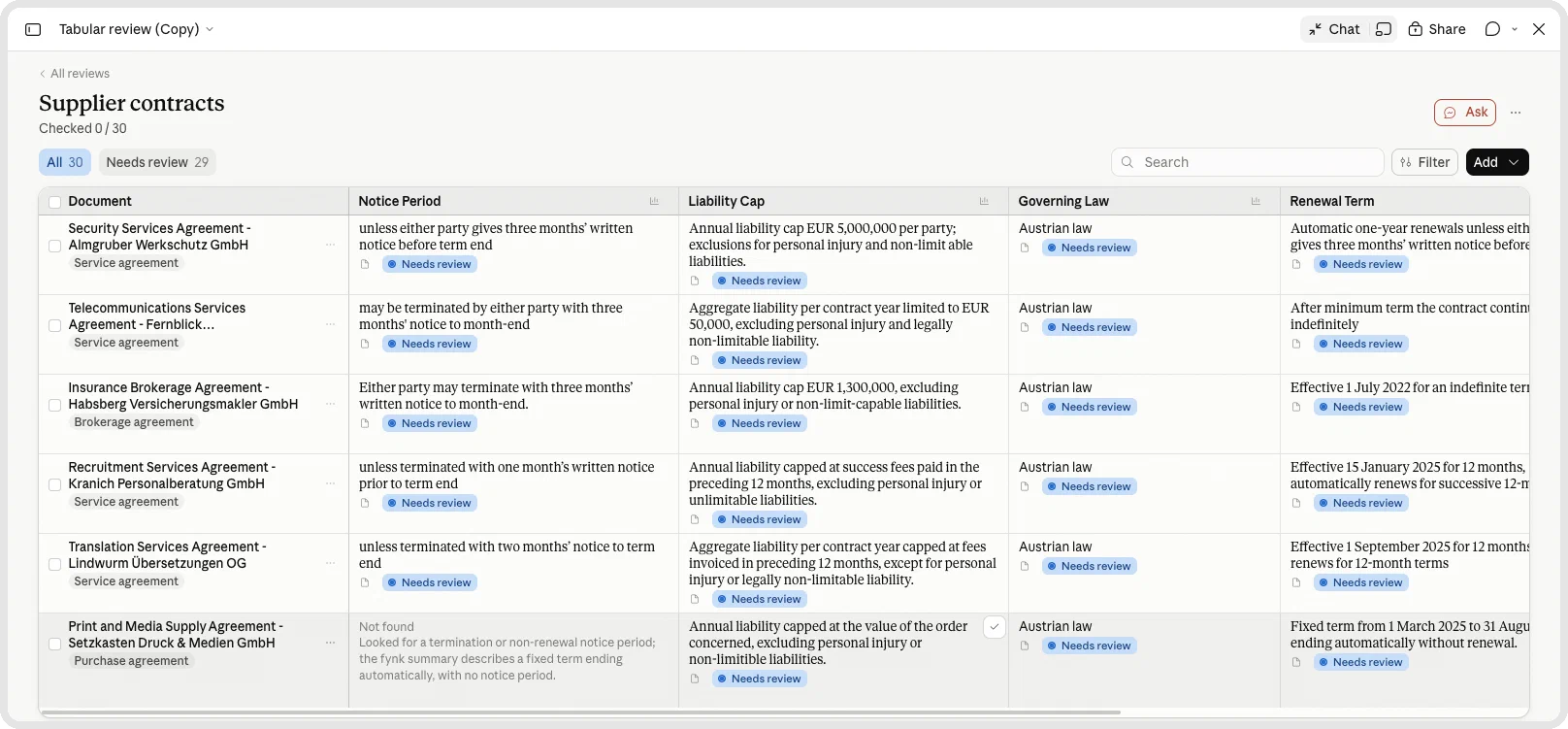
For contract teams, the playbook deviation board, tabular review, matter board and Obligations Checker are the strongest starting points. Each turns familiar document work into something a team can review together. The tabular review below is a real one we built in Claude from contracts in fynk; the other three are examples we made.
1. Playbook deviation board: which clauses need an exception?
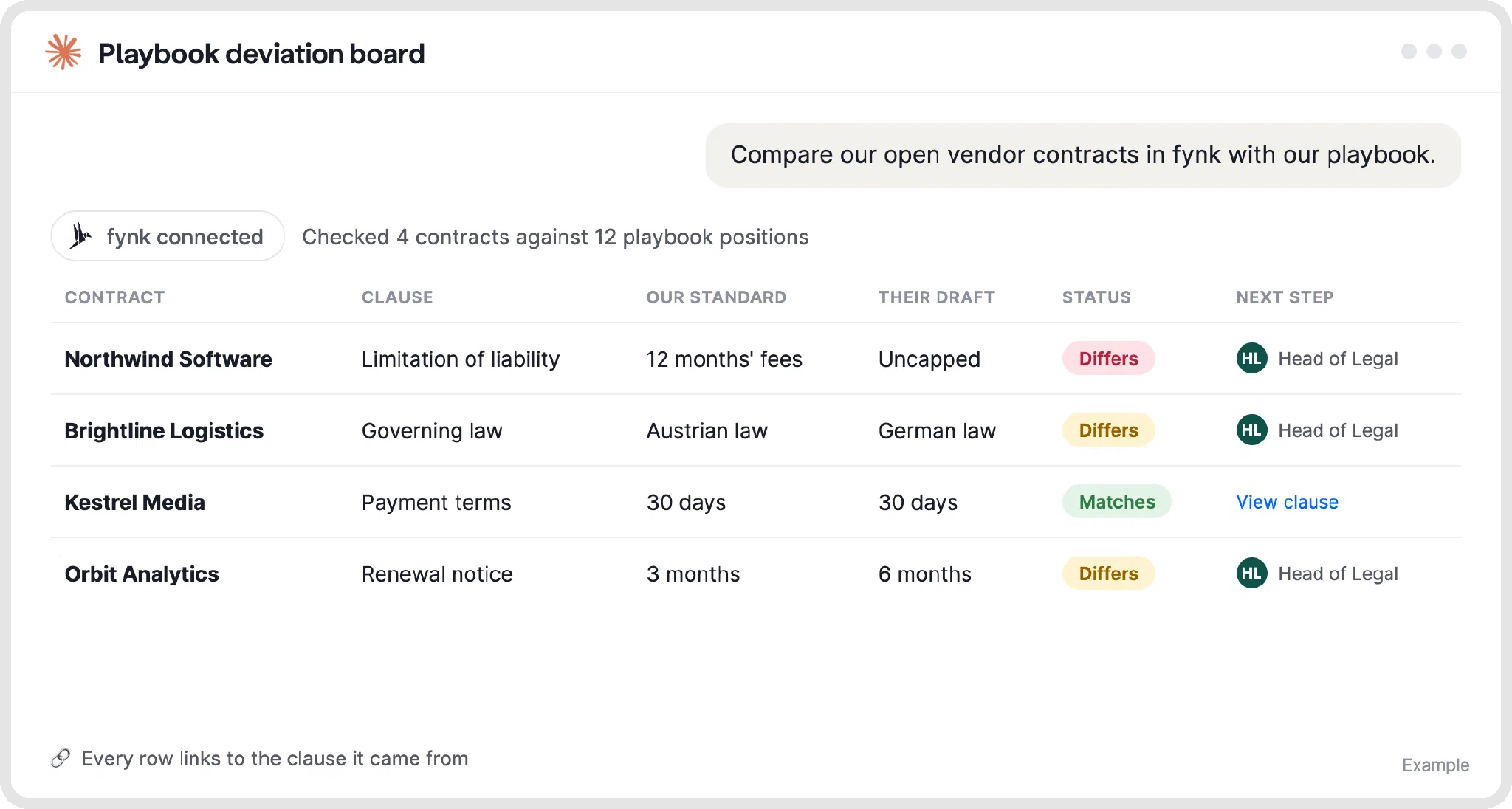
The playbook deviation board highlights departures from your standard terms and routes them to the person who approves exceptions. That’s useful when reviewers need one view of the differences across incoming drafts.
Supply the actual playbook, including acceptable fallbacks and escalation rules. “Different” and “unacceptable” aren’t the same thing.
2. Tabular review: what do these contracts actually say?
Tabular review creates a table of requested terms across agreements, with links to the exact language. It’s useful for a focused comparison, such as checking how a set of supplier agreements handles notice periods, liability caps or governing law.
Choose the question before choosing the columns. A smaller table with clear source language is easier to verify than a sprawling inventory.
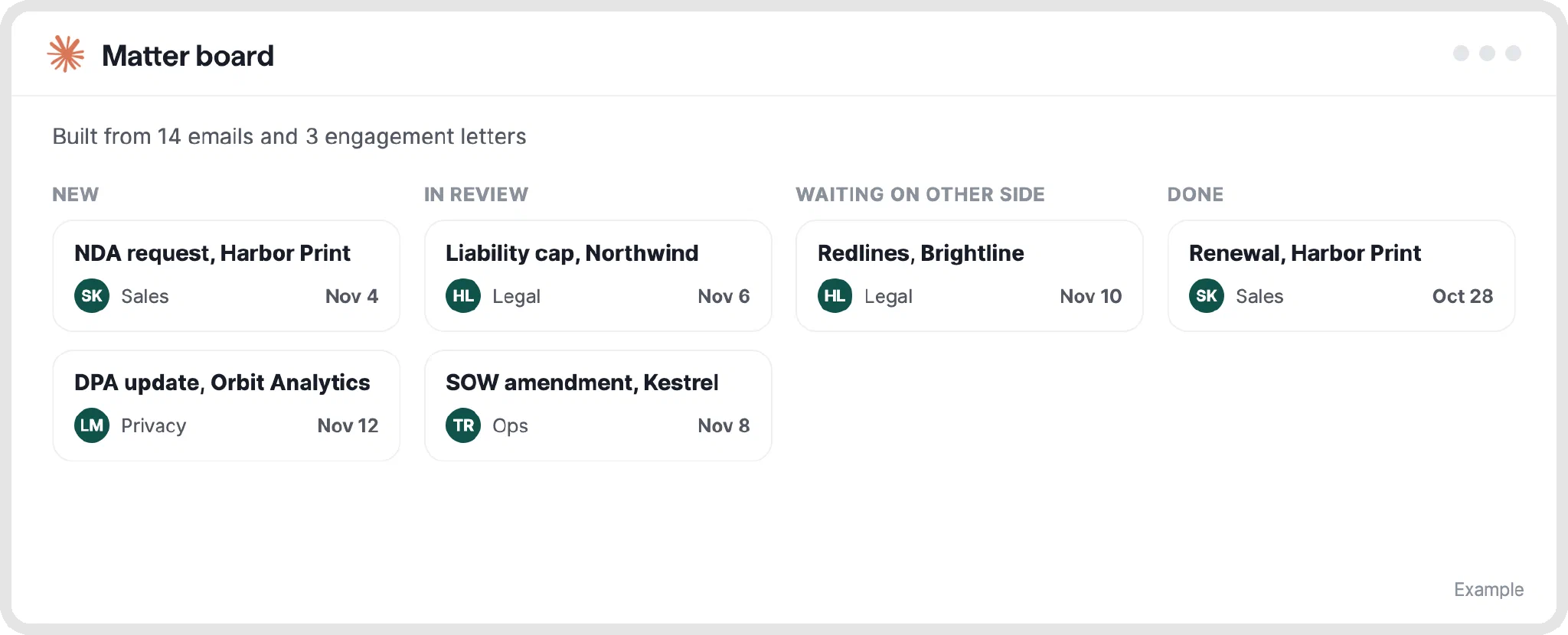
3. Matter board: who owns the next step?
The matter board brings scattered engagement letters, emails or spreadsheets into one view of open work. Its strength is making the owner, next action and deadline visible together.
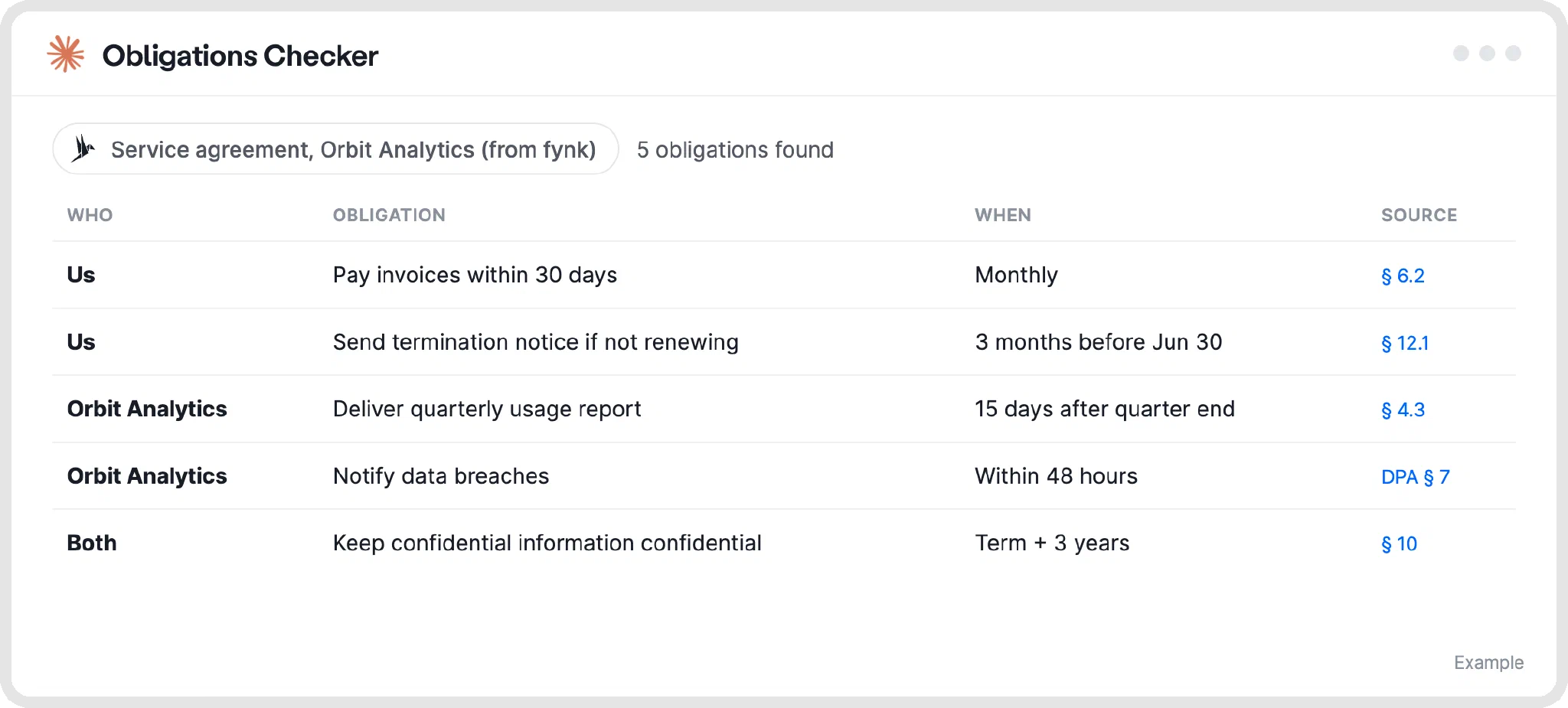
4. Obligations Checker: what happens after closing?
Foley & Lardner’s Obligations Checker reviews obligations on both sides of an agreement, before and after closing. It’s a useful starting point for finding promises that need an owner or a date.
Check each obligation against its source, then assign the work. A row saying “deliver quarterly usage report” won’t send the reminder.
Ask your contract anything.
What can you do with Claude legal artifacts and fynk together?
Claude builds the view; fynk keeps the contracts, approvals, signatures and deadlines behind it. fynk is in Claude’s connector directory, and its Claude integration only reaches what your fynk role allows.
1. Deviation board + approval workflows
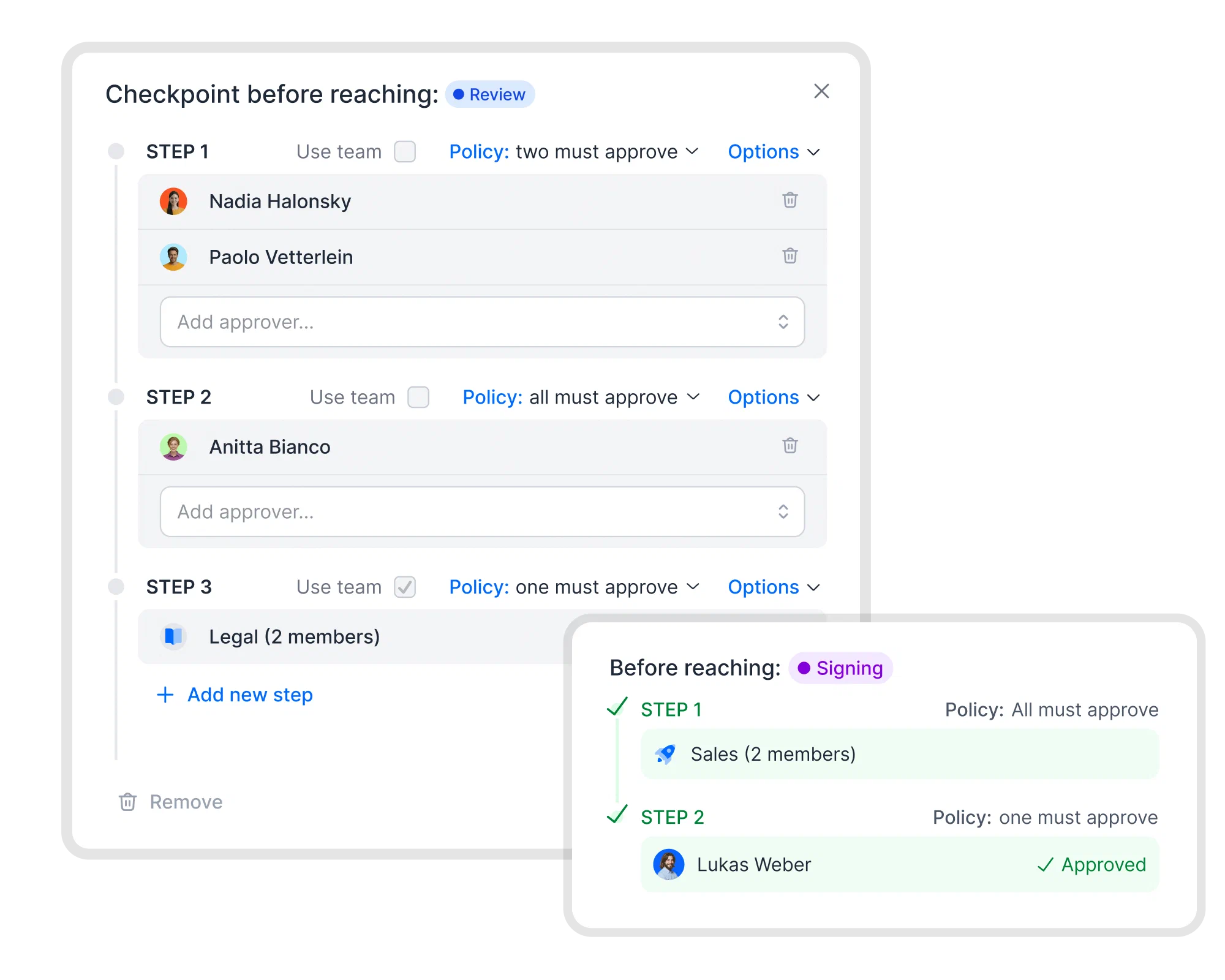
Build the board from contracts in fynk, then settle each exception where the contract lives. Approval workflows block signing until every approval is in, and AI review runs the same kind of check inside fynk.
2. Tabular review + metadata fields
Asking the same questions every quarter? Store the answers once. AI import turns agreements into data, and metadata fields keep dates, values and terms with each contract.
3. Matter board + live dashboards
A board built from emails ages from day one. fynk’s dashboards show contracts, tasks and stages straight from contract data, always current.
4. Obligations Checker + reminders
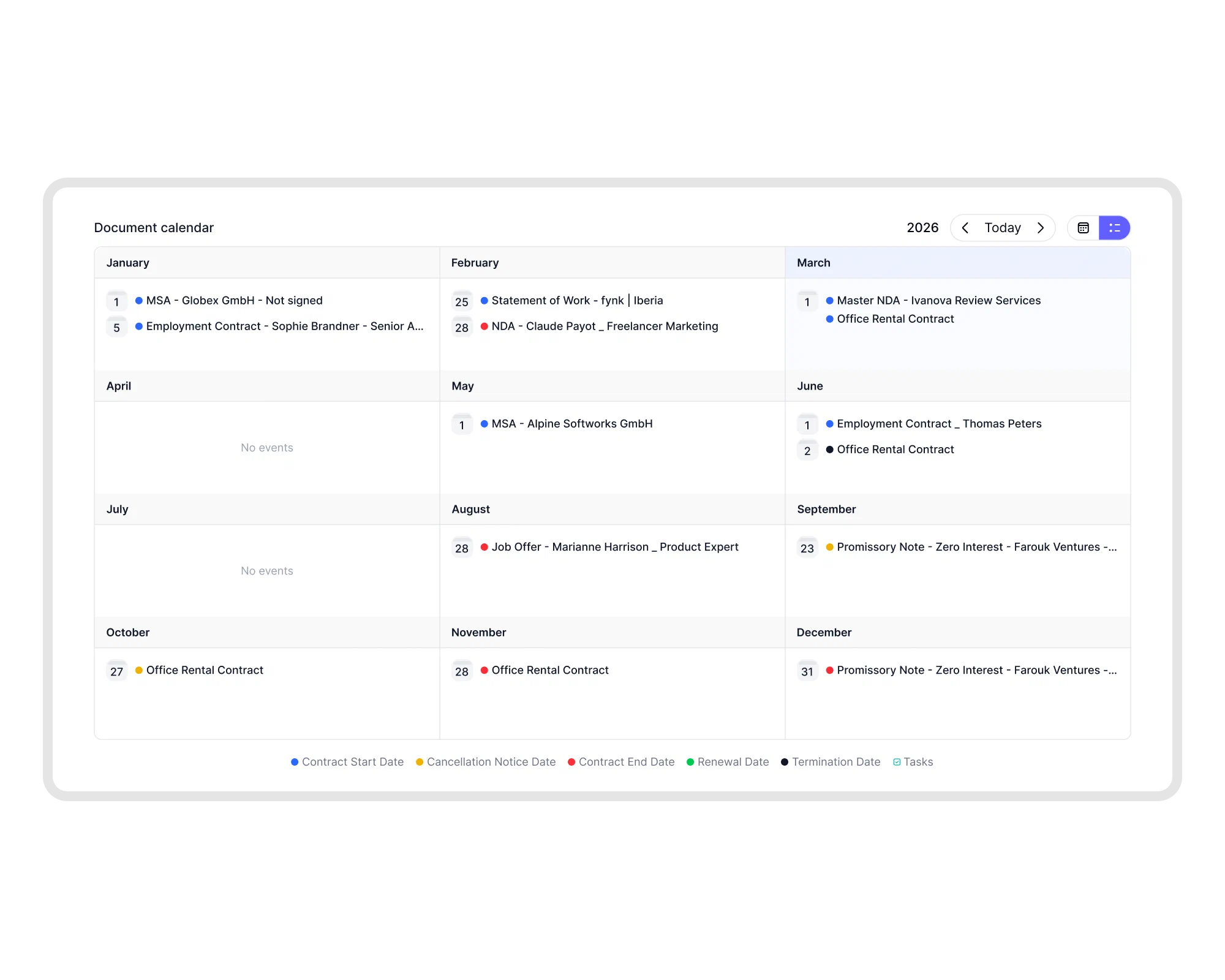
Found the deadlines? Keep them where someone gets reminded. The contract calendar and tasks and reminders alert the owner before each date.
Start small: build one board from a few contracts you already know and check every source. Signing, approvals and AI review stay in fynk, with people in control.
That split is how CoastCap runs the paperwork of seven companies from one Claude chat. Claude does the work, and fynk holds the signed record:
It's kind of bulletproof. Once the document is established in fynk and signed, it provides sufficient evidence for our system of record, and there is no way to alter it later on.

No Claude Enterprise? The fynk AI assistant is included on every fynk plan. It searches contracts, creates documents, fills fields and moves contracts toward signing, asking for confirmation before changes.
What can’t Claude legal artifacts do?
Claude legal artifacts give you a first pass, not the contract process around it. Anthropic puts a lawyer’s judgment after Claude’s first pass, and everything that happens to the contract afterwards needs a system that holds it. Here is where an artifact stops, and what fynk does at that point:
- Stay current on its own. A board is only as current as the documents behind it. If an amendment is missing, the analysis describes terms that no longer apply. fynk keeps one current version of every contract in its document hub, so a check runs on the version your team actually uses.
- Approve an exception. Routing a clause to an approver doesn’t approve it. In fynk, contracts can’t be signed until every required approval is in.
- Get the contract signed. An artifact doesn’t collect signatures. fynk sends contracts for signature in one click, at SES, AES or QES level under eIDAS, with no account needed for signers (electronic signatures).
- Remind anyone of a deadline. A list of obligations or renewal dates doesn’t alert people by itself. fynk sends alerts before renewals, expirations and key dates to the person who owns them.
- Keep a record of what happened. An artifact isn’t an audit trail. fynk logs every view, edit and signature automatically in a tamper-proof audit trail.
- Replace the review. Artifacts prepare a first pass; someone still decides, with or without AI help.
Access is worth checking too. The announcement lists Claude Enterprise and gives no pricing, and people you share an artifact with need a Claude account. On Team and Enterprise plans, public sharing is off by default, so check the sharing settings before sending client work.
To give your contract work a shared home, try fynk free .
What should you check before using Claude legal artifacts?
Check access, sharing permissions, review responsibility, and where the contract work continues.
The announcement gives no separate pricing for legal artifacts and lists Claude Enterprise. It doesn't say whether other plans get access.
It compares contracts with your standard terms, flags clauses that differ, and routes exceptions to the person who approves them. A reviewer still applies judgment.
Yes, within your plan's sharing settings. On Team and Enterprise, owners control outside sharing and public sharing is off by default, and recipients need a Claude account.
No. A review board doesn't replace required approvals, signing, a contract audit trail, or assigned deadline reminders. fynk holds the contracts and manages those steps throughout their lifecycle.
No. The legal plugin gives Claude a set of legal workflow commands. Legal artifacts are interactive boards and tables you open, fill and share, announced on October 28, 2026.
Searching for a contract management solution?
Find out how fynk can help you close deals faster and simplify your eSigning process – request a demo to see it in action.
Please keep in mind that none of the content on our blog should be considered legal advice. We understand the complexities and nuances of legal matters, and as much as we strive to ensure our information is accurate and useful, it cannot replace the personalized advice of a qualified legal professional.


Get a regular dose of insightful contract management content

Take control of your agreements. Move your business forward.
Run agreements the way they should run: fast, clear, and on your terms.
No setup headaches
Go live in days, not quarters
No lock-in
Full export anytime
No hidden fees
Signatures included, no envelope fee