
Contract repository management: a practical guide

Rezvan Golestaneh
Updated · Published · 14 min read
A contract repository only pays off if it is managed: one current version of every contract, structured data, clear access rules and dates that trigger action.
- What good contract repository management covers, in seven parts
- Spreadsheet vs shared drive vs CLM repository, side by side
- A step-by-step guide to setting up or migrating a repository
- The KPIs that show whether your repository is working
Contract repository management is the work of keeping every contract in one central place, with structured data about it, so that anyone with the right access can find the current version, see its key terms and act on its deadlines.
A well-managed repository has seven things: a single source of truth, consistent metadata, fast search, role-based access, tracked dates and renewals, an audit trail, and clear retention rules. To set one up: inventory your contracts, define a metadata schema and naming rules, import and extract data, set permissions and reminders, then measure coverage and missed deadlines.
- Contract repository
- A central, searchable store for all of an organisation’s contracts and their related documents (amendments, annexes, statements of work), together with structured data about each contract: parties, dates, value, owner and status. See also the glossary entry on the contract repository.
- Contract repository management
- The rules, roles and routines that keep that repository complete, accurate and useful over time: how contracts get in, how they are described, who can see them, how deadlines are tracked and when records are archived or deleted.
What is a contract repository?
A contract repository is the one place where your organisation keeps its agreements: signed contracts, drafts in progress and everything attached to them. It replaces the mix of shared folders, email attachments, desk drawers and personal drives that most companies start with.
The difference between a repository and a folder is the data. A folder holds files. A repository also knows what is inside them: who the parties are, when the contract ends, how much notice you have to give, what it is worth and who is responsible for it. That data is what makes contracts searchable, reportable and actionable without opening each PDF.
Why contract repository management matters
Scattered contracts cost money in ways that are invisible until something goes wrong: an auto-renewal nobody caught, a price increase nobody invoiced, an obligation nobody knew about.
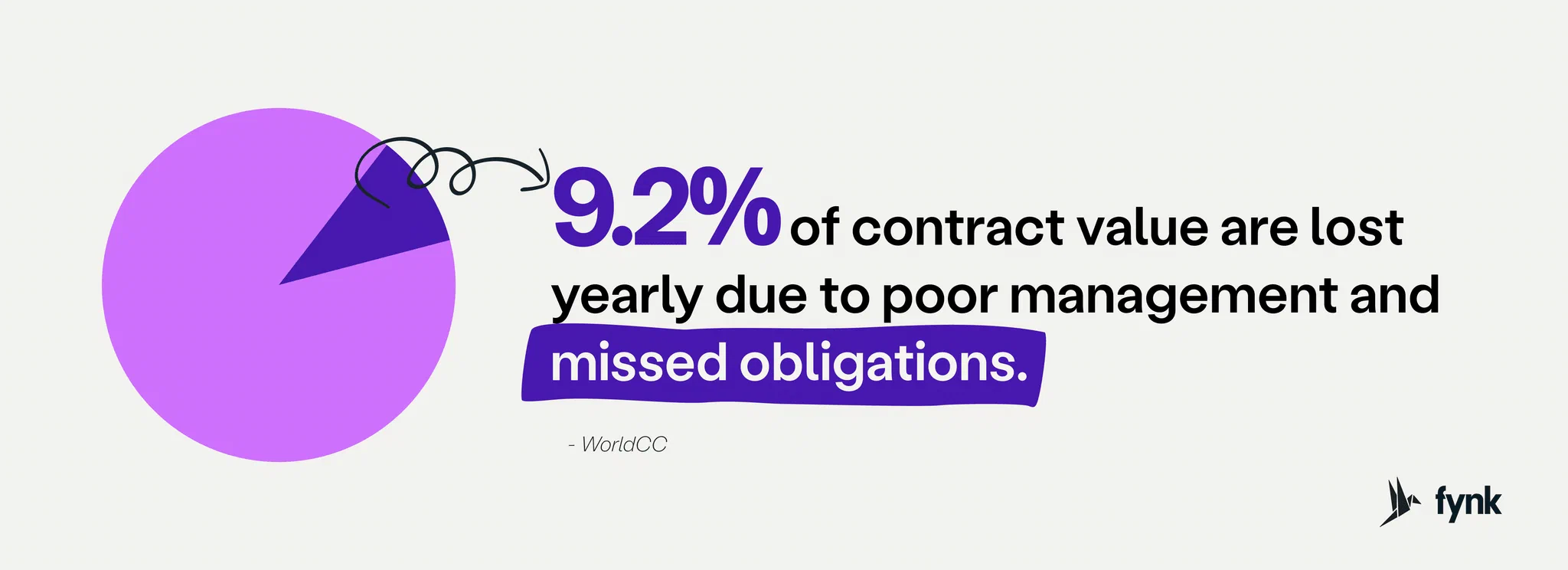
Industry research puts the value lost to poor contract management at around 9% of annual contract value, with most of the loss happening after signature.


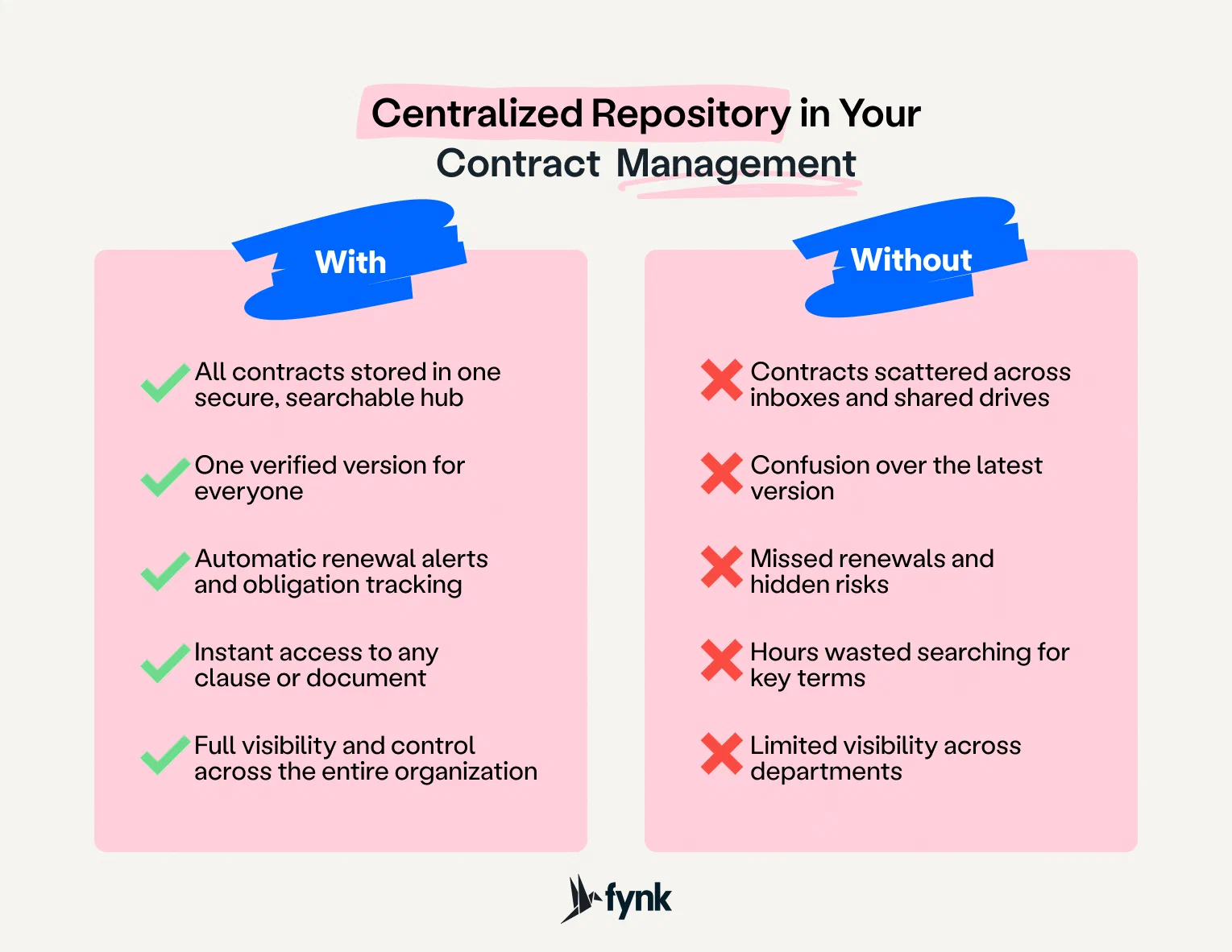
A central, well-run repository fixes the basics:
- Findability: any contract, and any clause in it, in seconds instead of hours.
- One version: everyone works from the current signed version, not a draft someone saved locally.
- Deadlines: renewals, notice periods and expiries trigger reminders instead of relying on memory.
- Visibility: you can answer “how many supplier contracts renew next quarter, and what are they worth?” without a project.
- Audit readiness: you can show who changed, approved and signed what.
What good contract repository management covers
| Part | What it means | The test question |
|---|---|---|
| Single source of truth | Every contract lives in one place, in its current version, with amendments and annexes attached | Can anyone tell you where the current version of a given contract is, in under a minute? |
| Metadata | Each contract has structured fields: parties, type, start and end dates, notice period, value, owner, status | Can you filter all contracts by end date or counterparty without opening them? |
| Search | Full-text search across contracts, including scanned files, plus filters on metadata | Can you find every contract with an auto-renewal clause? |
| Access control | Users see and edit only what their role and team allow | Can a sales rep see HR contracts? (The answer should be no.) |
| Deadlines and renewals | Key dates trigger reminders and tasks for a named person, early enough to act | Who gets told 90 days before the biggest supplier contract renews? |
| Audit trail | Every view, edit, approval and signature is logged and cannot be altered | Can you show who approved a change, and when? |
| Retention | Rules for how long each contract type is kept after it ends, and when it is archived or deleted | Do you know which expired contracts you must still keep, and for how long? |
Most problems with repositories come from missing one of these, not from the software. A tool with perfect search is still useless if half the contracts never get uploaded.
What to store in a contract repository
Documents:
- Customer contracts: sales agreements, subscription terms, master service agreements and statements of work
- Supplier and vendor contracts: purchase agreements, service-level agreements, NDAs
- Employment and HR: employment contracts, contractor agreements, non-competes
- Corporate: shareholder agreements, joint venture agreements, board resolutions
- Real estate and assets: leases, licences, equipment financing
- Everything that changes a contract: amendments, addenda, side letters, renewals and termination notices
Data about each contract (the metadata):
- Parties and the internal owner
- Contract type and status (draft, in negotiation, signed, expired, terminated)
- Start date, end date, renewal terms and notice period
- Contract value, currency and payment terms
- Governing law and key obligations
- Links to related contracts (a master agreement and its statements of work)
For a deeper look at which fields to track, read our guide to contract metadata best practices.
Spreadsheet vs shared drive vs CLM repository
Most companies move through three stages. The table shows what each one can and cannot do.
| Spreadsheet register | Shared drive (Google Drive, SharePoint, Dropbox) | CLM repository | |
|---|---|---|---|
| Where the contract lives | Somewhere else; the sheet only lists it | In folders | In the system, with its data |
| Contract data | Typed in by hand, often out of date | Only the file name and folder | Structured metadata, often extracted by AI |
| Search | Only what someone typed into the sheet | File names and, in some tools, full text | Full text including scans, plus filters on any field |
| Deadlines and reminders | Manual, or a calendar entry someone has to create | None | Automatic reminders and tasks from contract dates |
| Versions | Not tracked | Version history per file, but drafts and copies multiply | One record per contract with version history |
| Related documents | Not linked | Loosely, by folder | Linked: amendments, annexes and child agreements |
| Access control | Whole sheet or nothing | Per folder or file | Per role, team and document |
| Audit trail | None | Basic file activity | Every view, edit, approval and signature |
| Reporting | Possible, if the data is correct | None | Dashboards built on live contract data |
| Works for | A few dozen contracts and one owner | Small teams that mainly need storage | Growing teams with renewals, approvals and audits |
Spreadsheets and shared drives are not wrong. They stop working at the point where more than one person relies on the contract data and nobody owns keeping it current. We cover that tipping point in why contract management in Excel is not a good idea.
Contract repository vs document management system
A document management system (DMS) stores any kind of file and is good at folders, versions and sharing. A contract repository is built for contracts: it knows what a renewal date, a notice period or a counterparty is, and it uses those fields to search, remind and report. If your DMS cannot tell you which contracts end next month, it is storage, not contract repository management. The longer comparison is in contract management vs document management.
How to set up or migrate a contract repository, step by step
Step 1: Inventory what you have
List every place contracts live today: shared drives, email inboxes, the CRM, the ERP, personal laptops, filing cabinets. Ask each department head. Expect to find contracts you did not know about.
For each source, estimate the number of contracts and note who owns them. Decide what moves: active contracts always, expired contracts only if you still need them for retention, disputes or reference.
Step 2: Define your metadata schema
Agree on the fields every contract must have before anything is imported. Start small: ten to fifteen fields that people will actually use beat fifty that nobody fills in. A good minimum:
| Field | Example | Why it matters |
|---|---|---|
| Contract type | Supplier agreement | Filtering, reporting, templates |
| Counterparty | Acme GmbH | Search, relationship view |
| Internal owner | Head of Procurement | Accountability, reminders |
| Team or department | Procurement | Access control |
| Status | Signed | Pipeline and reporting |
| Start date | 2026-01-01 | Term calculation |
| End date | 2027-12-31 | Renewal tracking |
| Renewal type | Automatic, 12 months | Avoiding unwanted renewals |
| Notice period | 3 months | The date that actually matters |
| Contract value | EUR 48,000 per year | Spend and revenue reporting |
| Governing law | German law | Risk and legal review |
Define allowed values for each field (a fixed list of contract types, a date format) so that reports add up.
Step 3: Set naming and structure rules
Even with good metadata, consistent names help. A simple pattern such as Counterparty_ContractType_YYYY-MM-DD makes duplicates obvious. Decide how amendments and statements of work are linked to their master agreement, and who is allowed to create new contract types or fields.
Step 4: Clean up, then import
Remove duplicates, identify unsigned or incomplete copies and find the final signed versions before you import. Bad data in means bad reminders and bad reports out.
Then import in batches, starting with the contracts that carry the most value or risk: top customers, key suppliers, anything renewing in the next twelve months. Scanned paper contracts should go through OCR so their text becomes searchable.
Step 5: Extract the data with AI, then review it
Filling in metadata by hand is where most repository projects stall. AI extraction reads each contract and proposes the values for your fields: parties, dates, durations, renewal terms, value. Plan for a human review, especially for scans and unusual contracts. Check a sample of each contract type, correct the errors, and spot-check again after the first full batch.
Step 6: Set permissions
Map access to your organisation. Legal usually needs everything. Finance needs values and payment terms. Sales needs its customer contracts. HR contracts stay with HR. Assign contracts to teams so access follows ownership automatically, and keep the number of people with full access small.
Step 7: Turn dates into reminders and tasks
For every contract with an end date or notice period, set a reminder for the owner far enough ahead to act: typically 60 to 90 days before the notice deadline for important contracts, so there is time to renegotiate or terminate. Remind on the notice date, not the end date, because by the end date it is too late.
Step 8: Make the repository the only way in
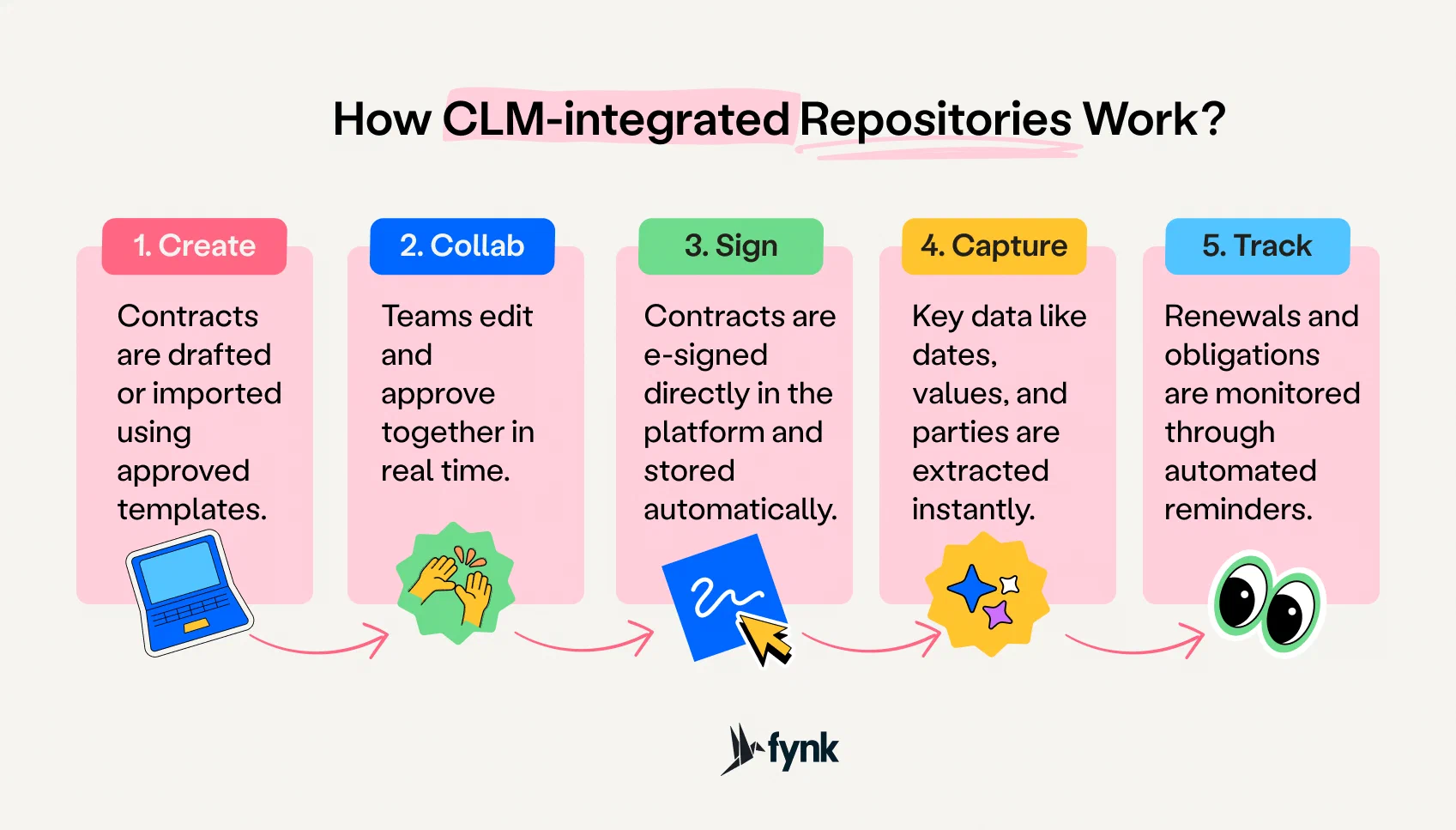
Agree that new contracts are created in, or uploaded to, the repository the day they are signed, and that nobody keeps a private copy as the reference. If contracts are drafted and signed inside the same system, this happens automatically. Name an owner for the repository itself (often legal operations) and review data quality and access rights at least twice a year.
KPIs for contract repository management
You cannot tell whether a repository works by looking at it. Measure it.
| KPI | How to measure | What good looks like |
|---|---|---|
| Coverage | Contracts in the repository ÷ all active contracts you know of | Close to 100% for active contracts |
| Metadata completeness | Contracts with all required fields filled ÷ all contracts | Above 90%, and 100% for end date and owner |
| Time to find a contract | Average time for a user to find a given contract and clause | Seconds to a minute, not hours |
| Missed deadlines | Renewals or notice periods missed in the period | Zero |
| Unwanted auto-renewals | Contracts renewed that the owner wanted to end or renegotiate | Falling to zero |
| Contracts without an owner | Contracts with no internal owner assigned | Zero |
| Adoption | Share of new contracts created or uploaded in the repository within a set number of days of signing | Every new contract |
| Access exceptions | Users with broader access than their role needs, found in access reviews | Falling over time |
| Audit preparation time | Time to produce the contracts and history an auditor requests | Hours, not weeks |
Track two or three of these from day one, usually coverage, metadata completeness and missed deadlines. They tell you whether the repository is complete, whether its data can be trusted and whether it is preventing the losses it was set up to prevent. A contract management audit is a good moment to take a baseline.
How AI helps contract repository management
AI changes the economics of a repository, because the expensive part was always reading contracts and typing data into fields.
- Data extraction: AI reads uploaded contracts, including scans, and fills in parties, dates, durations, renewal terms and values. Our guide to contract metadata extraction walks through the process.
- Search in plain language: instead of guessing keywords, you ask “which supplier contracts renew automatically next year?” and get the matching contracts, even when the wording varies.
- Keeping data current: when a contract changes, re-running the analysis on that contract refreshes the affected fields, so reports stay accurate.
- Risk review: AI can flag clauses that differ from your standard positions, so legal reviews the exceptions instead of everything.
AI makes mistakes, particularly with poor scans and unusual layouts. Treat its output as a first draft that a person confirms, at least until you trust it for a given contract type.
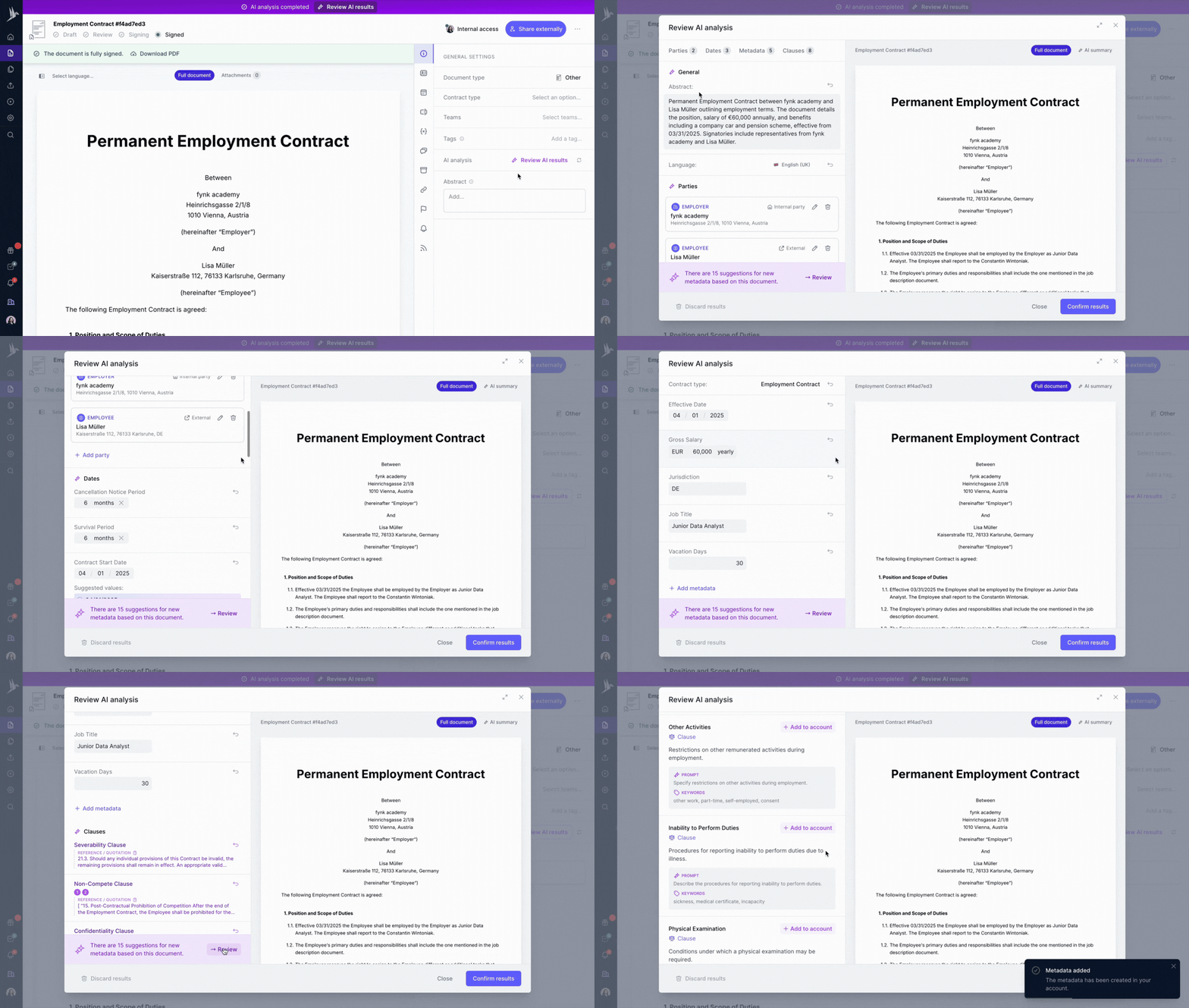
AI analysis and metadata extraction in fynk
Common contract repository mistakes
| Mistake | Why it hurts | What to do instead |
|---|---|---|
| Treating it as a legal-only tool | Other teams keep their own files and spreadsheets, so the repository is never complete | Involve finance, procurement, sales and HR from the start and give them views that serve them |
| Importing everything as-is | Duplicates and drafts make search results unreliable | Clean up and identify final signed versions before import |
| Too many metadata fields | Nobody fills them in, and completeness collapses | Start with 10 to 15 required fields and add more only when someone needs them |
| Reminders on the end date | By the end date, the notice period has usually passed | Remind on the notice deadline, with lead time |
| Everyone can see everything | Sensitive contracts are exposed and compliance risk grows | Role- and team-based permissions, reviewed regularly |
| No owner for the repository | Data quality decays within months | Name an owner and schedule a data review twice a year |
| No connection to other systems | Data is typed in twice and drifts apart | Connect the repository to your CRM and other core tools |
How fynk handles contract repository management
fynk is contract management software with the repository at its centre. The parts described above map directly onto it:
- One home for every contract. The document hub keeps every contract with a single current version, version history and an audit trail, and lets you search, filter, update, move or export contracts in bulk.
- Structured data without manual entry. Metadata fields hold dates, values, owners and terms, standard or custom. AI import reads PDFs, Word files and scans in bulk and extracts parties, dates, durations and renewal terms for you to review and confirm.
- Search that understands questions. AI search finds clauses, names or whole agreements from a plain-language question, and OCR makes scanned files searchable.
- Deadlines that trigger action. Contract dates and renewals are tracked with automatic reminders, and the contract calendar shows every date and task in one view.
- The right access. User roles and teams control who sees and edits what, and the tamper-proof audit trail logs every view, edit, approval and signature.
- The whole picture. Related files link a master agreement to its statements of work and attach annexes and amendments, and dashboards turn contract data into charts and numbers.
Because contracts are drafted, approved and signed in the same system, new agreements land in the repository automatically. fynk connects to CRMs such as Salesforce, HubSpot and Pipedrive, and to tools such as Slack and Zapier, through its integrations. fynk is ISO 27001 certified and hosted in the EU.
It’s about time your documents
find a home.
FAQs about contract repository management
Contract repository management is keeping all of an organisation’s contracts in one central place with structured data about each one, and maintaining it over time: how contracts get in, how they are described, who can access them, how deadlines are tracked and when records are archived or deleted.
A contract repository stores and organises contracts and their data. A contract lifecycle management (CLM) platform covers the whole process: drafting, negotiation, approval, signature, storage and renewal. The repository is the core of a CLM, and a CLM keeps the repository complete because new contracts are created inside it.
For storage, yes. But a shared drive does not know a contract’s end date, notice period or owner, so it cannot remind anyone, report on renewals or restrict access by contract type. Many teams outgrow it once more than one person relies on the contract data.
At minimum: contract type, counterparty, internal owner, team, status, start date, end date, renewal type, notice period, contract value and governing law. Start with a short list everyone fills in, and add fields only when someone needs them.
Inventory where contracts live, define your metadata fields, remove duplicates and find the final signed versions, then import in batches starting with the most valuable or soonest-renewing contracts. Use OCR for scans and AI extraction for the data, and review a sample of the extracted values.
Usually legal or legal operations owns the structure, data quality and access rules, while each contract has its own internal owner in the business who is responsible for its deadlines and obligations.
Review data quality and access rights at least twice a year, and check coverage whenever a new team or entity starts using it. Archive expired contracts according to your retention rules.
Start with coverage (share of active contracts in the repository), metadata completeness and the number of missed renewals or notice deadlines. Time to find a contract and audit preparation time are useful additions.
Yes, especially with poor scans and unusual layouts. Treat AI-extracted data as a draft: review it before confirming, and check samples for each contract type until you trust the results.
Yes, once you have more contracts than one person can keep in their head. Even a small company has customer, supplier, freelancer and lease contracts, and a single missed auto-renewal can cost more than the software.
Please keep in mind that none of the content on our blog should be considered legal advice. We understand the complexities and nuances of legal matters, and as much as we strive to ensure our information is accurate and useful, it cannot replace the personalized advice of a qualified legal professional.




Get a regular dose of insightful contract management content



Take control of your agreements. Move your business forward.
Run agreements the way they should run: fast, clear, and on your terms.
No setup headaches
Go live in days, not quarters
No lock-in
Full export anytime
No hidden fees
Signatures included, no envelope fee