How to create and send an NDA from a form automatically
Share a simple form, collect the details, and send a personalized, ready-to-sign NDA in minutes. All done with automations, nothing manual.
Video transcript
Click any line to jump thereHi and welcome! In this video I'll show you how to automatically create an NDA that's ready to sign just from filling a form. You need three things, a fynk account with an NDA template, a form tool like Google Forms, Tally, Typeform or whatever you like, and Zapier to connect them all together. Let's get started.
Click the plus button to create a new template. You can also search our public templates for an NDA if you don't already have one.
I'm just going to start fresh and import my own.
You'll see a preview and you'll have a chance to do a little bit of formatting if it's needed.
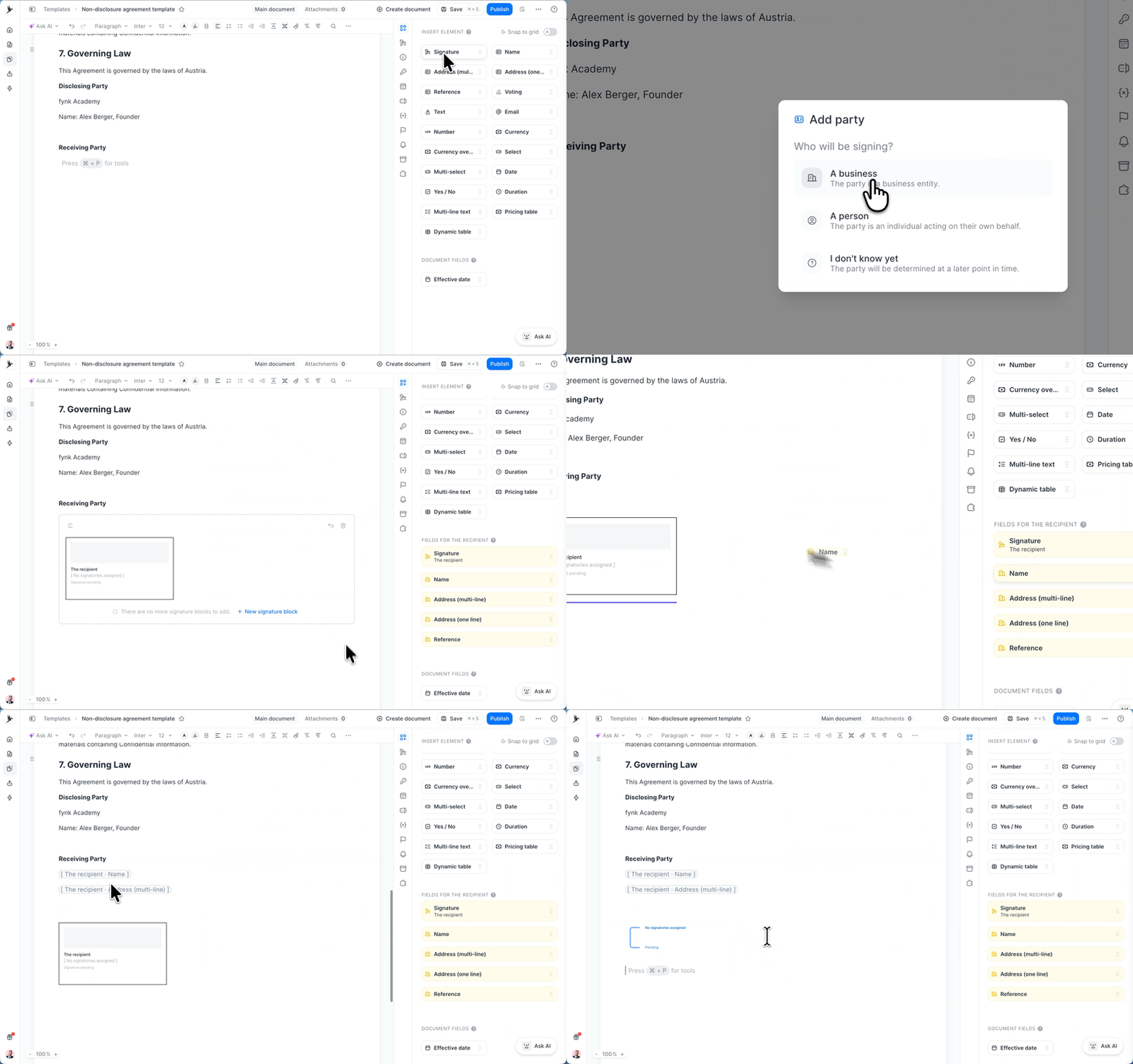
Here you can see that I've highlighted the sections that need to be filled in by the recipients of the NDA. What we're going to do is to change each of these fields into a dynamic field, so Zapier can read them and fill them with information it gets from the form. The first thing you need to do is to create two parties. One is you and the other is the recipient. Go to the parties and signatories panel and hit Add Party.
You can add your business here and you can choose your signatory if you already know who signs the NDA.
For this example, I'm just going to assign it to this user and hit save. The same exactly goes for the recipient party. Go ahead and choose a person, you don't need to add any information about them yet, just a reference is enough.
Now if you go back to the content tab, you can see that two sets of new fields have been added. which has the name, address, and reference of each party.
What you have to do is to replace the static placeholders in the text with one of these fields.
And for the other fields, like dates and email addresses, you can create dynamic fields from this tab. All you have to do is to delete the placeholder, choose the appropriate field type, and give it a name.
And here's the cool part. For the date, you can also auto-fill it based on the specific moment. For example, I'll set it on the start of the signing process, so the effective date is automatically the signing date. I'll do the same for the rest of the dynamic fields.
The last step is to add the signature blocks. You don't actually need any of the signer details because the signature blocks in fynk already have that information. So from the side menu, grab a signature block and just drag and drop it to where each party is going to sign the NDA.
The next step is to create your form. I'm using a simple tool like Google Forms and I've added the questions I need to ask each recipient. And I can share it on my website or send it as a link or whatever I like.
Now it's time to create the automation. To do that, go to Zapier and create a new zap.
As a trigger, you want to use Google Forms or whatever platform you're using to receive forms.
For the trigger event, choose New Form Response and make sure your account is already connected.
Then go to the configure page and choose the NDA form you want to use for the automation.
For the action, you want to choose Faint.
For the action event, to choose Create Document from Template. If you haven't got your API key, you have to go to fynk Settings. then API integration
and click on fynk API. Click configure and create a new token.
Just make sure you set the role to document manager. Now, back in Zapier, in the configure section, choose the film template you used for this NDA.
Once you do, you'll see all of the fields that need to be mapped out between Google Forms and fynk's Dynamic fields. So go ahead and map out these fields and once it's ready we can test it out.
Toward the end, you'll see an option to move the document straight to the signing stage when the form is filled. That means that immediately after a form is completed, the recipient receives the document for signature. To do that, go ahead and set it to true. You'll see that three new options are now available to you. Signature type. I'll just use the simple signature for this one.
Sequential signing, this just decides whether you or the recipient signs first, and a signing message.
When everything looks good, go ahead and continue.
The next step is to actually test our automation, which is where the fun actually begins.
So go ahead and fill in the form that you already created and
Test whether the automation looks good, click Submit. Then go back to fynk and in your document list
And here it is. You can see here that it's already in the signing stage and if you open it you can see the recipient is now filled in and the other dynamic fields are filled as well.
All you have to do now is to click here to sign it and you can choose any method you like for signing. And it's done from your side. If you're interested to see how your recipient will see it, here's a sample email they get from you in their inbox. And you can see our personalized message is included as well. Hope you find this video helpful.
The goal
Create a ready-to-sign NDA for every form submission. No need to create drafts by hand or email people manually.
- Upload or create an NDA template in fynk
- Build a simple form to collect the details you need
- Set up a simple automation in Zapier
You set this up once, and it runs on its own from then on. It replaces a routine you probably know too well: opening the same template, editing in a few details, exporting a PDF, and emailing it out, again and again.

Upload your NDA template in fynk
To get started, you need an NDA template in fynk. This template contains the dynamic fields (or placeholders) that Zapier then fills with your form data.
Add a dynamic field wherever a variable goes, then give it a clear name like “NDA effective date”. Use the correct field type and names you will recognize, because you will select these exact fields again when you map the form in Zapier.
In simple words: Placeholders in your NDA = Dynamic fields in fynk = answer fields in your form.
Finally, add signature blocks for each signer at the end of your template. Once the recipient fills your form, this block is assigned to the signer automatically. Leave the rest of the document, your clauses and standard terms, untouched.
Build your NDA form
Build a form that asks for exactly the data your dynamic fields need, one question per field. If your NDA uses a name, an email, and a company, your form asks for a name, an email, and a company. Keeping them one-to-one is what makes the next step painless.
This guide uses Google Forms, but any form tool that connects to Zapier works the same way, including Typeform, Paperform, Tally, or any other tools that allow you to create forms. The only thing that changes is how you select the trigger in Step 3. Once the form is built, share it however you like: email it, share the link directly, or embed it on your website.

Automate everything in Zapier
This is where the two pieces meet. In Zapier, create a new Zap and set the following:
- Trigger: your form tool, set to fire on “New form submission” and connect your tool to Zapier.
- Action: choose fynk, then set to “Create a document from a template” and add your fynk API key to connect it to Zapier.
Then in the “Configure” tab, map each form answer to its matching dynamic field. So the email answer fills the email field, the name answer fills the name field, and so on. This mapping is the heart of the whole thing, since it is what turns one generic template into a personalized NDA every time.
In the same Configure tab, you can send the newly created document straight for signature. Set the “Move to Signing Stage” option to True and choose:
- Type of signature: simple, advanced, or qualified.
- Sequential signing: choose who should sign first.
- Signing message: the message included in the email sent to signatories. If you leave it empty, a default message is sent.
All mandatory fields must be set and signatories must be specified. This way, the moment someone submits the form, fynk generates their NDA and delivers it for signature, with no email for you to write and nothing for you to click.
If you would rather review the NDA before sending, set Move to Signing Stage to False and the document will be drafted in your fynk document hub. You can also add a review step in your template through a checkpoint before signing and assign it to a reviewer, then automate it with a second Zapier action set to “Send document to review stage.”
Hit continue and test the step. If everything looks good, go ahead and publish your Zap.


Test it, then go live
What makes it fast?
No editing templates manually
No exporting PDFs
No manual emailing
Set it up once, runs on its own
"[with fynk] What used to take a week or longer now happens in half an hour."



Frequently asked questions.
Yes. Any form tool that integrates with Zapier works, including Typeform, Tally, Paperform, and HubSpot Forms. The steps are the same; only the trigger selection in Zapier changes.
By default, fynk collects first name and last name, title and position, address, company name, and signatory email address for each party. You only need to add dynamic fields for any additional information your NDA requires beyond those defaults.
Yes. Set Move to Signing Stage to False in Zapier and the document will be saved as a draft in fynk for you to review first. You can also add a review checkpoint in your template and assign it to a specific reviewer.
No. The signing link works in any browser and recipients can sign without creating an account.
Still have questions?



Take control of your agreements. Move your business forward.
Run agreements the way they should run: fast, clear, and on your terms.
No setup headaches
Go live in days, not quarters
No lock-in
Full export anytime
No hidden fees
Signatures included, no envelope fee