
DocuSign envelope limits: what counts, and what “unlimited” covers

Markus Presle
Published · 10 min read
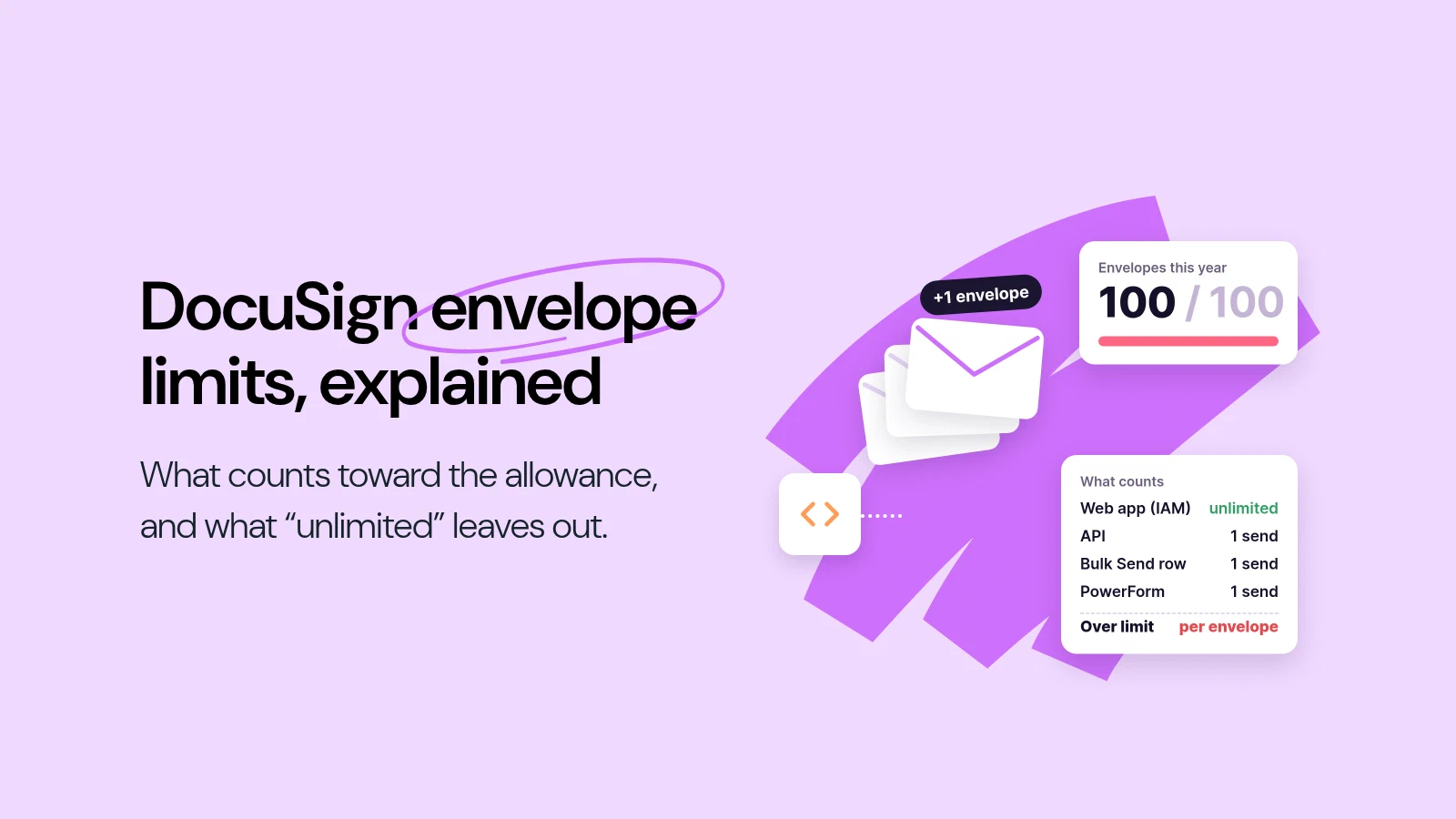
DocuSign’s eSignature Standard and Business Pro plans include 100 envelopes per user per year on annual billing, or 10 per user per month on monthly billing. An envelope counts as soon as it is sent, signed or not, and every envelope beyond the allowance is billed at “a set, per-envelope rate” that the pricing page does not state. The IAM Standard and Professional plans offer unlimited envelopes, but only when they are sent through the web or mobile app. Envelopes sent through the API, partner integrations, Bulk Send, PowerForms or Web Forms count against a separate allowance of 100 automation sends per user per year (10 per user per month on monthly plans).
Standard and Business Pro: 100 envelopes per user per year. That is roughly 8 a month per seat. PowerForms count toward it, and an envelope counts once sent, whether or not anyone signs it.
IAM “unlimited” means the web app. IAM Standard and Professional have unlimited envelopes sent from the web or mobile app, and 100 automation sends per user per year for everything an integration, Bulk Send or form sends.
Over the allowance, DocuSign bills per envelope. On the eSignature plans, sending does not stop. Extra envelopes are charged “Pay-As-You-Go” at a per-envelope rate that is not on the pricing page, so ask for it before you sign.
What a DocuSign envelope is
DocuSign measures usage in envelopes. Its pricing FAQ defines one as “an electronic record containing one or more documents uploaded to the Docusign eSignature service for signature processing, and the unit by which usage allowances… are measured.”
Two rules from the same FAQ decide how fast an allowance runs down:
- One envelope counts once, however many documents, fields and signers it contains: “Regardless of how many documents, fields and signers a given envelope contains, it still counts only once towards your eSignature plan’s Envelope allowance once it is sent out for signature.”
- Sent is enough. For Standard and Business Pro, DocuSign spells it out: “Once an Envelope is sent, it will count toward this allowance whether or not the Envelope is signed or completed.” A contract that is sent, declined and sent again in a new envelope counts twice.
Envelope allowances by DocuSign plan
| Plan | Price, annual plan billed monthly | Envelopes included |
|---|---|---|
| eSignature Personal | $11 per month | 5 per month |
| eSignature Standard | $30 per user per month | 100 per user per year (10 per user per month on monthly plans) |
| eSignature Business Pro | $45 per user per month | 100 per user per year (10 per user per month on monthly plans) |
| IAM Starter | $45 per user per month | 100 envelope sends per user per year, all sending methods |
| IAM Standard | $50 per user per month, 3-user minimum | Unlimited through the web app, plus 100 automation sends per user per year (10 per user per month on monthly plans) |
| IAM Professional | $80 per user per month, 3-user minimum | Unlimited through the web app, plus 100 automation sends per user per year (10 per user per month on monthly plans) |
| Enhanced and Enterprise plans | Custom | Set in your contract |
DocuSign shows three prices for each plan, and the table uses the one its pricing page opens with: an annual commitment paid monthly. Paid upfront for the year, Personal is $10, Standard $25, Business Pro $40, IAM Starter $40, IAM Standard $45 and IAM Professional $75 per user per month. On monthly billing with no annual commitment, Standard is $45, Business Pro $65, IAM Starter $65, IAM Standard $75 and IAM Professional $95.
Some features that produce envelopes are tied to the plan as well. On the eSignature plans, PowerForms, Bulk Send, Web Forms and API access are listed for Business Pro, not Standard. On IAM, Web Forms, PowerForms and Bulk Send are listed for Professional and Enterprise, not Starter or Standard, and API access is “Contact sales” on every IAM plan.
What counts as an automation send on IAM
DocuSign’s plan allowances page lists what draws on the automation allowance rather than the unlimited web-app envelopes:
- Sending an agreement for signature through an API call or a customer-built integration
- Sending through an API call or integration from a third-party service, on IAM Standard and IAM Professional
- Starting a Workflow Builder workflow through an API call or integration that sends an agreement for signature
- Bulk Send, where “Each envelope requiring signature counts as one Automation Send”, one for each row with data in the Bulk Send template
- A Web Form or PowerForm that results in a send for signature
What stays inside the unlimited web-app envelopes: sending from the DocuSign web or mobile app, and starting a Workflow Builder workflow from the app that sends an agreement.
The practical effect: a team on IAM Standard that sends contracts by hand has no envelope ceiling. The same team that connects its CRM, or sends a batch of renewal letters with Bulk Send, has 100 sends per user per year for all of that combined. For three users, that is 300 automated envelopes a year, or 25 a month.
What happens when you go over the allowance
On the eSignature plans, DocuSign does not stop you from sending. The FAQ says: “If your Envelope usage exceeds your plan allowance, each Envelope used in excess is considered an ‘additional’ Envelope that will be billed in a ‘Pay-As-You-Go’ manner, where Docusign will charge a set, per-envelope rate.” It adds that this “ensures you can continue using your Docusign eSignature service without interruption to your business.”
What the pricing page does not give is the rate. For automation sends on IAM, the plan allowances page says only: “To purchase additional entitlements beyond the allowance in your plan, add additional users, or for further help understanding the usage allowances please contact sales.” So the extra cost of a busy year depends on the per-envelope rate in your order, and that is the number to get in writing before you commit.
One more detail matters on annual plans. You can cancel within 30 days of purchase for a refund, an option the FAQ says “may only be used once per customer”. After that, “you’ll be required to pay the remaining balance on your annual subscription, including any taxes or overage costs.”
How DocuSign’s allowances have changed
DocuSign’s plan allowances page keeps its own change log for plans bought through sales. In its own words:
| Order start date on or after | Change |
|---|---|
| 28 August 2024 | IAM Standard, Professional, Enterprise, IAM for Sales and IAM for CX: automation sends raised from 50 to 100 per user per year. On Enterprise, Sales and CX, sends from a third-party integration no longer count against it |
| 21 November 2025 | No more limit on ongoing Agreement Manager agreements. “Customers will continue to be bound by the Automation sends allowance of 100 per user per year, pooled at the account level” |
| 20 February 2026 | IAM Enterprise, IAM for Sales and IAM for CX: a new allowance of 200 sends per user per year from a third-party integration, pooled at the account level |
So the direction has been mixed: the automation allowance doubled in 2024, and third-party sends on the top plans went from uncounted to capped in 2026.
How to plan your DocuSign envelope usage
- Count envelopes per year, not per month. On annual Standard and Business Pro, 100 per user per year is about 8 a month per seat. A team of three that sends 50 contracts a month needs 600 envelopes a year, or 300 more than it has.
- Ask for the overage rate in writing. Neither the pricing page nor the FAQ states the per-envelope rate, and it is what decides the cost of a busy year.
- Check where the allowance is pooled. For plans bought through sales, the allowance page says usage “is pooled together for all user seats purchased”, and on multi-year terms the whole allowance is available across the term. Confirm the same for a plan bought online.
- Separate manual from automated sending on IAM. Unlimited web-app envelopes do not cover your CRM integration, Bulk Send or forms. Estimate those separately against 100 per user per year.
- Put more into one envelope. An order form, a contract and a data processing agreement sent to the same signers in one envelope count once.
What DocuSign gets right here
The allowance model has real strengths. One envelope covers any number of documents and signers, which rewards bundling. On the eSignature plans, sending does not stop when the allowance runs out, so a busy month does not break a workflow. On IAM Standard and Professional, everything sent by hand from the app is genuinely unlimited. For plans bought through sales, the allowance is pooled across seats, so a heavy sender can use a light sender’s share, and multi-year terms make the full allowance available across the term. And DocuSign documents what counts as an automation send in detail, down to Bulk Send rows, which is more than many vendors publish.
For a team that sends most contracts by hand and stays under eight or so per person a month, the included envelopes are enough.
How fynk counts signatures
We created fynk, so weigh this section with that in mind.
fynk has no envelope allowance. Every plan, including Free, lists unlimited documents and e-signatures, with fair use applying to tracked documents on Free and Essential. Simple, advanced and qualified signatures (SES, AES and QES) are on every plan. QES is provided free within fair use, and fynk’s service description reserves the right to charge for QES beyond fair use with prior notice. The REST API, webhooks and the Zapier integration are on Business, at €39 per user per month billed annually, and documents sent through them are not metered.
If envelope counting is what drives your DocuSign invoice, the DocuSign alternatives and the fynk vs DocuSign comparison cover the rest of the decision: signature levels, hosting and contract management after signing.
This time, send and sign contracts
stress-free.
Sources
Checked on 22 October 2026.
- Docusign, eSignature plans and pricing: prices, envelope allowances, the definition of an envelope, Pay-As-You-Go overage, PowerForms, refunds and auto-renewal.
- Docusign, IAM plans and pricing: IAM prices and minimums, unlimited envelopes through the web app, automation sends.
- Docusign, IAM plan allowances and included features: what counts as an automation send, pooling, multi-year terms, and the dated allowance changes.
- fynk, Pricing: documents, e-signatures and signature levels by plan, API and Zapier on Business.
Spotted a figure that has moved? Tell us at [email protected] and we will re-check it.
Frequently asked questions
eSignature Standard and Business Pro include 100 envelopes per user per year on annual billing, or 10 per user per month on monthly billing. Personal includes 5 a month. IAM Standard and Professional include unlimited envelopes sent through the web app, plus 100 automation sends per user per year on annual plans.
An envelope is one send for signature, containing one or more documents. It counts once, however many documents, fields and signers it holds, and it counts as soon as it is sent, whether or not it is signed.
On the eSignature plans, sending continues. Each envelope beyond the allowance is billed Pay-As-You-Go at a set per-envelope rate. DocuSign's pricing page does not publish that rate, so ask for it before you sign.
Only for envelopes sent through the DocuSign web or mobile app. Envelopes sent through the API, partner integrations, Bulk Send, PowerForms or Web Forms count as automation sends, with an allowance of 100 per user per year on annual IAM Standard and Professional plans.
Yes. On IAM, each envelope requiring signature in a Bulk Send counts as one automation send, one for each row with data in the Bulk Send template. Bulk Send is not included on eSignature Standard, IAM Starter or IAM Standard.
Yes. On eSignature plans they count toward the envelope allowance. On IAM Standard and Professional, envelopes sent through the API or an integration count as automation sends, not as unlimited web-app envelopes.
The pricing page does not say they roll over. For plans bought through sales, the allowance page says the allowance is pooled across all seats and, on multi-year terms, available for the whole term.
On an annual plan billed monthly, eSignature Standard is $30 and Business Pro $45 per user per month; paid upfront for the year, they are $25 and $40. IAM Starter is $45, IAM Standard $50 and IAM Professional $80 per user per month billed monthly on an annual plan ($40, $45 and $75 paid upfront), the last two with a three-user minimum.
fynk, which publishes this article, lists unlimited documents and e-signatures on every plan, with fair use on Free and Essential, and SES, AES and QES on every plan. The API and Zapier are on its Business plan at €39 per user per month billed annually.
Please keep in mind that none of the content on our blog should be considered legal advice. We understand the complexities and nuances of legal matters, and as much as we strive to ensure our information is accurate and useful, it cannot replace the personalized advice of a qualified legal professional.




Get a regular dose of insightful contract management content




Take control of your agreements. Move your business forward.
Run agreements the way they should run: fast, clear, and on your terms.
No setup headaches
Go live in days, not quarters
No lock-in
Full export anytime
No hidden fees
Signatures included, no envelope fee