
Audit trail for legal documents: what to log and how

Rezvan Golestaneh
Updated · Published · 12 min read
Every legal document carries risk, and an audit trail is how you prove you managed it properly.
- Why regulations like GDPR, HIPAA and SOX rely on traceable document histories
- What a legal-grade audit trail records: views, edits, approvals, versions, signatures and access
- Why a system-generated log is far stronger evidence than a manual change list
- Six practical steps to set up reliable document tracking in your contract workflows
A contract rarely causes trouble on the day it is signed. Trouble comes months later, when a counterparty disputes a clause, an auditor asks who approved a discount, or someone claims they never saw the final version. At that point the document itself is not enough. You need its history: who opened it, who changed what, who approved it and who signed it, and when. That history is the audit trail.
An audit trail for legal documents is an automatic, time-stamped log of every action on a document, tied to the person who took it. For contracts and other legal documents it should record:
- Access: who viewed, downloaded or shared the document
- Changes: every edit, with the version it created
- Decisions: approvals, rejections and comments
- Signatures: who signed, when and how their identity was checked
- Permissions: who was given or lost access
The log must be generated by the system and impossible to edit afterwards. Only then is it reliable evidence for auditors, regulators and courts. The easiest way to get one is a contract management platform that logs everything from the first draft, rather than a shared drive plus a manual change list.
- Audit trail (legal documents)
- A chronological, tamper-resistant record of every event in a document’s life, from creation through negotiation, approval, signature and storage. Each entry states what happened, who did it and when. Unlike a version history, which stores the different states of the text, an audit trail records the actions around those versions.
For a general introduction to the concept outside the legal context, see our guide to the document audit trail. This article focuses on contracts and other legal documents, where the audit trail has to stand up in an audit or a dispute.
How audit trails improve compliance and security
When you handle legal documents you are not just managing words on a page. You are managing risk, responsibility and regulatory exposure. A well-implemented document audit trail brings three gains.
Legal and regulatory alignment
Audit trails give you a clear, time-stamped log of who did what, when and how with every legal document. That kind of traceability is what frameworks like GDPR, HIPAA, SOX and ISO 27001 expect when you have to demonstrate control over records.
- GDPR makes the controller responsible for demonstrating compliance (the accountability principle). For contracts that contain personal data, such as employment contracts or data processing agreements, a log of who accessed them is part of that proof.
- HIPAA requires covered entities in the US to have audit controls that record and examine activity in systems holding electronic health information.
- SOX puts public companies under strict rules on preserving financial records and penalises altering or destroying them. Contracts that drive revenue recognition fall within that scope.
- ISO 27001 includes logging and monitoring among its information security controls.
In practice, when an auditor asks “show me every change to this contract”, you deliver the full log, not just the latest version. That reduces regulatory risk and gives you stronger documentation control. If you are preparing for an internal review, our guide to running a contract management audit shows where the audit trail fits.
Preventing tampering and unwanted edits
A robust audit trail does not just record passively. It deters and exposes tampering, because each action is logged, versioned and tied to a user. If a clause changes after approval, the log shows who changed it and when, and the earlier version is still there to compare.
That protects your business from disputes, fraud and unauthorised changes. It also protects the people involved: an employee accused of changing a payment term can point to the log that shows they did not.
Maintaining a trusted document history
The biggest benefit is trust, with internal teams, regulators and counterparties. A documented history shows the lifecycle of your document: creation, edits, reviews, approvals, signature and archiving. When you need to go back, you have a reliable chain of custody.
When a legal document ends up in a dispute or negotiation, you can say with confidence: “Here is the complete trail, every version, every change, every person who accessed it."
Is an audit trail admissible as evidence?
In general, yes. Courts in the US, the UK and the EU accept electronic records as evidence, provided the party relying on them can show they are authentic and have not been altered. How much weight a log carries depends on how it was produced:
| Type of record | Evidential weight |
|---|---|
| Manual change list in a spreadsheet or Word file | Weak. Anyone could have typed or edited it later. |
| File-share activity (shared drive, email threads) | Patchy. Shows some events, but rarely approvals or signatures, and admins can often delete entries. |
| System-generated, immutable log in a contract platform | Strong. Created automatically, tied to user accounts, cannot be changed afterwards. |
For signed contracts the audit trail is often the decisive piece of evidence. If a signer later denies signing, the record of when the signing link was opened, from which device, and how the signer’s identity was confirmed is what proves the signature was theirs. That is also why e-signatures with a proper trail are legally valid and harder to dispute than a scanned signature, and why the trail helps when a forged signature is alleged.
This is general information, not legal advice. Specific rules on admissibility differ between countries and courts.
What types of document changes can be tracked
In legal-document workflows you need to track more than edits. A strong audit trail covers a wide range of events, so you always know what happened, when and by whom.
1. Views, edits, access events and approvals
Your system should record every major interaction with the document: when someone opens or views it, when a clause is edited, when it is approved or rejected, when it is shared or moved. For example, “user X viewed document Y at time T” or “user Z approved version 2 at time T”.
This gives you visibility into who accessed or changed things, which is the core of accountability and compliance. Access events matter more than many teams expect: in a confidentiality dispute, the question is often not who edited the contract but who saw it.
2. Version creation and rollback
Contracts go through several versions: first draft, redlines from the counterparty, the negotiated draft, the final. A good document management setup with audit-trail support logs when each version was created, who created it and what changed, and lets you go back to an earlier one if needed.
If something goes wrong, you want to know that version 3 was replaced by version 4 at time T by user U, and be able to compare the two.
3. Signature events
Who signed, in which order, at what time, and how their identity was confirmed (email link, a code sent to the phone, or a national eID). Together with a seal on the final PDF, this proves both who signed and that the signed document has not changed since.
What a complete audit trail entry contains
| Field | Example |
|---|---|
| Event | Clause 7.2 edited; document approved; document signed |
| User | Name and account of the person who acted |
| Timestamp | Date and exact time, with time zone |
| Document and version | Contract ID and the version the event belongs to |
| Context | IP address or device for signatures and access, comment text for approvals |
How document management software with an audit trail works
When you bring in a contract management system like fynk that combines version history and an audit trail, legal workflows become cleaner, clearer and more dependable.
How businesses audit document trails for cross-team workflows
In a busy organisation, several teams (legal, procurement, operations and finance) often work on the same documents. A platform that supports version control and audit trails logs the full lifecycle automatically.
For example, when Legal uploads a draft, Procurement requests changes, Finance approves the budget terms and Operations signs off on implementation, each of those steps is logged and tied to the document version. Version control keeps one source of truth, and the audit trail logs who, when and what.
What this gives you: transparency on hand-offs, clarity on responsibilities, and a complete history you can review afterwards. That is especially useful when you need to show how a contract evolved across teams.
Managing edits in collaborative workspaces
When several people edit a document, sometimes at the same time, it is easy to lose track of versions, overwrite critical clauses or end up with conflicting files. A good system avoids that by keeping every change in one place and logging it. Users can see “contract X changed by Jane at 14:12” and still open the earlier version.
Combined with role-based access, so that only the right people can edit or approve, you can collaborate without giving up control, traceability or compliance.
What’s the best way to track changes in your legal documents using audit trails
If you want to stay on top of document changes, version history, approvals, and the “who, what, when” of each step, the best route is a tool designed for it. Here are six steps.
1. Use a contract lifecycle solution
Choose a contract lifecycle management (CLM) platform rather than a generic file share. CLM platforms track the full document lifecycle, from creation through negotiation, approval, signature and renewal.
In fynk, the audit trail starts as soon as you upload a contract or create one from a template. There is nothing to switch on.
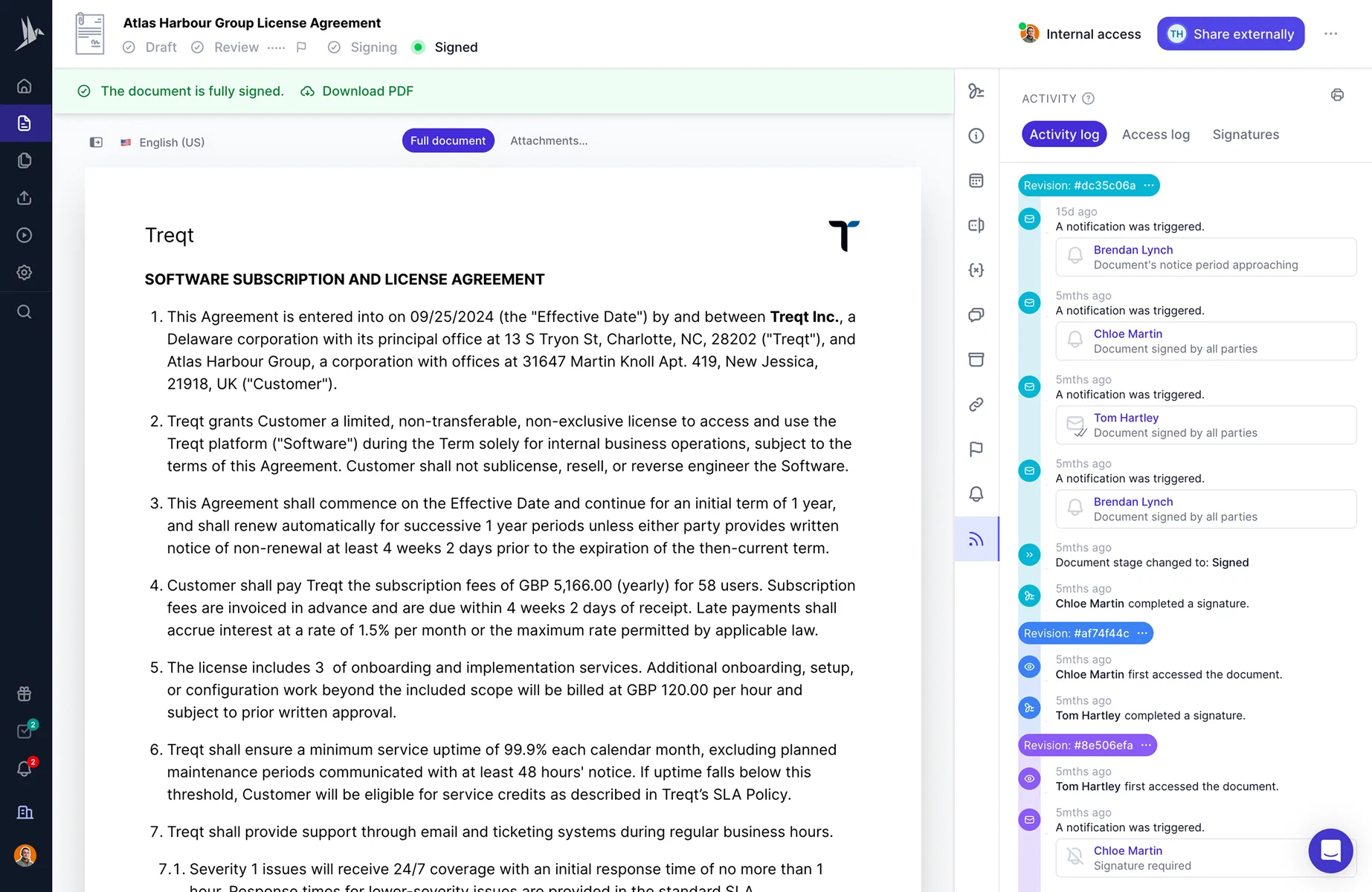


Activity log in fynk app
2. Ensure it has metadata and dynamic fields for better tracking
Add structured metadata (contract ID, contract type, department, owner, status) so every contract is identifiable and trackable. Metadata links each logged action to a specific, findable document. Without it, you have a perfect log of events on files nobody can locate.
In fynk, each document carries metadata such as parties, contract value, owner and key dates, so you can filter the repository and open the trail of exactly the contract you need.
3. Make sure it has signature-tracking logs
After negotiation and edits, the contract needs signatures. Make sure your system logs each signature event: who signed, when and how. Signature logs are what make an e-signed contract defensible.
In fynk, once a signatory signs electronically, the signature event is logged in real time with the signer’s identity and timestamp, and the signed PDF is sealed.
4. Make sure it has an activity log covering all events
Beyond edits and signatures, you want view, download, share and permission-change events logged. A full audit trail means complete coverage of all document actions.
In fynk, every action on the contract (views, comments, approval decisions, edits, sharing and status changes) is recorded in a log that no user, including admins, can change or delete. You can filter it by user, date, action type or contract. Our walkthrough of what you can track with fynk’s audit trail shows each event type.
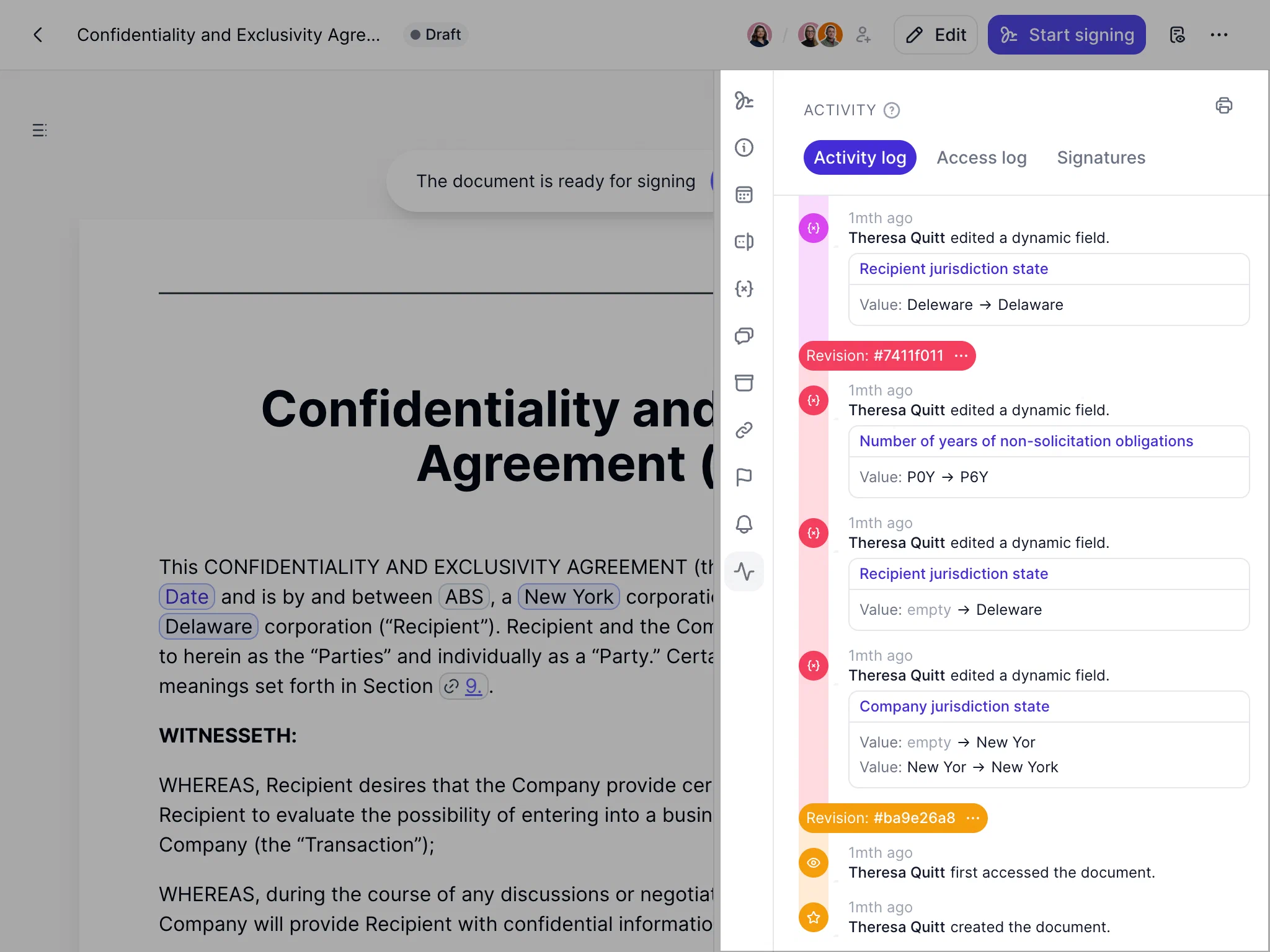
Activity log events in fynk app
5. Version control for seeing the full changes
Make sure the system saves a new version every time a document is edited and ties it to the action that caused it. When you compare versions or roll back, you want the full history available. Version control is not just helpful, it is fundamental to audit readiness.
In fynk, every edit becomes its own version. With PDF comparison you can compare any two versions from a document’s history and see every addition, deletion and change highlighted.
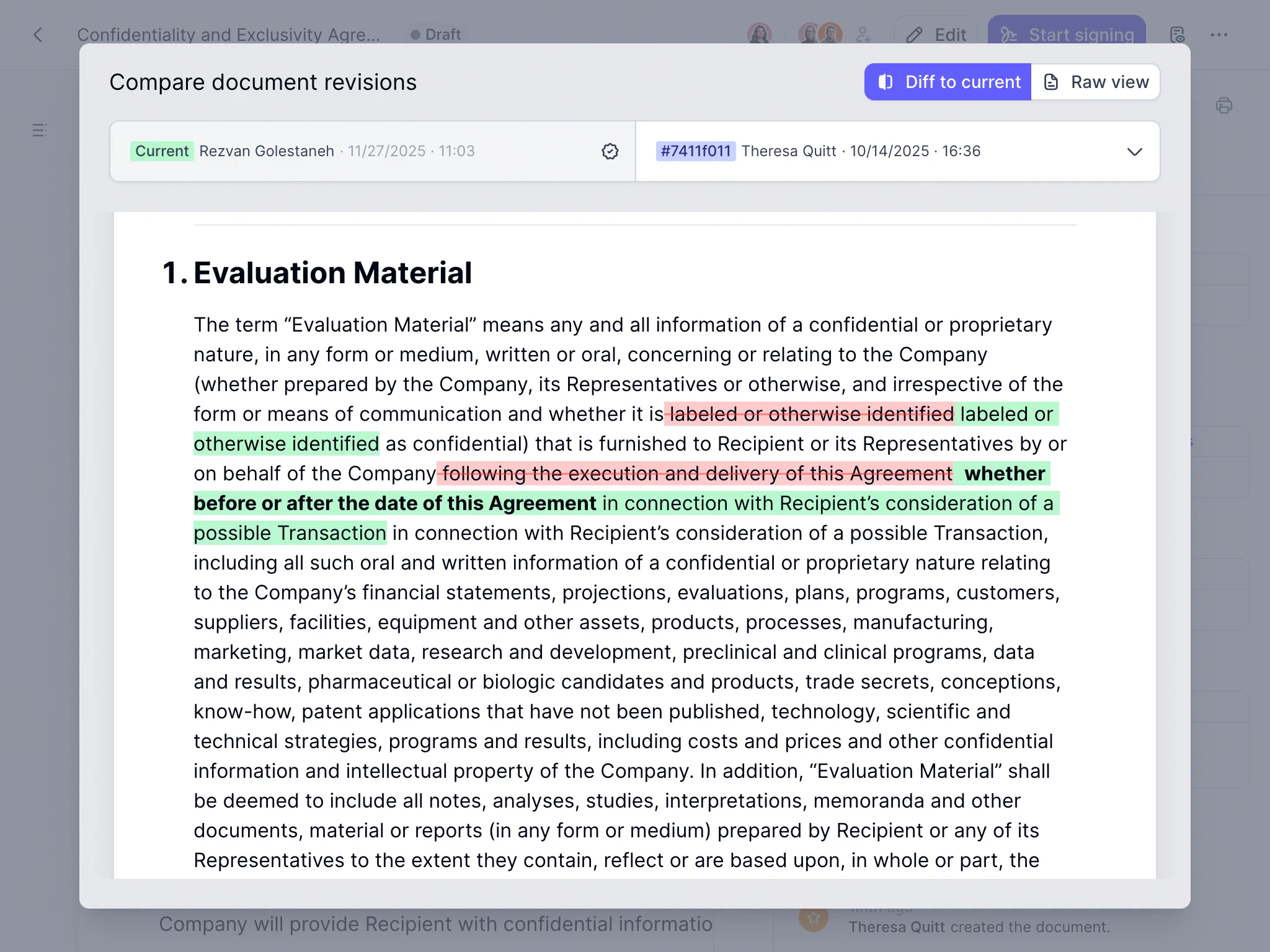
Version control in fynk
6. Define review, retention and approval workflows
Tracking is more than logs; it is active governance. Decide who has to approve which contracts, set review dates (for example, an annual review of supplier contracts), and agree how long signed contracts and their trails are kept. This keeps the audit trail useful instead of a black hole of data.
In fynk, approval workflows put each sign-off into the trail, and tasks and reminders prompt the owner when a review or renewal is due.
Common audit trail mistakes
- Relying on a manual change log. It is only as complete as the most forgetful person on the team, and it proves little in a dispute.
- Logging edits but not access. For confidential contracts, who saw the document can matter as much as who changed it.
- Approvals by email. An “OK from me” in an inbox is not linked to a version. Approvals belong in the same system as the document.
- Signing outside the system. A contract signed on paper and scanned back in has a gap exactly at the most important event.
- Deleting the history with the file. When a contract is archived, its trail must be archived with it.
Try fynk’s audit trail + version control
If you want to take the guesswork out of managing contract changes, approvals and versions, fynk gives you everything in one place: an automatic audit trail, a clear activity log, signature tracking and version history, without extra work on your side.
It is the simplest way to stay compliant, organised and in control of your legal documents, and to have the answer ready when someone asks what happened.
Searching for a contract management solution?
Find out how fynk can help you close deals faster and simplify your eSigning process – request a demo to see it in action.
FAQ
It is an automatic, time-stamped log of every action on a legal document, such as views, edits, approvals, signatures and access changes, each tied to the person who took it. It shows how a contract reached its final form and who was involved at each step.
At minimum the event, the user, the date and time, and the document version it relates to. For signatures it should also record how the signer's identity was confirmed and, where available, the device or IP address. Access events such as views and downloads should be logged too, not just edits.
An audit trail is evidence, not a contract, but courts generally accept electronic records when their authenticity can be shown. A system-generated log that nobody can edit carries far more weight than a manual change list. The exact rules differ by country, so take legal advice for a specific case.
Version history stores the different states of the document text. An audit trail records the actions around those versions: who created each version, who viewed, approved or signed the document, and when. You need both to show how a contract evolved.
In a well-designed system, no. Entries are written automatically and no user, including administrators, can edit or remove them. If a log can be edited, it loses most of its value as evidence. In fynk, the audit trail is immutable.
At least as long as the contract itself, plus the period in which claims can still be brought or records can be audited. Retention periods depend on the country, the industry and the type of document, so align them with your legal and tax retention rules.
Please keep in mind that none of the content on our blog should be considered legal advice. We understand the complexities and nuances of legal matters, and as much as we strive to ensure our information is accurate and useful, it cannot replace the personalized advice of a qualified legal professional.




Get a regular dose of insightful contract management content

Take control of your agreements. Move your business forward.
Run agreements the way they should run: fast, clear, and on your terms.
No setup headaches
Go live in days, not quarters
No lock-in
Full export anytime
No hidden fees
Signatures included, no envelope fee