
Free signature maker
Make a signature you'd actually use
Draw a signature online, type your name in a handwritten style, or upload a photo of the one you already sign. This online signature generator refines it until it looks like a pen wrote it, then hands you a transparent PNG or SVG.
No pointer? The Type tab works entirely from the keyboard.
Draw your signature with your mouse, trackpad or finger.
Type your name and pick a style.
Upload a photo or scan of your signature on paper.
Drawn with a mouse? Smoothness takes out the wobble, and pen pressure adds the thick-and-thin a real pen leaves behind.
Drag until the ink is solid and the paper is gone.
Downloads your signature and opens a free fynk account, where you add it once and then apply it to any contract in a click.
Saved to your downloads
That is a picture of your signature. What makes it hold up in a dispute is the record around it: who signed, when, and proof that nothing changed afterwards. fynk puts that record around every signature, at all three eIDAS levels.
Your upload goes inside the SVG as an image, so it stays as sharp as the photo you started with, and no sharper. Draw or type it instead for a version that scales cleanly to any size.
Nothing is uploaded Your signature is created in your browser and never sent to us. Nothing to delete afterwards, because we never had it.
How to make a signature online:
3 ways in 30 seconds
A signature maker should not make your signature look like it came off a computer. Pick the route that suits you. All three run in your browser, with no account and no upload.
Way 1: Draw it yourself.
Sign with a mouse, trackpad or finger. The refine controls turn the wobbly line into something that reads as handwriting.
Way 2: Type your name.
Enter your name and pick one of six cursive styles, each previewed in your own name. No drawing at all, and it works entirely from the keyboard.
Way 3: Upload a photo.
Digitise the signature you already sign on paper. The background comes off and the ink stays, as a transparent PNG.
Free, no account.
A free signature with no sign-up and no watermark. There's no limit on how many you create or download.
Nothing is uploaded.
Your signature is made on your own device. No image data ever leaves your browser, so there is nothing for us to store.
PNG, SVG, animated.
Transparent PNG for documents, vector for large formats, an animated version for the web. All of it free.
How to draw a signature online that looks handwritten
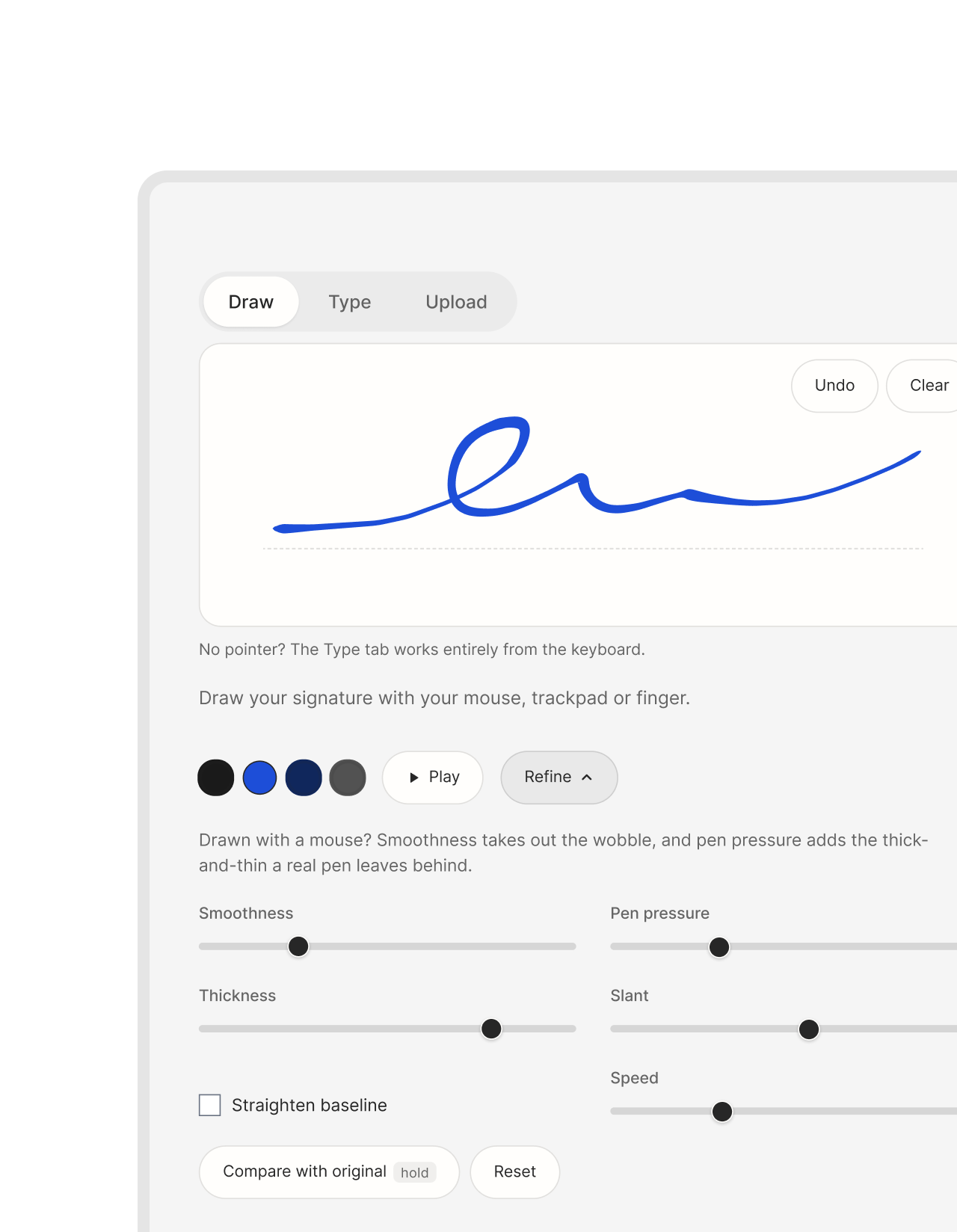
A mouse has no wrist and a trackpad has no pressure, so a signature drawn on a screen comes out shaky and flat. The refine controls each fix one part of that.
 Handwritten signature generator
From wobbly line to written ink
Smoothness removes the tremor. Pointer devices sample your hand in coarse steps, so what feels like a curve arrives as a staircase. Smoothing rounds those corners off until the line reads as one continuous gesture.
Pen pressure puts the thick-and-thin back. A real pen lays down more ink where your hand slows and less where it speeds up, and that variation is most of what makes handwriting look handwritten. We measure how fast you moved and vary the stroke width to match.
Slant restores the forward lean. Your hand braces against a desk when it holds a mouse, which is why screen signatures come out more upright than the same person’s signature on paper.
Straighten baseline finds the line you actually wrote along and levels it, so a signature that drifted uphill sits flat.
While drawing, hold Compare with original to see the raw capture underneath. Nothing is destructive: every control recalculates from what you drew, so you can move them in any order and back again.
 Type a signature or upload a photo
Drawing isn't the only way
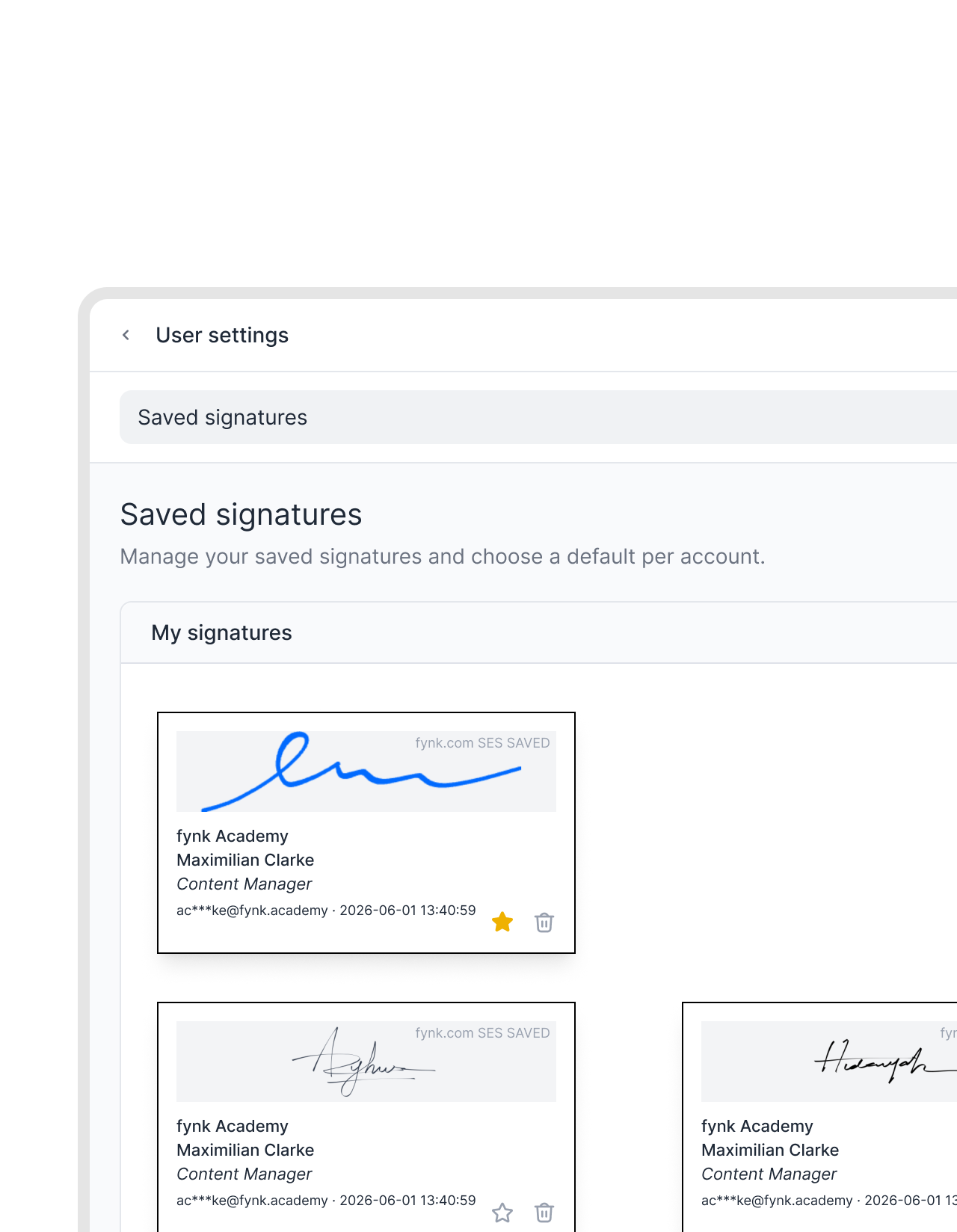
Type your name and pick a style if you’d rather not draw at all. This is the cursive signature generator route: six script styles (Oliver, Roundhand, Script, Brush, Handwriting and Casual), each previewed in your own name. Most of them use the handwriting fonts already on your device, so the same style can look slightly different on Windows, a Mac or a phone. It’s also the accessible route: the whole flow works from the keyboard, which a drawing canvas never can.
Upload a photo to digitise a signature you already signed on paper, and we’ll lift it off the page. The background is removed automatically, the image is cropped to the ink, and stray specks of paper texture and camera noise are cleaned away. A photo taken on your phone works fine, and you don’t need a scanner.
However you made it, the transparent PNG drops straight into a PDF, a Word document, Google Docs or your Gmail or Outlook signature. Inside fynk you set it once as your signature style and never draw it again.
Signing for someone else? The image is only half of it. The wording next to it is what makes the representation valid, and the rules differ by marker: see how to sign on behalf of others for p.p. and for/on behalf of, or how to sign as power of attorney if you hold a POA.


Tips for a good signature: how to design one worth using
A signature isn't a logo. It has to come off your hand quickly, look roughly the same every time, and still be hard to copy. Being legible is optional.
 Signature styles and ideas
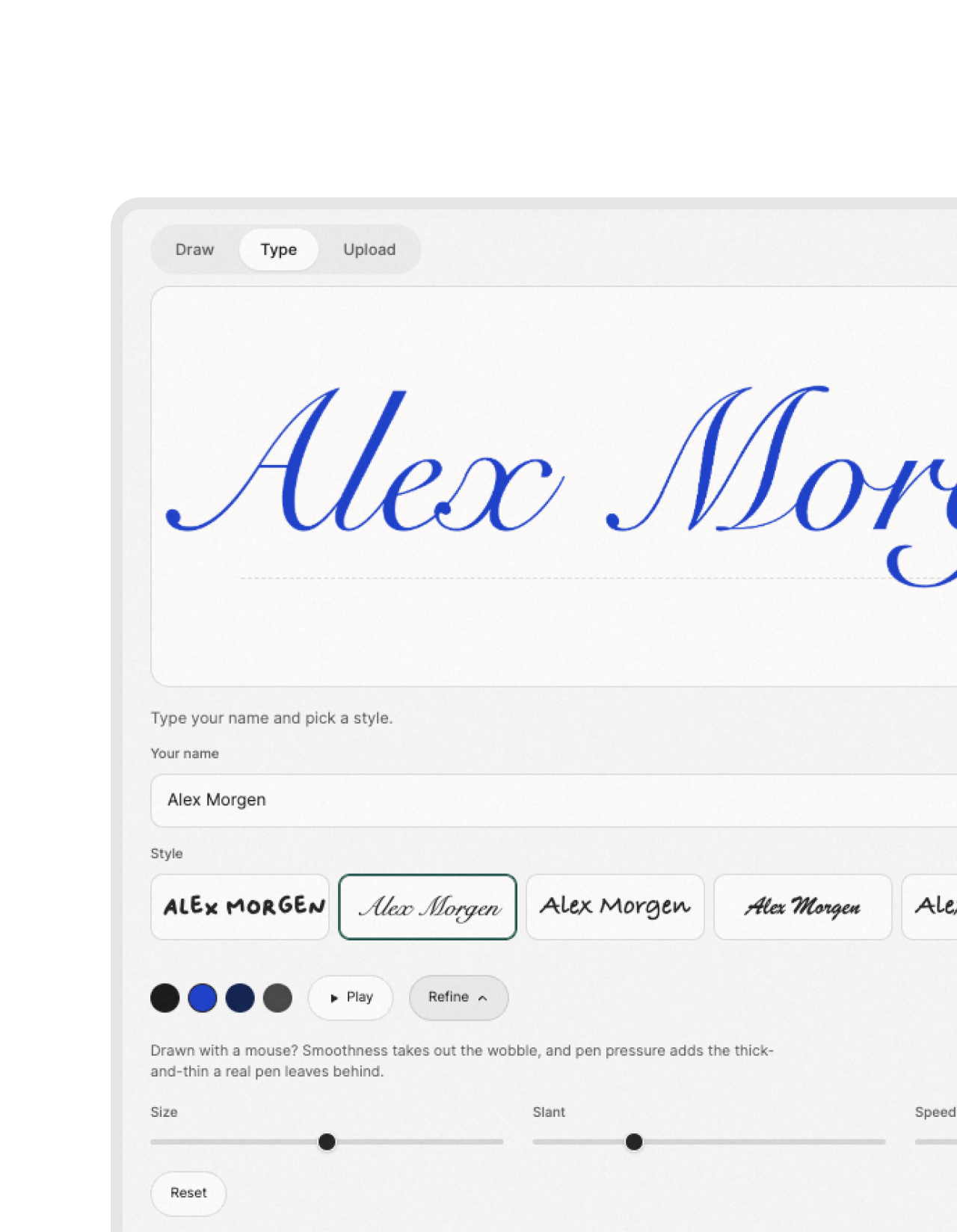
Practise it first, then commit
Write it quickly rather than draw it. Speed produces the sweep and the thick-and-thin that people read as handwriting. Draw slowly and you get an evenly thick line, which is exactly what looks manufactured.
Lean on a recognisable first letter. In most professional signatures the first letter carries the recognition and the rest is allowed to become a flourish. A consistent slant holds the whole thing together.
Practise on paper. Write your own signature a dozen times in a row and keep the version that comes off your hand most easily, not the prettiest one. A signature you can’t repeat is useless in daily life.
Design your own, or generate one? If you type it here, choose the style that looks least like a font and then change the slant and size. An untouched font at its default settings is the easiest kind of signature to spot as generated. If you draw it, it stays yours either way, since the controls only correct what the mouse and trackpad broke.
Pick an ink a pen would leave. The signature maker offers black, blue, navy and grey. On a printed page, blue or navy stands apart from the black text around it, which is why many people sign in blue. Black blends in with the document. Keep the stroke at a weight a ballpoint or fineliner would draw: a very thick line looks like a marker, a hairline disappears when the page is scanned.
Make it look real, not perfect. Real signatures are a little uneven: the baseline drifts, the end trails off, one letter is bigger than the rest. Leave some of that in. Smooth out the tremor, but don’t push every control to its maximum, because a perfectly regular line is what gives a generated signature away.
Keep it the right size. A signature should fit the signature line it sits on, roughly the width of the name typed beneath it. Download the PNG and scale it down to that in Word or your PDF editor, rather than letting it fill half the page.

Is a signature image a legally valid electronic signature?
This is the part most signature generators leave out, and it's the part that matters if you're signing something that has to hold up.
 Electronic signature vs. signature imageCreate a free fynk account
A picture is where signing starts, not where it ends
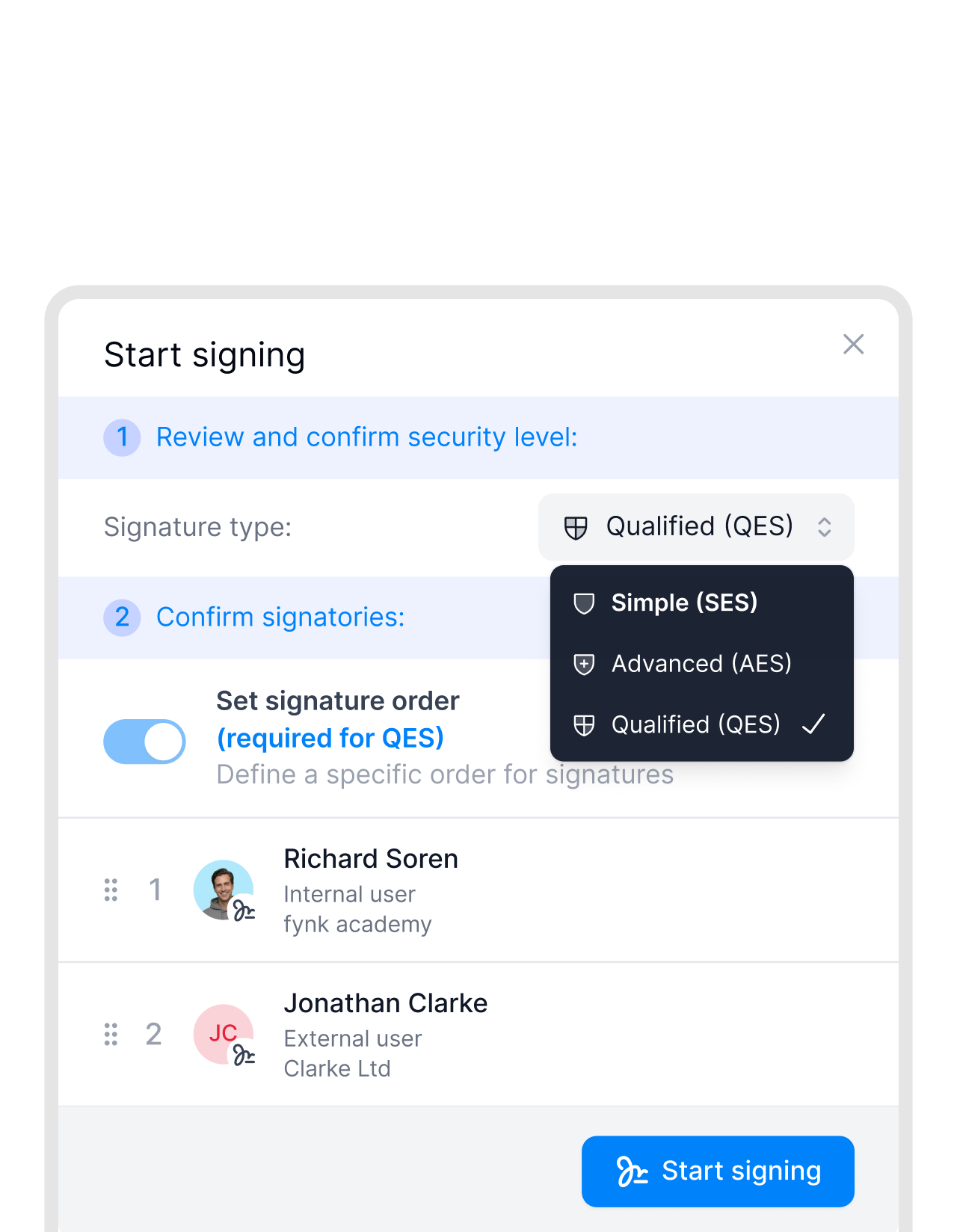
An image of your signature is not an electronic signature. When you create a signature as an image here, what you get is a picture: pasted into a PDF it looks right, and for low-stakes documents that is often enough, because eIDAS Article 25 says an electronic signature cannot be denied legal effect simply for being electronic.
What an image cannot do is prove anything. It carries no record of who applied it, when, or whether the document changed afterwards. Anyone who receives it can lift it out and reuse it. If a signature is ever disputed, the image is not the evidence. The trail around it is. And where the law requires a specific form, an image does not satisfy it on its own.
That trail is what eIDAS defines three levels of. A simple signature (SES) is the image-plus-intent case. An advanced signature (AES) ties the signature to one identified person and detects any later change to the document. A qualified signature (QES) adds a verified identity check and carries the same legal weight as a handwritten signature across the EU.
In the US the ESIGN Act and UETA take the same starting point as eIDAS: a signature is not invalid just because it is electronic, and the open question is again what you can prove. Our guide to whether electronic signatures are legally binding covers the rules country by country, including the documents that still need ink.
fynk does all three eIDAS levels, plus the audit trail, timestamps and tamper-evidence underneath them. Use the generator for the image, then sign in something that can prove it.

Signature image vs. real electronic signature
A picture in a document
What you download here, and what every other generator gives you.
Looks right, proves nothing
No record of who signed, or when
Later changes stay invisible
Fails a statutory form requirement


A signature with a record
The same signature, with everything around it that matters in a dispute.
Signer identity evidenced
Timestamp and full audit trail
Tampering is detected
QES equals a handwritten signature

"Sending contracts by email and waiting for signatures sometimes used to take a week or more. Now, contracts are signed within half an hour in many cases, sometimes even faster."

Trusted and loved by our users
OMR rating
4.8/5
100+ reviews
G2 rating
4.9/5
50+ reviews

Trusted rating
4.7/5
1,0 Sehr gut
The next-generation CLM
Only fynk offers a flexible, integrated and truly end-to-end contract platform for all teams to use - not just legal.
Sign
Organize
Boost
Scale
Insights
Organize your agreements using AI
Work smarter and faster with fynk’s built-in AI. Centralize agreements, extract data, automate tasks, and offer secure access for your entire team.
Signatures (SES, AES, AES eID, QES)
Signature order
Signature style
Voting
Signature tracking
eIDAS Compliance
Document hub
Bulk import
Document calendar
Tasks & Reminders
Configurable notifications
Kanban dashboard
Multi-entity management
AI assistant
AI analysis
AI summary
AI draft
AI review
AI search
Approval workflows
Dates & durations
PDF comparison
Integrations
API
Branding
Teams
Dashboards
Metadata
Analytics
Audit trail
History
Frequently asked questions.
Pick one of three routes in the signature maker on this page. Draw your signature with a mouse, trackpad or finger and let the refine controls take out the wobble; type your name and choose a handwriting style; or upload a photo of a signature you signed on paper and let the background be removed automatically. Then download it as a transparent PNG for documents, or as an SVG if you need it very large. If you came here to create a digital signature, this is usually what you mean: a signature image that drops cleanly into a document. It is free, there is no account and no watermark, and the whole thing runs in your browser.
Right here. This signature generator is free with no sign-up, no email wall and no watermark, and there is no limit on how many signatures you make or download. The high-resolution PNG and the SVG cost nothing either. You only need a fynk account if you want to go past an image and sign documents with a real record behind them: who signed, when, and whether anything changed afterwards.
Write it at your normal speed instead of drawing it slowly, because speed is what produces the thick-and-thin and the sweep of real ink. Then use the refine controls with a light hand: enough smoothness to remove the mouse tremor, pen pressure to vary the stroke width, and a little slant so it leans the way handwriting does. Pick blue, navy or black ink and a stroke weight a ballpoint would leave. Don't push every slider to the maximum: real signatures are slightly uneven, and a perfectly regular line is what gives a generated one away. The most convincing option is still to sign on paper and upload a photo, which keeps your actual handwriting.
Yes. Switch to Type, enter your name and choose one of six cursive styles: Oliver, Roundhand, Script, Brush, Handwriting and Casual. Each one is previewed in your own name, and you can adjust the slant and size before you download. Most of the styles use the handwriting fonts installed on your device, so the exact look can differ a little between Windows, Mac and phones. If you want a cursive signature that is genuinely yours, draw it instead: the refine controls smooth it without replacing your letterforms.
Yes. The drawing canvas works with a finger on a phone or tablet as well as with a mouse or trackpad, and everything runs in the mobile browser without an app. A finger is wider than a pen tip, so turn the thickness down a little after drawing. On a phone it is often easier still to sign on paper, take a photo and upload it, since the camera is already in your hand.
It is a tool that produces a signature image which reads as handwriting rather than as a font. That is the harder half of the job: a mouse has no wrist and a trackpad has no pressure, so a signature drawn on a screen comes out shaky and evenly thick, which is exactly what makes it look generated. This one smooths the tremor out, varies the stroke width by how fast you moved so the line thickens and thins the way a pen does, restores the forward slant, and levels a baseline that drifted uphill.
Start from the letters you actually write quickly, not from a font you like the look of. Most distinctive signatures lean on a recognisable first letter and let the rest of the name become a flourish, held together by a consistent slant. Write it a dozen times on paper and keep the one that comes off your hand most easily rather than the prettiest. Then draw that version here, where the refine controls keep it yours instead of replacing it with a typeface.
The image on its own is not a signature in any legal sense, it is a picture. Applied to a document with clear intent to sign, it can constitute a simple electronic signature (SES), which under eIDAS cannot be denied legal effect merely for being electronic and is accepted for most everyday agreements. What it lacks is proof: no record of who signed, when, or whether the document was altered afterwards, and where the law prescribes a particular form an image does not satisfy it. In the US, the ESIGN Act and UETA likewise accept electronic signatures, so the question there is also one of proof. For anything you might need to defend, use an advanced (AES) or qualified (QES) electronic signature, which fynk provides.
No image data ever leaves your browser. The drawing, the refinement, the animation and the export all run on your own machine, and the file is written straight to your downloads folder. Your signature is never sent to fynk or anyone else, so there is nothing for us to store, leak or delete.
No. There's no sign-up, no email wall and no watermark, and there's no limit on how many signatures you can make or download. You only need a fynk account if you want to go beyond an image and sign documents with an audit trail behind them.
Yes. Every PNG is exported with real transparency, so the signature sits directly on whatever is behind it rather than in a white box. If you want to check it, view the file on a dark background: a white rectangle is the usual sign that a signature was exported wrong somewhere else.
If you are starting from a photo or scan, upload it here and the paper behind the ink is removed for you, leaving a transparent PNG. Two controls tune the result: lower the ink threshold if a grey wash of paper survives, raise it if parts of the stroke break apart, and use Remove specks for the leftover dust and camera noise. If you drew or typed the signature on this page there is nothing to remove, because it never had a background in the first place.
PNG for almost everything, because it's what Word, PDF editors, email signatures and signing tools expect. SVG is worth it when you need to place the signature very large, for example on a printed certificate, because a drawn signature is stored as real vector paths and stays sharp at any size. Typed and uploaded signatures are pixel-based by nature, so their SVG carries the image inside it rather than true outlines.
Sign on unlined white paper with a dark pen, photograph it straight on in even light, and avoid a shadow falling across the page. Upload it here and the background is removed automatically. If some paper still shows, lower the ink threshold, since a higher threshold counts more of the page as ink; if parts of the stroke disappear, raise it. Remove specks clears the leftover dust and camera noise.
It writes your signature out over a couple of seconds instead of showing it all at once. A drawn signature replays stroke by stroke in the order you drew it; typed and uploaded ones are traced along their own centreline, since there are no real strokes to replay. It's used for website footers, email sign-offs, portfolio and about pages and video intros. Download it as an animated SVG for anything on the web, or as a video file, which your browser records as WebM, or MP4 in Safari, so convert it before posting somewhere that insists on MP4. One caveat: most email clients strip the animation and show only the finished signature, so treat that as the fallback.
Yes. Download the PNG and insert it as an image. In Word use Insert then Pictures, in Google Docs use Insert then Image, and in most PDF editors use the stamp or image tool. Because the background is transparent it will sit cleanly over the document text rather than covering it with a white block. We have step-by-step guides for signing a PDF, signing a Word document and adding a signature in Google Docs.
Download the PNG, then open the signature settings of your email client. In Gmail that is Settings, See all settings, General, Signature; in Outlook it is Settings, Account, Signatures. Use the image button in the signature editor to insert the file, resize it so it sits at roughly the height of two lines of text, and save. Our email signature guide walks through each version of Outlook, Gmail and Apple Mail step by step. Keep in mind that an image in an email signature is a sign-off, not a signature on a contract.
Pick the one that looks least like a font and most like a person: a slightly irregular style reads as a signature, while a very neat one reads like typeset text. Then use the slant and size controls to move it away from its default, since an untouched font at its default settings is the easiest kind of signature to recognise as generated.
Press Use it in fynk. Your signature downloads and fynk opens in a new tab, where you create a free account and add the image under your signature settings. From then on it's applied to any document in one click and you never have to draw it again, and everything you sign in fynk carries a full audit trail, automatic reminders and eIDAS-compliant signature levels, which an image on its own can never give you.
Still have questions?



More product features to explore.
Draft.
Create contracts from proven templates. Fast, consistent, and ready to send.
Boost.
AI reviews, summarizes, and explains your contracts so you never miss what matters.
Sign.
Send contracts for legally binding e-signatures, tracked from sent to signed.
Insights.
See the full picture of your contracts with dashboards, search, and smart alerts.
Take control of your agreements. Move your business forward.
Run agreements the way they should run: fast, clear, and on your terms.
No setup headaches
Go live in days, not quarters
No lock-in
Full export anytime
No hidden fees
Signatures included, no envelope fee