Our new Zapier integration (v2.0.0)

Felix Scholz
Mar 31, 2026 · 7 min read
Our latest Zapier update brings new actions and improvements: PDF uploads, simpler document creation, new tag management, and automatic AI analysis. Plus, we show you some real-world workflow examples.
Have you ever wanted to forward an email with an attached contract directly to fynk instead of uploading it yourself? Great news, you can do that now with our latest Zapier integration (v2.0.0)!
We just updated our Zapier integration to enable powerful new workflows and make it easier to use existing actions. Since releasing our first version of the integration, we’ve listened to your feedback, and a common request has been to simplify and reduce the number of steps required to manage new documents. We’re happy to tell you that from now on, you can create a new document from a template, provide all the necessary data for your dynamic fields, and add your signatories in one single step!
Create new documents [updated]
When you want to create a new document from one of your templates, you previously had to create the document and then find and update all the fields individually. With fynk’s Zapier integration 2.0.0, when you select your template, we will automatically load and show you all the dynamic fields you can change. We will also display all the parties in your template and allow you to add signatories in this step. You can configure all the data to be passed to your new document in a single Zapier action. If you want, you can then also immediately send your document into the signing stage - no need to tag on another step!
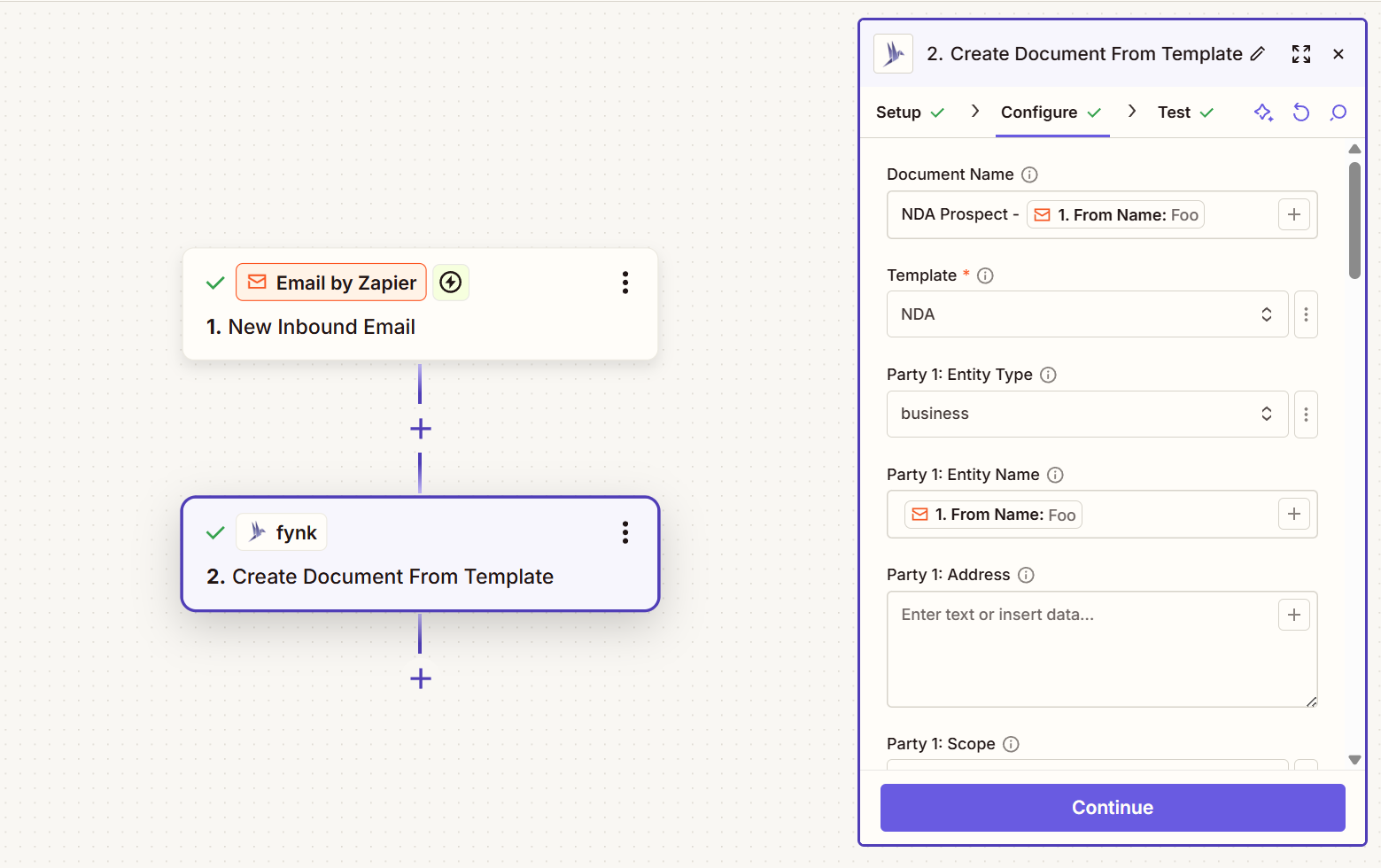

For many of your workflows, this will mean you can reduce them to two steps: your initial trigger and the Create Document From Template action.
For example, you could set up a self-serve Non-disclosure agreement (NDA) workflow that triggers after a successful sales call. Once the call is over and your future client or customer wants to work with you, you set up a new document from your NDA template, add their information to it, and send it to them for signature without ever opening the fynk app - all done automatically in one step.
Upload PDFs [new]
Our brand new Create Document From PDF action lets you do just that: upload a PDF. Thanks to Zapier’s extensive ecosystem, you can use any trigger that provides a PDF to kick off the upload.
You could, for example, listen to incoming emails containing contracts to automatically upload them to fynk. Or you can set up a trigger to watch for when someone adds a new document to your contract folder in Dropbox (or any other storage provider). You no longer have to chase people to upload documents by hand. Instead, you set up your workflow around the tools you are already using.
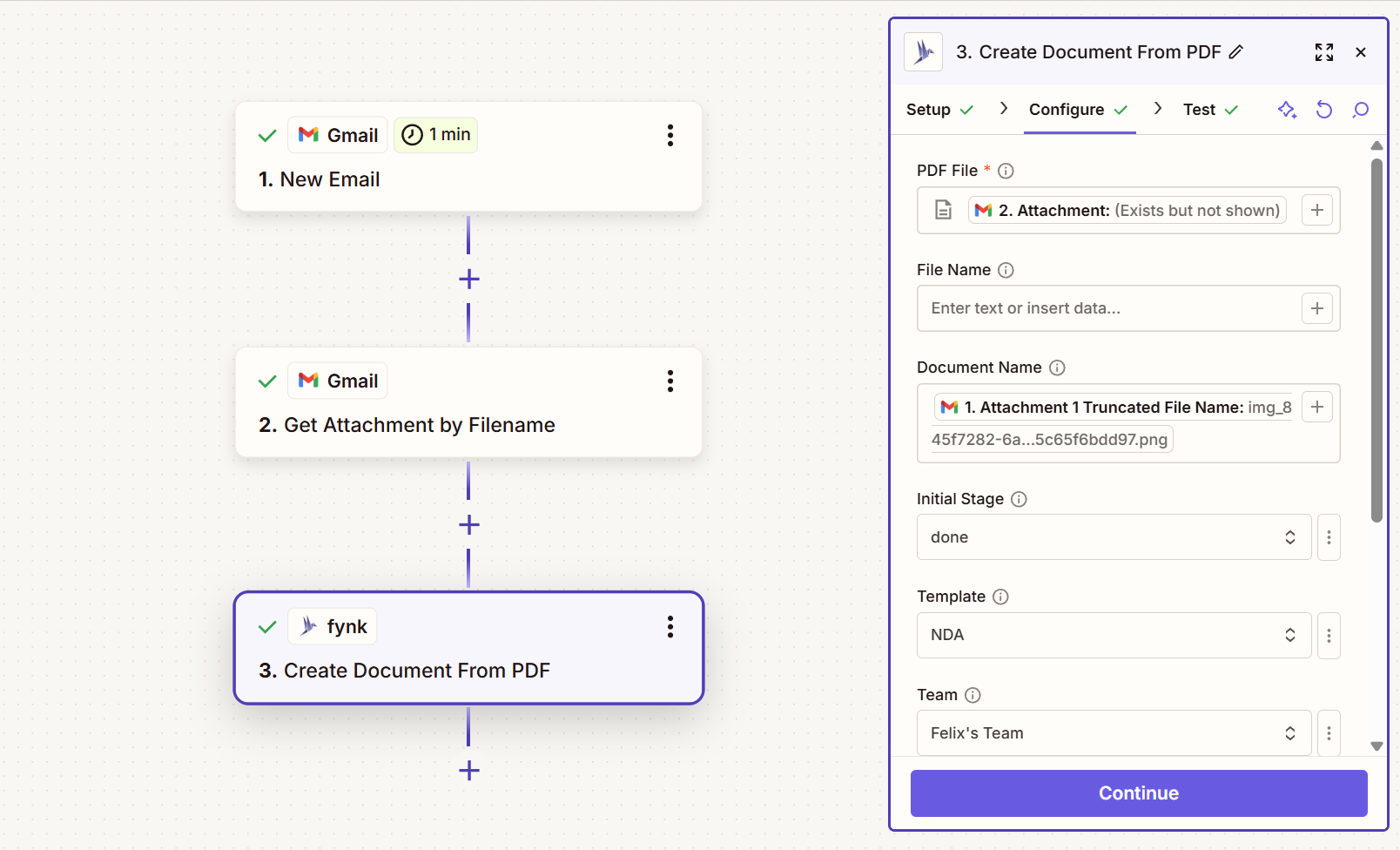
What’s even better? In our upload step, you can already organize your documents. Want to add them to a specific team? Done. Want to add some tags? Done. Want to have them processed by fynk’s data extraction AI? Done. Done. Done.
Create new tags [new]
Need more ways to categorize your documents? We’ve got you. You can now create new tags directly in Zapier. Use these for specific types of documents or to organize specific form submissions. Tags bring structure to your agreements and make it easy to filter them when you need to look them up later.
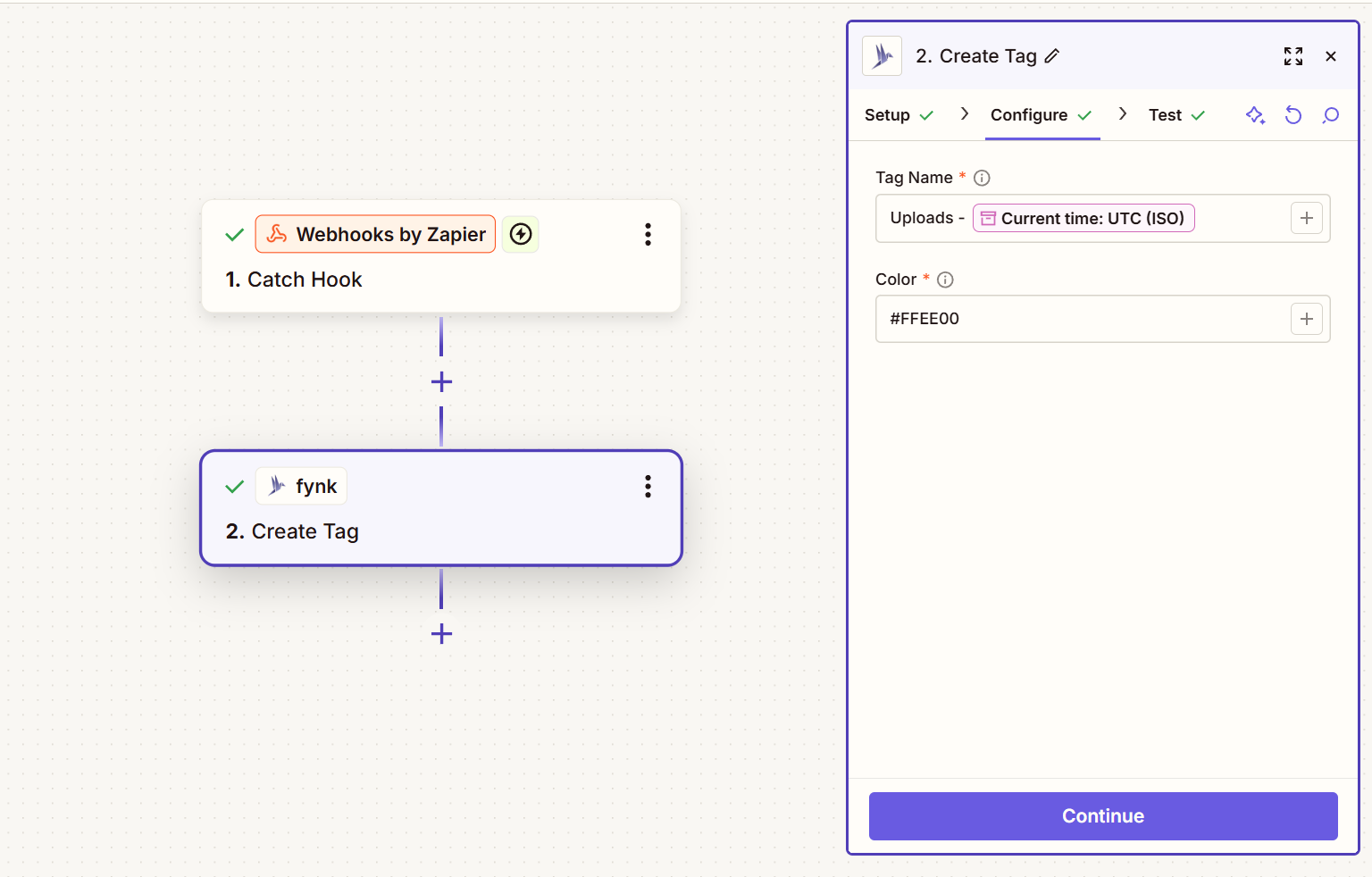
Contract workflow automation examples
Now, let’s talk about some real-world examples. The following are actual workflows you can use to simplify, improve, and organize your document work by using fynk and Zapier together.
Upload email attachments
Are you regularly receiving new proposals, agreements, and contracts in your inbox? Then it’s time to set up a workflow to automatically route these to your fynk account. If you have an email that only receives these legal documents, you can set up a trigger to listen for any incoming email. Otherwise, we recommend creating a folder for these emails, because you might not want to sync all of your emails.
Create a trigger in Zapier for the email service you use (Gmail, Outlook, etc.) to listen for new attachments on the chosen email account (or account’s folder). Then add the Create Document From PDF step of the fynk Zapier integration. Depending on the trigger you selected, you might have to add an intermediate step to retrieve the attachment from the email. For example, when using Gmail, you can use the Get Attachment by Filename step to retrieve the attachment from the trigger’s response.
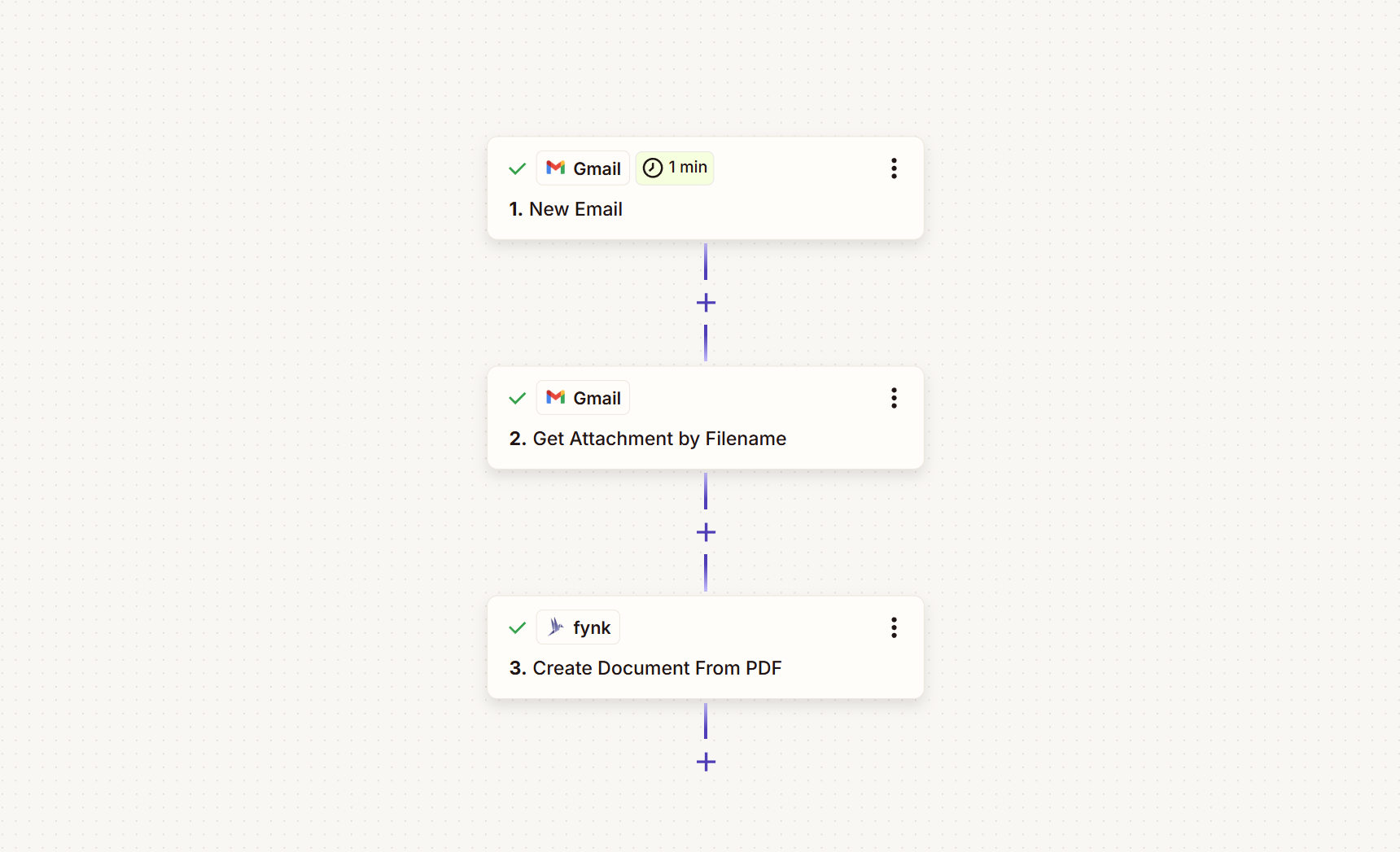
In the fynk action, you select the attachment, give it a name, and set the initial stage - you could use this step to create new drafts or mark anything uploaded as already signed and finalized. If you want to immediately process this document with our AI analysis (which is highly encouraged for new documents, so we can extract dates and set up reminders), you can also configure this here.
Once you are finished, hit Publish and have the peace of mind knowing that any new contract you receive will automatically be uploaded to your fynk account, where we will extract any important data and send you reminders once they’re up for renewal.

Cloud storage contract management
Maybe you already have a cloud storage service where you and your team store any new legal documents. We know adopting a new workflow can be difficult, so let’s make sure you can use fynk’s advanced capabilities with your existing storage providers.
In Zapier, set up a trigger so that any time a new PDF gets added to your storage service — whether that’s Dropbox, Google Drive, Microsoft OneDrive, Box, or even S3 — your workflow runs automatically. The next step, then, is to start the upload to fynk by using the Create Document From PDF action. You select the PDF file your trigger passes to you in step 1, then specify additional values, such as the name, stage, or teams you want to attach this document to. You can also do all of that later if you prefer. One recommended setting for these new documents is to set the AI Analysis configuration to True, so it runs on each new document.
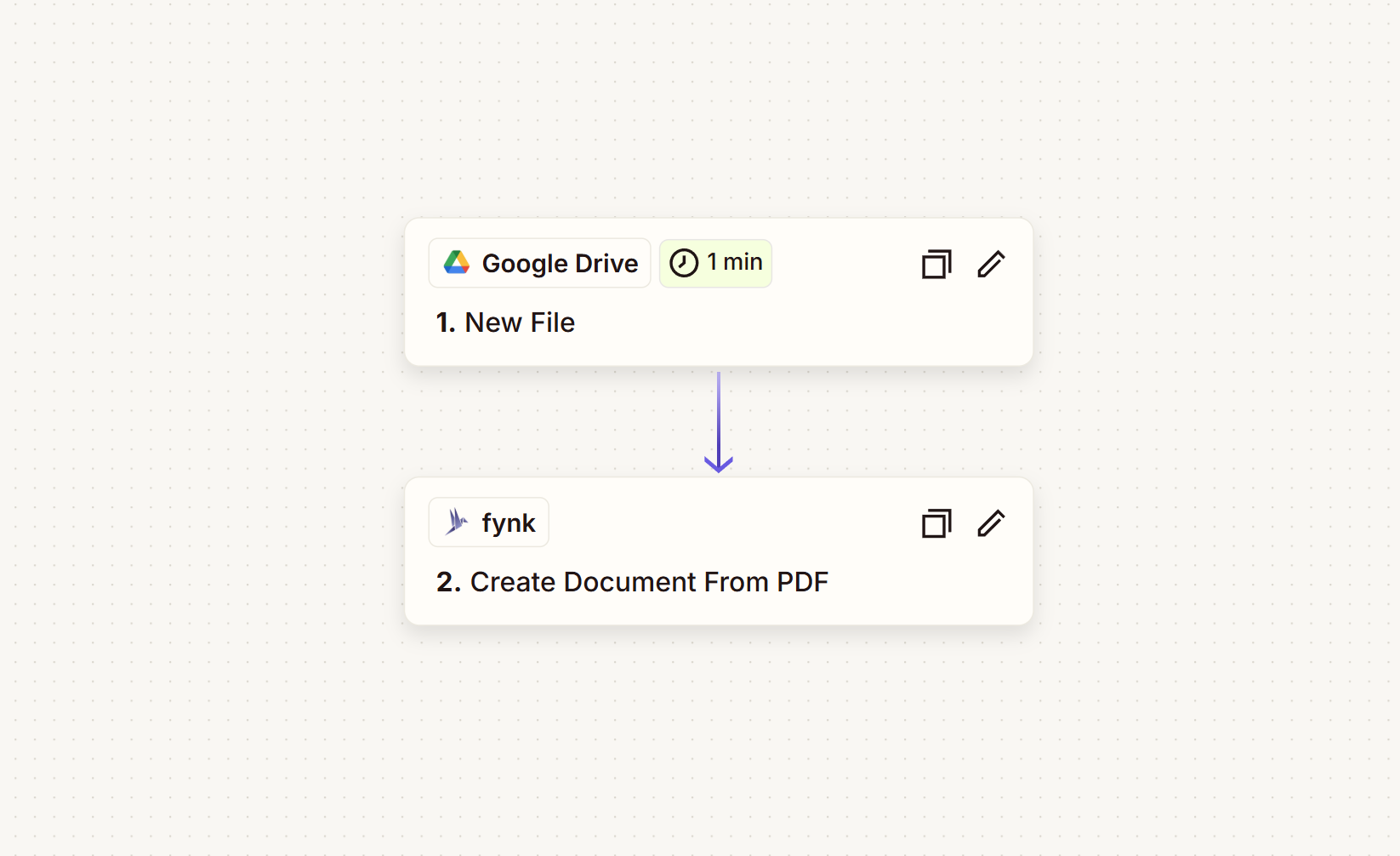
Once you’re done with configuration, you hit Publish, and from then on, each document added to your cloud storage service will be synced to and analyzed by fynk. You’ll automatically make sure that all your important dates are extracted and displayed on your dashboards. Plus, you will get automatic reminders from that point on.
Automatic AI analysis of contracts
As you already saw in the Upload email attachments and Cloud storage contract management examples, one of the new key settings is to turn on automatic AI Analysis for your uploaded documents. With that setting enabled, each newly added document will be analyzed by fynk’s AI for important metadata, such as key clauses, dates, and any custom information your business depends on.
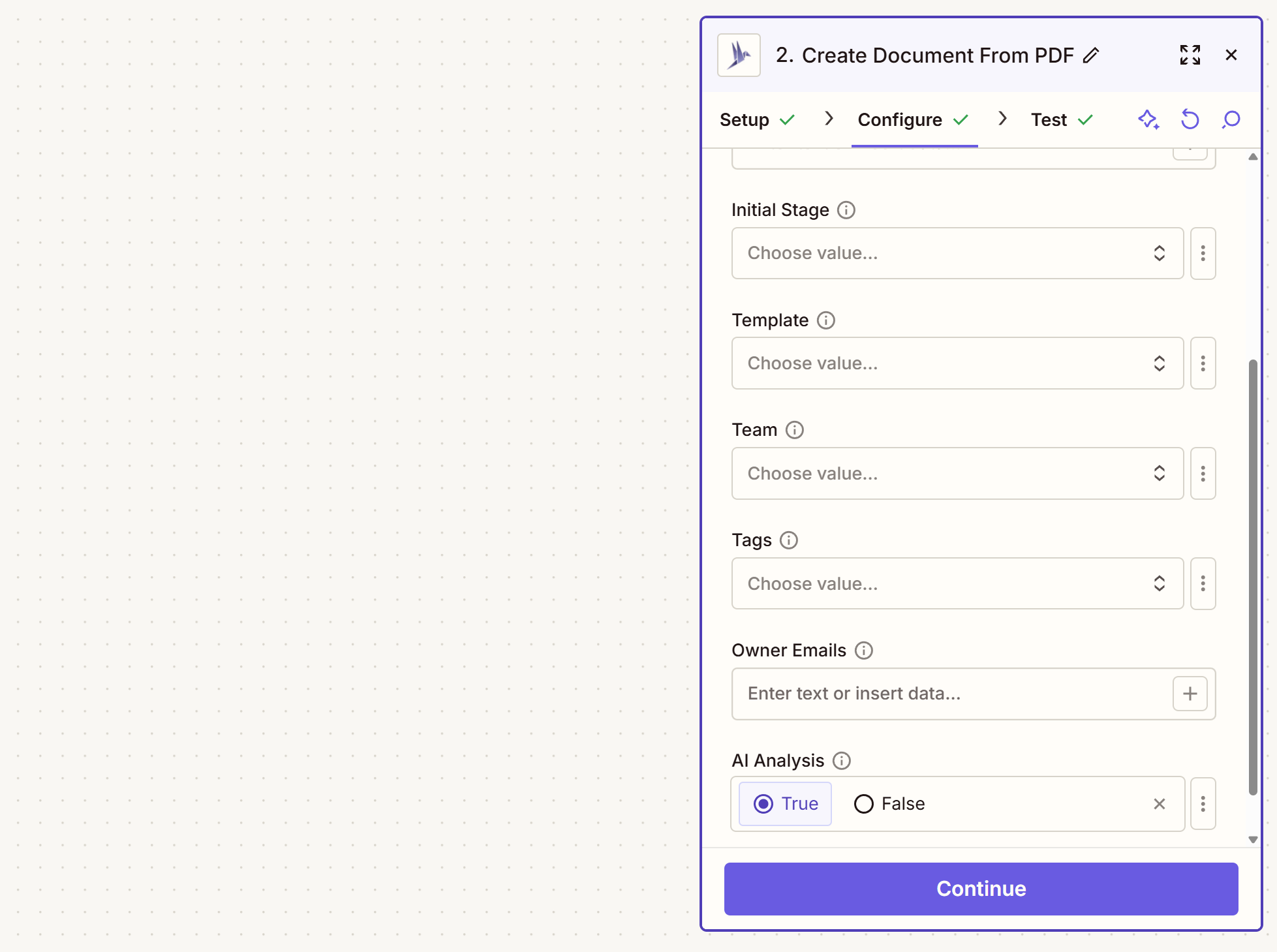
This data will then be available to you and your whole team via filters, displayed on your dashboards, and used to send you automatic reminders for renewals, cancellations, or other important dates in your contracts. With one Zap, you can save hours of tedious data extraction while ensuring no document is lost across your existing tools.
Document management pipeline
The power of storing all your legal documents in fynk becomes obvious once you ensure that all their key information is extracted and instantly available in dashboards, calendars, and reminders. The two examples, Upload email attachments and Cloud storage contract management, already covered how to sync documents through email inboxes and storage services.
In your company, you might have even more ways for how documents enter your system. For your source of truth to do its job, every entry point needs to lead to fynk. Make sure documents are uploaded reliably, no matter where they originate. You can set up multiple of these Zapier triggers to run side by side. Before you set up individual triggers for each of your teams’ inboxes, you might want to agree on a shared address you forward all of these documents to. Or agree on a shared drive folder where all newly signed documents should be placed.
You can then use the templates, tags, and owner email configurations in your upload step to assign each document to the right team or person. Instead of having multiple workflows managed by different people, you can set up your access rules by inferring them from templates or by using fynk’s built-in team access management. You can have all the ingestion pipeline logic in one or a few zaps, while ensuring every person receives the documents they should receive.
Agent + Zapier MCP
Are you already using agents like Claude Code or ChatGPT? Then you should use them with fynk as well. While we are preparing our very own fynk MCP server (sign up for the waitlist to be the first to get access), you can already use Zapier MCP with all existing fynk actions.
Select the agent you want to use, then pick the tools for your workflow, and Zapier MCP will let you use your agentic tool of choice to create new contracts, upload existing agreements, and change dynamic fields during your negotiations.
Bring AI-native workflows to your contracts today with fynk!
Please keep in mind that none of the content on our blog should be considered legal advice. We understand the complexities and nuances of legal matters, and as much as we strive to ensure our information is accurate and useful, it cannot replace the personalized advice of a qualified legal professional.

Get a regular dose of insightful contract management content


Take control of your agreements. Move your business forward.
Run agreements the way they should run: fast, clear, and on your terms.
No setup headaches
Go live in days, not quarters
No lock-in
Full export anytime
No hidden fees
Unlimited signatures included